GV

GeezerVison

The World Wide Web, restored to 800 pixels of glory.

Home|About|Gaming cabinet|Archives|How it works|Starter sites

On this site

  • Sign in
  • ActionsCI/CD and automation
  • CodespacesCloud development environments
  • All Features
  • Documentation
  • Training
  • Certifications
  • Build with Copilot
  • Customize Copilot
  • Integrations
  • Trending repos
  • GitHub Sponsors
  • Developer articles
  • Enterprises

This view

  • Original page
  • New address

GeezerVison is showing github.com — GitHub - stacklok/toolhive-studio: ToolHive is an application that allows you to install, manage and run MCP servers and connect them to AI agents

BranchesTags
Open more actions menu

Latest commit


History

2,173 Commits
2,173 Commits

Folders and files

NameName
Last commit message
Last commit date
.claude/skills
.claude/skills
 
 
.codex/skills
.codex/skills
 
 
.cursor/skills
.cursor/skills
 
 
.devcontainer
.devcontainer
 
 
.github
.github
 
 
.husky
.husky
 
 
__mocks__
__mocks__
 
 
__tests__
__tests__
 
 
assets
assets
 
 
branding-examples
branding-examples
 
 
common
common
 
 
docs
docs
 
 
e2e-tests
e2e-tests
 
 
examples/registries
examples/registries
 
 
flatpak
flatpak
 
 
icons
icons
 
 
main
main
 
 
patches
patches
 
 
preload
preload
 
 
renderer
renderer
 
 
scripts
scripts
 
 
utils
utils
 
 
.env.example
.env.example
 
 
.gitignore
.gitignore
 
 
.grype.yaml
.grype.yaml
 
 
.nvmrc
.nvmrc
 
 
.prettierignore
.prettierignore
 
 
.prettierrc
.prettierrc
 
 
AGENTS.md
AGENTS.md
 
 
CLAUDE.md
CLAUDE.md
 
 
CODE_OF_CONDUCT.md
CODE_OF_CONDUCT.md
 
 
CONTRIBUTING.md
CONTRIBUTING.md
 
 
DCO.md
DCO.md
 
 
LICENSE
LICENSE
 
 
README.md
README.md
 
 
SECURITY.md
SECURITY.md
 
 
components.json
components.json
 
 
context7.json
context7.json
 
 
eslint.config.mjs
eslint.config.mjs
 
 
fake-auto-update.yml
 
 
forge.config.ts
forge.config.ts
 
 
forge.env.d.ts
forge.env.d.ts
 
 
knip.ts
knip.ts
 
 
package.json
package.json
 
 
playwright.config.ts
 
 
pnpm-lock.yaml
pnpm-lock.yaml
 
 
pnpm-workspace.yaml
pnpm-workspace.yaml
 
 
renovate.json
renovate.json
 
 
tsconfig.app.json
tsconfig.app.json
 
 
tsconfig.json
tsconfig.json
 
 
tsconfig.node.json
tsconfig.node.json
 
 
vitest.config.ts
vitest.config.ts
 
 
vitest.setup.ts
vitest.setup.ts


Repository files navigation

ToolHive logo

Release Build status Coverage Status License: Apache 2.0 Discord

ToolHive desktop UI

Run any Model Context Protocol (MCP) server — securely, instantly, anywhere.

ToolHive is the easiest way to discover, deploy, and manage MCP servers. Launch any MCP server in a locked-down container with just a few clicks. No manual setup, no security headaches, no runtime hassles.
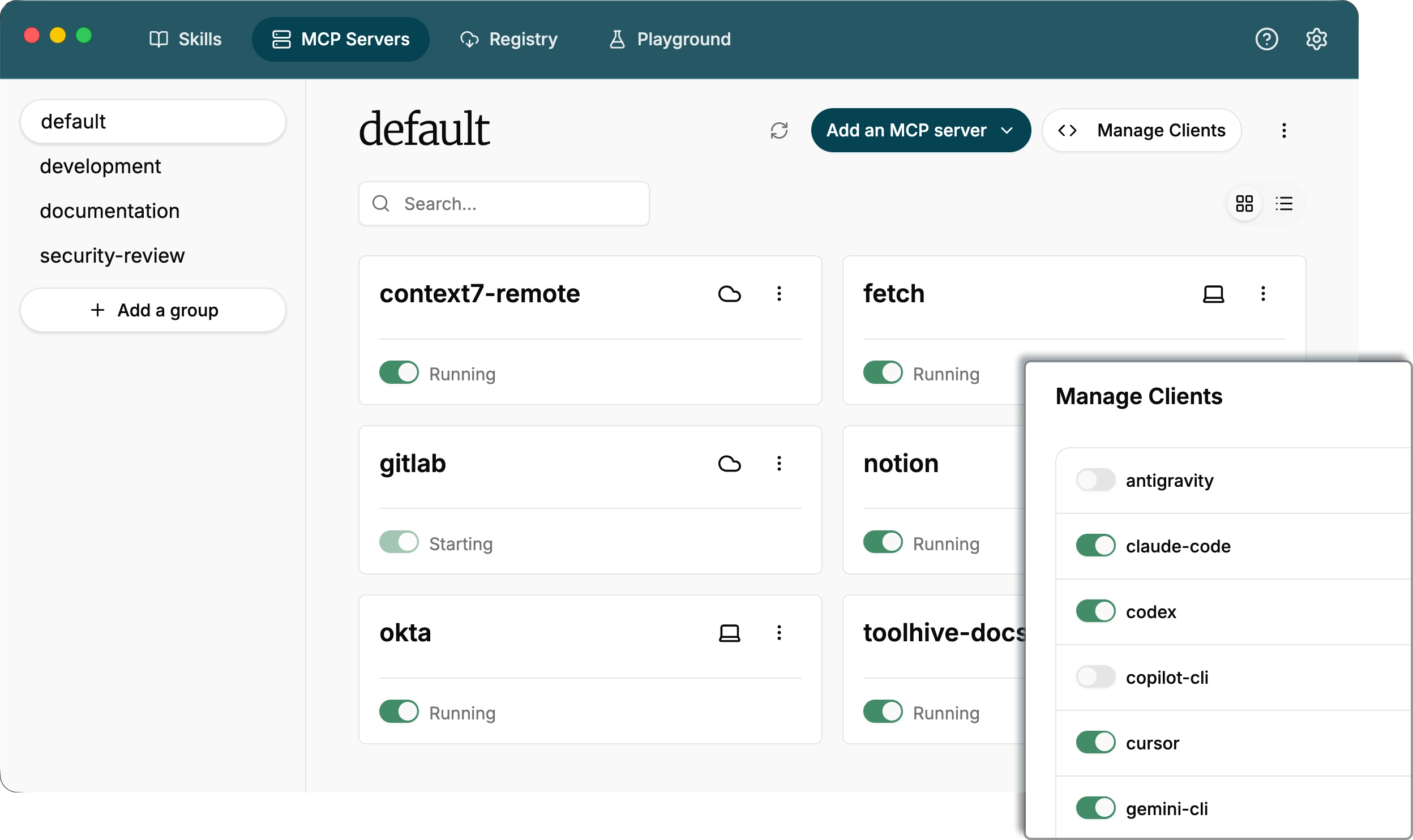
ToolHive screenshot

Quick links

  • 🚀 Quickstart - install ToolHive and run your first MCP server
  • 📚 Documentation - learn more about ToolHive's features
  • 💬 Discord community - connect with the ToolHive community, ask questions, and share your experiences
  • 🛠️ Developer guide - build, test, and contribute to the ToolHive UI

Why ToolHive?

  • Instant deployment: Start any MCP server with a simple graphical workflow.
  • Secure by default: Every server runs in an isolated container with only the permissions it needs. Secrets are managed securely, never in plaintext.
  • Works everywhere: Runs on Windows, macOS, or Linux.
  • Seamless integration: ToolHive auto-configures popular clients like GitHub Copilot, Cursor, Claude Code, and more.

ToolHive sources diagram

Getting started

To get started with ToolHive, download the latest release from the website and follow the quickstart guide.


How it works

Under the hood, ToolHive runs each MCP server in its own secure container and exposes an HTTP/SSE proxy that MCP clients connect to.

ToolHive diagram

For more advanced use cases, ToolHive is also available as a command-line tool which can be used standalone or side-by-side with the ToolHive UI and as a Kubernetes Operator. Learn more in the ToolHive documentation.


Privacy and telemetry

ToolHive uses Sentry for error tracking and performance monitoring to help us identify and fix issues, improve stability, and enhance the user experience. This telemetry is enabled by default but completely optional.

What data is collected?

  • Error reports and crash logs
  • Performance metrics
  • Usage patterns

How to opt out

You can easily disable telemetry at any time:

  1. Open ToolHive
  2. Go to Settings (gear icon in the top navigation)
  3. Find the Telemetry section
  4. Toggle off telemetry collection

Contributing

We welcome contributions and feedback from the community!

  • 🐛 Report issues
  • 💬 Join our Discord
  • 🤝 Contributing guide
  • 🛠️ Developer guide

If you have ideas, suggestions, or want to get involved, check out our contributing guide or open an issue. Join us in making ToolHive even better!

ToolHive mascot

License

This project is licensed under the Apache 2.0 License.

About

ToolHive is an application that allows you to install, manage and run MCP servers and connect them to AI agents

stacklok.com/download/

Topics

agentsaiai-securityclaudecontinuecopilotcursordeveloper-toolslinuxmacosmcpmcp-clientmcp-servermcp-toolsmodel-context-protocolsecuritytypescriptwindows

Resources

Readme
Apache-2.0 license

Code of conduct

Code of conduct

Contributing

Contributing

Security policy

Security policy
Activity
Custom properties

Stars

172 stars

Watchers

7 watching

Forks

28 forks
Report repository

Releases

Contributors

Languages

You are visitor 01402503 — GeezerVison does not store the pages you look up.
Best viewed with Netscape Navigator 4.7 or Internet Explorer 6 at 800×600. No cookies required.