
Your apps, links and tools. One keyboard shortcut.
A free, native macOS launcher built with Stacks, stx and Craft.
Website · Download for Mac · Get started · Development · Issues
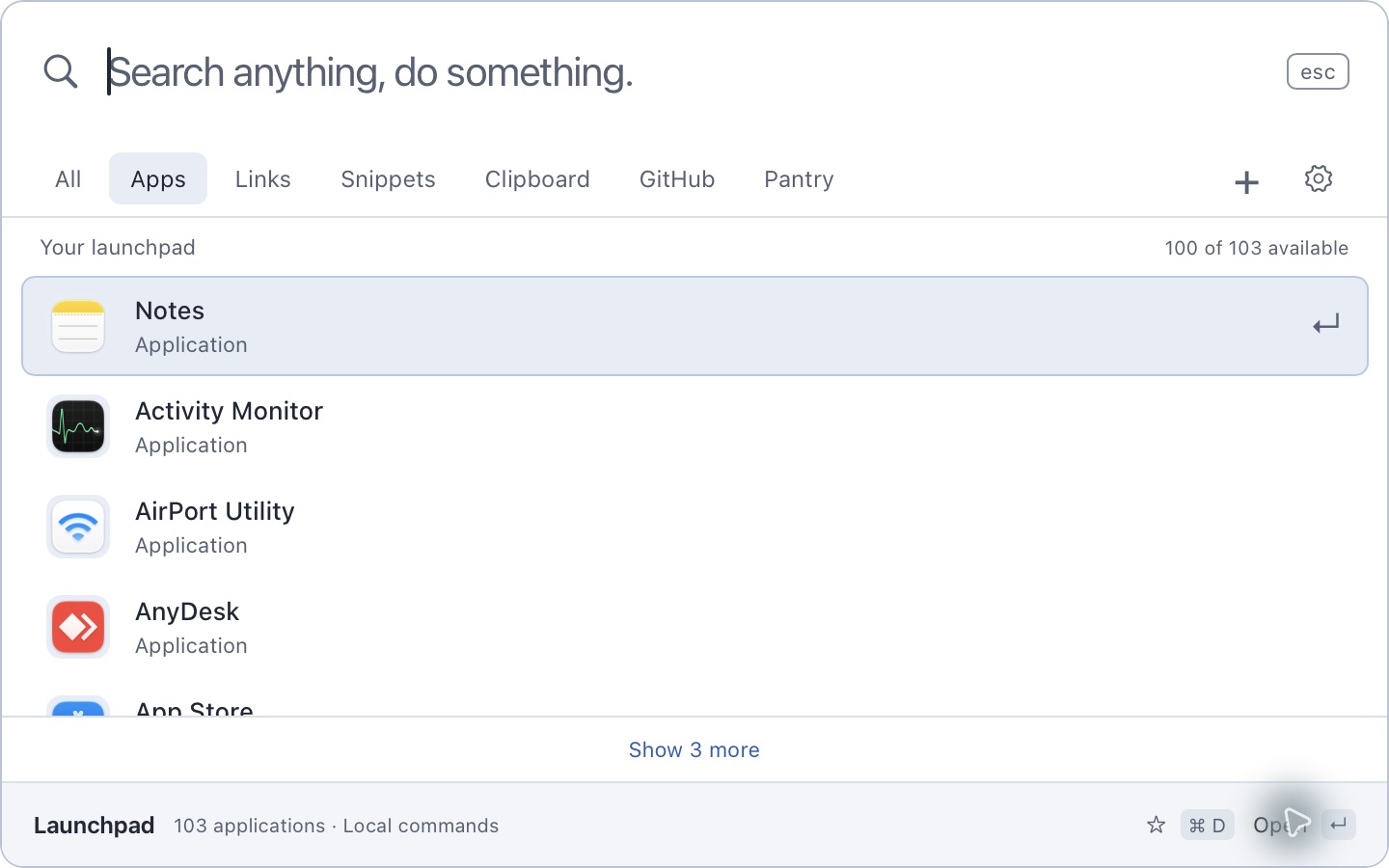
Real app icons, light and dark appearance, and a palette that stays out of your way.
Requires macOS 13 or later on an Apple Silicon Mac. Bun is needed for development, not for running the installed app.
With Pantry 0.11.142 or later:
pantry install launchpad
Or download the latest release, unzip the download, open the disk image, and drag Launchpad into Applications. Public direct-download builds are signed and notarized.
Open Launchpad once, then press Command + Space from another app to start typing. Use the arrow keys to select a result and Return to open or copy it. Escape or clicking outside dismisses the palette.
Launchpad lives in the menu bar with no Dock or app-switcher icon. First launch opens General settings, where you can opt into Launch at login. Later starts stay hidden until you open the palette. Click the Command symbol to open it, or right-click for support, updates, community links, settings and diagnostics.
Software Update in Settings checks for and downloads verified updates automatically. You choose when to install and restart. Automatic Updates can be turned off on this Mac.
If another launcher owns Command + Space, quit it or reassign its shortcut before opening Launchpad.
| Tool | What it does |
|---|---|
| Applications | Find and open installed apps with localized macOS names and real icons. New installations are discovered when the palette opens and while it stays visible. |
| Search | Prioritize names and genuine aliases. Favorites and recent use refine relevant results; compact abbreviations such as vsc and sst still work. |
| Quicklinks | Save websites or search templates such as https://example.com/?q={query}, then use a named alias with your search argument. |
| Snippets | Keep reusable text close and copy it with Return. Fill in {date}, {time}, {datetime}, {weekday}, {year}, {uuid} or {clipboard} as you use one, and optionally paste it straight into the app you were in. |
| Files | Find files and folders by name through Spotlight's index, in your home folder. Return opens, Command Return reveals in Finder, Shift Command C copies the path. The Files tab also opens on your home folder, so you can step into a folder with Return and back out with Command Up. |
| System commands | Sleep, Lock Screen, Restart, Shut Down, Log Out, Empty Trash, Eject, dark mode, mute and every System Settings pane, found by familiar names such as wifi or reboot. Anything that ends work or deletes data asks first. |
| Conversions | 5 km in miles, 72 f to c, 1.5 gb in mb, 2 hours in minutes, and currencies such as 100 usd to eur once you opt in to exchange rates. |
| Web search | Every search ends with a row that searches the web with DuckDuckGo, Google, Bing, Brave Search or Kagi. Choose or turn it off in Settings. |
| Emoji | Type :rocket or open the Emoji tab, then press Return to copy. |
| Large type | Press Command L to fill the window with the selected result, scaled to fit. Useful for reading a code aloud or holding a number up to someone. Escape closes it; the text stays selectable. |
| Bookmarks | Search the bookmarks already saved in Chrome, Brave, Edge, Vivaldi, Chromium or Arc, across every profile. Choose which browsers in Settings. Read only. |
| Windows | List and switch between open windows. Needs the Accessibility permission. |
| People and Calendar | Look up contacts and see the next two weeks of events from the Contacts and Calendar apps. They ask for Automation permission, and nothing they find is saved. |
| Extensions | Install packs of quicklinks and snippets from a JSON file in Settings. Extensions are data only: they cannot run code, use the network or read files. |
| Calculator | Calculate locally with parentheses, powers, percentages, ×, ÷ and thousands separators such as 1,250, then copy the answer. |
| Clipboard History | Search and preview saved text, with opt-in recording, retention controls and individual deletion. |
| GitHub | Search repositories, issues and pull requests, or check assigned issues, review requests and notifications. |
| Pantry | Browse apps, CLI tools, libraries and fonts, inspect upstream details, and request installs from the Pantry CLI. |
| Local usage | See app sessions, palette time, app and link opens, commands and Pantry install totals. These records prepare for a future year review. |
| Appearance | Choose System, Light or Dark in Settings. |
All shows your installed tools. Suggested brings together favorites and recently used apps and commands using only local records. Scroll through the full list without a Show more button. Installed Pantry packages sit alongside Mac apps and saved commands. The Pantry tab shows the full discovery catalog. Ordinary launcher search matches package identities; descriptions are searchable on the Pantry page.
| GitHub | Pantry |
|---|---|
 |
 |
Public repository search works without signing in. Choose a view and optionally narrow the scope to owner/repository. Connect a personal access token in Settings for account features and authorized private resources. The token stays in macOS Keychain and can be removed by disconnecting.
GitHub searches go to GitHub's API. Your app, snippet and clipboard searches stay on your Mac.
You can browse the catalog before connecting the installer. To install through Launchpad, set up Pantry's local desktop service:
pantry desktop setup --yes
Open Settings → Pantry and enter the single-use pairing code. Launchpad stores the connection token in macOS Keychain. Package details show original logos, upstream links, installed versions and job status. The separately installed Pantry service manages packages under your user account.
Choose Pantry → Installed, or Settings → Pantry → Manage installed packages, to review your apps, CLI tools, libraries and fonts. Package details offer Reinstall latest and, with Pantry Desktop 0.11.180 or later, Uninstall. Removal requires confirmation and moves Pantry-managed user files to Trash while keeping app data, preferences and other packages. Quit a running app before removing it. Apps installed outside Pantry remain openable; their files are kept. Packages missing from the public catalog remain removable.
To enable uninstall on an existing connection, run pantry upgrade and pantry desktop setup --yes, then refresh the connection in Launchpad.
| Shortcut | Action |
|---|---|
| ⌘ Space | Open Launchpad and focus search |
| ↑ / ↓, Ctrl P / Ctrl N | Move through results |
| Page Up / Page Down | Jump eight results |
| Return | Open or copy the selected result |
| ⌘ Delete | Clear the search |
| ⌘ N | Create a quicklink or snippet |
| ⌘ D | Toggle a favorite |
| ⌘ E | Edit the selected saved command |
| ⌘ G | Open GitHub search |
| ⌘ L | Show the selected result in large type |
| ⌘ ↑ | Step out to the enclosing folder while browsing |
| ⌘ ] / ⌘ [ | Next or previous tab |
| ⌘ Return | Reveal the selected file in Finder |
| ⇧ ⌘ C | Copy a file's path, or a contact's email or phone |
| ⌘ Shift V | Open Clipboard History |
| ⌘ , | Open Settings |
| Escape | Dismiss the palette |
A quicklink or snippet can also carry a shortcut of its own, set when you create or edit it. That shortcut runs the command from anywhere without opening the palette. Settings > Shortcuts lists every one in a single place.
Saved commands and clipboard entries have a separate Delete control. Command + Delete clears what you typed.
Launchpad works without a Stacks account or hosted API. Its local SQLite database holds commands, preferences, favorites, clipboard entries and usage records in the macOS app container.
- Clipboard recording is opt-in. Keep up to 200 text entries with 1, 7 or 30 day retention. Protected pasteboard types are skipped, but unmarked sensitive text can still be captured. Pause recording before copying private material.
- Usage stays local. Inspect, pause or clear it in Settings. Search queries, URLs, file paths, clipboard text and snippet contents are excluded from activity records. Year-review image export is planned; the current app collects and summarizes the local records.
- Files, windows, contacts and events are looked up, not stored. File names come from Spotlight and are never saved, ranked by use or counted. Windows, contacts and events come from the apps that own them, stay in memory while the tab is open, and never enter usage records. None of it is sent anywhere.
- Exchange rates are opt-in. When you turn them on, Launchpad downloads the European Central Bank's published rates about once a day from
api.frankfurter.dev. The request carries no search text. - Credentials use Keychain. GitHub and Pantry connection tokens are separate from the local database.
- Connected services use the network. GitHub receives GitHub searches. Catalog refreshes and logos come from Pantry's public sources; installations contact the registry and upstream providers through Pantry.
- Settings travel as a file, not a service. Export your commands, themes, extensions, favorites and preferences to one JSON file, and import it on another Mac after reading what it would change. Clipboard history, usage records, launch counts and Keychain tokens are not in it. Keep a copy in a folder you choose — iCloud Drive, Dropbox, anything — and that service, not Launchpad, carries it.
- No cloud synchronization of its own. Launchpad has no account and no hosted service. Local clipboard history and usage history have separate clear controls.
Read the privacy policy and local usage contract for retention, metric definitions and API behavior.
Use an Apple Silicon Mac with macOS 13 or later and Bun 1.3 or later. Buddy provisions the immutable Craft runtime and toolchain declared in pantry.json.
git clone https://github.com/stacksjs/launchpad.git
cd launchpad
bun install --frozen-lockfile
./buddy dev./buddy lint
./buddy typecheck
./buddy test
./buddy build
./buddy packagebun run test:usage-native additionally qualifies the compiled backend with the Pantry Craft runtime active, or an explicit CRAFT_BIN for development. It uses isolated fixtures for model persistence, timing and Pantry job receipts. bun scripts/benchmark-search.ts measures local search computation; see performance notes.
Stacks provides the model API and application tooling. stx and ts-css render the interface; Craft supplies the native window, menu bar, global shortcut, application icons, clipboard and Keychain bridge. The backend ships with the app and uses an authenticated loopback session. Direct and Store packages use the macOS sandbox.
| Path | Responsibility |
|---|---|
resources/views/launcher.stx |
Native launcher interface |
resources/functions/ |
Search, execution and native integrations |
app/Models/ |
Local schema, validation and generated API definitions |
app/Desktop/ |
Bundled API, discovery, clipboard and usage services |
resources/views/site/ |
Marketing website |
assets/ |
App icon sources, licensed fonts and real screenshots |
tests/ |
Regression tests and API qualification |
craft.config.ts |
Native app and window configuration |
pantry.json |
Pinned runtime, checks and delivery targets |
Model definitions drive native schema upgrades. Keep application features in the Stacks model API and improve shared framework capabilities at their sources.
./buddy dev --site
bun run build:site
Launchpad owns its website at launchpad.stacksjs.com. Its own workflow builds dist/site and attaches the website and API to the shared host using config/cloud.ts. Run bun run deploy:website for a native deployment.
The Command mark starts at assets/brand/launchpad.svg. bun run generate:brand renders the PNG and macOS icon set with ts-images and the native SVG renderer. config/images.ts defines the website's share cards, generated by ./buddy generate:images --social. Builds reuse the shared mark and licensed Geist fonts.
bun run release:patch
Release patch versions until the project policy changes. Buddy qualifies a clean main checkout and creates the version tag. Pantry's reusable native workflow handles runtime provisioning, signing, notarization, packaging and registry delivery. Apple packaging and submission also run through Buddy. App Store availability follows Apple's review and release process.
Release inputs are encrypted in .env.production; .env.keys remains private. Keep credentials and signing material out of source changes and issue reports.
Read AGENTS.md, branch before editing main, and include a focused regression test for behavior changes. Run the relevant checks above and use conventional commit messages. Report bugs and propose features in GitHub Issues; include your app version, macOS version and reproduction steps, without tokens or private clipboard contents.
The v1 plan, research and changelog document scope and shipped changes.
Launchpad declares the MIT license in package.json. Bundled fonts and the Command mark's source artwork retain their respective notices.
The optional website updates form uses /api/subscribe on launchpad.stacksjs.com.
Its models, actions and routes live in the top-level app/, routes/ and config/
directories. config/cloud.ts makes Launchpad the owner of both its website and
API, attached to the shared Stacks compute host.
Launchpad’s own workflow deploys main through its protected website-production
environment. bun run deploy:website reads .env.web only, keeping Mac signing
credentials out of the web service. Native persistent state keeps the subscriber
database outside release directories. Desktop usage and clipboard data stay on
this Mac, in the native backend’s separate database and explicit model registry.