本人使用Python测试已有多年,略有些皮毛经验。每次有新员工入职,都会从头教一遍如何入门上手使用Python进行测试。趁这段有空,整理成文档,也好方便后续新员工学习。文章如有不妥之处,也请各位不吝赐教^ ^
我的答案是:基本哪都可以用到,尤其是有重复的费时费力的任务时。大概罗列一下:
- 持续集成CI (自动部署,测试)
- 自动化测试(后端、前端及客户端自动化测试)
- 爬虫、日志分析等工具
-
Python2.7在线教程
http://www.liaoxuefeng.com/wiki/001374738125095c955c1e6d8bb493182103fac9270762a000
-
《Python核心编程》
PDF链接:http://pan.baidu.com/s/1bpzpY6j 提取码:bk6w
-
pip
pip是一款非常方便的python包管理工具,安装教程:http://lovesoo.org/windows-install-the-pip-method.html
-
pycharm
官网:http://www.jetbrains.com/pycharm/
下载安装完成后,注册时选择License server,输入:http://idea.imsxm.com
即可激活^ ^
目前常用的持续集成工具一般是Jenkins,使用Python可以轻松完成版本构建后的自动部署、自动化测试(主要是BVT测试,功能自动化测试及回归测试)。
《Jenkins集成taffy进行自动化测试并输出测试报告》详见:http://www.cnblogs.com/lovesoo/p/7719138.html
常用的自动部署工具有fabric及ansible。
fabric官网:https://github.com/fabric
fabric入门教程:http://lovesoo.org/python-fabric-yuan-cheng-zi-dong-bu-shu-jian-jie.html
ansible官网:https://github.com/ansible
ansible中文教程:http://www.ansible.com.cn/
由于本人从事后端及部分WEB前端测试,对于客户端(ios/android)的自动化测试不甚了解,所以在此着重介绍Python在后端接口测试中的应用。
后端测试主要时通过测试http,webservice,dubbo(hessian)等类型接口,从而完成对后端组件的功能测试。一般接口基本测试流程如下:
-
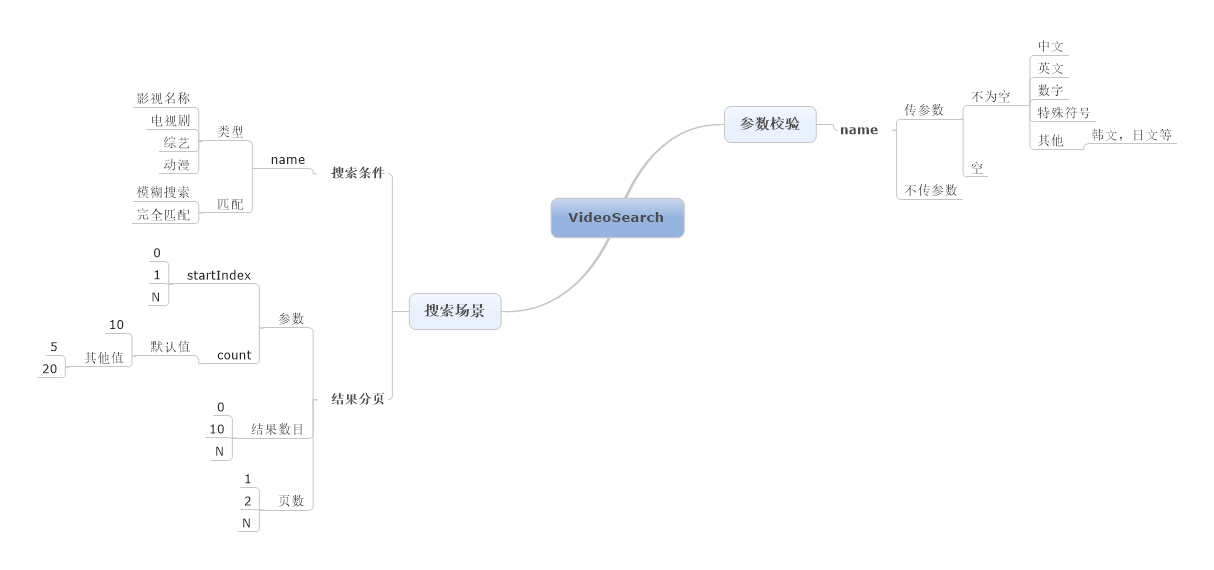
用例设计,主要使用MindManager/XMind等脑图软件设计接口测试用例
如一个简单视频搜索接口(输入name返回videoName)的用例设计示例如下:
-
转换为python测试脚本,主要包括用例管理,接口调用及结果校验等
-
执行脚本完成接口自动化测试

这里只介绍目前主流的两种框架:
-
RobotFramework
-
Nose
目前我们主要使用Nose框架,之前调研了RF框架并实现了几个接口的自动化测试,个人感觉而言RF上手相对较难,在基础类库(keyword)稳定后测试人员只需简单编写测试数据驱动即可,对测试人员成长不是很有利,而且Noses框架与pycharm无缝连接,使用更加便捷直观。
Taffy是在nose框架基础进行的二次封装,可以实现对不同类型的后台接口及WEB页面自动化测试及性能测试,详见:https://github.com/lovesoo/Taffy
关于不同类型的测试框架选择,请参考:http://www.infoq.com/cn/news/2012/06/robot-author-suggest-autotest/
下面介绍使用Python编写后端接口测试代码中常用的lib库:
-
通用lib库
-
json: https://docs.python.org/2.7/tutorial/inputoutput.html#saving-structured-data-with-json
-
日志模块:logging https://docs.python.org/2.7/library/logging.html
-
异步并发模块:concurrent.futures
-
excel相关操作库:读取 xlrd、写入 xlwt、修改 xlutils
-
正则表达式模块:re
-
日期模块:time,datetime
-
-
http接口
-
dubbo接口(hessian协议)
python-hessian:https://github.com/theatlantic/python-hessian
Python调用Hessian协议接口示例:http://lovesoo.org/python-called-dubbo-hessian-protocol-interface-example.html
以百度首页搜索为例,写了比较简单的Nose框架接口测试demo
详见:https://github.com/lovesoo/test_demo/tree/master/test_baidu
Selenium几乎是现在Python WEB自动化测框架的唯一选择了
官网地址:http://www.seleniumhq.org/
PDF教程: https://pan.baidu.com/s/1c2IXJWW 密码: 4r5v
Python客户端(ios/android)自动化主要框架主要有Appium,uiautomator等
Appium: http://appium.io/
uiautomator: https://github.com/xiaocong/uiautomator
我们经常会遇到一些需要手工操作、比较繁琐且耗时的重复性工作。这时就可以考虑是否可以通过现有工具或自己编写脚本来代替手工操作。在提升工作效率、效果的同时还可以提升自己的编程水平,何乐而不为?
举例:之前做的一个搜索引擎项目,其中有一个功能是根据歌手的别名搜索歌手,而别名确定需要通过搜索网上的几大音乐网站来确定。大致简单梳理逻辑就会发现这是一个完全可以用Python实现的功能,如下:
示例代码详见:https://github.com/lovesoo/test_demo/tree/master/SearchArtist
-
学习Python过程时遇到问题如何解决?
-
lib库及函数相关问题,建议查看官方文档或书籍
-
其次,百度Google一般基本可以解决问题,另外强烈推荐去stackoverflow搜索提问
-
对于无法正常访问Google或Github的同学,可以通过修改hosts方式访问:https://github.com/racaljk/hosts/
-
-
入门后如何提高?
-
实践 - 总结 - 提高
-
照抄 - 照抄之后的理解 - 重新自己实现
-