GV

GeezerVison

The World Wide Web, restored to 800 pixels of glory.

Home|About|Gaming cabinet|Archives|How it works|Starter sites

On this site

  • Sign in
  • ActionsCI/CD and automation
  • CodespacesCloud development environments
  • All Features
  • Documentation
  • Training
  • Certifications
  • Build with Copilot
  • Customize Copilot
  • Integrations
  • Trending repos
  • GitHub Sponsors
  • Developer articles
  • Enterprises

This view

  • Original page
  • New address

GeezerVison is showing github.com — GitHub - tmr232/function-graph-overview: Control-Flow Graph (CFG) Visualizer for VSCode

BranchesTags
Open more actions menu

Latest commit


History

988 Commits
988 Commits

Folders and files

NameName
Last commit message
Last commit date
.github
.github
 
 
.vscode
.vscode
 
 
docs
docs
 
 
media
media
 
 
mocks
mocks
 
 
parsers
parsers
 
 
patches
patches
 
 
scripts
scripts
 
 
src
src
 
 
.clang-format
.clang-format
 
 
.gitignore
.gitignore
 
 
.oxlintrc.json
.oxlintrc.json
 
 
.vscode-test.mjs
.vscode-test.mjs
 
 
.vscodeignore
.vscodeignore
 
 
AGENTS.md
AGENTS.md
 
 
CHANGELOG.md
CHANGELOG.md
 
 
CONTRIBUTING.md
CONTRIBUTING.md
 
 
CONTRIBUTORS.md
CONTRIBUTORS.md
 
 
LICENSE.txt
LICENSE.txt
 
 
README.md
README.md
 
 
biome.jsonc
biome.jsonc
 
 
bun.lock
bun.lock
 
 
eslint.config.js
eslint.config.js
 
 
package.json
package.json
 
 
tsconfig.json
tsconfig.json
 
 
typedoc.config.mjs
typedoc.config.mjs
 
 
zizmor.yml
zizmor.yml


Repository files navigation

Function Graph Overview

Control-flow graph visualization for VS Code.

This extension adds a Graph Overview to VS Code, showing the CFG (control-flow graph) for the current function.

Screenshot of the extension

Getting Started

  1. Install via the extension page at the VSCode Marketplace.

  2. Open the command-palette (Ctrl+Shift+P or ⇧⌘P) and run the Function Graph Overview: Show Graph Overview command.

  3. Open your code and place your cursor inside a function to see the graph.

  4. You can drag the graph view to the other sidebar or to the bottom panel

JetBrains IDEs

If you're using a JetBrains IDE, see the JetBrains plugin for further instructions.

Demo

You can try it out via an interactive demo if you don't want to install it.

Note that the demo only supports a single function and ignores the cursor location.

Dark Mode

Both dark, light, and custom color schemes are supported.

Dark Light Custom
CFG with dark colors CFG with light colors CFG with custom colors

By default, the color scheme will match the VSCode theme (light or dark).

You can change to a different preset via the settings:

The "Color Scheme" menu in the VSCode settings

Custom Color Schemes

Custom color schemes are created via the interactive demo.

  1. Enable the Color Picker above the graph
  2. Select the colors you want for your color scheme
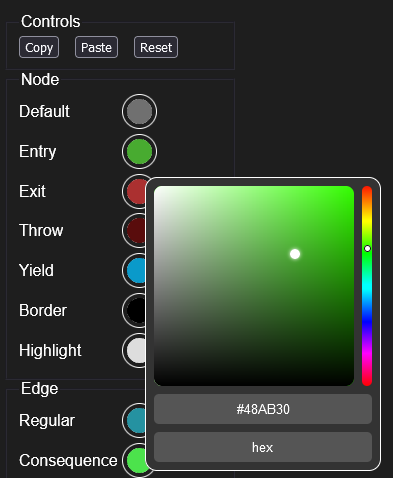
    The interactive color picker
  3. Press the Copy button to copy the color scheme into the clipboard
  4. Paste the config into the Custom Color Scheme field in the VSCode extension settings.
    The Custom Color Scheme field in the settings

Pan & Zoom

If the graph is too small, enable the "Pan & Zoom" checkbox. You can zoom with the mouse wheel, and pan by dragging the mouse. Additionally, the view will automatically pan to the highlighted node when it changes.

Demonstration of pan & zoom in VSCode

Supported Languages

  • Go
  • C
  • C++
  • Python
  • TypesScript & TSX
  • JavaScript & JSX
  • C#
  • Java

About

Control-Flow Graph (CFG) Visualizer for VSCode

tmr232.github.io/function-graph-overview/

Topics

control-flow-graphvisualizationvscode-extension

Resources

Readme
MIT license

Contributing

Contributing
Activity

Stars

69 stars

Watchers

1 watching

Forks

9 forks
Report repository

Releases

Used by

Contributors

Languages

You are visitor 01402503 — GeezerVison does not store the pages you look up.
Best viewed with Netscape Navigator 4.7 or Internet Explorer 6 at 800×600. No cookies required.