A powerful web crawler chatbot that processes URLs, extracts content, and answers questions based on the indexed information using LLM technology.
Question and Answer Output:

| What is generative ai? | What do you know about artificial intelligence? |
|---|---|
 |
 |
- URL Processing: Extract & index content from multiple web pages.
- Natural Language Querying: Ask questions about the indexed content in natural language.
- Streamlit Web Interface: A user-friendly UI for adding URLs and asking questions.
- Command-line Interface: Flexible CLI with multiple commands for different use cases enabled by
typer. - LLM Integration: Powered by Ollama's LLM models (default:
llama3.2).
web-crawler-chatbot/
├── app.py                 # CLI(typer) / application (steamlit)
├── bin/
│   └── scraper.py         # main functionality
└── requirements.txt       # dependencies
-
Clone the Repository:
git clone https://github.com/yourusername/web-crawler-chatbot.git cd web-crawler-chatbot -
Install Dependencies:
pip install -r requirements.txt
-
Setup Ollama and run it:
ollama pull llama3.2
-
Launch the Streamlit Interface (interactive web-interface)
python app.py streamlit
or
./app.py streamlit
Port defaults on 8501, to specify custom port using
--portflag.Example:


Note: For all the tinkerers out there, here's an alternative method to run the tool entirely from the command line, as detailed in Steps 2 and 3.
-
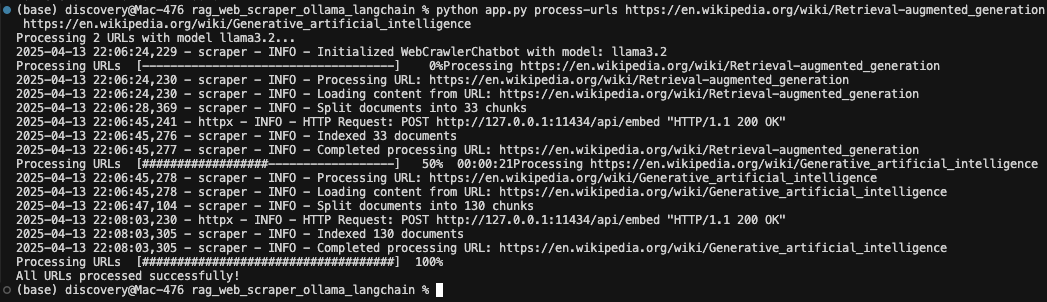
Extract and index content from specified URLs:
python app.py process-urls https://en.wikipedia.org/wiki/Generative_artificial_intelligence https://en.wikipedia.org/wiki/Retrieval-augmented_generation
or
./app.py process-urls https://en.wikipedia.org/wiki/Generative_artificial_intelligence https://en.wikipedia.org/wiki/Retrieval-augmented_generation
Example:
-
Process and Query in One Command:
python app.py query "What is Gen AI?" --urls https://en.wikipedia.org/wiki/Generative_artificial_intelligence https://en.wikipedia.org/wiki/Retrieval-augmented_generationor
./app.py query "What is Gen AI?" --urls https://en.wikipedia.org/wiki/Generative_artificial_intelligence https://en.wikipedia.org/wiki/Retrieval-augmented_generationExample:



The process begins with URL processing where selenium, unstructure and langchain webloader loads web pages and extracts their content(all the elements for javascript & typescript) automatically. Once the content is retrieved, long documents are split into manageable chunks using a text splitting technique. These smaller segments are then converted into vector embeddings through Ollama, enabling the application to transform unstructured text into a structured form. The generated embeddings are stored in an in-memory vector store to allow for fast and efficient access during subsequent operations.
When a question is asked, a similarity search is performed to retrieve the most relevant content chunks from the vector store. The retrieved context, which closely matches the query, is then passed to a large language model. This model generates a response that is both contextually coherent and accurate based on the indexed information. This end-to-end pipeline ensures that the application delivers prompt and context-aware answers using a seamless integration of web scraping, text processing, and advanced LLM functionalities.
- Ollama - High-performance AI model execution.
- Llama-3.2 - LLM trained on 1B parameters.
- Streamlit - Web-based UI framework.
Feel free to contribute or reach out!
- GitHub Issues - Report bugs or request features.
- Pull Requests - Improve the project with your contributions.
- Email - G-mail
This project is licensed under the MIT License.