

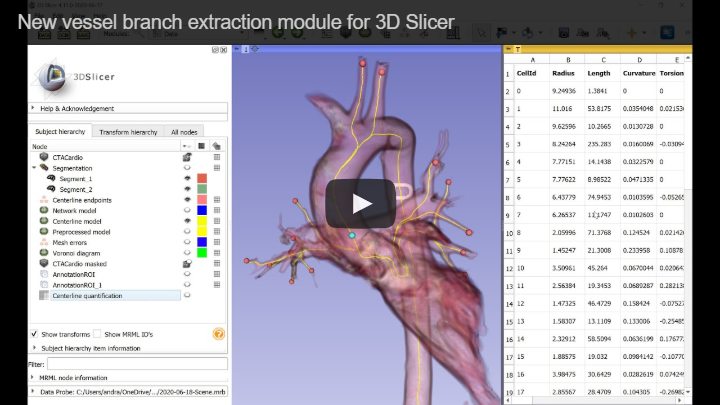
This extension makes the Vascular Modeling Toolkit (VMTK, https://vmtk.github.io/) available in 3D Slicer (https://www.slicer.org). Features include vessel tree segmentation and centerline extraction. Short demo video of vessel segmentation and centerline extraction is available here: https://youtu.be/caEuwJ7pCWs
VMTK extension is available for recent 3D Slicer versions 4.10 and above. Install 3D Slicer, start 3D Slicer, and in the extension manager install SlicerVMTK extension.
SlicerVMTK extension provides the following modules:
Segmentation:
- Vesselness Filtering: Image processing operation that increases brightness of tubular structures and suppresses other shapes (plates and blobs). This module can be used to pre-process image data to make vessel segmentation easier.
- Level Set Segmentation: This module can segment a single vessel branch of a vessel tree from an image (either unprocessed or vesselness-filtered can be used). Place "Seeds" points inside vessels and place "Stoppers" points in areas to avoid (where segmentation leaked out to). To segment multiple branches, you can use Segment Editor module.
Analysis:
- Extract Centerline: Determine centerlines in a vessel tree from an input segmentation or model. It can either do quick network extraction or an accurate centerline computation and branch extraction between designated endpoints. The module can simplify the input to make computations fast (typically 5-20 seconds) without significant decrease in accuracy and can also detect and mark mesh errors (non-manifold edges).
- Cross-Section Analysis: Reslice images, segmentations, or models along a centerline curve. It can measure cross-sectional area and various other metrics and displays it as a table or plot.
Workflows:
- Guided Artery Segmentation: Create targeted segmentations from a contrast enhanced CT angio scan using a markups open curve, and to finally extract centerlines from the surface model. Overall, it's a small wrapper to create short arterial segments as single tubes, with subsequent centerline extraction.
- Quick Artery Segmentation: Create targeted (small) segmentations from a contrast enhanced CT angio scan using fiducial points, and to finally extract centerlines from the surface model. Overall, it's a small wrapper for common arterial segmentation tasks.
- Stenosis measurement 1D: use distances between control points of a straightened open curve to evaluate a stenosis.
- Stenosis measurement 2D: use segment surface areas to evaluate a stenosis.
- Stenosis measurement 3D: use lumen and wall volumes to evaluate a stenosis.
- Branch clipper: This module splits a bifurcated vascular segment into individual branches, given its centerline model.
- Guided Vein Segmentation: Segment major veins using an open markups curve leveraging the segment editor effects.
- Arterial calcification pre-processor: Segment arterial calcifications within a specified distance around a lumen.
- Centerline disassembly: Break down a bifurcated centerline model into parts.
- Centerline junction angles: Measure angles between branches at centerline bifurcations.
- Clip vessel: Clip a segmentation or model normal to the centerline.
- Edit centerline: Create a Shape::Tube markups node around an artery.
- CFD Mesh Generator: Fill a clipped vessel surface with tetrahedra for a computational fluid dynamics solver, using TetGen, fTetWild or Netgen, with capping, surface remeshing and an optional prismatic boundary layer.
Legacy modules (replaced by other modules, not developed anymore):
- Centerline Computation: This module determines centerlines in a vessel tree from an input model node. This module is replaced by the much improved, faster and more robust "Extract Centerline" module in current Slicer versions (Slicer-4.11 and later).

- Coronary artery centerline extraction: End-to-end walkthrough of segmenting a coronary artery from a CT angiogram and extracting its centerline, using vesselness filtering, level set segmentation, and centerline extraction.
Results can quantitatively analyzed in Slicer's virtual Python environment (or by implementing custom Slicer modules).
Get centerline point coordinates and radii as numpy array and print them:
c = getNode('CenterlineComputationModel')
points = slicer.util.arrayFromModelPoints(c)
radii = slicer.util.arrayFromModelPointData(c, 'Radius')
for i, radius in enumerate(radii):
  print("Point {0}: position={1}, radius={2}".format(i, points[i], radius))
Get centerline points and lines as VTK object:
centerlineModel = getNode('CenterlineComputationModel')
centerlinePoly = centerlineModel.GetPolyData()

# Get first point position:
print(centerlinePoly.GetPoints().GetPoint(0))

# Get point IDs of the first line segment
pointIds = vtk.vtkIdList()
centerlinePoly.GetLines().GetCell(0, pointIds)
See Developer notes for running a build and for running the automated tests.