GV

GeezerVison

The World Wide Web, restored to 800 pixels of glory.

Home|About|Gaming cabinet|Archives|How it works|Starter sites

On this site

  • Sign in
  • ActionsCI/CD and automation
  • CodespacesCloud development environments
  • All Features
  • Documentation
  • Training
  • Certifications
  • Build with Copilot
  • Customize Copilot
  • Integrations
  • Trending repos
  • GitHub Sponsors
  • Developer articles
  • Enterprises

This view

  • Original page
  • New address

GeezerVison is showing github.com — GitHub - whjiang/cqeb: 超强二笔(超强音形、超强快码)适配RIME(鼠须管、中州韵、安卓同文、iRIME等输入框架)

BranchesTags
Open more actions menu

Latest commit


History

56 Commits
56 Commits

Folders and files

NameName
Last commit message
Last commit date
img
img
 
 
lua
lua
 
 
opencc
opencc
 
 
.gitignore
.gitignore
 
 
README.md
README.md
 
 
cqkm.dict.yaml
cqkm.dict.yaml
 
 
cqkm.schema.yaml
cqkm.schema.yaml
 
 
cqkm.src.dict.yaml
cqkm.src.dict.yaml
 
 
cqkm_42.dict.yaml
cqkm_42.dict.yaml
 
 
cqkm_42.schema.yaml
cqkm_42.schema.yaml
 
 
cqkm_cf.dict.yaml
cqkm_cf.dict.yaml
 
 
cqkm_cf.phrase.dict.yaml
 
 
cqkm_cf.schema.yaml
cqkm_cf.schema.yaml
 
 
cqkm_cf.single.dict.yaml
 
 
cqkm_cm.custom.yaml
cqkm_cm.custom.yaml
 
 
cqkm_cm.dict.yaml
cqkm_cm.dict.yaml
 
 
cqkm_cm.schema.yaml
cqkm_cm.schema.yaml
 
 
cqkm_cm.src.dict.yaml
 
 
cqkmcf.otf
cqkmcf.otf
 
 
cqlb.dict.yaml
cqlb.dict.yaml
 
 
cqlb.schema.yaml
cqlb.schema.yaml
 
 
cqlb.src.dict.yaml
cqlb.src.dict.yaml
 
 
cqyx.dict.yaml
cqyx.dict.yaml
 
 
cqyx.schema.yaml
cqyx.schema.yaml
 
 
cqyx.src.dict.yaml
cqyx.src.dict.yaml
 
 
english.dict.yaml
english.dict.yaml
 
 
english.schema.yaml
english.schema.yaml
 
 
essay-zh-hans.txt
essay-zh-hans.txt
 
 
ipinyin.dict.yaml
ipinyin.dict.yaml
 
 
ipinyin.schema.yaml
ipinyin.schema.yaml
 
 
key_bindings.yaml
key_bindings.yaml
 
 
nlp-ge-1000.dict.yaml
 
 
punctuation.yaml
punctuation.yaml
 
 
rime.lua
rime.lua
 
 
spelling.dict.yaml
spelling.dict.yaml
 
 
spelling.schema.yaml
 
 
spelling_lb.dict.yaml
 
 
spelling_lb.schema.yaml
 
 
symbols.yaml
symbols.yaml


Repository files navigation

如何在RIME中使用超强音形输入法

RIME是一个通用的输入法引擎,它支持几乎所有的常见平台:

  • 在Windows上是小狼毫
  • 在MAC上是鼠须管
  • 在Linux上是ibus-rime或者fcitx-rime
  • 在手机安卓平台上是同文输入法
  • 在IOS(苹果手机)上是iRIME

为什么我们会使用rime平台?一言以蔽之:它是一款极为强大的跨平台免费输入法引擎。

因为是一个通用输入法引擎,所以我们可以使用一份配置来支持所有这些引擎。

这个文档就是如何在RIME中支持超强音形输入法。

超强音形输入法

超强音形、超强二笔、超强快码都是付东升老师基于二笔输入法改进而来的输入法。它们的官方网站在此。

功能

【功能(重要)】:

  1. i键:引导拼音混输,并进行反查。超强系列遇到一个字不会读可以用先打i键代替读音,后加形打出来;或者用i键引导一个全拼打出这个字。
  2. v键来引导部分符号的输入,所以不需要点开符号面板,比如,一个熟练的人的手里,问号键一定是按vv,两键上问号符。

感谢

本配置主要是基于挥泪审判者 在同文输入法上的工作改进而成的。特此表示感谢,没有他的工作,就没有这个项目。

Windows安装方法

Win怎样在RIME小狼毫输入法平台上使用超强系列两笔输入法?

话不多说,在win上使用小狼毫运行超强系列输入法,共分为五步。如果你不熟悉小狼毫的使用方式,请使用者严格遵守此步骤。

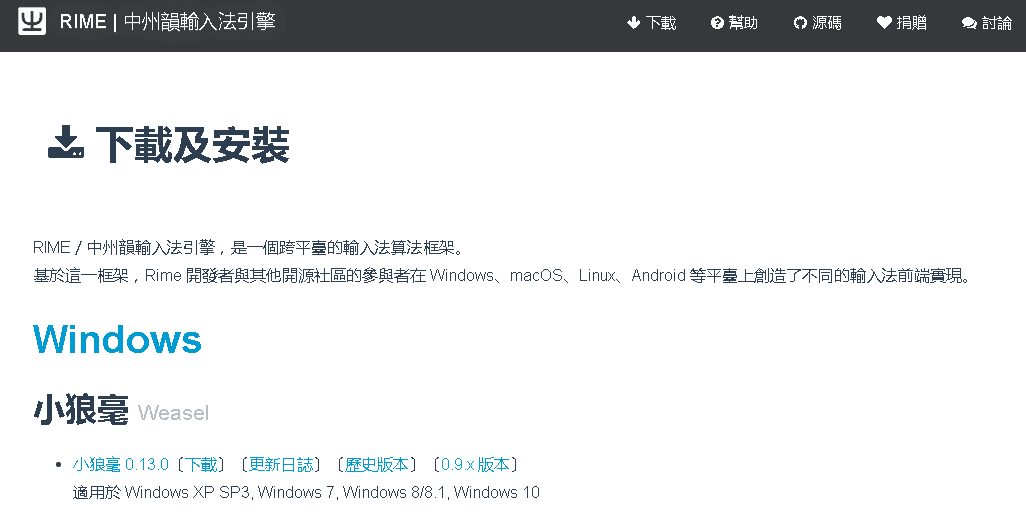
  1. 下载小狼毫输入法平台。并启用它,至少能出字。

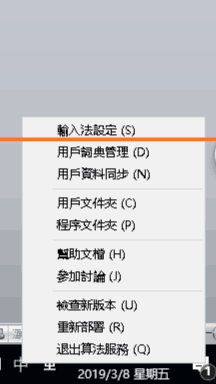
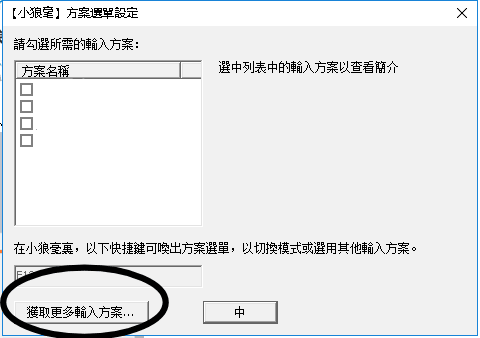
  2. 点击小狼毫输入法平台的自身设定,然后点击获取更多输入方案。

  3. 然后就会到达“东风破”界面,“东风破”小狼毫的官方输入法获取程序。

    Rime的规划是以后的发行版只保留2-3种内置,其他都用东风破下载。到了此界面,输入法会自动变为英文输入模式。

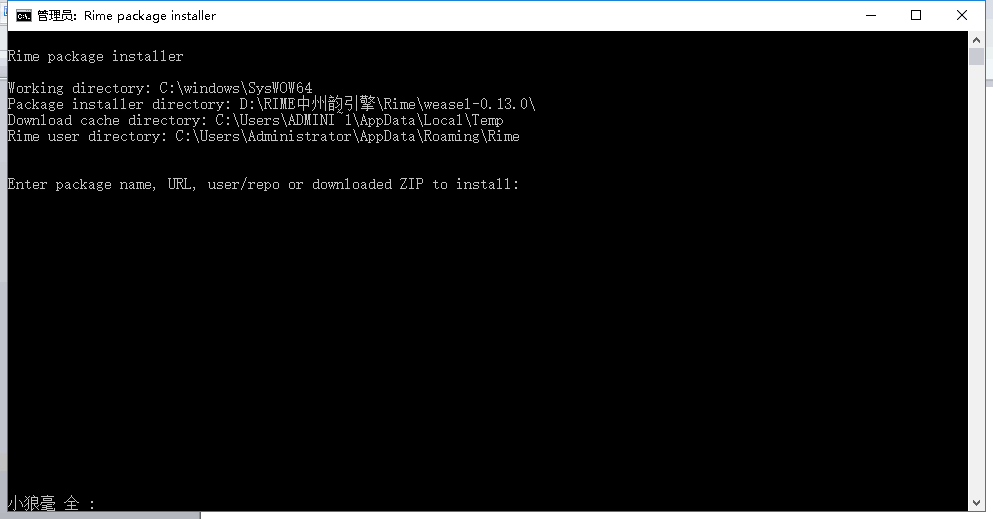
  4. 第四步,也是最关键的一步:在如下界面输入Whjiang/cqeb,回车确定。然后只需静静等待即可。

    效果如下图。

此时光标再次出现,证明输入法已经安装好了。

  1. 你再次回车,然后就可以在输入法获取的界面点选超强两笔,并可在输入法重启部署之后使用了,如果内置了多个方案需要切换,按小狼毫的F4键可换方案。

五个步骤,请牢牢遵守说明。 谢谢使用!

Mac/Linux安装方法

步骤1: 安装输入方案

方案1

安装步骤:

  1. 安装 東風破 。
  2. 使用 東風破 安装超强系列。
  3. 修改Rime的配置增超强系列选项。
  4. 重新部署RIME,以生效。

安装東風破

具体安装方法见東風破 官方网站。

简单来说,Linux/Mac上使用下列命令安装:

curl -fsSL https://git.io/rime-install | bash

Windows上用家可以通過 小狼毫 0.11 以上「輸入法設定/獲取更多輸入方案」調用配置管理器或者東風破 官方网站列出的其他安装方法。

安装超强系列

在Linux、MAC上使用以下命令安装:

bash rime-install pinyin-simp whjiang/cqeb

其中, bash rime-install是東風破 的命令。在Windows上,请替换为相应的命令(例如:rime-install.bat)。pinyin-simp和whjiang/cqeb是我们要通过東風破 安装的两个输入法名字。

方案2

把目录下的所有文件拷贝到~/Library/Rime, 然后在鼠须管里,选择“重新部署”即可。

步骤2: 配置RIME字体 (可选)

  1. 双击cqkmcf.otf 来安装字体(不安装的话,正常输入没有问题,就是不能进行笔画显示)。

  2. 修改MAC的~/Library/Rime/squirrel.custom.yaml 文件,增加如下内容:

patch:
  style/font_face: "cqkmcf"

让鼠须管里用cqkmcf作为字体来显示笔画。

然后在鼠须管里,选择“重新部署”即可。

可以用

ctrl-`

打开鼠须管的选单,在中/隐/亚/半菜单里把隐改成显。这样,候选的第一个字会自动显示字是怎么分解的。对于学习快码非常有帮助。

修改Rime的配置增加超强系列选项

然后创建一个default.custom.yaml文件。该文件的位置为:

  • MAC ~/Library/Rime
  • Linux
    • fcitx ~/.config/fcitx/rime
    • ibus ~/.config/ibus/rime
    • fcitx5 ~/.local/share/fcitx5/rime

文件内容如下:

patch:
  schema_list:
    - {schema: cqkm} #超强快码
    - {schema: cqkm_cm} #超强快码(重码版),重码版相比无重码版并没有增加更多的词,仅是调整了编码方式
    - {schema: cqkm_42} #超强快码(弛放版),追加拼音引擎,四码以内单字优先,四码开外转为类双拼输入法
    - {schema: cqlb} #超强二笔
    - {schema: cqyx} #超强音形

About

超强二笔(超强音形、超强快码)适配RIME(鼠须管、中州韵、安卓同文、iRIME等输入框架)

Resources

Readme
Activity

Stars

39 stars

Watchers

6 watching

Forks

11 forks
Report repository

Releases

Packages

Used by

Contributors

Languages

You are visitor 01402792 — GeezerVison does not store the pages you look up.
Best viewed with Netscape Navigator 4.7 or Internet Explorer 6 at 800×600. No cookies required.