GV

GeezerVison

The World Wide Web, restored to 800 pixels of glory.

Home|About|Gaming cabinet|Archives|How it works|Starter sites

On this site

  • Sign in
  • ActionsCI/CD and automation
  • CodespacesCloud development environments
  • All Features
  • Documentation
  • Training
  • Certifications
  • Build with Copilot
  • Customize Copilot
  • Integrations
  • Trending repos
  • GitHub Sponsors
  • Developer articles
  • Enterprises

This view

  • Original page
  • New address

GeezerVison is showing github.com — GitHub - winnieay/Sailpoint-IIQ_Decompose-Certification-Archives: The Sailpoint IIQ provides functionality to archive the certification campaign. But cannot decompose the archived certification. The PowerShell script is for generating the csv report based on the archived data export from the SailPoint DB.

BranchesTags
Open more actions menu

Latest commit


History

17 Commits
17 Commits

Folders and files

NameName
Last commit message
Last commit date
Sailpoint-IIQ_Decompose-Certification-Archives
 
 
images
images
 
 
Complex_decomposeArchivedCert.ps1
 
 
README.md
README.md
 
 
certificationData.csv
 
 
decomposeArchivedCert.ps1
 
 
output.csv
output.csv


Repository files navigation

Sailpoint-IIQ_Decompose-Certification-Archives

The Sailpoint IIQ provides functionality to archive the certification campaign. But cannot decompose the archived certification. The PowerShell script is for generating the csv report based on the archived data export from the SailPoint DB.

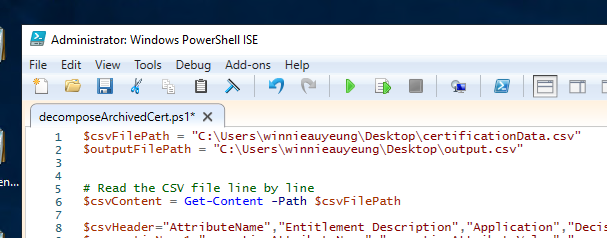
The Powershell decomposeArchivedCert.ps1 is for the sample archived certification (certificationData.csv). In that csv file, only one certification campaign is included. And for the Powershell Complex_decomposeArchivedCert.ps1, it is used for the condiction that multiple certification campaign archived in signle csv file.

To be clear, the upload powershell code is the basis for processing archived certification activity data. If more customized reports are required, modifications will be required.

Scenario:

  • MSSQL
  • SailPoint IdentityIQ

Step One - Export the archived certification form DB

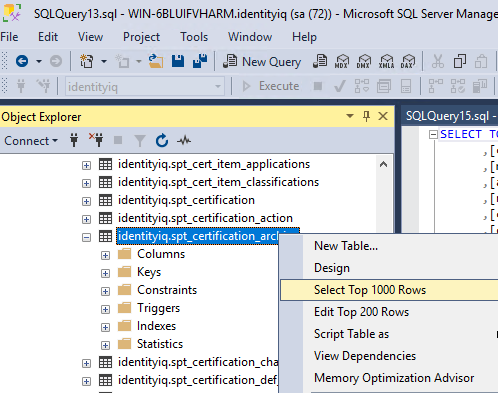
  1. Go the Table identityiq.spt._certification_achive.
  2. Right click and select the option "Select Top 1000 Rows". And then Execute the sql script.


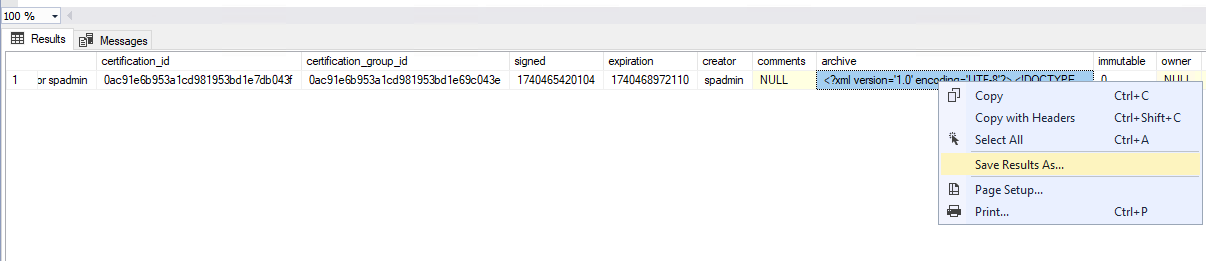
  3. In the result console, find and select the column named "archive"
  4. Right click and sava the archived data as csv file.


Step Two - Change the file directory in the PowerShell script

  1. Input CSV file directory
  2. Output CSV file directory


About

The Sailpoint IIQ provides functionality to archive the certification campaign. But cannot decompose the archived certification. The PowerShell script is for generating the csv report based on the archived data export from the SailPoint DB.

Resources

Readme
Activity

Stars

0 stars

Watchers

1 watching

Forks

0 forks
Report repository

Releases

Packages

Contributors

Languages

You are visitor 01402792 — GeezerVison does not store the pages you look up.
Best viewed with Netscape Navigator 4.7 or Internet Explorer 6 at 800×600. No cookies required.