XPLPC - Cross Platform Lite Procedure Call


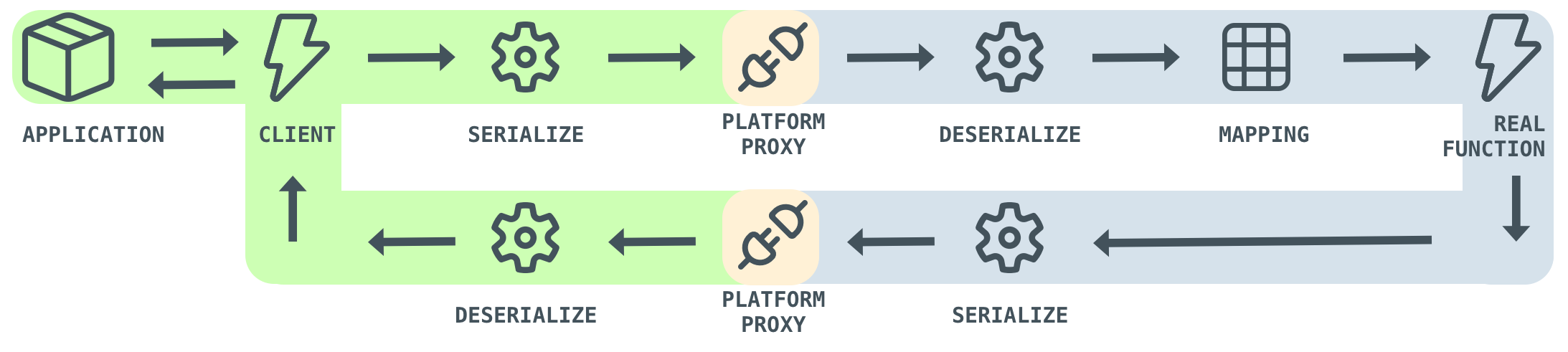
The XPLPC project connects languages and platforms, allowing for the transfer of serialized data between them. This is achieved without the need for a server, but instead by utilizing device memory. This approach is known as Lite Procedure Call.
One router lives in the C++ core for the whole process, and every language attaches to it as a layer. A layer registers the function names it serves, and a call from any language reaches the layer that registered that name last, so C++ can serve a name, an Android layer can take it over and a Flutter layer can take it from both, and when the Flutter layer goes away the name goes back to Android. Large buffers cross as a handle to bytes their owner registered, so they are neither copied nor encoded.
For example, you can call a procedure written in C++ code from a mobile application, or vice versa, with ease. This opens up a wide range of possibilities for developers and allows for a more seamless integration of different languages and platforms.
The XPLPC project needs no generator for the calls themselves, since a mapping is registered by name in plain code on every side. The one exception is Flutter, where filling an answer into a class of yours needs the reflection data reflectable's builder generates, which the Flutter guide describes. The library is added to an existing project without rewriting its code.
You do not need to copy this repository to build on it. Add it to your own CMake project with FetchContent or add_subdirectory, put your mappings into the xplpc target, define NativeLayer::initializePlatform to register them, and link xplpc::xplpc, and taking an update is moving one tag:
include(FetchContent)

FetchContent_Declare(xplpc GIT_REPOSITORY https://github.com/xplpc/xplpc.git GIT_TAG main-<commit>)
FetchContent_MakeAvailable(xplpc)

target_sources(xplpc PRIVATE src/NativeLayer.cpp)
target_link_libraries(app PRIVATE xplpc::xplpc)
cxx/consumer is a complete project built that way, and the C++ guide describes the options a consumer sets.
Using C++ code:
auto request = Request{
    "sample.login",
    Param<std::string>{"username", "paulo"},
    Param<std::string>{"password", "123456"},
    Param<bool>{"remember", true},
};

Client::call<std::string>(request, [](const auto &response) {
    std::cout << "Returned Value: " << (response ? response.value() : "Empty") << std::endl;
});
Using Kotlin code:
val request = Request(
    "sample.login",
    Param("username", "paulo"),
    Param("password", "123456"),
    Param("remember", true)
)

Client.call<String>(request) { response ->
    println("Returned Value: $response")
}
Using Swift code:
let request = Request(
    "sample.login",
    Param("username", "paulo"),
    Param("password", "123456"),
    Param("remember", true)
)

Client.call(request) { (response: String?) in
    print("Returned Value: \(response ?? "")")
}
Using WASM with Typescript:
const request = new Request(
    "sample.login",
    new Param("username", "paulo"),
    new Param("password", "123456"),
    new Param("remember", true),
);

Client.call<string>(request).then((response : string | undefined) => {
    console.log("Returned Value: " + response);
});
Using Flutter with Dart:
var request = Request("sample.login", [
    Param("username", "paulo"),
    Param("password", "123456"),
    Param("remember", true),
]);

Client.call<String>(request, (response) {
    print("Returned Value: $response");
});
Using Python code:
request = Request(
    "sample.login",
    [
        Param("username", "paulo"),
        Param("password", "123456"),
        Param("remember", True),
    ],
)

Client.call(request, lambda response: print(f"Returned Value: {response}"), str)
Every language but C also has a waiting form of the same call, which is callAsync, or call_async in Python, and TypeScript has none of its own because call already answers with a promise. And every language has callSync, or call_sync in Python, which answers with the value itself when the mapping answered before it returned, and with the empty value when it did not. The guide for each language describes both, and the C guide shows the same thing done by hand over xplpc_call and xplpc_cancel.
- C
- C++
- Kotlin (Android, Desktop)
- Swift (iOS, macOS, tvOS, watchOS, Catalyst)
- WebAssembly
- Flutter (iOS, Android, Desktop)
- Python
Copyright (c) 2022-2026, Paulo Coutinho