Based on kivy 2.0 python framework. GPL-3.0 License with available source code.
CrossK is a small but conspiratorial app engine based on kivy 2 / opengles 2.0 in background.
Created to make future fast and quick.
- Create multiplatform target builds with real time net driver.
Basic : 2D UI visual app creator. Future features player, networking, 3d/2d canvas based engine.
Because html5 is excluded for now from this story maybe some real time networking makes fit for
all platforms. In basic we can create server-client native application for any platform (desktops, android)
- Create server part with also visual GUI approach.
Strong implementation and relationship between creating server database entity with client
automatic adaptation in preview mode.

https://www.youtube.com/watch?v=Ci8GNd3FDHw&ab_channel=javascriptfanatic
-
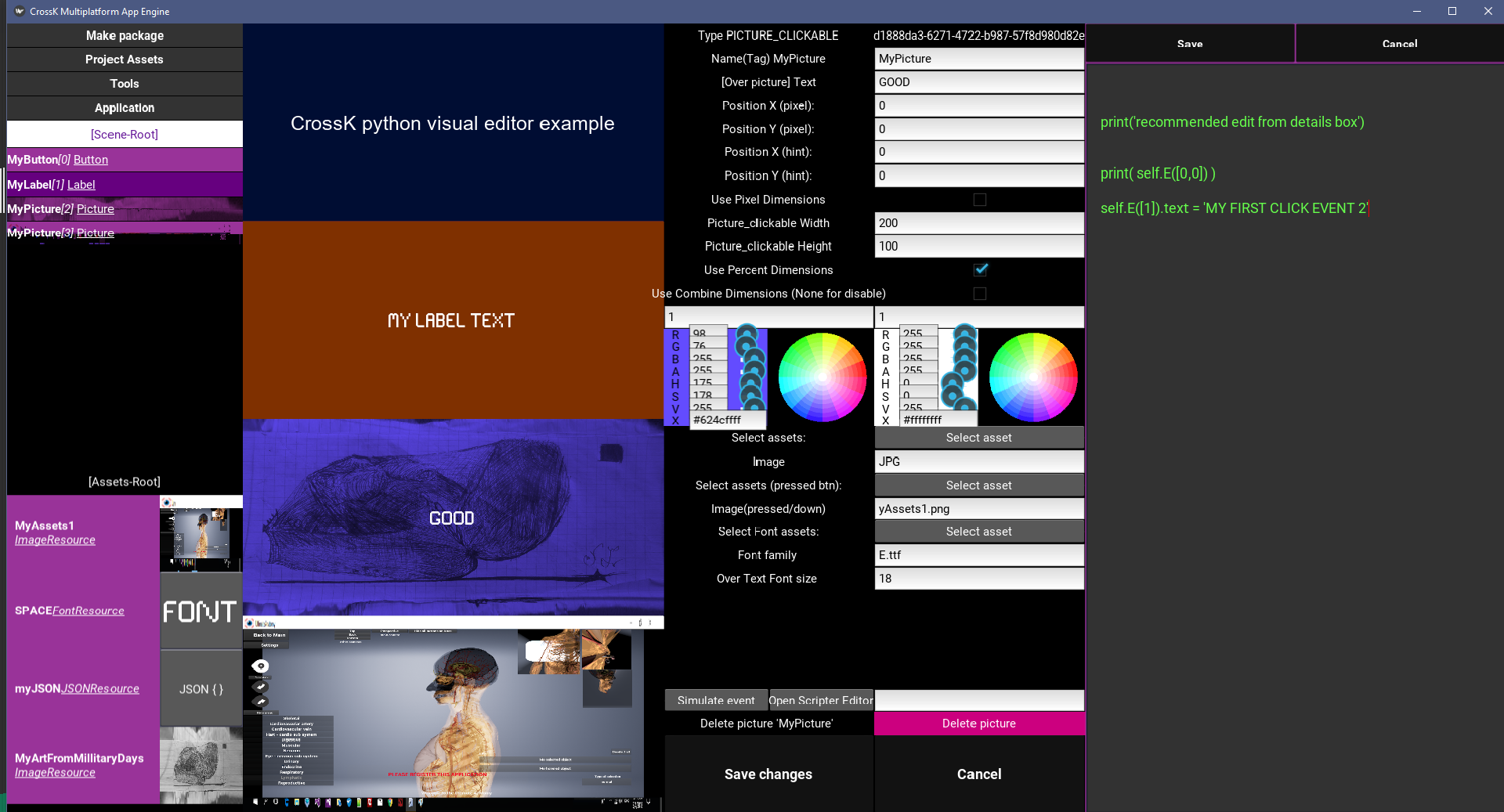
Left is Scene list and assets list scrollbars

-
Label details box

-
Images example

-
Script editor


-
- After cloning this project only need to install python (current used 3.9.5 python version),
pip on you computer. Allow adding env variable during installation.
Install Docker on your system, i use version 20.10.8, build 3967b7d
After installation check in terminal
docker -v.
- After cloning this project only need to install python (current used 3.9.5 python version),
pip on you computer. Allow adding env variable during installation.
Install Docker on your system, i use version 20.10.8, build 3967b7d
After installation check in terminal
-
- Run this
pre-installation.bat
- Run this
-
- You need first time to create
kivy_venv:
- You need first time to create
Windows command line [Only first time]
  python -m pip install --upgrade --force-reinstall pip
  python -m pip install --upgrade pip setuptools virtualenv
  python -m virtualenv kivy_venv
-
- Activate env [you need to activate env every time before start to work on it]
Windows command
kivy_venv\Scripts\activate
Bash command
source kivy_venv/Scripts/activate kivy_venv/Scripts/activate -
Now you can install last version of kivy 2.1.0 framework.
You can try this windows installation script install-win.bat
You can try this macox installation script install-macos.sh
You can try this linux installation script install-ubuntu.sh
python crossk.editor
[WINDOWS]
Pack Application for windows10 with GUI command.
Manual you can package whole engine not just application project.
kivy_venv/Scripts/python.exe -m PyInstaller --onefile --name CROSSK_PROJECT1 --distpath packages/projectTest --workpath .cache/ main.py
[ANDROID]
(non project files) => Files from marked folder are not in active dependency of this software. (Auto generated) => Usually dont edit dont use it (VisualCode/debugger) => You can find help script for python debugger from MS Visual Code Editor.
├── .cache/                      (Auto generated)
├── .vscode/                     (VisualCode/debugger)
├── inactive/                    (not project files)
├── projects/                    (Auto generated - Project files)
├── main.py                      (App Instance - PackageProduction)
├── crossk.editor                (Engine Editor Instance - This is python file)
├── engine/
|   ├── assets/
|   ├── common/
|   |   └── assetsEditor.py
|   |   └── assetsEditorOperation.py
|   |   └── commons.py
|   |   └── enginePackage.py           (Popup GUI for windows, linux, macos packing)
|   |   └── enginePackageAndroid.py    (Popup GUI for android packing)
|   |   └── modification.py
|   |   └── operationBox.py
|   |   └── operationButton.py
|   |   └── operationLabel.py
|   |   └── operationsPicture.py
|   ├── editor/
|   |   └── layout.py
|   |   └── networking.py            For now kivy support only curl (http request)
|   |   └── resources.py
|   |   └── scripter.py              Future visual node sub editor,text script for now
|   |   └── resourcesGUIContainer.py
|   |   └── sceneGUIContainer.py     Visual Editor Asset GUI box
|   ├── config.py                    (Engine editor config)
|   ├── editor_main.py               Main Engine File
|   ├── app_main.py                  Main Final App File [Used for package proccess]
|   ├── kivy_venv/                   (Auto generated - env libraries)
|   ├── shader-editor/               (non project files)
ACTUAL VERSION [no release] BETA

BETA VERSION [0.6.0] STATUS  2024

[EDITOR]

 - Add option solution for dimension ref system
   (use pixels, percents or combine)

 - Add option solution for frameLayout and
   position hint also.
   (use pixels, percents or combine)

 - Manage scene element
     - Details box with save options
     - SceneContainer to select and preview render elements
       in left side of engine window -scroll added
     - AssetsContainer to select and preview assets items
       in left side of engine window -scroll added

 - Remove elements
 - Add Element type:
       - Button element
       - Label element
       - CheckBox element
       - Picture Clickable (bg img , pressed bg img)
       - Layouts (dinamic with props) element
 - Layouts - Handle sub components
 - Layouts ( Details commands:
                      - Add button
                      - Add Label
                      - Add layout
                      - add checkbox)
 - CrossK Scripter, Basic script bind attacher for live (app) buttons.

Example for CrossK scripting:
Access element by array id.
```python
      print( self.E([1,0])['text'] , "  Look at 0 1 ")
```


[ASSETS EDITOR]

 - Operation ( Type of Asset:
                          - imageResource,
                          - fontResource
                          - JSONResource - read only root keys
 - OperationAdd

[PACKAGE-SYSTEM]

 - Package for windows                             [SUPPORTED]
 - Package for Linux                               [SUPPORTED]
 - Package for android                             [SUPPORTED][DOCKER]
 - Package for macOS                               [NOTESTED]
 - Package for iOS                                 [NOTESTED]

[PACKAGE-ANDROID]

 - Preparing automatisation for window docker apk build  [WIP]
 - Test kivy solution                               [NOTESTED]
 - Test canvas solution (if ti posible)             [NOTESTED]
 - Test opengles2/3 in native canvas manir          [NOTESTED]
First implementation for windows building android apk... wip
[0.5.0]
You need to have Docker app on your mashine also to pull zlatnaspirala/crossk-pack:beta
If yor already run pre-installation.bat you probably no need for this line.
docker pull zlatnaspirala/crossk-pack:beta