GeezerVisonThe World Wide Web, restored to 800 pixels of glory. |
| Home|About|Gaming cabinet|Archives|How it works|Starter sites |
GeezerVison is showing hackr.io — 16 Best JavaScript Projects for Beginners [With Source Code] If I could go back in time to help my younger self learn JavaScript, I'd tell him to build more JavaScript projects! That's exactly why I wrote this article: to share 16 JavaScript projects to help beginners like you. Whether you’re looking to start a career in web development or enhance your portfolio, these JavaScript projects are perfect for leveling up your JS skills. I’ve also personally designed the first seven JavaScript projects to be step-by-step tutorials so you can follow along with me using our online JavaScript compiler, to get hands-on and code some cool stuff. You can think of these tutorial projects as taking a free JavaScript course while growing your JavaScript portfolio! I'm also regularly adding new JavaScript projects with step-by-step tutorials, so make sure you bookmark this page and check back for the latest JavaScript projects to grow your skills. Without further ado, let’s dive in and start building with JavaScript! 16 Best JavaScript Projects of 20261. JavaScript Countdown Timer
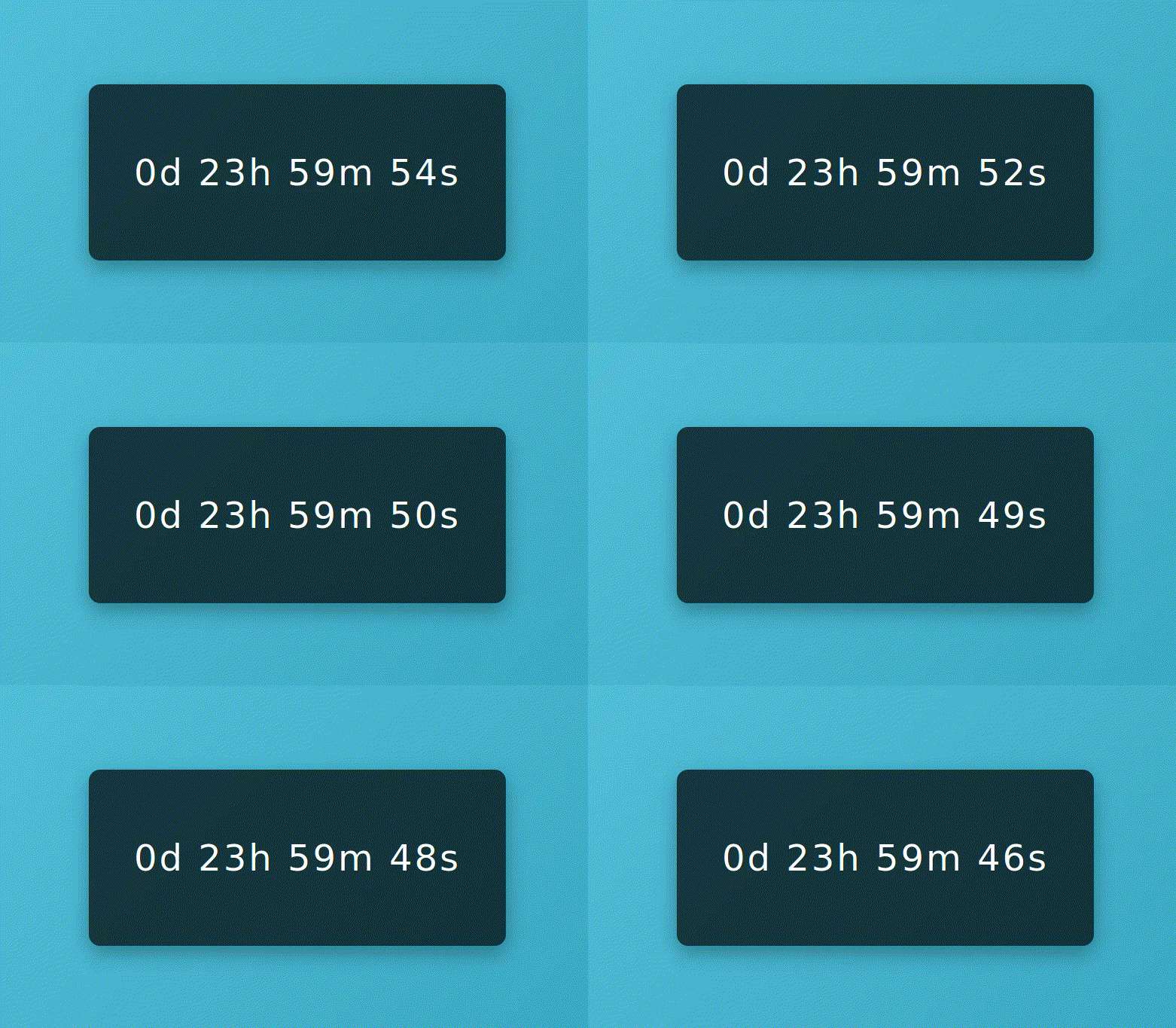
What is this JavaScript project? In this JavaScript project, you'll build a dynamic countdown timer, which is ideal for websites featuring upcoming events or sales. I really like this project because it's a practical example of how the JavaScript programming language brings interactivity to web pages. Plus, it's a solid addition to your portfolio if you want to break into web development, thanks to its wide applicability and real-world focus. If you're brand new to JavaScript, grab a JavaScript book in case you need extra help, and start here! JavaScript Skills Covered:
Build This JavaScript Project Here 2. JavaScript Tic-Tac-Toe Game
What is this JavaScript project? In this JavaScript project idea, you'll create a Tic-Tac-Toe game, which is not only fun to play but also a classic project for basic game development. I find this project particularly effective for showing how JavaScript enhances user experience on web pages. It's also a great addition to your portfolio, especially if you're looking to make a mark in web development or you're eyeing up a JS certification, as it demonstrates key programming concepts in a familiar and relatable context. JavaScript Skills Covered:
Build This JavaScript Project Here 3. JavaScript To-Do List
What is this JavaScript project? In this JavaScript project, you'll build a To-Do List app, a practical and highly useful application that is a staple in many people's daily productivity routines. This project is not just about creating a functional tool; it’s also a brilliant demonstration of how JavaScript can be used to enhance the interactivity and responsiveness of web pages. It's an excellent addition to your portfolio, especially if you're aiming to showcase your skills in web development, as it highlights essential programming concepts in a context that is both familiar and widely applicable. I'd also recommend having a JavaScript cheatsheet handy in case you need some quick refreshers on rusty concepts. JavaScript Skills Covered:
Build This JavaScript Project Here 4. JavaScript Drum Kit
What is this JavaScript project? In this JavaScript project, you'll create a Drum Kit app, an engaging and musical web application that lets users play drum sounds using their keyboard or mouse clicks. This project goes beyond simply triggering sounds; it's a vibrant showcase of how JavaScript can bring dynamic content and interactivity to life on web pages. I think this is a fantastic piece to add to your portfolio, particularly if you're keen on demonstrating your prowess in web development. It encapsulates fundamental programming concepts within an entertaining and creative framework that's sure to capture attention. Plus, you can do all of this with vanilla JS and without using JavaScript frameworks. JavaScript Skills Covered:
Build This JavaScript Project Here 5. JavaScript Calculator
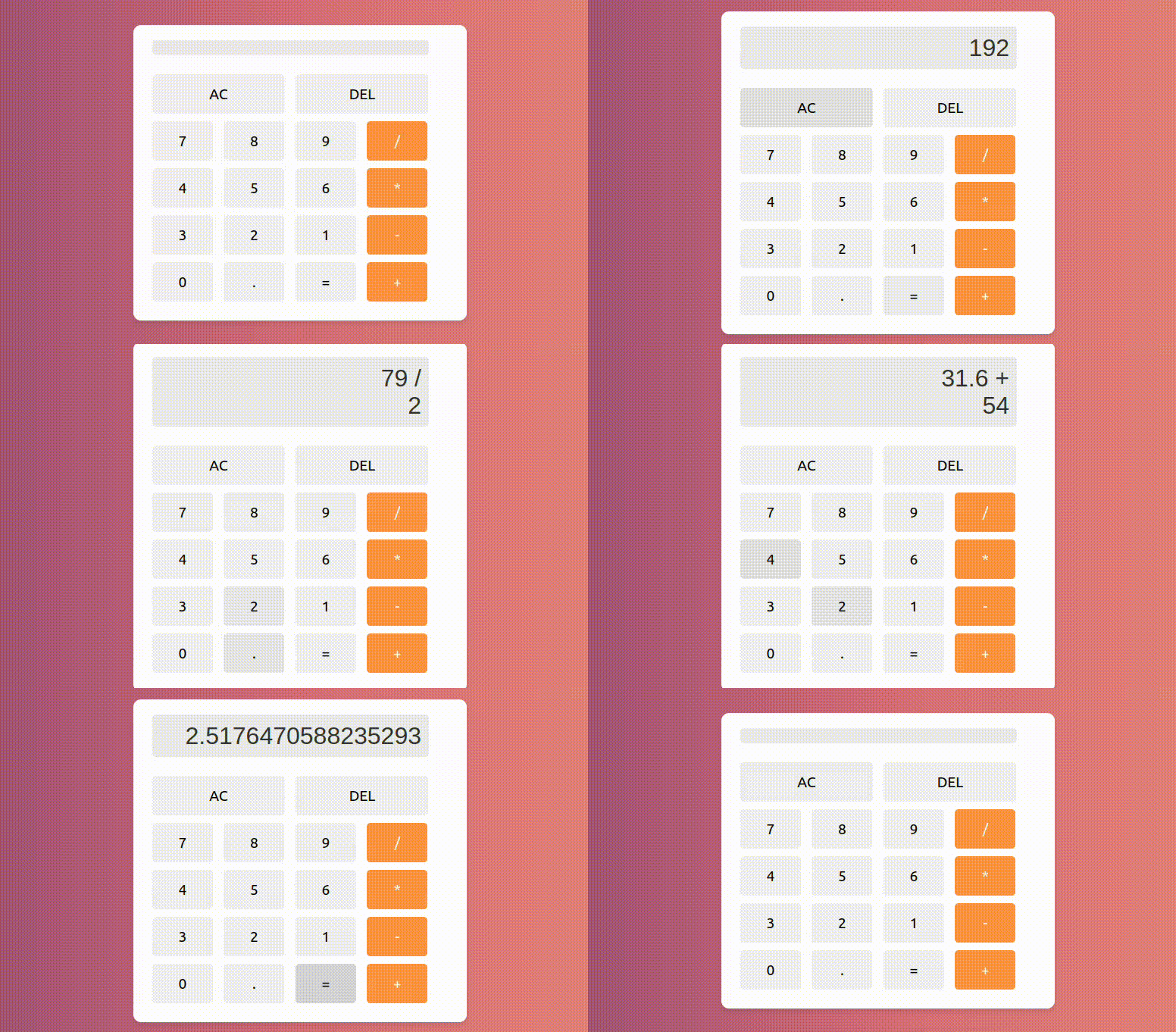
What is this JavaScript project? In this JavaScript project, you'll construct a classic calculator app. While it seems simple, calculator apps are an indispensable and universally utilized tool, in both personal and professional settings. Plus, this project is more than just functional; it's also a fantastic way to showcase JavaScript's capability to not only elevate web page interactivity but also to build useful everyday tools that appeal to a broad user base. If you're a beginner and you want to grow your portfolio, this is a solid starting point, especially if you want to boost your web development skills while also using fundamental programming principles in a relatable and widely relevant context. JavaScript Skills Covered:
Build This JavaScript Project Here 6. JavaScript Quiz App
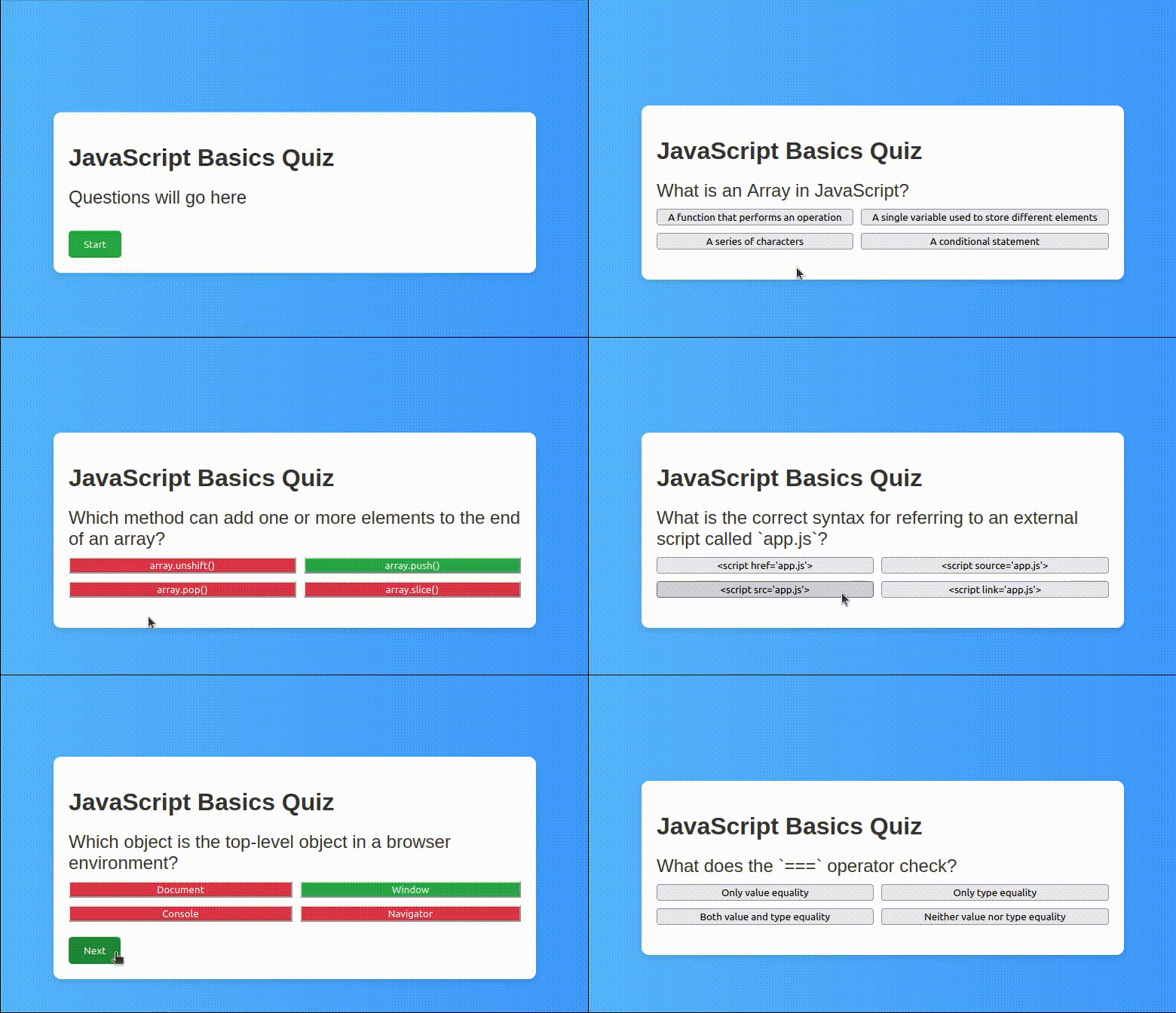
What is this JavaScript project? In this JavaScript project, you'll create a really useful and widely applicable quiz app. This is a really engaging and interactive application that you can use to test knowledge across various subjects. I've chosen to make my quiz about JavaScript, so feel free to take the test and check on your JavaScript progress! This project also goes beyond merely crafting a functional tool, as it showcases the power of JavaScript in making web pages dynamic and interactive, providing immediate visual feedback and challenging users in real time. It's also a fantastic portfolio piece, particularly if you want to highlight your real-world abilities in web development with a skill that's broadly relevant and helpful. JavaScript Skills Covered:
Build This JavaScript Project Here 7. JavaScript Rock, Paper, Scissors Game
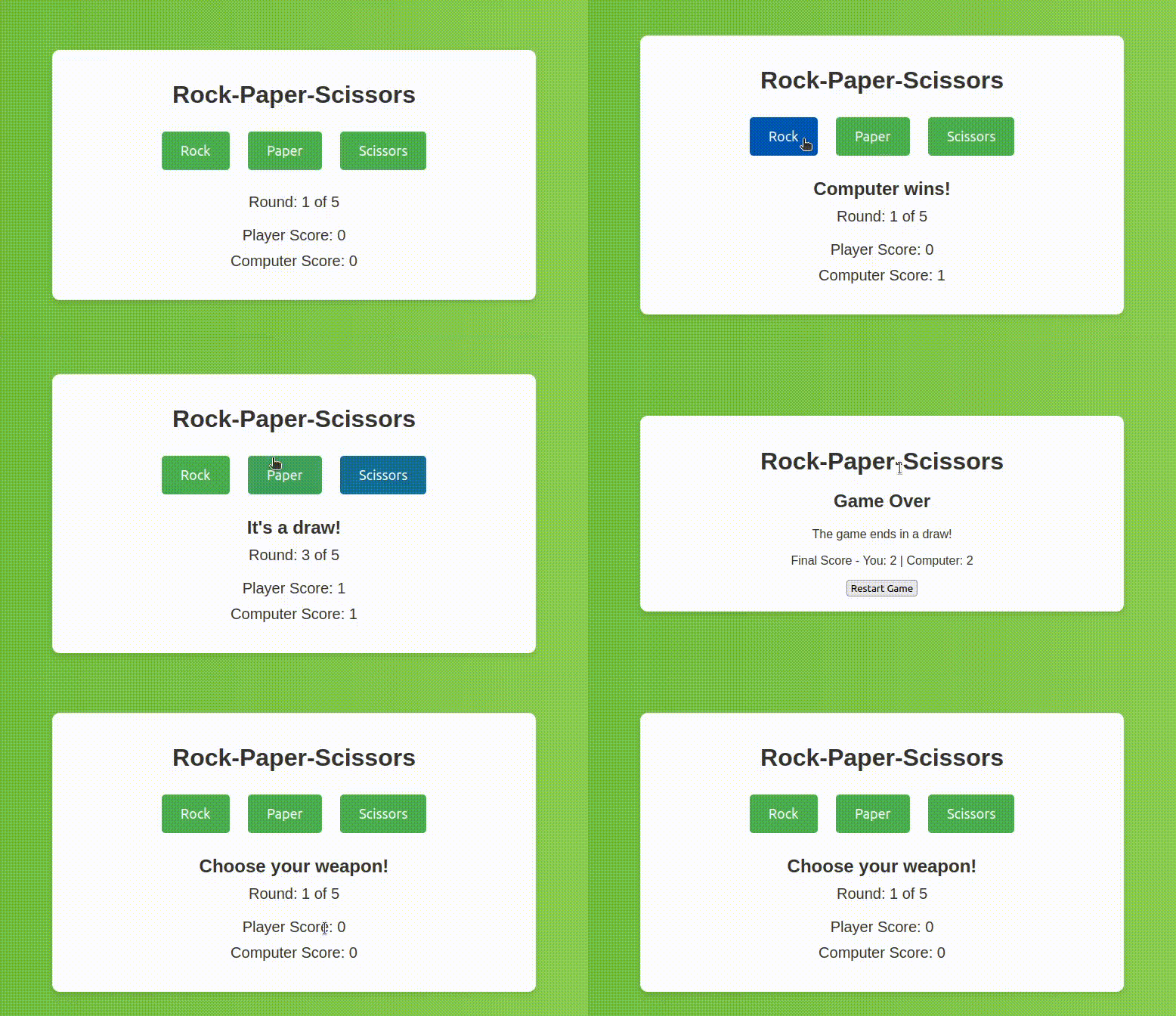
What is this JavaScript project? In this JavaScript project, you'll create the timeless classic Rock Paper Scissors game. It really needs no introduction, but this is an engaging and interactive application that brings a classic game to your web browser. But this JavaScript project goes beyond merely replicating a well-known game; it's also a fantastic showcase of JavaScript's power to create dynamic and responsive web experiences. It's also a solid portfolio piece, particularly if you want to highlight your web development prowess by using core programming principles in a context that's both enjoyable and easy to understand JavaScript Skills Covered:
Build This JavaScript Project Here 8. Hangman Game
Hangman is a well-known game, and one of our simple JS projects. You can develop it in a jiffy using JavaScript, HTML, and CSS. Note that the main functionality is defined using JS. HTML is for display, and CSS does the job of beautifying the contents. Many methods are defined in the JS code, so it may seem a bit complicated, but you will realize it is simple once you read the code thoroughly. You can also run the code and see the execution line by line. Check the code and execution here. 9. JavaScript Weather App
Weather apps are also popular JavaScript projects. Once you change the location name in this project, the weather display changes immediately without a page refresh. The UI is also quite sleek. Note that most weather apps use an API that gets the weather data. We will use the popular and most common API, OpenWeatherMap. Check out this Youtube video that explains the weather app code and functionality in detail. There are three files, as usual: index.html, main.js, and main.css. Although you can put all the code in a single file (HTML), it is more convenient to maintain separate files. 10. Build a Shopping Cart for Order Fulfillment
So far, we have run through small projects with pure JS, HTML, and CSS. Here, the author builds a full-fledged shopping cart for order fulfillment, and the project also uses jQuery. You can use this as an opportunity to learn the important concepts of jQuery. This will be a good project to build because shopping websites are extremely popular today, as digital shopping has become quite popular. This project will take time, but it is worth it! 11. Single Page Application
Here, the page won’t reload upon navigating the side links, but the content will change. Again, we will use eventListeners to change the view from one link to another. Check out the code and explanation on this YouTube video. 12. JavaScript Browser Code Editor
While you already have an ample choice of JS code editors, it’s always nice to be able to create your own. JS allows you to create an in-browser code editor, which is what this project is about. It makes use of some useful JS methods - and even features syntax highlighting! The source code for this project is available here. 13. Real-time Chat Application
Chat applications are comparatively simple to make and you can create one yourself using JavaScript. This project makes use of both React and Node.js, so it might be a little intimidating. However, it’s a good way to get your hands dirty and learn how to work with these invaluable tools. You can view the source code on GitHub. 14. 2D Platforming Game
Games are an excellent and fun way to learn JS. It’s why you’ll see so many projects revolving around games. This project teaches you how to create a 2D platformer game — all using JS, HTML, and CSS. You’ll make use of OOPs concepts and an API, both handy skills to have. Check out the source code here. 15. Photo-sharing App
Everyone knows Instagram. It has a lot of features, but fundamentally, it’s a photo-sharing application. You can create a similar but smaller-scale version of it using JS. This is a hefty project and you’ll find yourself using React, Node.js, and Postgres, among other things. Take a look at the source code here. 16. File Sharing App
Learning how to share files is another useful skill to have. You’ll be using the Virgil Crypto Library in JavaScript to create this app. It’s secure, and you’ll be able to download, decrypt, and view encrypted media files. Take a look at the source code here. How To Setup Your JavaScript EnvironmentBefore you start coding in JavaScript, it's essential to have your coding environment properly set up and ready for action. Being an interpreted language that runs in web browsers, you don't need to worry about having a compiler. That said, setting up a good development environment can really help to enhance your coding efficiency and provide you with powerful tools to debug and test your code. If you want to dive straight in, I'd recommend following along with me using our online JavaScript compiler. This is pre-populated with the HTML, CSS, and JavaScript files you need to build any JavaScript project without switching on an IDE. Equally, if you're already equipped with a basic setup on your own computer, you might want to skip this. If not, let me walk you through how to set up a JavaScript development environment. You can even use these steps for any of the most popular operating systems. Install a JavaScript Code EditorFirst things first, you'll need a code editor that supports JavaScript syntax highlighting and potentially IntelliSense for code completion. Visual Studio Code (VSCode) is a popular choice among developers for its extensive feature set and vast library of extensions. That's why it's one of my favorite web development IDEs. Assuming you have VSCode installed, follow these steps to enhance your JavaScript development experience: Open VSCode and navigate to the VSCode Extensions tab (you can use the shortcut `Ctrl+Shift+X` on Windows/Linux or `Cmd+Shift+X` on macOS) and search for JavaScript-related extensions like:
You can install these extensions by clicking the install button next to each. Install a Web Browser with Developer ToolsModern web browsers like Google Chrome, Mozilla Firefox, and Microsoft Edge come with built-in developer tools, which are indispensable for web development. These tools allow you to debug JavaScript, inspect the DOM, view network requests, and much more. Install Node.js and npm [Optional]While JavaScript runs in the browser, Node.js allows you to run JavaScript on your computer as a standalone application, which is particularly useful for development. You can download Node from the official website. I'd also recommend choosing the LTS (Long-Term Support) version for stability. Next, we have npm (Node Package Manager), and luckily for you, this comes with Node.js! The more you dive into JS development, the more npm is essential for managing JavaScript libraries and packages. These commands should display the versions of Node.js and npm, respectively, indicating a successful installation. Install Git [Optional but Recommended]If you're really new to coding, you might want to skip this step, but even then, I'd really recommend becoming familiar with Git as soon as you can. If you want the TL-DR, Git is a version control system that lets you track changes in your code and collaborate with others. While this step is not strictly necessary for JavaScript development, it's a best practice, especially for larger projects or when working in a team. Simply download Git from the official Git website, and during installation, you can accept most default settings. That said, you might want to choose your preferred text editor and ensure that Git is added to your system's PATH. Wrapping UpAnd there we have it! If you've taken the time to build these 16 JavaScript projects, you should be feeling much more competent and confident with JavaScript. You'll also have a burgeoning JavaScript portfolio that's packed full of interesting and practical JavaScript projects, each demonstrating your dedication and abilities. I also hope you enjoyed following along with my step-by-step tutorials in the first seven JavaScript projects! Which one was your favorite? I'll confess that I really enjoyed making all of them, especially the drum kit! My motivation with these JavaScript tutorials was to guide you through the nuances of JavaScript development while also giving you hands-on experience that you'd usually only get when taking a JavaScript course. Here at hackr.io, we're huge fans of project-based learning, so I hope these JavaScript projects have bolstered your confidence and sparked a deeper interest in web development or any other form of JavaScript development. Remember, the journey doesn't end here! With new projects and step-by-step tutorials regularly added to this page, be sure to check back often for new opportunities to refine your JS skills and expand your portfolio. And remember, you can do all this using our online JavaScript compiler, so get creative, have fun, and happy coding! Want to sharpen up your JavaScript and web development skills? Check out: |
| You are visitor 01402503 — GeezerVison does not store the pages you look up. Best viewed with Netscape Navigator 4.7 or Internet Explorer 6 at 800×600. No cookies required. |