GeezerVisonThe World Wide Web, restored to 800 pixels of glory. | |||||||||||||||||||||||||||||||||||||||||||||||||||
| Home|About|Gaming cabinet|Archives|How it works|Starter sites | |||||||||||||||||||||||||||||||||||||||||||||||||||
GeezerVison is showing html.spec.whatwg.org — HTML Standard
15 RenderingUser agents are not required to present HTML documents in any particular way. However, this section provides a set of suggestions for rendering HTML documents that, if followed, are likely to lead to a user experience that closely resembles the experience intended by the documents' authors. So as to avoid confusion regarding the normativity of this section, "must" has not been used. Instead, the term "expected" is used to indicate behavior that will lead to this experience. For the purposes of conformance for user agents designated as supporting the suggested default rendering, the term "expected" in this section has the same conformance implications as "must". 15.1 IntroductionThe suggestions in this section are generally expressed in CSS terms. User agents are expected to either support CSS, or translate from the CSS rules given in this section to approximations for other presentation mechanisms. In the absence of style-layer rules to the contrary (e.g. author style sheets), user agents are expected to render an element so that it conveys to the user the meaning that the element represents, as described by this specification. The suggestions in this section generally assume a visual output medium with a resolution of 96dpi or greater, but HTML is intended to apply to multiple media (it is a media-independent language). User agent implementers are encouraged to adapt the suggestions in this section to their target media. An element is being rendered if it has any associated CSS layout boxes, SVG layout boxes, or some equivalent in other styling languages. Just being off-screen does not mean the element is not being
rendered. The presence of the The fully active state does not affect whether an element is being rendered or not. Even if a document is not fully active and not shown at all to the user, elements within it can still qualify as "being rendered". An element is said to intersect the viewport when it is being rendered and its associated CSS layout box intersects the viewport. Similar to the being rendered state, elements in non-fully active documents can still intersect the viewport. The viewport is not shared between documents and might not always be shown to the user, so an element in a non-fully active document can still intersect the viewport associated with its document. This specification does not define the precise timing for when the intersection is tested, but it is suggested that the timing match that of the Intersection Observer API. [INTERSECTIONOBSERVER] An element is delegating its rendering to its children if it is not being rendered but its children (if any) could be rendered, as a result of CSS 'display: contents', or some equivalent in other styling languages. [CSSDISPLAY] User agents that do not honor author-level CSS style sheets are nonetheless expected to act as if they applied the CSS rules given in these sections in a manner consistent with this specification and the relevant CSS and Unicode specifications. [CSS] [UNICODE] [BIDI] This is especially important for issues relating to the 'display', 'unicode-bidi', and 'direction' properties. 15.2 The CSS user agent style sheet and presentational hintsThe CSS rules given in these subsections are, except where otherwise specified, expected to be used as part of the user-agent level style sheet defaults for all documents that contain HTML elements. Some rules are intended for the author-level zero-specificity presentational hints part of the CSS cascade; these are explicitly called out as presentational hints. When the text below says that an attribute attribute on an element element maps to the pixel length property (or properties) properties, it means that if element has an attribute attribute set, and parsing that attribute's value using the rules for parsing non-negative integers doesn't generate an error, then the user agent is expected to use the parsed value as a pixel length for a presentational hint for properties. When the text below says that an attribute attribute on an element element maps to the dimension property (or properties) properties, it means that if element has an attribute attribute set, and parsing that attribute's value using the rules for parsing dimension values doesn't generate an error, then the user agent is expected to use the parsed dimension as the value for a presentational hint for properties, with the value given as a pixel length if the dimension was a length, and with the value given as a percentage if the dimension was a percentage. When the text below says that an attribute attribute on an element element maps to the dimension property (ignoring zero) (or properties) properties, it means that if element has an attribute attribute set, and parsing that attribute's value using the rules for parsing nonzero dimension values doesn't generate an error, then the user agent is expected to use the parsed dimension as the value for a presentational hint for properties, with the value given as a pixel length if the dimension was a length, and with the value given as a percentage if the dimension was a percentage. When the text below says that a pair of attributes w and h on an
element element map to the aspect-ratio property, it means that if
element has both attributes w and h, and parsing those
attributes' values using the rules for parsing non-negative integers doesn't
generate an error for either, then the user agent is expected to use the parsed
integers as a presentational hint for the
'aspect-ratio' property of the form When the text below says that a pair of attributes w and h on an
element element map to the aspect-ratio property (using dimension rules), it
means that if element has both attributes w and h, and parsing
those attributes' values using the rules for parsing dimension values doesn't
generate an error or return a percentage for either, then the user agent is expected
to use the parsed dimensions as a presentational hint
for the 'aspect-ratio' property of the form When a user agent is to align descendants of a node, the user agent is
expected to align only those descendants that have both their
'margin-inline-start' and 'margin-inline-end' properties computing to a
value other than 'auto', that are over-constrained and that have one of those two margins with a
used value forced to a greater value, and that do not themselves have an applicable
15.3 Non-replaced elements15.3.1 Hidden elements15.3.2 The pageFor each property in the table below, given a
If the The above requirements imply that a page can change the margins of another page
(including one from another origin) using, for example, an If a If a When a When a When a When a When a When a 15.3.3 Flow contentThe following rules are also expected to apply, as presentational hints: In quirks mode, the following rules are also expected to apply: The The The The 15.3.4 Phrasing contentThe following rules are also expected to apply, as presentational hints: For the purposes of the CSS ruby model, runs of children of When a particular part of a ruby has more than one annotation, the annotations should be distributed on both sides of the base text so as to minimize the stacking of ruby annotations on one side. When it becomes possible to do so, the preceding requirement will be updated to be
expressed in terms of CSS ruby. (Currently, CSS ruby does not handle nested User agents that do not support correct ruby rendering are expected to render
parentheses around the text of User agents are expected to support the 'clear' property on inline
elements (in order to render The initial value for the 'color' property is expected to be black. The initial value for the 'background-color' property is expected to be 'transparent'. The canvas's background is expected to be white. When a When a When a
15.3.5 Bidirectional textWhen an Input fields (i.e. When the document's character encoding is ISO-8859-8, the following rules are additionally expected to apply, following those above: [ENCODING] 15.3.6 Sections and headings15.3.7 ListsThe following rules are also expected to apply, as presentational hints: In quirks mode, the following rules are also expected to apply: When rendering For CSS user agents, some aspects of rendering list items are defined by the CSS Lists specification. Additionally, the following attribute mappings are expected to apply: [CSSLISTS] When an When an
15.3.8 TablesThe following rules are also expected to apply, as presentational hints: In quirks mode, the following rules are also expected to apply: For the purposes of the CSS table model, the For the purposes of the CSS table model, the For the purposes of the CSS table model, the In HTML documents, the following rules are also expected to apply: The The The The The The The The The The The The The User agents are expected to have a rule in their user agent style sheet that
matches When a When a When a The Rules marked "only if border is not equivalent to zero"
in the CSS block above is expected to only be applied if the In quirks mode, a 15.3.9 Margin collapsing quirksA node is substantial if it is a text node that is not inter-element whitespace, or if it is an element node. A node is blank if it is an element that contains no substantial nodes. The elements with default margins
are the following elements: In quirks mode, any element
with default margins that is the child of a
In quirks mode, any element
with default margins that is the child of a
In quirks mode, any element
with default margins that is the child of a
In quirks mode, any 15.3.10 Form controlsIn quirks mode, the following rules are also expected to apply: Each kind of form control is also described in the Widgets section, which describes the look and feel of the control. For
15.3.11 The
|
direction attribute state
| Direction of animation | Start edge | End edge | Opposite direction |
|---|---|---|---|---|
| left | ← Right to left | Right | Left | → Left to Right |
| right | → Left to Right | Left | Right | ← Right to left |
| up | ↑ Up (Bottom to Top) | Bottom | Top | ↓ Down (Top to Bottom) |
| down | ↓ Down (Top to Bottom) | Top | Bottom | ↑ Up (Bottom to Top) |
In any case, the animation should proceed such that there is a delay given by the marquee scroll interval between each frame, and such that the content moves at most the distance given by the marquee scroll distance with each frame.
When a marquee element has a bgcolor
attribute set, the value is expected to be parsed using the rules for parsing
a legacy color value, and if that does not return failure, the user agent is
expected to treat the attribute as a presentational hint setting the element's 'background-color' property
to the resulting color.
The width and height attributes on a marquee element
map to the dimension properties
'width' and 'height' on the element respectively.
The natural height of a marquee element with its direction attribute in the up or down states is 200 CSS
pixels.
The vspace attribute of a
marquee element maps to the dimension
properties 'margin-top' and 'margin-bottom' on the element. The
hspace attribute of a marquee
element maps to the dimension properties
'margin-left' and 'margin-right' on the element.
15.5.14 The meter element
@namespace "http://www.w3.org/1999/xhtml" ;
meter { appearance : auto; } The meter element is a devolvable widget. Its native
appearance is expected to render as an 'inline-block' box with a
'block-size' of '1em' and an 'inline-size' of '5em', a
'vertical-align' of '-0.2em', and with its contents depicting a gauge.
When this element has a horizontal writing mode, the depiction is expected to be of a horizontal gauge. Its minimum value is on the right if the 'direction' property has a computed value of 'rtl', and on the left otherwise. When this element has a vertical writing mode, it is expected to depict a vertical gauge. Its minimum value is on the bottom if the 'direction' property has a computed value of 'rtl', and on the top otherwise.
User agents are expected to use a presentation consistent with platform conventions for gauges, if any.
Requirements for what must be depicted in the gauge are
included in the definition of the meter element.
Need to detail the primitive appearance.
15.5.15 The progress element
@namespace "http://www.w3.org/1999/xhtml" ;
progress { appearance : auto; } The progress element is a devolvable widget. Its
native appearance is expected to render as an
'inline-block' box with a 'block-size' of '1em' and an
'inline-size' of '10em', and a 'vertical-align' of '-0.2em'.
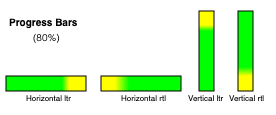 When this element has a horizontal writing mode, the element is
expected to be depicted as a horizontal progress bar. The start is on the right and
the end is on the left if the 'direction' property on this element has a
computed value of 'rtl', and with the start on the left and the end on the right
otherwise. When this element has a vertical writing mode, it is
expected to be depicted as a vertical progress bar. The start is on the bottom and
the end is on the top if the 'direction' property on this element has a
computed value of 'rtl', and with the start on the top and the end on the bottom
otherwise.
User agents are expected to use a presentation consistent with platform conventions for progress bars. In particular, user agents are expected to use different presentations for determinate and indeterminate progress bars. User agents are also expected to vary the presentation based on the dimensions of the element.
Requirements for how to determine if the progress bar is determinate or
indeterminate, and what progress a determinate progress bar is to show, are included in the
definition of the progress element.
Need to detail the primitive appearance.
15.5.16 The select element
The select element is an element with default preferred size, and
user agents are expected to apply the 'field-sizing' CSS property to
select elements.
A select element is either a list box or a drop-down box, depending on its attributes.
A select element whose multiple
attribute is present is expected to render as a multi-select list
box if its display size is greater than 1. If the
select element has the multiple attribute
and a display size of 1, then it may render as a
multi-select drop-down box if the platform supports it; otherwise as a multi-select
list box.
A select element whose multiple
attribute is absent is expected to render as a single-select drop-down
box if its display size is 1, or as a
single-select list box if its display size
is greater than 1.
When the element renders as a list box, it is a devolvable widget
expected to render as an 'inline-block' box. The inline
size of its intrinsic size is the width of the select's
labels plus the width of a scrollbar. The block size of its intrinsic
size is determined by the following steps:
-
If the 'field-sizing' property on the element has a computed value of 'content', return the height necessary to contain all rows for items.
-
If the
sizeattribute is absent or it has no valid value, return the height necessary to contain four rows. -
Otherwise, return the height necessary to contain as many rows for items as given by the element's display size.
A select element which is being rendered as a drop-down box is
expected to render as an 'inline-block' box. The inline
size of its intrinsic size is the width of the select's
labels. If the 'field-sizing' property on the element has a computed
value of 'content', the inline size
of the intrinsic size depends on the shown text. The shown text is typically the
label of an option of which selectedness is set to true.
When the element renders as a drop-down box, it is a devolvable
widget. Its appearance in the devolved state, as well as its appearance when the
computed value of the element's 'appearance' property is
'menulist-button', is that of a drop-down box, including a "drop-down button",
but not necessarily rendered using a native control of the host operating system. In such a state,
CSS properties such as 'color', 'background-color', and 'border' should
not be disregarded (as is generally permissible when rendering an element according to its
native appearance).
In either case (list box or drop-down box), the element's items are
expected to be the element's list of
options, with the element's optgroup element children providing headers for groups of options where
applicable.
select elements which render as a drop-down box support a base
appearance in addition to native appearance and primitive
appearance.
select elements which render as a drop-down box without the multiple attribute or as a list box support a
base appearance in addition to native appearance and primitive
appearance.
The select element's select popover supports a base
appearance and a native appearance. The select popover can only
be rendered with base appearance if its associated select is being
rendered with base appearance.
When a select is being rendered as a drop-down box with base
appearance, it is expected to render with a shadow tree that
contains the following elements:
A select button slot, which is a
slotelement. It is appended to theselect's shadow root as the first child. It is expected to take the first child element of theselectif the first child element is abutton.A select fallback button text, which is a
divelement. It is appended to the select button slot.A select popover, which is a
divelement. It is appended to theselect's shadow root as the second child, after the select button slot. Theselectelement's '::picker' pseudo-element is the select popover if the provided argument isselect.A select popover slot, which is a
slotelement. It is appended to the select popover. It is expected to take all child nodes of theselectexcept for the first childbutton, which is taken by the select button slot.
Since base appearance is determined by computing style, it isn't
possible to swap this DOM structure when switching appearance. Implementations can always include
the DOM structure for base appearance when the select is rendered as a
drop-down box and then choose to include or exclude it from the layout tree in order
to control whether it gets rendered or not.
The select popover is only rendered when it is opted in to base
appearance separately from the select element. Otherwise, a native picker is
used.
When a select is being rendered as a list box with base
appearance, it is expected to render with a shadow tree that contains a
select list box slot, which is a slot element. The select list box
slot is appended to the select's shadow root as the first child.
The select list box slot is expected to take all children of the select
element.
The select popover's implicit anchor element is its associated
select element.
When a select element is being rendered with native appearance or
primitive appearance, or the select element is being rendered as a
list box, the '::picker' pseudo-element and the
'::picker-icon' pseudo-element do not apply.
The '::picker' pseudo-element is not rendered when it has native appearance or primitive appearance.
The '::checkmark' pseudo-element only applies to option elements
which are being rendered with base appearance.
An optgroup element has an internal shadow tree with at least one
slot element.
An optgroup element is rendered with base
appearance if it has a nearest
ancestor select whose contents are being rendered with base appearance.
If an optgroup element is not being rendered with base appearance, then it is
expected to be rendered by displaying the element's label and children.
If an optgroup element is being rendered
with base appearance, then it is expected to render with a shadow
tree that contains the following elements:
An optgroup legend slot, which is a
slotelement. It is appended to theoptgroup's shadow root as the first child. It is expected to take the first child element of theoptgroupif the first child element is alegendelement.An optgroup label element, which is a
divelement. It is appended to the optgroup legend slot. It is expected to contain aTextnode whose data is the result of getting anoptgroupelement's label given theoptgroupelement.An optgroup contents slot, which is a
slotelement. It is appended to theoptgroup's shadow root after the optgroup legend slot. It is expected to take all remaining child nodes of theoptgroupelement.
To determine if a select's contents are being rendered with base appearance, given a
select element select:
If select is being rendered as a list box with base appearance, then return true.
If select is being rendered as a drop-down box with base appearance, and its select popover is being rendered with base appearance, and select does not have the
multipleattribute set, then return true.Return false.
An option element has an internal shadow tree with a
slot element.
An option element is rendered with base
appearance if it has a nearest
ancestor select and the select's contents are being rendered with base
appearance.
If an option does not have a nearest ancestor select, then it is expected to render
its children.
Otherwise, if an option element is not being rendered with base appearance, then it is
expected to be rendered by displaying the result of getting an option element's label given the
option and true.
Otherwise, it is expected to render with a shadow tree that contains the following elements:
-
An option contents slot, which is a
slotelement. It is appended to theoption's shadow root as the first child. If theoptionelement has alabelattribute whose value is not the empty string, then the option contents slot is expected to not take any nodes. Otherwise, it is expected to take all child nodes of theoptionelement.When the option contents slot does not take any elements, the option label element is rendered as fallback content.
An option label element, which is a
spanelement. It is appended to the option contents slot. It is expected to contain aTextnode whose data is the value of theoption'slabelattribute.
Each sequence of one or more child hr element siblings may be rendered as a single
separator.
The width of the select's labels is the wider of the width necessary to
render the widest optgroup, and the width necessary to render the widest
option element in the element's list of
options (including its indent, if any). If the select has the multiple attribute and is being rendered as a
drop-down box, then the width should also be wide enough to accommodate the text
rendered in the select with any combination of options selected.
The width of the select's labels has an accommodation for
multiple because some implementations use special text
to represent multiple options being selected, such as "2 selected." In this case, the select needs
to be wide enough to render "2 selected" in addition to the individual options.
If a select element contains a placeholder label option, the user
agent is expected to render that option in a manner that conveys that
it is a label, rather than a valid option of the control. This can include preventing the
placeholder label option from being explicitly selected by the user. When the
placeholder label option's selectedness is true, the control is
expected to be displayed in a fashion that indicates that no valid option is
currently selected.
User agents are expected to render the labels in a select in such a
manner that any alignment remains consistent whether the label is being displayed as part of the
page or in a menu control.
Need to detail the native appearance and primitive appearance.
@namespace "http://www.w3.org/1999/xhtml" ;
option {
display : block;
}
optgroup {
display : block;
font-weight : bolder;
} The following styles are expected to apply to select elements when
they are being rendered as a drop-down box:
@namespace "http://www.w3.org/1999/xhtml" ;
select {
align-content : center;
} The following styles are expected to apply to select elements when
they are being rendered with native appearance or primitive
appearance:
@namespace "http://www.w3.org/1999/xhtml" ;
select {
letter-spacing : initial;
word-spacing : initial;
line-height : initial;
} The following styles are expected to apply to select elements when
they are being rendered as a drop-down box with native appearance or
primitive appearance:
@namespace "http://www.w3.org/1999/xhtml" ;
select {
display : inline-block;
} The following styles are expected to apply to select elements when
they are being rendered with base appearance:
@namespace "http://www.w3.org/1999/xhtml" ;
select {
background-color : transparent;
border : 1 px solid currentColor;
user-select : none;
box-sizing : border-box;
}
select option:enabled:hover {
background-color : color-mix ( currentColor 10 % , transparent);
}
select option:enabled:active {
background-color : color-mix ( currentColor 20 % , transparent);
}
select option:disabled {
color : color-mix ( currentColor 50 % , transparent);
}
select option {
min-inline-size : 24 px ;
min-block-size : max ( 24 px , 1 lh );
padding-inline : 0.5 em ;
padding-block-end : 0 ;
display : flex;
align-items : center;
gap : 0.5 em ;
white-space : nowrap;
}
select option::checkmark {
content : '\2713' / '' ;
}
select option:not(:checked)::checkmark {
visibility : hidden;
}
select optgroup {
display : block;
font-weight : bolder;
}
select optgroup option {
font-weight : normal;
}
select optgroup legend {
padding-inline : 0.5 em ;
min-block-size : 1 lh ;
} The following styles are expected to apply to select elements when
they are being rendered as a drop-down box with base appearance:
@namespace "http://www.w3.org/1999/xhtml" ;
select {
border-radius : 0.5 em ;
padding-block : 0.25 em ;
padding-inline : 0.5 em ;
min-block-size : calc-size ( auto, max ( size, 24 px , 1 lh ));
min-inline-size : calc-size ( auto, max ( size, 24 px ));
display : inline-flex;
gap : 0.5 em ;
border-radius : 0.5 em ;
field-sizing : content !important;
}
select > button:first-child {
all: unset;
display: contents;
}
select:enabled:hover {
background-color: color-mix(currentColor 10%, transparent);
}
select:enabled:active {
background-color: color-mix(currentColor 20%, transparent);
}
select:disabled {
color: color-mix(currentColor 50%, transparent);
}
::picker(select) {
box-sizing: border-box;
border: 1px solid;
padding: 0;
color: CanvasText;
background-color: Canvas;
margin: 0;
inset: auto;
min-inline-size: anchor-size(self-inline);
max-block-size: stretch;
overflow: auto;
position-area: self-block-end span-self-inline-end;
position-try-order: most-block-size;
position-try-fallbacks:
self-block-start span-self-inline-end,
self-block-end span-self-inline-start,
self-block-start span-self-inline-start;
}
select::picker-icon {
content: counter(fake-counter-name, disclosure-open);
display: block;
margin-inline-start: auto;
}The following styles are expected to apply to select elements when
they are being rendered as a list box with base appearance:
@namespace "http://www.w3.org/1999/xhtml" ;
select {
overflow : auto;
display : inline-block;
block-size : calc ( max ( 24 px , 1 lh ) * attr(size type(<integer>), 4));
}The following styles are expected to apply to the optgroup label element:
padding-inline: 0.5emmin-block-size: 1lh
15.5.17 The textarea element
The textarea element is a devolvable widget expected to
render as an 'inline-block' box depicting a multiline text control. If this
multiline text control provides a selection, then, when the user changes the current selection,
the user agent is expected to queue an element task on the user
interaction task source given the textarea element to fire an event named select
at the element, with the bubbles attribute initialized to
true.
The textarea element is an element with default preferred size, and
user agents are expected to apply the 'field-sizing' CSS property to
textarea elements.
If the 'field-sizing' property on the element has a computed value
of 'content', the intrinsic size is
determined from the text which the element shows. The text is either a
raw value or a short hint specified by the
placeholder attribute. User agents may take the
text caret size into account in the intrinsic size. Otherwise, its
intrinsic size is computed from textarea effective width and
textarea effective height (as defined below).
The textarea effective width of a textarea element is size×avg + sbw, where
size is the element's character width,
avg is the average character width of the primary font of the element, in CSS pixels, and sbw is the width of a scrollbar, in CSS pixels. (The element's 'letter-spacing' property does not
affect the result.)
The textarea effective height of a textarea element is the height in
CSS pixels of the number of lines given by the element's character height, plus the height of a scrollbar in CSS pixels.
User agents are expected to apply the 'white-space' CSS property to
textarea elements. For historical reasons, if the element has a wrap attribute whose value is an ASCII
case-insensitive match for the string "off", then the user agent is expected to treat the attribute as a
presentational hint setting the element's
'white-space' property to 'pre'.
Need to detail the native appearance and primitive appearance.
15.6 Frames and framesets
User agents are expected to render frameset elements as a box with
the height and width of the viewport, with a surface rendered according to the
following layout algorithm:
-
The cols and rows variables are lists of zero or more pairs consisting of a number and a unit, the unit being one of percentage, relative, and absolute.
Use the rules for parsing a list of dimensions to parse the value of the element's
colsattribute, if there is one. Let cols be the result, or an empty list if there is no such attribute.Use the rules for parsing a list of dimensions to parse the value of the element's
rowsattribute, if there is one. Let rows be the result, or an empty list if there is no such attribute. -
For any of the entries in cols or rows that have the number zero and the unit relative, change the entry's number to one.
-
If cols has no entries, then add a single entry consisting of the value 1 and the unit relative to cols.
If rows has no entries, then add a single entry consisting of the value 1 and the unit relative to rows.
-
Invoke the algorithm defined below to convert a list of dimensions to a list of pixel values using cols as the input list, and the width of the surface that the
framesetis being rendered into, in CSS pixels, as the input dimension. Let sized cols be the resulting list.Invoke the algorithm defined below to convert a list of dimensions to a list of pixel values using rows as the input list, and the height of the surface that the
framesetis being rendered into, in CSS pixels, as the input dimension. Let sized rows be the resulting list. -
Split the surface into a grid of w×h rectangles, where w is the number of entries in sized cols and h is the number of entries in sized rows.
Size the columns so that each column in the grid is as many CSS pixels wide as the corresponding entry in the sized cols list.
Size the rows so that each row in the grid is as many CSS pixels high as the corresponding entry in the sized rows list.
-
Let children be the list of
frameandframesetelements that are children of theframesetelement for which the algorithm was invoked. -
For each row of the grid of rectangles created in the previous step, from top to bottom, run these substeps:
-
For each rectangle in the row, from left to right, run these substeps:
-
If there are any elements left in children, take the first element in the list, and assign it to the rectangle.
If this is a
framesetelement, then recurse the entireframesetlayout algorithm for thatframesetelement, with the rectangle as the surface.Otherwise, it is a
frameelement; render its content navigable, positioned and sized to fit the rectangle. -
If there are any elements left in children, remove the first element from children.
-
-
-
If the
framesetelement has a border, draw an outer set of borders around the rectangles, using the element's frame border color.For each rectangle, if there is an element assigned to that rectangle, and that element has a border, draw an inner set of borders around that rectangle, using the element's frame border color.
For each (visible) border that does not abut a rectangle that is assigned a
frameelement with anoresizeattribute (including rectangles in further nestedframesetelements), the user agent is expected to allow the user to move the border, resizing the rectangles within, keeping the proportions of any nestedframesetgrids.A
framesetorframeelement has a border if the following algorithm returns true:If the element has a
frameborderattribute whose value is not the empty string and whose first character is either a U+0031 DIGIT ONE (1) character, a U+0079 LATIN SMALL LETTER Y character (y), or a U+0059 LATIN CAPITAL LETTER Y character (Y), then return true.Otherwise, if the element has a
frameborderattribute, return false.Otherwise, if the element has a parent element that is a
framesetelement, then return true if that element has a border, and false if it does not.Otherwise, return true.
The frame border color of a
framesetorframeelement is the color obtained from the following algorithm:If the element has a
bordercolorattribute, and applying the rules for parsing a legacy color value to that attribute's value does not return failure, then return the color so obtained.Otherwise, if the element has a parent element that is a
framesetelement, then return the frame border color of that element.Otherwise, return gray.
The algorithm to convert a list of dimensions to a list of pixel values consists of the following steps:
-
Let input list be the list of numbers and units passed to the algorithm.
Let output list be a list of numbers the same length as input list, all zero.
Entries in output list correspond to the entries in input list that have the same position.
Let input dimension be the size passed to the algorithm.
-
Let total percentage be the sum of all the numbers in input list whose unit is percentage.
Let total relative be the sum of all the numbers in input list whose unit is relative.
Let total absolute be the sum of all the numbers in input list whose unit is absolute.
Let remaining space be the value of input dimension.
-
If total absolute is greater than remaining space, then for each entry in input list whose unit is absolute, set the corresponding value in output list to the number of the entry in input list multiplied by remaining space and divided by total absolute. Then, set remaining space to zero.
Otherwise, for each entry in input list whose unit is absolute, set the corresponding value in output list to the number of the entry in input list. Then, decrement remaining space by total absolute.
-
If total percentage multiplied by the input dimension and divided by 100 is greater than remaining space, then for each entry in input list whose unit is percentage, set the corresponding value in output list to the number of the entry in input list multiplied by remaining space and divided by total percentage. Then, set remaining space to zero.
Otherwise, for each entry in input list whose unit is percentage, set the corresponding value in output list to the number of the entry in input list multiplied by the input dimension and divided by 100. Then, decrement remaining space by total percentage multiplied by the input dimension and divided by 100.
-
For each entry in input list whose unit is relative, set the corresponding value in output list to the number of the entry in input list multiplied by remaining space and divided by total relative.
Return output list.
User agents working with integer values for frame widths (as opposed to user agents that can lay frames out with subpixel accuracy) are expected to distribute the remainder first to the last entry whose unit is relative, then equally (not proportionally) to each entry whose unit is percentage, then equally (not proportionally) to each entry whose unit is absolute, and finally, failing all else, to the last entry.
The contents of a frame element that does not have a frameset parent
are expected to be rendered as transparent black; the user agent is
expected to not render its content navigable in this case, and its
content navigable is expected to have a viewport with zero
width and zero height.
15.7 Interactive media
15.7.1 Links, forms, and navigation
User agents are expected to allow the user to control aspects of hyperlink activation and form submission, such as which navigable is to be used for the subsequent navigation.
User agents are expected to allow users to discover the destination of hyperlinks and of forms before triggering their navigation.
User agents are expected to inform the user of whether a hyperlink includes hyperlink auditing, and to let them know at a minimum which domains will be contacted as part of such auditing.
User agents may allow users to navigate navigables to the URLs indicated by the cite attributes on q,
blockquote, ins, and del elements.
User agents may surface hyperlinks created by link
elements in their user interface, as discussed previously.
15.7.2 The title attribute
User agents are expected to expose the advisory information of elements upon user request, and to make the user aware of the presence of such information.
On interactive graphical systems where the user can use a pointing device, this could take the form of a tooltip. When the user is unable to use a pointing device, then the user agent is expected to make the content available in some other fashion, e.g. by making the element a focusable area and always displaying the advisory information of the currently focused element, or by showing the advisory information of the elements under the user's finger on a touch device as the user pans around the screen.
U+000A LINE FEED (LF) characters are expected to cause line breaks in the tooltip; U+0009 CHARACTER TABULATION (tab) characters are expected to render as a nonzero horizontal shift that lines up the next glyph with the next tab stop, with tab stops occurring at points that are multiples of 8 times the width of a U+0020 SPACE character.
For example, a visual user agent could make elements with a title attribute focusable, and could make
any focused element with a title attribute
show its tooltip under the element while the element has focus. This would allow a user to tab
around the document to find all the advisory text.
As another example, a screen reader could provide an audio cue when reading an element with a tooltip, with an associated key to read the last tooltip for which a cue was played.
15.7.3 Editing hosts
The current text editing caret (i.e. the active range, if it is empty and in an editing host), if any, is expected to act like an inline replaced element with the vertical dimensions of the caret and with zero width for the purposes of the CSS rendering model.
This means that even an empty block can have the caret inside it, and that when the caret is in such an element, it prevents margins from collapsing through the element.
15.7.4 Text rendered in native user interfaces
User agents are expected to honor the Unicode semantics of text that is exposed in user interfaces, for example supporting the bidirectional algorithm in text shown in dialogs, title bars, popup menus, and tooltips. Text from the contents of elements is expected to be rendered in a manner that honors the directionality of the element from which the text was obtained. Text from attributes is expected to be rendered in a manner that honours the directionality of the attribute.
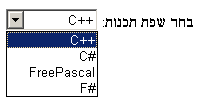
Consider the following markup, which has Hebrew text asking for a programming language, the languages being text for which a left-to-right direction is important given the punctuation in some of their names:
< p dir = "rtl" lang = "he" >
< label >
בחר שפת תכנות:
< select >
< option dir = "ltr" > C++</ option >
< option dir = "ltr" > C#</ option >
< option dir = "ltr" > FreePascal</ option >
< option dir = "ltr" > F#</ option >
</ select >
</ label >
</ p > If the select element was rendered as a drop down box, a correct rendering would
ensure that the punctuation was the same both in the drop down, and in the box showing the
current selection.
The directionality of attributes depends on the attribute and on the element's dir attribute, as the following example demonstrates. Consider this
markup:
< table >
< tr >
< th abbr = "(א" dir = ltr > A
< th abbr = "(א" dir = rtl > A
< th abbr = "(א" dir = auto > A
</ table > If the abbr attributes are rendered, e.g. in a tooltip or
other user interface, the first will have a left parenthesis (because the direction is 'ltr'),
the second will have a right parenthesis (because the direction is 'rtl'), and the third will
have a right parenthesis (because the direction is determined from the attribute value
to be 'rtl').
However, if instead the attribute was not a directionality-capable attribute, the results would be different:
< table >
< tr >
< th data-abbr = "(א" dir = ltr > A
< th data-abbr = "(א" dir = rtl > A
< th data-abbr = "(א" dir = auto > A
</ table > In this case, if the user agent were to expose the data-abbr attribute
in the user interface (e.g. in a debugging environment), the last case would be rendered with a
left parenthesis, because the direction would be determined from the element's
contents.
A string provided by a script (e.g. the argument to window.alert()) is expected to be treated as an
independent set of one or more bidirectional algorithm paragraphs when displayed, as defined by
the bidirectional algorithm, including, for instance, supporting the paragraph-breaking behavior
of U+000A LINE FEED (LF) characters. For the purposes of determining the paragraph level of such
text in the bidirectional algorithm, this specification does not provide a higher-level
override of rules P2 and P3. [BIDI]
When necessary, authors can enforce a particular direction for a given paragraph by starting it with the Unicode U+200E LEFT-TO-RIGHT MARK or U+200F RIGHT-TO-LEFT MARK characters.
Thus, the following script:
alert( '\u05DC\u05DE\u05D3 HTML \u05D4\u05D9\u05D5\u05DD!' ) ...would always result in a message reading "למד LMTH היום!" (not "דמל HTML םויה!"), regardless of the language of the user agent interface or the direction of the page or any of its elements.
For a more complex example, consider the following script:
/* Warning: this script does not handle right-to-left scripts correctly */
var s;
if ( s = prompt( 'What is your name?' )) {
alert( s + '! Ok, Fred, ' + s + ', and Wilma will get the car.' );
} When the user enters "Kitty", the user agent would alert "Kitty! Ok, Fred, Kitty, and Wilma will get the car.". However, if the user enters "لا أفهم", then the bidirectional algorithm will determine that the direction of the paragraph is right-to-left, and so the output will be the following unintended mess: "لا أفهم! derF ,kO, لا أفهم, rac eht teg lliw amliW dna."
To force an alert that starts with user-provided text (or other text of unknown directionality) to render left-to-right, the string can be prefixed with a U+200E LEFT-TO-RIGHT MARK character:
var s;
if ( s = prompt( 'What is your name?' )) {
alert( ' \u200E ' + s + '! Ok, Fred, ' + s + ', and Wilma will get the car.' );
} 15.8 Print media
User agents are expected to allow the user to request the opportunity to
obtain a physical form (or a representation of a physical form) of a
Document. For example, selecting the option to print a page or convert it to PDF
format. [PDF]
When the user actually obtains a physical form (or
a representation of a physical form) of a Document, the user agent is
expected to create a new rendering of the Document for the print media.
15.9 Unstyled XML documents
HTML user agents may, in certain circumstances, find themselves rendering non-HTML documents that use vocabularies for which they lack any built-in knowledge. This section provides for a way for user agents to handle such documents in a somewhat useful manner.
While a Document is an unstyled document, the user agent is
expected to render an unstyled document view.
A Document is an unstyled document while it matches the following
conditions:
- The
Documenthas no author style sheets (whether referenced by HTTP headers, processing instructions, elements likelink, inline elements likestyle, or any other mechanism). - None of the elements in the
Documenthave any presentational hints. - None of the elements in the
Documenthave any style attributes. - None of the elements in the
Documentare in any of the following namespaces: HTML namespace, SVG namespace, MathML namespace. - The
Documenthas no focusable area (e.g. from XLink) other than the viewport. - The
Documenthas no hyperlinks (e.g. from XLink). - There exists no script whose settings object's global object is a
Windowobject with thisDocumentas its associatedDocument. - None of the elements in the
Documenthave any registered event listeners.
An unstyled document view is one where the DOM is not rendered according to CSS
(which would, since there are no applicable styles in this context, just result in a wall of
text), but is instead rendered in a manner that is useful for a developer. This could consist of
just showing the Document object's source, maybe with syntax highlighting, or it
could consist of displaying just the DOM tree, or simply a message saying that the page is not a
styled document.
If a Document stops being an unstyled document, then the
conditions above stop applying, and thus a user agent following these requirements will switch to
using the regular CSS rendering.
Best viewed with Netscape Navigator 4.7 or Internet Explorer 6 at 800×600. No cookies required.