GeezerVisonThe World Wide Web, restored to 800 pixels of glory. | |||||||||||||||||||||||||||||||||||||||||||||||||||||||||||||||||||||||||
| Home|About|Gaming cabinet|Archives|How it works|Starter sites | |||||||||||||||||||||||||||||||||||||||||||||||||||||||||||||||||||||||||
GeezerVison is showing inventwithpython.com — Chapter 7 - Programming Jargon
(close)
Prev: Chapter 6 - Writing Pythonic Code | Next: Chapter 8 - Common Python Gotchas
...and other books as well! Or register for the online video course. You can also donate to support the author directly.  In the XKCD comic “Up Goer Five” (https://xkcd.com/1133/), the webcomic’s artist Randall Munroe created a technical schematic for the Saturn V rocket using only the 1,000 most common English words. The comic breaks down all the technical jargon into sentences a young child could understand. But it also highlights why we can’t explain everything using simple terms: The explanation “Thing to help people escape really fast if there’s a problem and everything is on fire so they decide not to go to space” might be easier to understand for a lay audience than “Launch Escape System.” But it’s too verbose for NASA engineers to say in their day-to-day work. Even then, they’d probably rather use the acronym LES. Although computer jargon can be confusing and intimidating for new programmers, it’s a necessary shorthand. Several terms in Python and software development have subtle differences in meaning, and even experienced developers sometimes carelessly use them interchangeably. The technical definitions for these terms can vary between programming languages, but this chapter covers the terms as they relate to Python. You’ll get a broad, albeit not deep, understanding of the programming language concepts behind them. This chapter assumes you aren’t yet familiar with classes and object-oriented programming (OOP). I’ve limited the explanations for classes and other OOP jargon here, but the jargon is explained in more detail in Chapters 15 to 17. DefinitionsAs the number of programmers in a room approaches two, the likelihood of an argument about semantics approaches 100 percent. Language is fluid and humans are the masters of words rather than the other way around. Some developers might use terms slightly differently, but becoming familiar with these terms is still useful. This chapter explores these terms and how they compare with each other. If you need a glossary of terms in alphabetical order, you can rely on the official Python glossary at https://docs.python.org/3/glossary.html to provide canonical definitions. No doubt, some programmers will read the definitions in this chapter and bring up special cases or exceptions that can be endlessly nitpicked. Rather than being a definitive guide, this chapter is intended to give you accessible definitions, even if they’re not comprehensive. As with everything in programming, there’s always more to learn. Python the Language and Python the InterpreterThe word python can have multiple meanings. The Python programming language gets its name from the British comedy group Monty Python, rather than the snake (although Python tutorials and documentation use both Monty Python and snake references). Similarly, Python can have two meanings in regard to computer programming. When we say, “Python runs a program” or “Python will raise an exception,” we’re talking about the Python interpreter—the actual software that reads the text of a .py file and carries out its instructions. When we say, “the Python interpreter,” we’re almost always talking about CPython, the Python interpreter maintained by the Python Software Foundation, available at https://www.python.org. CPython is an implementation of the Python language—that is, software created to follow a specification—but there are others. Although CPython is written in the C programming language, Jython is written in Java for running Python scripts that are interoperable with Java programs. PyPy, a just-in-time compiler for Python that compiles as programs execute, is written in Python. All of these implementations run source code written in the Python programming language, which is what we mean when we say, “This is a Python program” or “I’m learning Python.” Ideally, any Python interpreter can run any source code written in the Python language; however, in the real world there’ll be some slight incompatibilities and differences between interpreters. CPython is called the Python language’s reference implementation because if there’s a difference between how CPython and another interpreter interpret Python code, CPython’s behavior is considered canonical and correct. Garbage CollectionIn many early programming languages, a programmer had to instruct the program to allocate and then deallocate, or free, memory for data structures as needed. Manual memory allocation was the source of numerous bugs, such as memory leaks (where programmers forgot to free memory) or double-free bugs (where programmers freed the same memory twice, leading to data corruption). To avoid these bugs, Python has garbage collection, a form of automatic memory management that tracks when to allocate and free memory so the programmer doesn’t have to. You can think of garbage collection as memory recycling, because it makes memory available for new data. For example, enter the following into the interactive shell: When LiteralsA literal is text in the source code for a fixed, typed-out value. In the following code example the Table 7-1: Examples of Literals in Python
Nitpickers will argue that some of my choices aren’t literals based on the official Python language documentation. Technically, KeywordsEvery programming language has its own keywords. The Python keywords are a set of names reserved for use as part of the language and cannot be used as variable names (that is, as identifiers). For example, you cannot have a variable named
Note that the Python keywords are always in English and aren’t available in alternative languages. For example, the following function has identifiers written in Spanish, but the Unfortunately for the 6.5 billion people who don’t speak it, English dominates the programming field. Objects, Values, Instances, and IdentitiesAn object is a representation of a piece of data, such as a number, some text, or a more complicated data structure, such as a list or dictionary. All objects can be stored in variables, passed as arguments to function calls, and returned from function calls. All objects have a value, identity, and data type. The value is the data the object represents, such as the integer An object is created with an identity that is a unique integer you can view by calling the The variable Now the list also contains The value in The identities of the You’ll see that changes to Without understanding that the You can use the The variables ItemsIn Python, an object that is inside a container object, like a list or dictionary, is also called an item or an element. For example, the strings in the list Mutable and ImmutableAs noted earlier, all objects in Python have a value, data type, and identity, and of these only the value can change. If you can change the object’s value, it’s a mutable object. If you can’t change its value, it’s an immutable object. Table 7-2 lists some mutable and immutable data types in Python. Table 7-2: Some of Python’s Mutable and Immutable Data Types
When you overwrite a variable, it might look like you’re changing the object’s value, as in this interactive shell example: But in this code, you haven’t changed the These two string objects have different identities (40718944 and 40719224) because they’re different objects. But variables that refer to mutable objects can have their values modified in-place. For example, enter the following into the interactive shell: The List concatenation creates a new list with a new identity. When this happens, the old list will eventually be freed from memory by the garbage collector. You’ll have to consult the Python documentation to see which methods and operations modify objects in-place and which overwrite objects. A good rule to keep in mind is that if you see a literal in the source code, such as Assignment is simpler for objects of immutable data types like integers, strings, or tuples. For example, enter the following into the interactive shell: Strings are immutable, so you cannot change their value. Although it looks like the string’s value in A tuple’s value is defined as the objects it contains and the order of those objects. Tuples are immutable sequence objects that enclose values in parentheses. This means that items in a tuple can’t be overwritten: But a mutable list inside an immutable tuple can still be modified in-place: Although this is an obscure special case, it’s important to keep in mind. The tuple still refers to the same objects, as depicted in Figure 7-3. But if a tuple contains a mutable object and that object changes its value—that is, if the object mutates—the value of the tuple also changes. I, and almost every Pythonista, call tuples immutable. But whether some tuples can be called mutable depends on your definition. I explore this topic more in my PyCascades 2019 talk, “The Amazing Mutable, Immutable Tuple” at https://invpy.com/amazingtuple/. You can also read Luciano Ramalho’s explanation in Chapter 2 of Fluent Python. (O’Reilly Media, 2015) 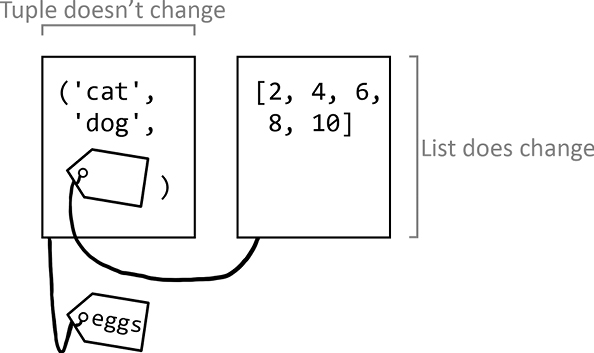
Figure 7-3: Although the set of objects in a tuple is immutable, the objects can be mutable. Indexes, Keys, and HashesPython lists and dictionaries are values that can contain multiple other values. To access these values, you use an index operator, which is composed of a pair of square brackets ( In this example, You can also use the index operator on a list literal, although all those square brackets can look confusing and unnecessary in real-world code: Indexing can also be used for values other than lists, such as on a string to obtain individual characters: Python dictionaries are organized into key-value pairs: Although list indexes are limited to integers, a Python dictionary’s index operator is a key and can be any hashable object. A hash is an integer that acts as a sort of fingerprint for a value. An object’s hash never changes for the lifetime of the object, and objects with the same value must have the same hash. The string Although the details are beyond the scope of this book, the key’s hash is used to find items stored in a dictionary and set data structures. That’s why you can’t use a mutable list for a dictionary’s keys: A hash is different from an identity. Two different objects with the same value will have different identities but the same hash. For example, enter the following into the interactive shell: The tuples referred to by Notice that Containers, Sequences, Mapping, and Set TypesThe words container, sequence, and mapping have meanings in Python that don’t necessarily apply to other programming languages. In Python, a container is an object of any data type that can contain multiple other objects. Lists and dictionaries are common container types used in Python. A sequence is an object of any container data type with ordered values accessible through integer indexes. Strings, tuples, lists, and bytes objects are sequence data types. Objects of these types can access values using integer indexes in the index operator (the A mapping is an object of any container data type that uses keys instead of an index. A mapping can be ordered or unordered. Dictionaries in Python 3.4 and earlier are unordered because there is no first or last key-value pair in a dictionary: You have no guarantee of getting items in a consistent order from dictionaries in early versions of Python. As a result of dictionaries’ unordered nature, two dictionary literals written with different orders for their key-value pairs are still considered equal: But starting in CPython 3.6, dictionaries do retain the insertion order of their key-value pairs: This is a feature in the CPython 3.6 interpreter but not in other interpreters for Python 3.6. All Python 3.7 interpreters support ordered dictionaries, which became standard in the Python language in 3.7. But just because a dictionary is ordered doesn’t mean that its items are accessible through integer indexes: The Dunder Methods and Magic MethodsDunder methods, also called magic methods, are special methods in Python whose names begin and end with two underscores. These methods are used for operator overloading. Dunder is short for double underscore. The most familiar dunder method is Modules and PackagesA module is a Python program that other Python programs can import so they can use the module’s code. The modules that come with Python are collectively called the Python Standard Library, but you can create your own modules as well. If you save a Python program as, for example, spam.py, other programs can run A package is a collection of modules that you form by placing a file named __init__.py inside a folder. You use the folder’s name as the name of the package. Packages can contain multiple modules (that is, .py files) or other packages (other folders containing __init__.py files). For more explanation and detail about modules and packages, check out the official Python documentation at https://docs.python.org/3/tutorial/modules.html. Callables and First-Class ObjectsFunctions and methods aren’t the only things that you can call in Python. Any object that implements the callable operator—the two parentheses Classes are an OOP concept, and a class is an example of a callable object that isn’t a function or method. For example, the Functions are first-class objects in Python, meaning you can store them in variables, pass them as arguments in function calls, return them from function calls, and do anything else you can do with an object. Think of a You can also assign the These are called aliases, which are different names for existing functions. They’re often used if you need to rename a function. But a large amount of existing code uses the old name, and it would be too much work to change it. The most common use of first-class functions is so you can pass functions to other functions. For example, we can define a You could just write Commonly Confused TermsTechnical jargon is confusing enough, especially for terms that have related but distinct definitions. To make matters worse, languages, operating systems, and fields in computing might use different terms to mean the same thing or the same terms to mean different things. To communicate clearly with other programmers, you’ll need to learn the difference between the following terms. Statements vs. ExpressionsExpressions are the instructions made up of operators and values that evaluate to a single value. A value can be a variable (which contains a value) or a function call (which returns a value). So, Statements are, effectively, all other instructions in Python. These include Although Python 3 uses a Although this looks like a function call 1, it’s actually a But using this same code in Python 2 would be interpreted as passing a tuple of two string values in a A statement and an expression composed of a function call have subtle but real differences. Block vs. Clause vs. BodyThe terms block, clause, and body are often used interchangeably to refer to a group of Python instructions. A block begins with indentation and ends when that indentation returns to the previous indent level. For example, the code that follows an But Python does allow one-line blocks. This is valid, although not recommended, Python syntax: By using the semicolon, you can also have multiple instructions in the But you can’t have one-liners with other statements that require new blocks. The following isn’t valid Python code: This is invalid because if an The official Python documentation prefers the term clause rather than block (https://docs.python.org/3/reference/compound_stmts.html). The following code is a clause: The Variable vs. AttributeVariables are simply names that refer to objects. Attributes are, to quote the official documentation, “any name following a dot” (https://docs.python.org/3/tutorial/classes.html#python-scopes-and-namespaces). Attributes are associated with objects (the name before the dot/period). For example, enter the following into the interactive shell: In this code example, Other languages call attributes fields, properties, or member variables. Function vs. MethodA function is a collection of code that runs when called. A method is a function (or a callable, described in the next section) that is associated with a class, just as an attribute is a variable associated with an object. Functions include built-in functions or functions associated with a module. For example, enter the following into the interactive shell: In this example, Iterable vs. IteratorPython’s You use iterables in Iterables also include all sequence types, such as range, list, tuple, and string objects, but also some container objects, such as dictionary, set, and file objects. However, more is going on under the hood in these Notice that if you call An iterator can only iterate over the items in an iterable once. This is similar to how you can only use Remember that iterable objects are passed as an argument to the Syntax vs. Runtime vs. Semantic ErrorsThere are many ways to categorize bugs. But at a high level you could divide programming errors into three types: syntax errors, runtime errors, and semantic errors. Syntax is the set of rules for the valid instructions in a given programming language. A syntax error, such as a missing parenthesis, a period instead of a comma, or some other typo will immediately generate a A runtime error is when a running program fails to perform some task, such as trying to open a file that doesn’t exist or dividing a number by zero. In English, a runtime error is the equivalent of giving an impossible instruction like, “Draw a square with three sides.” If a runtime error isn’t addressed, the program will crash and display a traceback. But you can catch runtime errors using This code will display this traceback when you run it: It’s helpful to remember that the line number the traceback mentions is only the point at which the Python interpreter detected an error. The true cause of the error might be on the previous line of code or even much earlier in the program. Syntax errors in the source code are caught by the interpreter before the program runs, but syntax errors can also happen at runtime. The A semantic error (also called a logical error) is a more subtle bug. Semantic errors won’t cause error messages or crashes, but the computer carries out instructions in a way the programmer didn’t intend. In English, the equivalent of a semantic error would be telling the computer, “Buy a carton of milk from the store and if they have eggs, buy a dozen.” The computer would then buy 13 cartons of milk because the store had eggs. For better or worse, computers do exactly what you tell them to. For example, enter the following into the interactive shell: You would get the following output: Obviously, 42 isn’t the answer. But notice that the program didn’t crash. Because Python’s Parameters vs. ArgumentsParameters are the variable names between the parentheses in a In the Type Coercion vs. Type CastingYou can convert an object of one type to an object of another type. For example, Python will often implicitly do a type conversion, such as when evaluating the expression Coercion can sometimes lead to surprising results. The Boolean Properties vs. AttributesIn many languages, the terms property and attribute are used synonymously, but in Python these words have distinct meanings. An attribute, explained in “Variable vs. Attribute” on page 124, is a name associated with an object. Attributes include the object’s member variables and methods. Other languages, such as Java, have In Python, properties allow programmers to use getters and setters with much cleaner syntax. Chapter 17 explores Python properties in more detail. Bytecode vs. Machine CodeSource code is compiled into a form of instructions called machine code that the CPU directly carries out. Machine code is composed of instructions from the CPU’s instruction set, the computer’s built-in set of commands. A compiled program composed of machine code is called a binary. A venerable language like C has compiler software that can compile C source code into binaries for almost every CPU available. But if a language such as Python wants to run on the same set of CPUs, a large amount of work would have to go into writing Python compilers for each of them. There is another way of turning source code into machine-usable code. Instead of creating machine code that is carried out directly by CPU hardware, you could create bytecode. Also called portable code or p-code, bytecode is carried out by a software interpreter program instead of directly by the CPU. Python bytecode is composed of instructions from an instruction set, although no real-world hardware CPU carries out these instructions. Instead, the software interpreter executes the bytecode. Python bytecode is stored in the .pyc files you sometimes see alongside your .py source files. The CPython interpreter, which is written in C, can compile Python source code into Python bytecode and then carry out the instructions. (The same goes for the Java Virtual Machine [JVM] software, which carries out Java bytecode.) Because it’s written in C, CPython has a Python interpreter and can be compiled for any CPU that C already has a compiler for. The PyCon 2016 talk, “Playing with Python Bytecode” by Scott Sanderson and Joe Jevnik, is an excellent resource to learn more about this topic (https://youtu.be/mxjv9KqzwjI). Script vs. Program, Scripting Language vs. Programming LanguageThe differences between a script and a program, or even a scripting language and a programming language, are vague and arbitrary. It’s fair to say that all scripts are programs and all scripting languages are programming languages. But scripting languages are sometimes regarded as easier or “not real” programming languages. One way to distinguish scripts from programs is by how the code executes. Scripts written in scripting languages are interpreted directly from the source code, whereas programs written in programming languages are compiled into binaries. But Python is commonly thought of as a scripting language, even though there is a compilation step to bytecode when a Python program is run. Meanwhile, Java isn’t commonly thought of as a scripting language, even though it produces bytecode instead of machine code binaries, just like Python. Technically, languages aren’t compiled or interpreted; rather, there are compiler or interpreter implementations of a language, and it’s possible to create a compiler or interpreter for any language. The differences can be argued but ultimately aren’t very important. Scripting languages aren’t necessarily less powerful, nor are compiled programming languages more difficult to work with. Library vs. Framework vs. SDK vs. Engine vs. APIUsing other people’s code is a great time-saver. You can often find code to use packaged as libraries, frameworks, SDKs, engines, or APIs. The differences between these entities are subtle but important. A library is a generic term for a collection of code made by a third party. A library can contain functions, classes, or other pieces of code for a developer to use. A Python library might take the form of a package, a set of packages, or even just a single module. Libraries are often specific to a particular language. The developer doesn’t need to know how the library code works; they only need to know how to call or interface with the code in a library. A standard library, such as the Python standard library, is a code library that is assumed to be available to all implementations of a programming language. A framework is a collection of code that operates with inversion of control; the developer creates functions that the framework will call as needed, as opposed to the developer’s code calling functions in the framework. Inversion of control is often described as “don’t call us, we’ll call you.” For example, writing code for a web app framework involves creating functions for the web pages that the framework will call when a web request comes in. A software development kit (SDK) includes code libraries, documentation, and software tools to assist in creating applications for a particular operating system or platform. For example, the Android SDK and iOS SDK are used to create mobile apps for Android and iOS, respectively. The Java Development Kit (JDK) is an SDK for creating applications for the JVM. An engine is a large, self-contained system that can be externally controlled by the developer’s software. Developers usually call functions in an engine to perform a large, complex task. Examples of engines include game engines, physics engines, recommendation engines, database engines, chess engines, and search engines. An application programming interface (API) is the public-facing interface for a library, SDK, framework, or engine. The API specifies how to call the functions or make requests of the library to access resources. The library creators will (hopefully) make documentation for the API available. Many popular social networks and websites make an HTTP API available for programs to access their services rather than a human with a web browser. Using these APIs allows you to write programs that can, for example, automatically post on Facebook or read Twitter timelines. SummaryIt’s easy to program for years and still be unfamiliar with certain programming terms. But most major software applications are created by teams of software developers, not individuals. So being able to communicate unambiguously is important when you’re working with a team. This chapter explained that Python programs are made up of identifiers, variables, literals, keywords, and objects, and that all Python objects have a value, data type, and identity. Although every object has a data type, there are also several broad categories of types, such as container, sequence, mapping, set, built-in, and user-defined. Some terms, like values, variables, and functions, have different names in specific contexts, such as items, parameters, arguments, and methods. Several terms are also easy to confuse with each other. It’s not a big deal to confuse some of these terms in day-to-day programming: for example, property versus attribute, block versus body, exception versus error, or the subtle differences between library, framework, SDK, engine, and API. Other misunderstandings won’t make the code you write wrong but might make you look unprofessional: for example, statement and expression, function and method, and parameter and argument are commonly used interchangeably by beginners.But other terms, such as iterable versus iterator, syntax error versus semantic error, and bytecode versus machine code, have distinct meanings that you should never confuse with each other unless you want to confuse your colleagues. You’ll still find that the use of terms varies from language to language and even programmer to programmer. You’ll become more familiar with jargon with experience (and frequent web searches) in time. Further ReadingThe official Python glossary at https://docs.python.org/3/glossary.html lists short but helpful definitions the Python ecosystem uses. The official Python documentation at https://docs.python.org/3/reference/datamodel.html describes Python objects in greater detail. Nina Zakharenko’s PyCon 2016 talk, “Memory Management in Python—The Basics,” at https://youtu.be/F6u5rhUQ6dU, explains many details about how Python’s garbage collector works. The official Python documentation at https://docs.python.org/3/library/gc.html has more information about the garbage collector. The Python mailing list discussion about making dictionaries ordered in Python 3.6 makes for good reading as well and is at https://mail.python.org/pipermail/python-dev/2016-September/146327.html. Buy this book direct from the publisher. (Free ebook) Bookshop.org Powells Amazon Barnes and Noble | |||||||||||||||||||||||||||||||||||||||||||||||||||||||||||||||||||||||||
| You are visitor 01402503 — GeezerVison does not store the pages you look up. Best viewed with Netscape Navigator 4.7 or Internet Explorer 6 at 800×600. No cookies required. |