GV

GeezerVison

The World Wide Web, restored to 800 pixels of glory.

Home|About|Gaming cabinet|Archives|How it works|Starter sites

On this site

  • 📚 Books
  • 🎓 Courses
  • 👩‍💻 Resources
  • ✨ Latest Tips and Tutorials
  • 📬 Newsletter
  • 🪪 Who we are?

This view

  • Original page
  • New address

GeezerVison is showing linuxhandbook.com — Git Show Files in a Commit

  • Using Git
    • How to Undo a Commit in Git
    • How to Delete Local Git Branch
    • How to Delete Remote Git Branch
    • Create a New Branch in Git
    • Setup Username and Email in Git
    • How to Unstage Files in Git
    • Switching Branches in Git
    • Clean Your Git Repository With Git Clean
    • What is the .git folder?
    • Undo Git Add and Remove Files from Staging
    • Git Move Commit to Another Branch
    • Git Show Files in a Commit
    • Check Git Commit History
    • Amend a Comment in Git
Using Git
Using Git
Introduction to Flatpak
Learn Firewalld: Manage Linux Firewall with firewall-cmd
Getting Started With Nano Editor
Start Learning Vim
Learn Zsh
Using Git
Rethinking DevOps
Exploring Ansible Modules
Pentora Box: Pen-Test Practice Labs
Linux CTF Challenges
Learn SSH
Warp Terminal

Once you are done with committing files in Git, you may want to list them to verify if the correct files are committed or not.

To do so, use the git show command in the following manner:

git show --name-only <commit_hash>

How to list files of a git commit

To list down the files of a git commit, you need a commit hash by which you can specify the commit to list files.

To find the commit hash, execute the git log command as shown here:

git log
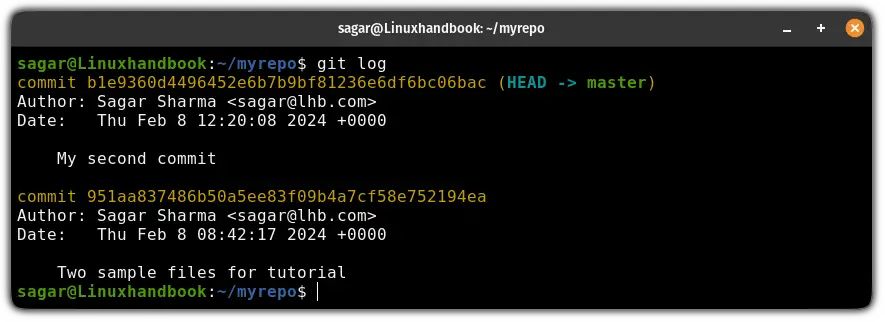
Find the commit hash in git

Once done, you can use the commit hash in the following command to list down files of that particular commit:

git show --name-only <commit_hash>

For example, here, I wanted to list down the files of a commit that had a message saying "My second commit" so I used the following:

git show --name-only b1e9360d4496452e6b7b9bf81236e6df6bc06bac
Use the git show command with the hash to list files in git commit

As you can see, it shows the name of the user who performed the commit including the date and comment.

In my case, there are two files in the commit: File1.txt and File2.txt.

List files of the most recent commit

If you want to list files of the most recent commit, then you can skip the hash part from the previous command and use the HEAD flag instead:

git show HEAD --name-only
Use the git show command to list files of the most recent commit

List files of all the commits that were added or modified

📋
This will only work with a single repository at a time and display files of all the commits of a single repository.

If you want to list files of all the commits at once in a single repository, then you can use the git log command in the following manner:

git log --oneline --name-status
List files of all the commits in git using the git log command

Improve your GitHub profile

But if you're a student and want to kickstart your GitHub journey, then here's how you can create a rockstar GitHub profile:

7 Tips to Make a Rockstar Student Developer GitHub Profile
Time to enhance the look and feel of your boring default GitHub profile with these tips and suggestions.
Linux HandbookPrakhar Tiwari

I hope you will find this guide helpful.

Updated on Sep 8, 2024
Share to X Share to Facebook Share to Linkedin
Copied
Previous
Next

About the author

Sagar Sharma Sagar Sharma

A software engineer who loves to tinker with hardware till it gets crashed. While reviving my crashed system, you can find me reading literature, manga, or watering my plants.

View profile

On this page

You are visitor 01402503 — GeezerVison does not store the pages you look up.
Best viewed with Netscape Navigator 4.7 or Internet Explorer 6 at 800×600. No cookies required.