GeezerVisonThe World Wide Web, restored to 800 pixels of glory. |
| Home|About|Gaming cabinet|Archives|How it works|Starter sites |
GeezerVison is showing mesonbuild.com — Getting Meson Getting MesonMeson is implemented in Python 3, and requires 3.10 or newer. If your operating system provides a package manager, you should install it with that. For platforms that don't have a package manager, you need to download it from Python's home page. See below for platform-specific Python3 quirks. Downloading MesonMeson releases can be downloaded from the GitHub release page, and
you can run On Windows, if you did not install Python with the installer options
that make Python scripts executable, you will have to run The newest development code can be obtained directly from Git, and we strive to ensure that it will always be working and usable. All commits go through a pull-request process that runs CI and tests several platforms. Packing Meson into a zipappAfter downloading the release, you can create a standalone single-file executable for Meson by running the script: This uses python's native support for zipapp. Installing Meson with pipMeson is available in the Python Package Index and can be installed
with If you need to install your project in system directories, this
approach will not work as executable installed in this way are not
available when If you must install Meson with Installing Meson and Ninja with the MSI installerWe provide an MSI installer on the GitHub release page that can be used to install both Meson and Ninja at once for Windows. It also contains an embedded copy of Python, so scripts that use the Python module and do not have any external dependencies will continue to work as expected. Please note that this is a new feature, so bug reports are expected and welcome! DependenciesIn the most common case, you will need the Ninja executable for
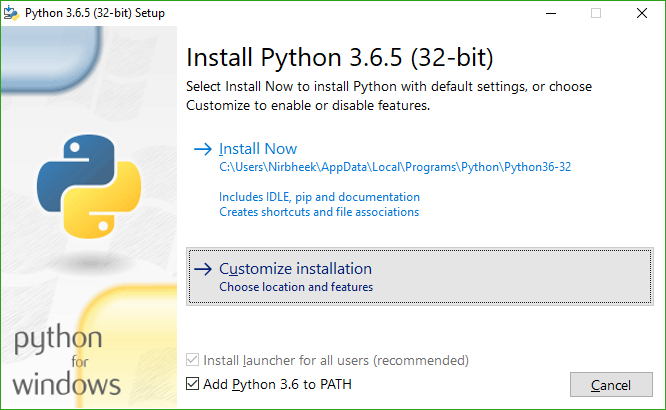
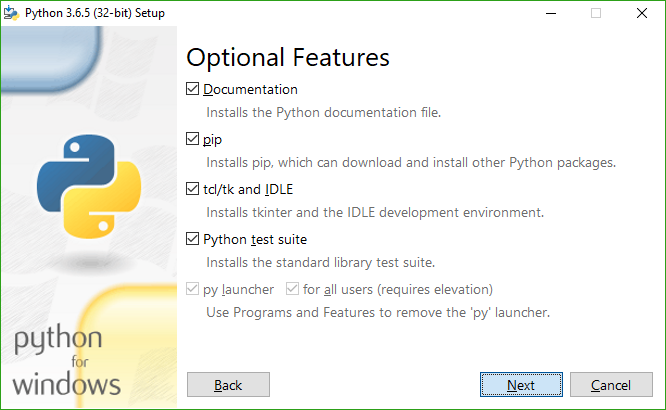
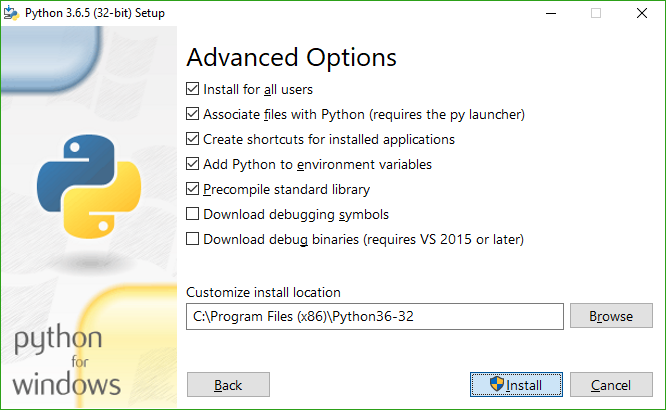
using the You can use the version provided by your package manager if possible, otherwise download the binary executable from the Ninja project's release page. If you will only use the Visual Studio backend ( Platform-specific install quirksWindows Python3 quirksWhen installing Python 3, it is highly recommended (but not required) that you select the installer options as follows:
With this, you will have MSYS2 Python3 quirksIf you are using MSYS2 on Windows as your development environment,
please make sure that you do not use the The results of the search are |
| You are visitor 01402503 — GeezerVison does not store the pages you look up. Best viewed with Netscape Navigator 4.7 or Internet Explorer 6 at 800×600. No cookies required. |