GV

GeezerVison

The World Wide Web, restored to 800 pixels of glory.

Home|About|Gaming cabinet|Archives|How it works|Starter sites

On this site

  • Home
  • Projects
  • CoffeeScript
  • Community
  • SHARE
  • Logos
  • Download
  • Enide
  • Enide Studio
  • Developing
  • Blog
  • REST CLIENT
  • SDK
  • Video

This view

  • Original page
  • New address

GeezerVison is showing nodeclipse.github.io — Nodeclipse -- CoffeeScript Editor

Enide Studio node
  • Home
  • Projects
  • CoffeeScript
  • Community
  • SHARE
  • Logos
  • Download
  • Enide
  • Enide Studio
  • Developing
  • Blog
  • REST CLIENT
  • SDK
  • Video
  • News
  • Ideas
  • Feeds

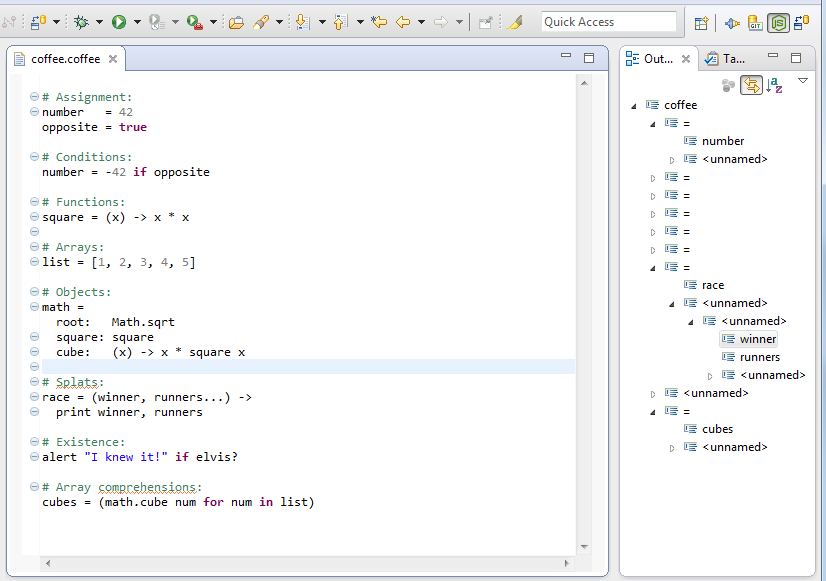
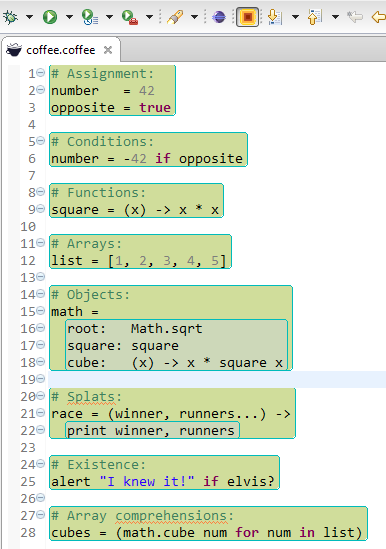
Nodeclipse CoffeeScript Editor

Nodeclipse CoffeeScript Editor is continuation of work by Adam Schmideg with FORMULA 400. Now it is just 2 persons Robert Gründle and Paul Verest, but we lack enough time to move it forward. Current 0.3.0 is refresh release with no new features added, but icon and internally switch to quicker Maven/Tycho build.

CoffeeScript Editor is general editor for Node.js or web-projects.

Hints

Just run your .coffee file to check if it can compile, and see coffee compiler message in Console View if it fails. (right-click in any Editor with .coffee file inside, select Run As -> coffee). This is quicker alternative to coffee -c . from command line.

Note on XText Nature

Notice that before you start using CoffeeScript Editor, you .project file looks like

<?xml version="1.0" encoding="UTF-8"?>
<projectDescription>
	<name>NodeProject1</name>
	<comment></comment>
	<projects>
	</projects>
	<buildSpec>
		<buildCommand>
			<name>com.eclipsesource.jshint.ui.builder</name>
			<arguments>
			</arguments>
		</buildCommand>
	</buildSpec>
	<natures>
		<nature>org.nodeclipse.ui.NodeNature</nature>
		<nature>org.eclipse.wst.jsdt.core.jsNature</nature>
	</natures>
</projectDescription>

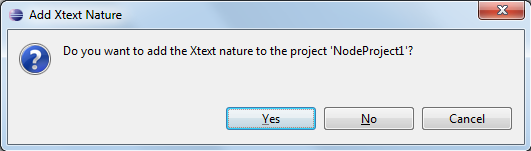
If you just add *.coffee file and open it, Eclipse will ask
.
After that your .project file will be like:

<?xml version="1.0" encoding="UTF-8"?>
<projectDescription>
	<name>NodeProject1</name>
	<comment></comment>
	<projects>
	</projects>
	<buildSpec>
		<buildCommand>
			<name>org.eclipse.xtext.ui.shared.xtextBuilder</name>
			<arguments>
			</arguments>
		</buildCommand>
		<buildCommand>
			<name>com.eclipsesource.jshint.ui.builder</name>
			<arguments>
			</arguments>
		</buildCommand>
	</buildSpec>
	<natures>
		<nature>org.nodeclipse.ui.NodeNature</nature>
		<nature>org.eclipse.wst.jsdt.core.jsNature</nature>
		<nature>org.eclipse.xtext.ui.shared.xtextNature</nature>
	</natures>
</projectDescription>

Sources and contribution

Sources at https://github.com/Nodeclipse/coffeescript-eclipse. We need help by those who mastered Eclipse XText.

comments powered by Disqus
You are visitor 01402503 — GeezerVison does not store the pages you look up.
Best viewed with Netscape Navigator 4.7 or Internet Explorer 6 at 800×600. No cookies required.