GeezerVisonThe World Wide Web, restored to 800 pixels of glory. |
| Home|About|Gaming cabinet|Archives|How it works|Starter sites |
GeezerVison is showing opentechschool.github.io — Dibujos simples con turtle (Tortuga) — Introduction to Programming with Python
Python for Beginners
2015.10.02
Dibujos simples con turtle (Tortuga)¶Introducción¶Turtle es como una pizarra para dibujar. Tiene funciones como Before you can use turtle, you have to import it. We recommend playing around with it in the interactive interpreter first, as there is an extra bit of work required to make it work from files. Just go to your terminal and type: import turtle 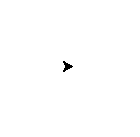
Nota Not seeing anything on Mac OS? Try issuing a command like
Nota Do you work with Ubuntu and get the error message “No module named
_tkinter”? Install the missing package with Nota While it might be tempting to just copy and paste what’s written on this page into your terminal, we encourage you to type out each command. Typing gets the syntax under your fingers (building that muscle memory!) and can even help avoid strange syntax errors. turtle.forward(25) 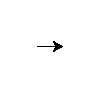
turtle.left(30) 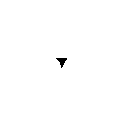
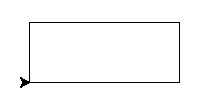
The Nota Want to start fresh? You can type La tortuga estándar es sólo un triángulo. Eso no es divertido!. Transformemos el triángulo en tortuga con el comando turtle.shape("turtle") Mucho mejor! Si pone los comandos en un archivo, verá que la ventana de la tortuga desaparece una vez que la tortuga finaliza sus movimientos (Esto sucede porque Python finaliza una vez que la tortuga termina de moverse. Dado que la ventana de turtle pertenece a Python, también termina). Para prevenir que esto suceda, sólo debe agregar el comando import turtle turtle.shape("turtle") turtle.forward(25) turtle.exitonclick() Nota Python is a programming language where horizontal indenting of text is important. We’ll learn all about this in the Functions chapter later on, but for now just keep in mind that stray spaces or tabs before any line of Python code can cause an unexpected error. Dibujando un cuadrado¶Nota No se espera que conozca las respuestas de manera inmediata. Aprenda de intentos y errores! Experimente, vea lo que python hace cuando usted le dice diferentes cosas, que da hermosos (aunque a veces inesperados) resultados y que da errores. Si usted quiere seguir jugando con algo que haya aprendido que entrega resultados ineteresantes, está BIEN. No tema intentar y fallar y aprender de ello! Ejercicio¶Dibuje un cuadrado como en la siguiente figura: 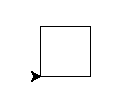
Para dibujar un cuadrado probablemente necesite ángulos rectos, que son 90 grados. Solución¶turtle.forward(50) turtle.left(90) turtle.forward(50) turtle.left(90) turtle.forward(50) turtle.left(90) turtle.forward(50) turtle.left(90) Nota Note como la tortuga parte y termina en el mismo lugar y mirando en la misma dirección, antes y después de dibujar el cuadrado. Esta es una convención muy útil a seguir, ya que es más fácil dibujar múltiples figuras después. Bonus¶Si se quiere poner creativo, usted puede modificar la figura con las funciones Truco Está viendo un error como este: NameError: name 'turtle' is not defined cuando intenta ver la ayuda? En Python usted debe importar los nombres antes de poder referirse a ellos, por lo tanto en una nueva consola interactiva de Python debe ingresar Otra forma de saber sobre funciones en buscar en la documentación en línea. Prudencia Si usted se equivoca, puede decirle a la tortuga que borre la pizarra con la directiva Truco Como debe haber visto en la ayuda, puede modificar el color con Dibujando un rectángulo¶Solución¶turtle.forward(100) turtle.left(90) turtle.forward(50) turtle.left(90) turtle.forward(100) turtle.left(90) turtle.forward(50) turtle.left(90) Bonus¶Que tal un triángulo? En un triángulo equilátero (triángulo con todos sus lados del mismo largo) cada esquina tiene un ángulo de 60 grados. Más cuadrados¶Ejercicio¶Ahora, dibuje un cuadrado inclinado. Y otro, y otro. Puede experimentar con los ángulos entre los diferentes cuadrados. 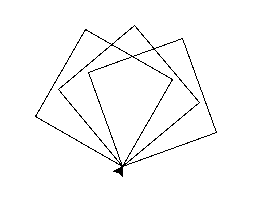
La figura muestra tres giros de 20 grados. Puede intentar con 20, 30 y 40, por ejemplo. Solución¶turtle.left(20) turtle.forward(50) turtle.left(90) turtle.forward(50) turtle.left(90) turtle.forward(50) turtle.left(90) turtle.forward(50) turtle.left(90) turtle.left(30) turtle.forward(50) turtle.left(90) turtle.forward(50) turtle.left(90) turtle.forward(50) turtle.left(90) turtle.forward(50) turtle.left(90) turtle.left(40) turtle.forward(50) turtle.left(90) turtle.forward(50) turtle.left(90) turtle.forward(50) turtle.left(90) turtle.forward(50) turtle.left(90) |
| You are visitor 01402503 — GeezerVison does not store the pages you look up. Best viewed with Netscape Navigator 4.7 or Internet Explorer 6 at 800×600. No cookies required. |