GeezerVisonThe World Wide Web, restored to 800 pixels of glory. | |||||||||||||||||||||||||||||||||||
| Home|About|Gaming cabinet|Archives|How it works|Starter sites | |||||||||||||||||||||||||||||||||||
GeezerVison is showing orca.dev — Ways to run Orca — Orca Docs Orca is not locked to your laptop. Every worktree runs somewhere — on the machine in front of you, on a box you already own, on a shared always-on server, or on a fresh cloud VM spun up for that one workspace. This page is the map. Deep dives live on the linked pages. At a glance
Orca does not sell managed VPS hosting. Remote modes always use machines and cloud accounts you control. 1. Local desktopInstall Orca, open a project, create worktrees. Agents, terminals, and the browser run on the same machine as the UI. 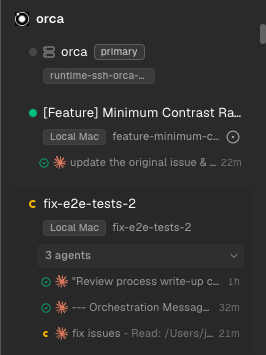 This is the default path for most people. See Your first 3-agent session and Worktrees. 2. SSH targetsPoint Orca at any SSH host — a beefier Mac mini, a Linux VPS, a GPU box, a cloud sandbox with SSH. When you create a worktree, pick that host under Run on. Agents and 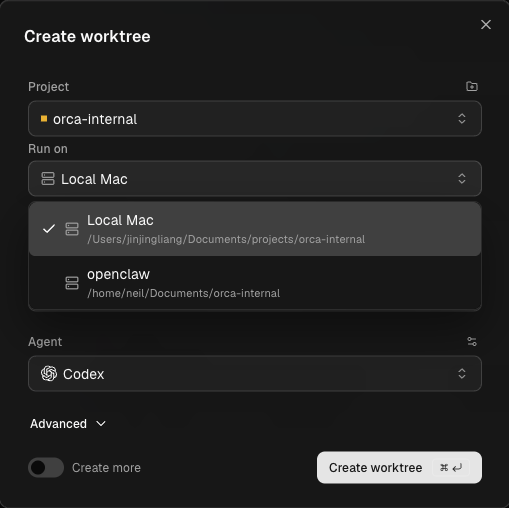 Good fit when: the remote already has your repo, tools, and credentials, and you want one laptop Orca to drive many boxes. Setup sketch:
SSH worktrees can open in VS Code Remote-SSH, download remote folders when SFTP allows it, and stay usable for files/git even when the remote cannot compile terminal natives. Orca sets up its own managed server on the host on first connect, so a wrong Node version or missing build tools no longer blocks the connection. Details: SSH worktrees and the recipe Work on a remote machine over SSH. 3. Remote Orca ServersKeep Orca running on a machine you control—an old laptop, Mac mini, home server, cloud VPS, or team box. Pair your laptop, browser client, or phone to that runtime. The server owns projects, worktrees, terminals, and agent processes; clients are the UI. Good fit when:
Easiest setup: install Orca and Tailscale on both computers. On the server, open Settings → Remote Orca Servers → Advertise this app as a server → New Link, choose its Tailscale address, and generate an access link. On the client, choose Add Server and paste that link. For a headless Linux server or service-managed VM, use Full detail: Remote Orca Servers. SSH vs Remote Orca Server
4. Cloud VMs (per-workspace environments)Each worktree can boot its own on-demand environment — a cloud sandbox, VM, or local Docker container — from a recipe checked into the repo ( In the product UI this surface is labeled Cloud VM under Settings → Experimental. Recipes still create per-workspace environments. Providers people wire today include Vercel Sandbox, Fly, Modal, plain SSH hosts, and local Docker. Connection is either Orca server (recipe starts 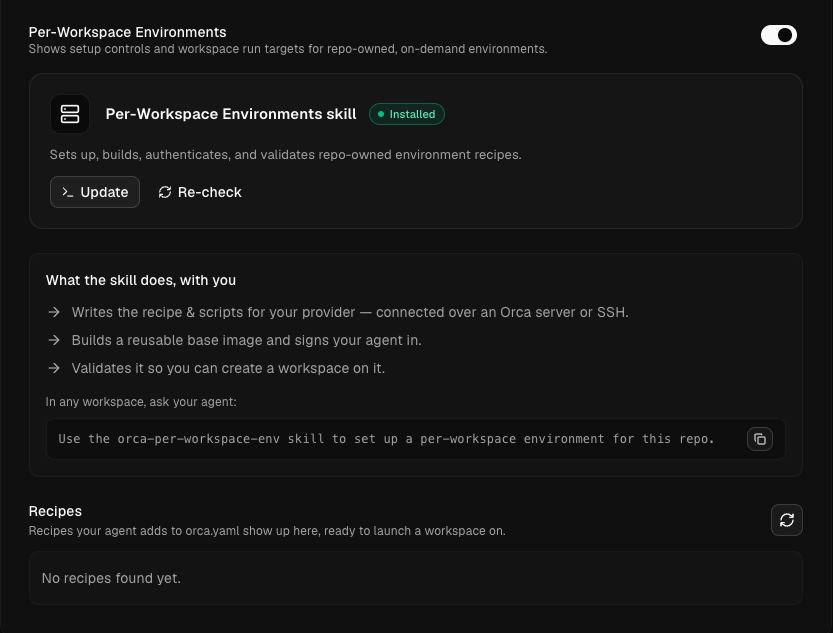 Good fit when: you want clean isolation per task, disposable compute, or a standard environment every agent boots into. Setup sketch:
The sidebar shows recipe-backed VM lifecycle states, including setup and resume failures. Right-click the workspace to Suspend VM or Resume VM; suspending first sleeps its open panels. Recipes only show up for workspace create once the How to choose
You can mix modes in one install: local worktrees for quick edits, SSH for a GPU box, and a recipe for CI-like isolation. Related | |||||||||||||||||||||||||||||||||||
| You are visitor 01402792 — GeezerVison does not store the pages you look up. Best viewed with Netscape Navigator 4.7 or Internet Explorer 6 at 800×600. No cookies required. |