GeezerVisonThe World Wide Web, restored to 800 pixels of glory. | |||||||||||||||
| Home|About|Gaming cabinet|Archives|How it works|Starter sites | |||||||||||||||
GeezerVison is showing pbpython.com — Efficiently Cleaning Text with Pandas - Practical Business Python 
IntroductionIt’s no secret that data cleaning is a large portion of the data analysis process. When using pandas, there are multiple techniques for cleaning text fields to prepare for further analysis. As data sets grow large, it is important to find efficient methods that perform in a reasonable time and are maintainable since the text cleaning process evolves over time. This article will show examples of cleaning text fields in a large data file and illustrates tips for how to efficiently clean unstructured text fields using Python and pandas. The problemFor the sake of this article, let’s say you have a brand new craft whiskey that you would like to sell. Your territory includes Iowa and there just happens to be an open data set that shows all of the liquor sales in the state. This seems like a great opportunity for you to use your analysis skills to see who the biggest accounts are in the state. Armed with that data, you can plan your sales process for each of the accounts. Excited about the opportunity, you download the data and realize it’s pretty large. The data set for this case is a 565MB CSV file with 24 columns and 2.3M rows. This is not big data by any means but it is big enough that it can make Excel crawl. It’s also big enough that some of the pandas approaches will be relatively slow on your laptop. For this article, I’ll be using data that includes all of 2019 sales. Due to the size, you can download it from the state site for a different time period. Let’s get started by importing our modules and reading the data. I will also use the sidetable package to summarize the data. It’s not required for the cleaning but I wanted to highlight how useful it can be for these data exploration scenarios. The dataLet’s get our data : import pandas as pd import numpy as np import sidetable df = pd.read_csv('2019_Iowa_Liquor_Sales.csv') Here’s what the data looks like. 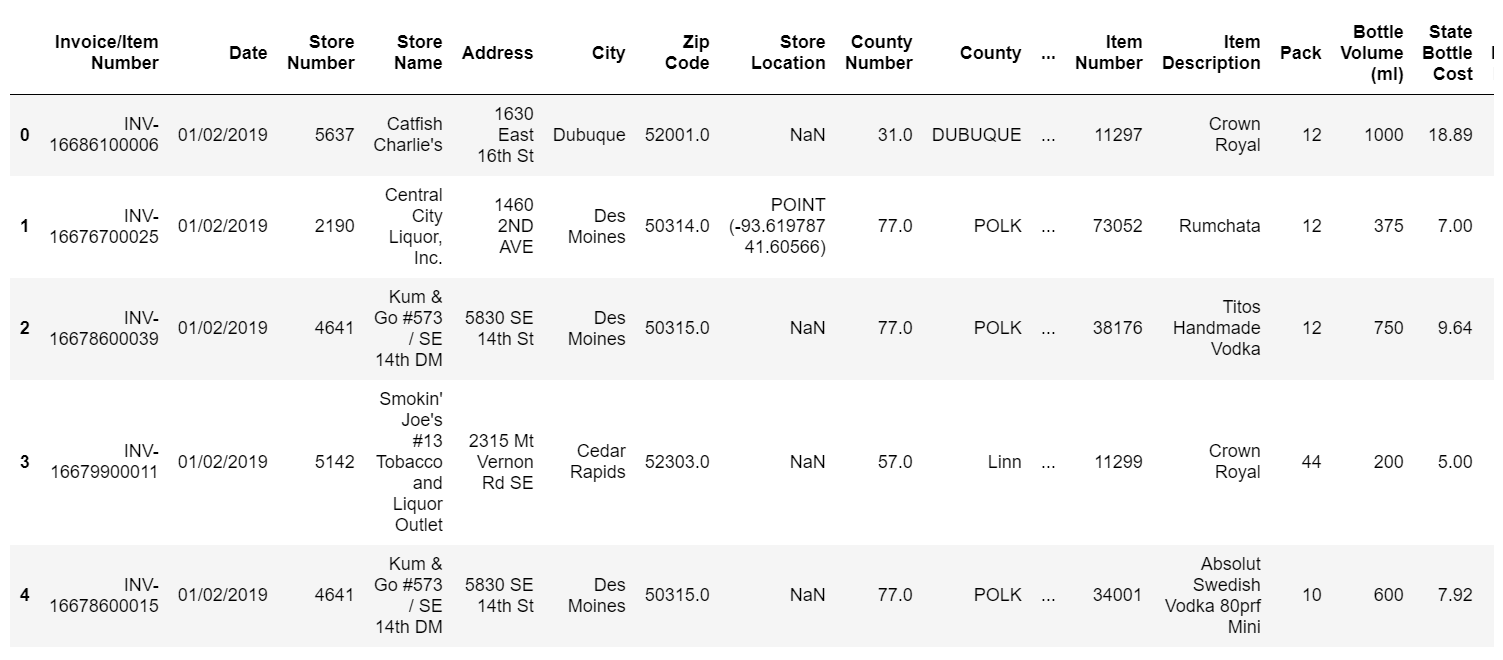
The first thing we might want to do is see how much each store purchases and rank them from the largest to the smallest. We have limited resources so we should focus on those places where we get the best bang for the buck. It will be easier for us to call on a couple of big corporate accounts instead of a lot of mom and pop stores.
df.stb.freq(['Store Name'], value='Sale (Dollars)', style=True, cum_cols=False) 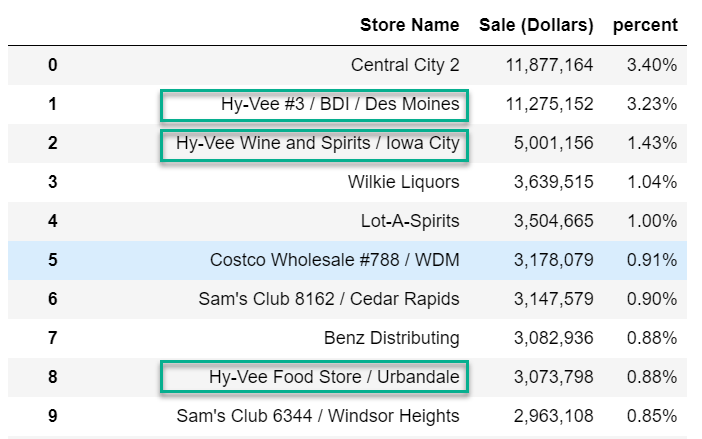
One thing that’s apparent is that the store names are unique per location in most cases. Ideally we would like to see all the sales for Hy-Vee, Costco, Sam’s, etc grouped together. Looks like we need to clean the data. Cleaning attempt #1The first approach we can investigate is using df.loc[df['Store Name'].str.contains('Hy-Vee', case=False), 'Store_Group_1'] = 'Hy-Vee' This code will search for the string ‘Hy-Vee’ using a case insensitive search and store the value
“Hy-Vee” in a new column called Here’s what 1.43 s ± 31.8 ms per loop (mean ± std. dev. of 7 runs, 1 loop each) Normally we don’t want to optimize too early in the process but one thing we can do is use
the df.loc[df['Store Name'].str.contains('Hy-Vee', case=False, regex=False), 'Store_Group_1'] = 'Hy-Vee' 804 ms ± 27.9 ms per loop (mean ± std. dev. of 7 runs, 1 loop each) Here are the counts in the new column: df['Store_Group_1'].value_counts(dropna=False) NaN 1617777 Hy-Vee 762568 Name: Store_Group_1, dtype: int64 We’ve cleaned up Hy-Vee but now there are a lot of other values we need to tackle. The Cleaning attempt #2Another approach that is very performant and flexible is to use There are several good resources that I used to learn how to use The simplest explanation for what In our case, our conditions will be different string lookups and the normalized string we want to use instead will be the value. After looking through the data, here’s a list of conditions and values in the store_patterns = [ (df['Store Name'].str.contains('Hy-Vee', case=False, regex=False), 'Hy-Vee'), (df['Store Name'].str.contains('Central City', case=False, regex=False), 'Central City'), (df['Store Name'].str.contains("Smokin' Joe's", case=False, regex=False), "Smokin' Joe's"), (df['Store Name'].str.contains('Walmart|Wal-Mart', case=False), 'Wal-Mart'), (df['Store Name'].str.contains('Fareway Stores', case=False, regex=False), 'Fareway Stores'), (df['Store Name'].str.contains("Casey's", case=False, regex=False), "Casey's General Store"), (df['Store Name'].str.contains("Sam's Club", case=False, regex=False), "Sam's Club"), (df['Store Name'].str.contains('Kum & Go', regex=False, case=False), 'Kum & Go'), (df['Store Name'].str.contains('CVS', regex=False, case=False), 'CVS Pharmacy'), (df['Store Name'].str.contains('Walgreens', regex=False, case=False), 'Walgreens'), (df['Store Name'].str.contains('Yesway', regex=False, case=False), 'Yesway Store'), (df['Store Name'].str.contains('Target Store', regex=False, case=False), 'Target'), (df['Store Name'].str.contains('Quik Trip', regex=False, case=False), 'Quik Trip'), (df['Store Name'].str.contains('Circle K', regex=False, case=False), 'Circle K'), (df['Store Name'].str.contains('Hometown Foods', regex=False, case=False), 'Hometown Foods'), (df['Store Name'].str.contains("Bucky's", case=False, regex=False), "Bucky's Express"), (df['Store Name'].str.contains('Kwik', case=False, regex=False), 'Kwik Shop') ] One of the big challenge when working with Because of this data structure, we need to break the list of tuples into two separate lists.
Using store_criteria, store_values = zip(*store_patterns) df['Store_Group_1'] = np.select(store_criteria, store_values, 'other') This code will fill in each match with the text value. If there is no match, we’ll assign it the value ‘other’. Here’s what it looks like now: df.stb.freq(['Store_Group_1'], value='Sale (Dollars)', style=True, cum_cols=False) 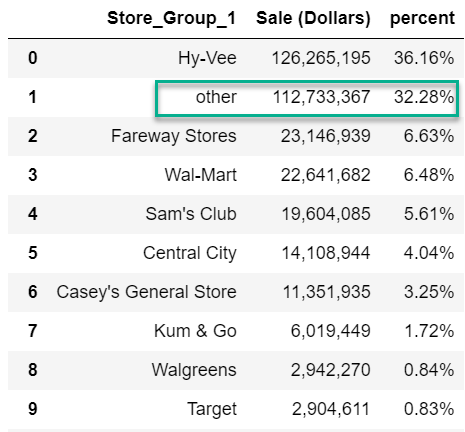
This looks better but there is still 32.28% of our revenue in “other” accounts. What might be nice is that if there is an account that doesn’t match, we use the df['Store_Group_1'] = np.select(store_criteria, store_values, None) df['Store_Group_1'] = df['Store_Group_1'].combine_first(df['Store Name']) This uses the Let’s check our data: df.stb.freq(['Store_Group_1'], value='Sale (Dollars)', style=True, cum_cols=False) 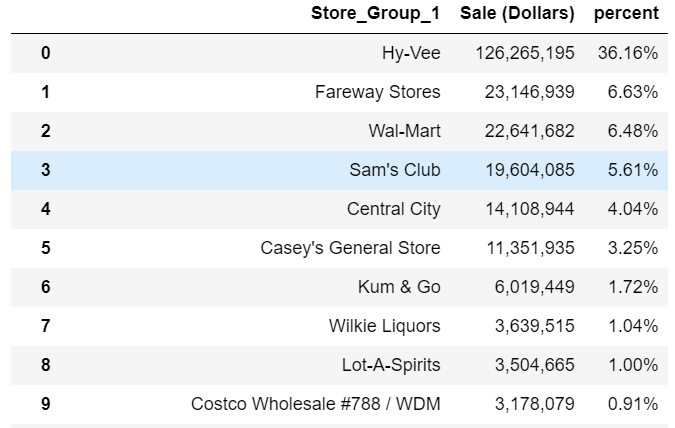
This looks better because we can continue to refine the groupings as needed. For instance, we may want to build a string lookup for Costco. Performance is not too bad for a large data set: 13.2 s ± 328 ms per loop (mean ± std. dev. of 7 runs, 1 loop each) The benefit of this approach is that you can use The one challenge with this approach is that there is a lot of code. If you had a large data set to clean, there’s a lot of data and code intermixed in this solution. Is there another approach that might have similar performance but be a little cleaner? Cleaning attempt #3The next solution is based on this excellent code example from Matt Harrison who developed
a def generalize(ser, match_name, default=None, regex=False, case=False): """ Search a series for text matches. Based on code from https://www.metasnake.com/blog/pydata-assign.html ser: pandas series to search match_name: tuple containing text to search for and text to use for normalization default: If no match, use this to provide a default value, otherwise use the original text regex: Boolean to indicate if match_name contains a regular expression case: Case sensitive search Returns a pandas series with the matched value """ seen = None for match, name in match_name: mask = ser.str.contains(match, case=case, regex=regex) if seen is None: seen = mask else: seen |= mask ser = ser.where(~mask, name) if default: ser = ser.where(seen, default) else: ser = ser.where(seen, ser.values) return ser This function can be called on a pandas series and expects a list of tuples. The first tuple item is the value to search for and the second is the value to fill in for the matched value. Here’s the equivalent pattern list: store_patterns_2 = [('Hy-Vee', 'Hy-Vee'), ("Smokin' Joe's", "Smokin' Joe's"), ('Central City', 'Central City'), ('Costco Wholesale', 'Costco Wholesale'), ('Walmart', 'Walmart'), ('Wal-Mart', 'Walmart'), ('Fareway Stores', 'Fareway Stores'), ("Casey's", "Casey's General Store"), ("Sam's Club", "Sam's Club"), ('Kum & Go', 'Kum & Go'), ('CVS', 'CVS Pharmacy'), ('Walgreens', 'Walgreens'), ('Yesway', 'Yesway Store'), ('Target Store', 'Target'), ('Quik Trip', 'Quik Trip'), ('Circle K', 'Circle K'), ('Hometown Foods', 'Hometown Foods'), ("Bucky's", "Bucky's Express"), ('Kwik', 'Kwik Shop')] A useful benefit of this solution is that it is much easier to maintain this list than
the earlier The other change I made with the Now that the data is all set up, calling it is simple: df['Store_Group_2'] = generalize(df['Store Name'], store_patterns_2) How about performance? 15.5 s ± 409 ms per loop (mean ± std. dev. of 7 runs, 1 loop each) It is a little slower but I think it’s a more elegant solution and what I would use in the future if I had to do a similar text cleanup. The downside to this approach is that it is designed for string cleaning. The What about data types?In recent versions of pandas there is a dedicated While the string type did not make a difference, the We can convert the data to a category using df['Store Name'] = df['Store Name'].astype('category') Now re-run the df['Store_Group_3'] = np.select(store_criteria, store_values, None) df['Store_Group_3'] = df['Store_Group_1'].combine_first(df['Store Name']) 786 ms ± 108 ms per loop (mean ± std. dev. of 7 runs, 1 loop each) We went from 13s to less than 1 second by making one simple change. Amazing! The reason this works is pretty straightforward. When pandas converts a column to a
categorical type, pandas will only call the expensive Let’s see if this works for our df['Store_Group_4'] = generalize(df['Store Name'], store_patterns_2) Unfortunately we get this error: ValueError: Cannot setitem on a Categorical with a new category, set the categories first That error highlights some of the challenge I have had in the past when dealing with Categorical data. When merging and joining categorical data, you can run into these types of challenges. I tried to figure out a good way to modify However, there is a way we can replicate the Category approach by building a lookup table. Lookup tableAs we learned with the Categorical approach, this data set has a lot of duplicated data. We can build a lookup table and process the resource intensive function only one time per string. To illustrate how this works on strings, let’s convert the value back to a string type instead of the category: df['Store Name'] = df['Store Name'].astype('string') First we build a lookup DataFrame that contains all the unique values and run the lookup_df = pd.DataFrame() lookup_df['Store Name'] = df['Store Name'].unique() lookup_df['Store_Group_5'] = generalize(lookup_df['Store Name'], store_patterns_2) 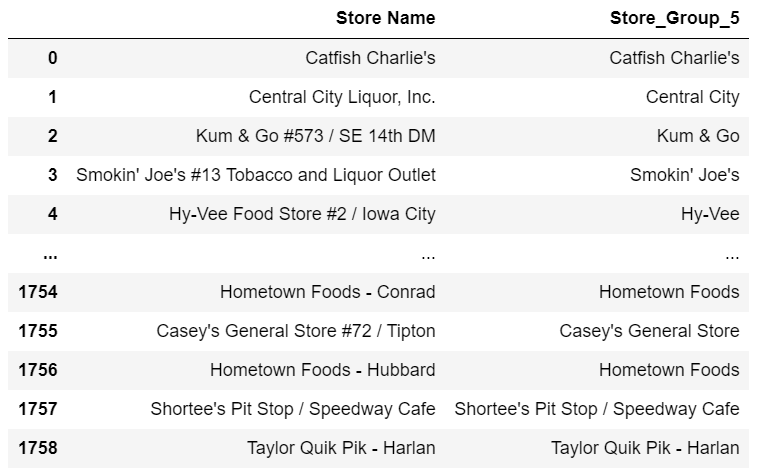
We can merge it back into a final DataFrame: df = pd.merge(df, lookup_df, how='left') 1.38 s ± 15.1 ms per loop (mean ± std. dev. of 7 runs, 1 loop each) It is slower than the Also, the intermediate SummaryThis newsletter by Randy Au is a good discussion about the important of data cleaning and the love-hate relationship many data scientists have with this task. I agree with Randy’s premise that data cleaning is analysis. In my experience, you can learn a lot about your underlying data by taking up the kind of cleaning activities outlined in this article. I suspect you are going to find lots of cases in your day to day analysis where you need to do text cleaning similar to what I’ve shown in this article. Here is a quick summary of the solutions we looked at:
For some data sets, performance is not an issue so pick what clicks with your brain. However, as the data grows in size (imagine doing this analysis for 50 states worth of data), you will need to understand how to use pandas in an efficient manner for text cleaning. My hope is that you bookmark this article and come back to it when you face a similar problem. As always, if you have some other tips that might be useful to folks, let me know in the
comments. If you figure out how to make my
Tags
pandas
Comments | |||||||||||||||
| You are visitor 01402503 — GeezerVison does not store the pages you look up. Best viewed with Netscape Navigator 4.7 or Internet Explorer 6 at 800×600. No cookies required. |