 README



sesh — A terminal-first authentication toolkit for secure credential workflows
A developer-friendly CLI that brings AWS MFA, TOTP authentication, and secure password management to your terminal, backed by an encrypted vault.
Purpose
I was tired of relying on browser extensions or native desktop apps from corporate vendors—tools that often feel like security theater while quietly harvesting data. I needed something lightweight, security-conscious, and that respects user privacy.
In particular, I wanted fast, secure MFA support directly in the terminal—both for AWS console access and for web-based TOTP forms. I was frustrated by how tightly MFA workflows are coupled to mobile devices, and I wanted to break free from that dependency.
sesh fills that gap. It's simple, scriptable, and works well for:
- AWS CLI + console MFA workflows
- Web-based MFA flows where a TOTP secret is available
- Secure storage for passwords, API keys, notes and files
While sesh overlaps a bit with tools like aws-vault, it goes further by offering a general-purpose CLI-based authentication and credential management experience—no mobile device, no bloat. Your security, your control, your terminal.
Features
- Terminal App —
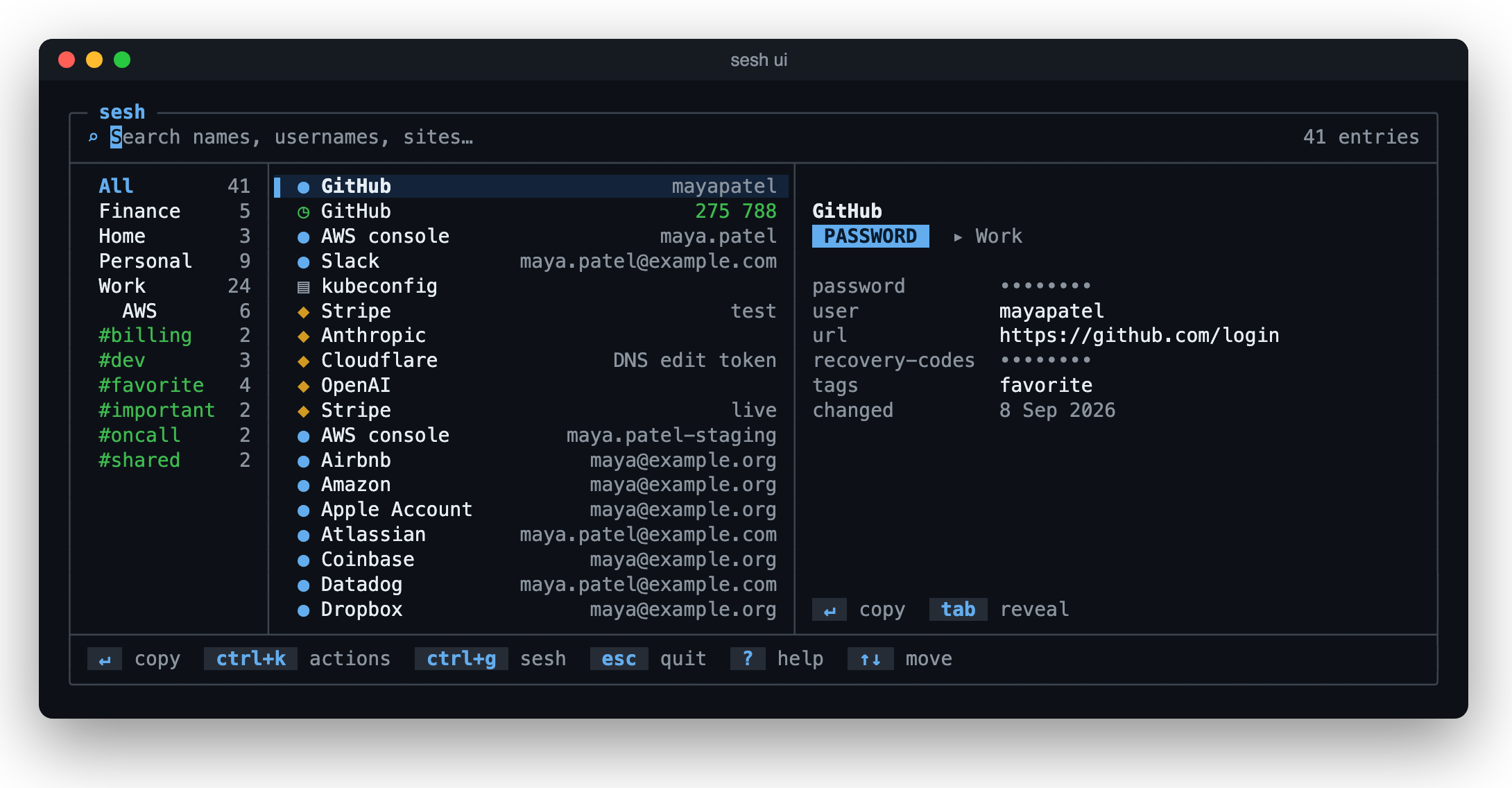
sesh ui: search every entry as you type, copy with Enter, and edit, file, and look after the vault, in one screen - Encrypted Vault — Secrets live in an encrypted SQLite vault (AES-256-GCM, Argon2id) unlocked with your master password, on macOS and Linux alike. No setup: your first
sesh addcreates it - Master-Password Agent — A per-user background agent holds the key so you type the password once; it locks itself when idle, after 8 hours, when the computer sleeps or (on macOS) its screen locks, and when you quit
sesh ui, and is hardened against memory inspection (Using the sesh agent) - Recovery Key — Optional: a code you write down when the vault is created; if you forget the master password,
sesh recoveruses it to set a new one. No server involved, and sesh keeps no copy - Touch ID Unlock (macOS) — Unlock the agent with your fingerprint instead of the master password, through a Secure Enclave key; the password always works as a fallback
- Config File — Optional
~/.config/sesh/config.toml;sesh configshows every setting and where it came from, andsesh config setchanges one - Sync Between Computers — Each computer keeps its own vault; a sync folder that any tool carries (iCloud Drive, Dropbox, Syncthing, a USB stick) holds one encrypted file per entry. Commands and
sesh uisync on their own, an entry changed on two computers is merged field by field, the older change's password kept in its history, and a master password change or the recovery key reaches every computer (Syncing between computers) - Automatic Backups — A copy of the encrypted vault each day, the newest 7 kept (
sesh backup,sesh restore) - Encrypted Export — Entries protected by a password of their own, to move them to another machine (
sesh export;sesh import --from seshreads it) - Import — From Bitwarden, KeePass, Chrome, Firefox, Apple Passwords, Google Authenticator and LastPass Authenticator (
sesh import) - Trash and History — A deleted entry stays in the trash for 30 days, and each entry keeps its earlier secrets, so either can be brought back
- Folders and Tags — Put entries in folders and tag them, and narrow lists and searches by them
- Health and Checks —
sesh healthfinds weak, reused and old passwords;sesh doctorchecks the setup and that every entry can be read - Password Manager — Store and retrieve passwords, API keys, TOTP secrets, secure notes, and files kept whole (a kubeconfig, a TLS key), each with a URL, encrypted notes, and custom fields, and find them by any part of a service or user name or the URL's host
- Secrets for commands —
sesh runputs vault values in a command's environment and hides them in its output;sesh injectfills a config template;sesh git-credentialgives git a site's password as its credential helper - Browser Extension —
sesh browser installconnects sesh-browser, which fills a site's login from the vault in Chrome and Firefox; it holds no vault, and isn't in the browsers' stores: load it by hand, as its README says (The browser extension) - Terminal-First Workflow — Authenticate without leaving the terminal
- Shell Completion — Tab completion for commands, flags, and their values in bash, zsh, and fish (
sesh completion zsh) - Smart TOTP Handling — Generate current and next codes, handle time window edge cases automatically. Supports non-standard configs (SHA-256/SHA-512, 8 digits, custom periods) extracted from QR codes
- Clipboard Auto-Clear — Clipboard is automatically cleared 30 seconds after copying secrets (configurable:
clipboard_timeout) - AWS Sign-in Shell —
sesh awsopens a shell with the session's credentials and helper commands; they leave with the shell when it exits - QR Codes — Set up TOTP by selecting the QR code on screen (macOS) or from a screenshot or photo (
--qr-image); move a key to your phone withsesh show --qr - Passphrases —
sesh generate --words 6makes a passphrase from the EFF's long word list (CC BY 4.0), as--generate --words 6does when storing a password - AWS Profiles and Several Accounts —
sesh aws --profile production; several accounts on one site, told apart by username - Audit Logging — Every secret read (except the TOTP codes
sesh uidraws), change and deletion is logged; review it withsesh audit. Events are kept 90 days by default (audit.retention_days)
Installation
Platform: macOS and Linux. The vault, encrypted and unlocked with your master password, works the same on both and needs no setup. Touch ID unlock is macOS-only.
# Option 1: Install with Homebrew (macOS and Linux)
brew install bashhack/sesh/sesh
# Note: Homebrew adds sesh to your PATH, and installs its shell completion
# for bash, zsh and fish (turn on Homebrew's completion to use it)

# Option 2: The install script: downloads the latest release for this
# computer, checks it against the release's checksums, and installs it
# to ~/.local/bin (for a given version: ... | bash -s -- v0.1.0)
curl -fsSL https://raw.githubusercontent.com/bashhack/sesh/main/install.sh | bash

# Option 3: Download a pre-built binary: macOS (zip) or Linux (tar.gz),
# for x86_64 or arm64
# Visit: https://github.com/bashhack/sesh/releases

# Option 4: Build from source (requires Go 1.27+). `go install …@latest`
# doesn't work: sesh's go.mod replaces two modules with forks.
git clone https://github.com/bashhack/sesh && cd sesh
go build -o ~/go/bin/sesh ./sesh/cmd/sesh   # ~/go/bin needs to be in your PATH
Quick Start
sesh add password github --username alice   # your first entry creates the vault
sesh ui                                     # then the whole vault is one screen away
The first entry creates your vault: sesh says where, and asks for a master
password, twice. A background agent then keeps it unlocked for a while, so
nothing asks again until it locks itself. To bring everything over from
another app instead, start with sesh import.
sesh ui: the whole vault in one screen
sesh ui is the easiest way to use sesh day to day.
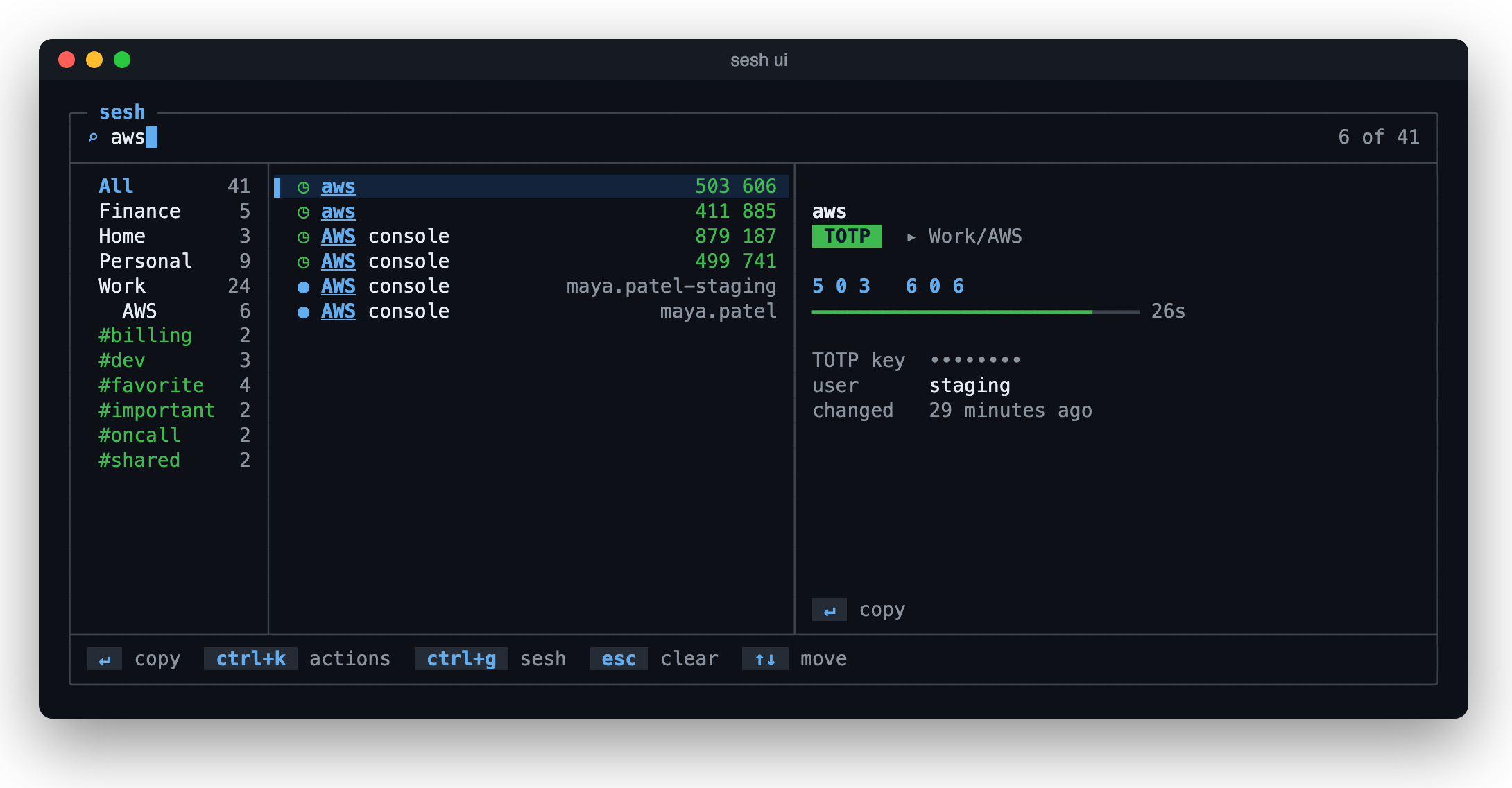
- Type to search names, usernames and sites. Enter copies the password, or the current TOTP code, shown large with the seconds it has left; the clipboard clears itself. Ctrl-Y copies the username, and Tab reveals a hidden value.
- Ctrl-K acts on the selected entry: edit it, copy any of its fields, open its URL, go back to an earlier secret, or move it to the trash. ↓, then Space, marks several, to file, tag or trash them together.
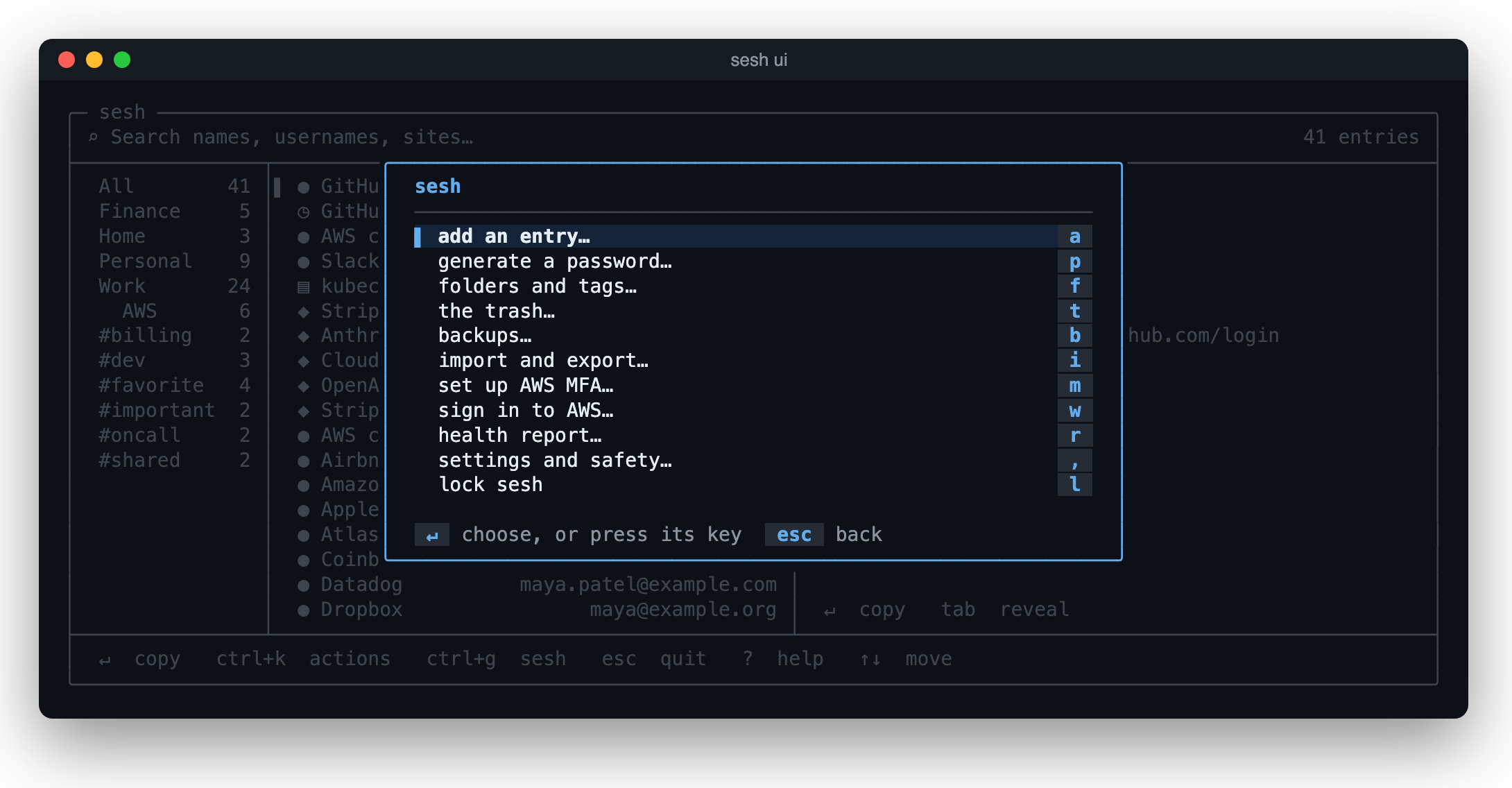
- Ctrl-G does everything else: add an entry or generate a password,
folders and tags, the trash, backups, import and export, AWS MFA setup and
sign-in, the health report, and settings: the master password, the recovery
key, Touch ID, sync,
sesh doctor's checks, the audit log, and every setting. - ?, with nothing typed, lists every key. In a window at least 110 columns wide, folders and tags sit on the left.
From the command line
Everything in sesh ui is also a command, for scripts and quick one-offs.
Type sesh for every command, or sesh <command> --help for one.
sesh add password shop --generate           # a strong one, copied as it's saved
sesh add totp github --qr                   # select the QR code on screen
sesh copy github password                   # its password
sesh copy github totp                       # its TOTP code
sesh aws                                    # sign in to AWS with your MFA code
Prerequisites
- AWS sign-in: the AWS CLI, installed. A profile with access keys is set up with
aws configure, and one with SSO withaws configure sso; one that signs in withaws login(AWS CLI 2.32 or later) needs nothing first:sesh awsrunsaws login, which sets it up. - TOTP codes: nothing more; any service that uses standard TOTP (RFC 6238).
- Copying on Linux:
wl-copy(wl-clipboard) under Wayland, orxcliporxselunder X11. macOS has one built in.
Usage
Every command works on the whole vault: passwords, API keys, notes, files and
TOTP entries. An <entry> is a few words of its name or username, as sesh ui's
search takes them (github alice; a kind word such as totp or note
narrows), or its ID, such as password/github/alice. When several entries
match, sesh asks which at a terminal, and lists them otherwise.
Finding and using entries
sesh list                          # every entry
sesh list notes                    # or of a kind: passwords, keys, notes, totp, files
sesh list --folder work --tag dev  # narrowed by folder and tag
sesh search github                 # by any part of a name, username, or site
sesh copy github password          # copy the password (the clipboard clears after 30s)
sesh copy github --username        # or --url, or --field pin
sesh get openai                    # print it, for a pipe
sesh code github                   # a TOTP code, and how long it has left
sesh show github --reveal          # URL, notes, fields, folder and tags
sesh open github                   # its URL, in the browser
Add --json to list, search, get, code, show or health for output a program reads.
Adding and changing entries
sesh add password github --username alice --url https://github.com/login
sesh add key openai                # an API key
sesh add file kubeconfig --from ~/.kube/config   # a file, kept whole
echo "door code 4711" | sesh add note house
sesh add totp github --qr          # or --qr-image shot.png, or type the key, or paste an otpauth:// link
sesh show totp github --qr         # its key as a QR code, to scan with a phone
sesh edit github --rename github-work
sesh edit github --field [email protected] --secret-field pin
sesh edit github --notes --editor
sesh generate --length 32          # a new password, stored nowhere
sesh generate --words 6            # or a passphrase
sesh trash github                  # into the trash; sesh trash lists and restores
sesh history github                # earlier secrets: --show N, --clip N, --restore N
sesh folder move work github       # and sesh tag add urgent github
Secrets for commands
sesh run --env OPENAI_API_KEY=sesh://api_key/openai -- python app.py
sesh run --env-file .env -- npm start      # .env holds NAME=sesh://... references, no secrets
sesh run --env KUBECONFIG=sesh://file/kubeconfig -- kubectl get pods   # a file entry, as a file
sesh inject -i config.yml.tpl -o config.yml
git config --global credential.helper '!sesh git-credential'   # git's HTTPS passwords from sesh
Bringing entries over, and taking them out
sesh import --from google-authenticator IMG_1234.png   # its "Transfer accounts" QR codes
sesh import --from bitwarden bitwarden_export.json
sesh import --from keepass Passwords.xml
sesh import --from lastpass-authenticator accounts.json
sesh import --from chrome "Chrome Passwords.csv"       # also firefox, apple-passwords
sesh export --file backup.enc       # encrypted with a password of its own
sesh import --from sesh backup.enc  # back in, on this machine or another
Each import shows what it found, and what's already in the vault, before it asks.
AWS
sesh aws setup                     # store a profile's MFA key: from a QR code, or typed
sesh aws                           # sign in: a shell with the session's credentials
sesh aws --profile production
sesh aws --no-subshell             # print the credentials, to eval
sesh aws --clip                    # copy the MFA code, for the AWS console
For a profile that signs in with aws login or SSO, sesh aws signs in when the session has ended, with the MFA code on the clipboard, and opens the shell with AWS_PROFILE set, so the AWS CLI keeps the credentials fresh. A profile the AWS CLI says has no credentials (nothing set up for it yet, as on a new computer; credentials in environment variables don't count, since sesh aws doesn't use them) signs in with aws login, which sets it up.
sesh aws opens your own shell, with your usual setup, plus the session's credentials and:
(sesh:aws)before your prompt;sesh_status(the session, and a check of the AWS connection),verify_aws, andsesh_help;SESH_ACTIVE=1andSESH_SERVICE=aws, with the standardAWS_ACCESS_KEY_ID,AWS_SECRET_ACCESS_KEYandAWS_SESSION_TOKEN;exitor Ctrl-D to leave.
The vault and keeping it safe
sesh config                        # every setting, and where it comes from
sesh config set clipboard_timeout 15s  # change one in the config file
sesh init                          # choose where the vault lives (optional)
sesh lock                          # lock now: the next command asks for the master password
sesh passwd                        # change the master password (every entry is re-encrypted)
sesh recovery new                  # a recovery key, in case you forget it
sesh touchid enable                # unlock with your fingerprint (macOS)
sesh backup                        # sesh also backs up on its own (backup.every_days)
sesh backup list                   # the backups; sesh backup delete <name> deletes one
sesh health                        # weak, reused and old passwords
sesh doctor                        # check the setup, and that everything reads
For scripts, SESH_MASTER_PASSWORD gives the master password without a prompt;
it exposes the password to the process environment, so keep it to CI. See
Using the sesh agent for
how the agent starts, locks, and stops.
Syncing between computers
sesh sync init ~/Dropbox/sesh-sync   # make a sync folder from this vault
sesh sync join ~/Dropbox/sesh-sync   # on each other computer, with an empty vault
sesh sync                            # sync now (commands also sync on their own)
sesh sync status                     # where it syncs, and what's waiting
sesh sync leave                      # stop syncing this vault
Documentation
- Usage & Configuration — Start here for setup prerequisites, example output, and daily workflows
- Security Model — Threat model, what sesh protects and what it doesn't
- Architecture Overview — Technical design for contributors
Development
Prerequisites
- Go 1.27+
- macOS or Linux (Touch ID unlock is macOS-only)
- Make (optional — provides convenience targets, but
go build ./sesh/cmd/seshworks directly) - On macOS, Xcode's command line tools: Touch ID unlock and locking when the screen locks are built with cgo, and a build without a C compiler quietly has neither. Linux builds are pure Go
Building
# Clone repository
git clone https://github.com/bashhack/sesh.git
cd sesh

# Build binary
make build

# Run tests
make test

# Generate coverage
make coverage

# Tidy, format, vet, lint and test (rewrites files)
make audit
Developing while using sesh every day
scripts/sesh-dev builds this checkout and runs it on a vault, config and
agent of its own (in ~/.local/share/sesh-dev), so an installed sesh and its
vault are never touched:
scripts/sesh-dev add password github --username alice
scripts/sesh-dev ui
AGENTS.md has the rest: what the two still share (the browser extension, the clipboard), trying a dev build as your everyday sesh, and the rules for coding agents working on sesh.
License
MIT License - see LICENSE for details.
 Directories

| Path | Synopsis |
|---|---|
|
internal
|
|
|
agent
Package agent implements the sesh agent daemon and its client protocol.
|
Package agent implements the sesh agent daemon and its client protocol. |
|
atomicfile
Package atomicfile replaces a file so that readers see either the old contents or the new, and a crash or power loss just afterwards can't leave it empty or lose the change.
|
Package atomicfile replaces a file so that readers see either the old contents or the new, and a crash or power loss just afterwards can't leave it empty or lose the change. |
|
aws
Package aws handles AWS STS authentication and temporary credential management.
|
Package aws handles AWS STS authentication and temporary credential management. |
|
aws/mocks
Package mocks provides test doubles for the AWS package interfaces.
|
Package mocks provides test doubles for the AWS package interfaces. |
|
backup
Package backup keeps copies of the vault: made by name and time in a folder, listed newest first, and pruned to a number kept.
|
Package backup keeps copies of the vault: made by name and time in a folder, listed newest first, and pruned to a number kept. |
|
clipboard
Package clipboard provides system clipboard access for copying and clearing secrets.
|
Package clipboard provides system clipboard access for copying and clearing secrets. |
|
config
Package config resolves sesh's settings from, in order of precedence, command-line flags, environment variables, the config file (~/.config/sesh/config.toml), and built-in defaults.
|
Package config resolves sesh's settings from, in order of precedence, command-line flags, environment variables, the config file (~/.config/sesh/config.toml), and built-in defaults. |
|
database
Package database provides a pure-Go SQLite-backed credential store.
|
Package database provides a pure-Go SQLite-backed credential store. |
|
env
Package env provides environment variable access and session configuration.
|
Package env provides environment variable access and session configuration. |
|
exportfile
Package exportfile is the file an export is written to: one replaced only once the export is whole, through a temporary file made after its password is asked; or a device or pipe written as it goes.
|
Package exportfile is the file an export is written to: one replaced only once the export is whole, through a temporary file made after its password is asked; or a device or pipe written as it goes. |
|
health
Package health finds what's wrong with the secrets in a vault: weak passwords, secrets used on more than one entry, and ones not changed in a long time.
|
Package health finds what's wrong with the secrets in a vault: weak passwords, secrets used on more than one entry, and ones not changed in a long time. |
|
importer
Package importer holds what every source sesh import reads has in common: the entries it found, and fitting other apps' names to sesh's rules.
|
Package importer holds what every source sesh import reads has in common: the entries it found, and fitting other apps' names to sesh's rules. |
|
importer/bitwarden
Package bitwarden reads Bitwarden's exports: the plain JSON one, the one protected by a password of its own, and the CSV one.
|
Package bitwarden reads Bitwarden's exports: the plain JSON one, the one protected by a password of its own, and the CSV one. |
|
importer/browser
Package browser reads the password exports of web browsers and Apple's Passwords app: Chrome's, and that of other browsers built on Chromium that write the same columns, Firefox's, and the Passwords app's.
|
Package browser reads the password exports of web browsers and Apple's Passwords app: Chrome's, and that of other browsers built on Chromium that write the same columns, Firefox's, and the Passwords app's. |
|
importer/gauth
Package gauth reads Google Authenticator's "Transfer accounts" codes: otpauth-migration://offline?data=<base64>, where the data is a small protobuf message (MigrationPayload) listing the accounts.
|
Package gauth reads Google Authenticator's "Transfer accounts" codes: otpauth-migration://offline?data=<base64>, where the data is a small protobuf message (MigrationPayload) listing the accounts. |
|
importer/keepass
Package keepass reads KeePass's XML export ("KeePass XML (2.x)"), as KeePassXC and KeePass 2 write it.
|
Package keepass reads KeePass's XML export ("KeePass XML (2.x)"), as KeePassXC and KeePass 2 write it. |
|
importer/lpauth
Package lpauth reads LastPass Authenticator's account export: a JSON file, made in the app's Settings, under Transfer accounts.
|
Package lpauth reads LastPass Authenticator's account export: a JSON file, made in the app's Settings, under Transfer accounts. |
|
importer/seshexport
Package seshexport reads sesh's own password-encrypted exports, for sesh import.
|
Package seshexport reads sesh's own password-encrypted exports, for sesh import. |
|
kdf
Package kdf holds the Argon2id settings that turn a password into a key: the vault's master password and an encrypted export's password.
|
Package kdf holds the Argon2id settings that turn a password into a key: the vault's master password and an encrypted export's password. |
|
keywrap
Package keywrap seals a secret to a P-256 public key, so that only the holder of the private key can open it: an ephemeral P-256 ECDH, HKDF-SHA256 salted with the one-off public key, and AES-256-GCM.
|
Package keywrap seals a secret to a P-256 public key, so that only the holder of the private key can open it: an ephemeral P-256 ECDH, HKDF-SHA256 salted with the one-off public key, and AES-256-GCM. |
|
mask
Package mask hides secret values in a stream of output, as sesh run does with a command's stdout and stderr.
|
Package mask hides secret values in a stream of output, as sesh run does with a command's stdout and stderr. |
|
password
Package password is sesh's password manager: passwords, API keys, TOTP secrets, and secure notes, kept in a vault.Store.
|
Package password is sesh's password manager: passwords, API keys, TOTP secrets, and secure notes, kept in a vault.Store. |
|
provider
Package provider defines the interface and registry for credential providers.
|
Package provider defines the interface and registry for credential providers. |
|
provider/aws
Package aws implements the AWS provider for sesh, handling MFA-based session credentials.
|
Package aws implements the AWS provider for sesh, handling MFA-based session credentials. |
|
qrcode
Package qrcode provides QR code scanning and decoding from screen captures.
|
Package qrcode provides QR code scanning and decoding from screen captures. |
|
recovery
Package recovery makes and uses a vault's recovery key: a random key the user writes down, which can open the vault when the master password is forgotten.
|
Package recovery makes and uses a vault's recovery key: a random key the user writes down, which can open the vault when the master password is forgotten. |
|
screenlock
Package screenlock tells whether the computer's screen is locked, so sesh's agent can lock with it.
|
Package screenlock tells whether the computer's screen is locked, so sesh's agent can lock with it. |
|
secretref
Package secretref reads sesh references, sesh://<id>[#field], which name a value in the vault for sesh run and sesh inject to put in its place.
|
Package secretref reads sesh references, sesh://<id>[#field], which name a value in the vault for sesh run and sesh inject to put in its place. |
|
secure
Package secure provides security-related utilities for sesh.
|
Package secure provides security-related utilities for sesh. |
|
setup
Package setup provides sesh aws setup: storing an AWS profile's MFA key.
|
Package setup provides sesh aws setup: storing an AWS profile's MFA key. |
|
shell
Package shell formats text for a POSIX shell.
|
Package shell formats text for a POSIX shell. |
|
sitematch
Package sitematch says whether a URL kept with an entry is a site's, for the programs that fill a site's password from sesh: git's credential helper and the browser's.
|
Package sitematch says whether a URL kept with an entry is a site's, for the programs that fill a site's password from sesh: git's credential helper and the browser's. |
|
subshell
Package subshell starts the shell sesh aws opens: the user's own shell, with their startup files, plus the session's credentials, a prompt prefix, and sesh's helper commands.
|
Package subshell starts the shell sesh aws opens: the user's own shell, with their startup files, plus the session's credentials, a prompt prefix, and sesh's helper commands. |
|
syncfolder
Package syncfolder reads and writes a sync folder: the folder, carried between computers by any tool (iCloud Drive, Dropbox, Syncthing, a USB stick), through which computers keeping their own vaults share entries.
|
Package syncfolder reads and writes a sync folder: the folder, carried between computers by any tool (iCloud Drive, Dropbox, Syncthing, a USB stick), through which computers keeping their own vaults share entries. |
|
testutil
Package testutil provides test helpers including command mocking, stdout/stderr capture, and random string generation.
|
Package testutil provides test helpers including command mocking, stdout/stderr capture, and random string generation. |
|
totp
Package totp generates time-based one-time passwords and validates TOTP secrets.
|
Package totp generates time-based one-time passwords and validates TOTP secrets. |
|
totp/mocks
Package mocks provides test doubles for the TOTP package interfaces.
|
Package mocks provides test doubles for the TOTP package interfaces. |
|
touchid
Package touchid unlocks a secret with Touch ID through the Mac's Secure Enclave, without the Keychain.
|
Package touchid unlocks a secret with Touch ID through the Mac's Secure Enclave, without the Keychain. |
|
tui
Package tui is sesh ui: a search over every entry, copying a secret or a code with Enter, with TOTP entries' codes drawn as they change.
|
Package tui is sesh ui: a search over every entry, copying a secret or a code with Enter, with TOTP entries' codes drawn as they change. |
|
vault
Package vault defines sesh's entries, each a kind, a service name, an optional username, an encrypted secret, and settings, and the Store interface that holds them.
|
Package vault defines sesh's entries, each a kind, a service name, an optional username, an encrypted secret, and settings, and the Store interface that holds them. |
|
vault/vaulttest
Package vaulttest is the behaviour every vault.Store must have, as tests a Store's own package runs.
|
Package vaulttest is the behaviour every vault.Store must have, as tests a Store's own package runs. |
|
vaultsync
Package vaultsync syncs a vault with a sync folder (internal/syncfolder): what changed here goes to the folder, what changed there comes here, and what changed in both is merged (syncfolder.Merge).
|
Package vaultsync syncs a vault with a sync folder (internal/syncfolder): what changed here goes to the folder, what changed there comes here, and what changed in both is merged (syncfolder.Merge). |
|
sesh
|
|
|
cmd/sesh
command
|