 README

auth-server

This project offers a toolkit for building and configuring a tailored authentication and authorization service.
auth-server can act as a proxy middleware or be configured in a stand-alone mode. It doesn't require any third-party software integration.
Leverage existing backend storage repositories for storing security policies or develop a custom one to suit your specific requirements.
For information on how to configure repositories using environment variables, refer to the repository configuration page.
[!NOTE] This project's security has not been thoroughly evaluated. Proceed with caution when setting up your own auth provider.
Introduction
- Authentication is used by a server when the server needs to know exactly who is accessing their information or site.
- Authorization is a process by which a server determines if the client has permission to use a resource or access a file.
The inherent complexity of crafting an authentication and authorization strategy raises a barrage of immediate questions:
- Would it be beneficial to utilize separate services for authentication and authorization purposes?
- What is the process for creating access tokens, and who is tasked with this responsibility?
- Is it necessary to adapt our REST service to support an authorization flow?
The auth-server project aims to address these concerns by serving as a transparent authentication and authorization proxy middleware.
Architecture
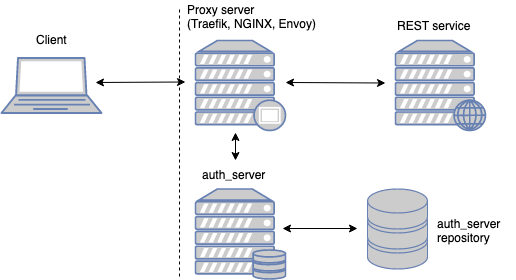
-
The user requests an access token (JWT), using a basic authentication header:
GET /token HTTP/1.1 Host: localhost:8081 Authorization: Basic YWRtaW46MTIzNA== -
The proxy server routes this request to
auth-serverto issue a token.
Response body:
{"access_token":"eyJhbGciOiJSUzI1NiIsInR5cCI6IkpXVCJ9...","token_type":"Bearer","expires_in":3600000} -
The user sends an authenticated request to the proxy server:
GET /foo HTTP/1.1 Host: localhost:8081 Authorization: Bearer eyJhbGciOiJSUzI1NiIsInR5cCI6IkpXVCJ9... -
Proxy invokes
auth-serveras an authentication/authorization middleware. In case the token was successfully authenticated/authorized, the request will be routed to the target service. Otherwise, an auth error code will be returned to the client.
Installation and Prerequisites
-
auth-serveris written in Go (1.24+). To install the latest stable version of Go, visit the releases page. -
Read the following instructions to generate keys required to sign the token. Specify the location of the generated certificates in the service configuration file. An example of the configuration file can be found here.
-
The following example shows how to run the service using a configuration file:
./auth -c service_config.yml -
To run the project using Docker, visit their page to get started. Docker images are available under the GitHub Packages.
-
Install Docker to get started with the examples.
Configuration
Proxy Providers
The proxy setting in your configuration determines how auth-server parses incoming requests to extract the original method and URI. This is important when running behind a reverse proxy that may modify or forward request details via headers.
| Provider | Description | Headers Used |
|---|---|---|
direct |
No proxy, use actual request values | None |
nginx |
Nginx with auth_request module |
X-Forwarded-Method, X-Forwarded-Uri |
traefik |
Traefik with ForwardAuth middleware | X-Forwarded-Method, X-Forwarded-Uri, X-Forwarded-Prefix |
envoy |
Envoy with ext_authz filter | X-Original-*, X-Envoy-Original-*, X-Forwarded-* (priority order) |
haproxy |
HAProxy with external auth | X-Forwarded-Method, X-Forwarded-Uri, X-Original-URI |
kong |
Kong API Gateway | X-Forwarded-Method, X-Forwarded-Path, X-Forwarded-Prefix |
Example configuration:
proxy: direct # or nginx, traefik, envoy, haproxy, kong
Examples
Examples are available under the examples folder.
Traefik
Run auth-server as a Traefik ForwardAuth middleware:
cd examples/traefik
docker compose up -d
Nginx
Run auth-server with Nginx using the auth_request module:
cd examples/nginx
docker compose up -d
Envoy
Run auth-server with Envoy using the ext_authz filter:
cd examples/envoy
docker compose up -d
License
Licensed under the Apache 2.0 License.
 Directories