GV

GeezerVison

The World Wide Web, restored to 800 pixels of glory.

Home|About|Gaming cabinet|Archives|How it works|Starter sites

On this site

  • Proxyman
  • Pricing
  • WorkspaceNew
  • Testimonials
  • Sign In
  • Download
  • iOS appFor iPhone and iPad
  • Android appFor phones and tablets

This view

  • Original page
  • New address

GeezerVison is showing proxyman.com — Proxyman - Best HTTP Debugging Proxy for macOS, iOS, Android, Windows & Linux

Ready for macOS 27 Golden Gate

Capture HTTP(s)
in a second

Best-in-class native macOS app to capture, decrypt, and mock

your HTTP(s) requests/ responses with powerful debugging tools.

Download for macOS
Apple Silicon & Intel • macOS 14+ • macOS 27 Golden Gate
GitHubRelease Notes
Product of the day by Product Hunt

Product of
the day

1st

Product of the day by Product Hunt
Best Developer Tool by Hacking with Swift

BESTDEVELOPERTOOL

Best Developer Tool by Hacking with Swift

Swift Community Awards 2022

Loved by developers
Loved by developers

Loved by
developers

4.8 / 5

Loved by developers

Trusted by 800,000+ developers worldwide

From individuals to teams of all sizes.

Big C, a Company that uses ProxymanYandex, a Company that uses ProxymanChowNow, a Company that uses ProxymanStarbucks, a Company that uses ProxymanCerid, a Company that uses ProxymanWarnerBros, a Company that uses ProxymanCisco, a Company that uses ProxymanShopify, a Company that uses ProxymanBinance, a Company that uses ProxymanAws, a Company that uses ProxymanTablePlus, a Company that uses ProxymanLine, a Company that uses ProxymanEtsy, a Company that uses ProxymanCCP, a Company that uses Proxymanwalmart, a Company that uses ProxymanOctopus, a Company that uses Proxyman7eleven, a Company that uses Proxyman
Atlantic, a Company that uses ProxymanShopback, a Company that uses ProxymanBytedance, a Company that uses ProxymanPaypal, a Company that uses ProxymanYelp, a Company that uses ProxymanDeloitte, a Company that uses ProxymanAtlassian, a Company that uses ProxymanShape, a Company that uses ProxymanFutirice, a Company that uses ProxymanNaver, a Company that uses Proxyman

Native macOS app

Best-in-class macOS app with meticulous attention to detail.

A closer look at Proxyman

1
01 / 06

Working Session

Pin working domains and hide noisy traffic while you debug.

All you'd expect from a great Mac app: Familiar UI, Universal Shortcuts Keys, and super-fast Apple M1/M2/M3/M4 and M5 performance.

Proxyman MCP + AI Agent

Your AI agent reads the traffic Proxyman captures, finds the failing request, explains why, and resends it with a fix, all from your terminal.

1

Connect the MCP server

Turn on Settings → MCP in Proxyman, then add it to your agent:

claude mcp add proxyman --transport stdio \
  -- "/Applications/Proxyman.app/Contents/MacOS/mcp-server"
2

Add the Proxyman Skills

Skills teach your agent the Proxyman workflows: setup, certificates, debugging tools, MCP, and proxyman-cli.

Terminal
npx skills add ProxymanApp/proxyman-SKILL.md/skills
Get Proxyman Skill →MCP documentation →Setup guide →

Complete suite of network debugging tools

Dive into the network level to diagnose and fix problems with reliable and powerful tools.

Capture HTTP/HTTPS Traffic

View HTTP/HTTPS
SSL Decryption
View traffic by App/Domain
Body Syntax Highlighting
Websocket
Proxyman acts as a man-in-the-middle server that capture the traffic between your applications and SSL Web Server. With built-in macOS setup, so you can inspect your HTTP/HTTPS Request and Responses in plain text with just one click.

Capture on mobile

Standalone apps. No desktop required.

Watch the video

Multiple Filters

Wildcard / Regex
Multi Filters
Full-Text Search
Saved Filters

Narrow down your search with Proxyman's Multiple Filters. You can combine complex filtered criteria like Protocol, Content-Type, URL, Request Header, Response Header, Body, etc that find exact what you're looking for.

Split View

Two Panes
Separate Filters
Separate Selection
Shared Capture
PRO

Keep two traffic views open in the same tab. Each pane has its own filters, selected request, and inspector, while both panes use the same live capture.

Scripting Tool

JS Rewrite
Modify Request
Modify Response
Built-in Snippet Code
Built-in Addons
Shared State

Breakpoint, Map local GUI is so slow?

Try Scripting Tool: Use Javascript code to manipulate the Request/Response with your own logic.

We provide a handful of Snippet Code, common Add-ons and JS Libraries to facilitate your debugging procedure and make it 100x faster.

Breakpoint Tool

Modify Request
Modify Response
Headers
URL / Query
Body Editor
Status Code
Abort / Continue

Breakpoint Tool helps you to modify Requests/Responses Data on the fly without changing any client code. Supports URL, Headers, Body, Status Code, Raw Message, etc.

Watch the video

Map Local Tool

Mock Response
Local File
Status Code
Headers / Body

Map Local Tool allows developers to mock a Response with a local file. Boost development speed up by directly modifying the response with Status Code, Header, and Body without waiting for the backend.

Watch the video

GraphQL Debugging

Match with Operation Name
Custom GraphQL Column

Easily debug GraphQL Request by defining a matching rule with a particular GraphQL QueryName. Works with Breakpoint, Map Local, Map Remote, and Scripting Tool.

WebSocket Realtime

WS / WSS
Realtime Frames
Filter: Sent / Received
JSON / Tree / HEX
Binary Decode
Protobuf

Inspect live WebSocket messages as they arrive. Follow client and server frames in real time, preview their payloads, and quickly track down realtime communication issues.

New feature

AI-Powered Debugging with MCP

Connect Claude Code to Proxyman via Model Context Protocol. Fetch flows, analyze requests, and create debugging rules - all from your terminal.

Claude Code

Fetch all requests from a connected iPhone or Android device

Connecting to Proxyman MCP server...
Fetching flows from remote mobile device...
MethodURLStatusDuration
GET/api/v2/users/profile200124ms
POST/api/v2/auth/refresh-token20089ms
GET/api/v2/projects/list200203ms
GET/api/v2/notifications30445ms
PUT/api/v2/settings/preferences200167ms
GET/api/v2/analytics/dashboard200312ms

Found 6 requests from the connected mobile device. All requests target the api.atlantis.com domain with successful responses.

Reply...
Sonnet 4.6 Extended

Proxyman's built-in MCP server lets AI assistants interact with your debugging session in real time - no plugins required.

MCP documentationSetup guideGet Proxyman SkillDownload Proxyman Plugin

Works with your favorite AI tools

Claude Code
ChatGPT
Gemini CLI
Codex CLI
Cursor

Spot your bugs with ease

Quickly find the differences between requests/responses with built-in Diff Tool.

Side-by-Side or Unified Display, with Light/Dark GitHub Theme.

Try Online

Run directly on your Web Browser. Your data is safe 🔐

Try macOS app

Offline macOS app works with your local data. Lifetime deal.

Compose requests with ease

Create, edit, and send custom HTTP requests directly from Proxyman.

Start from scratch, paste a cURL command, or reuse requests from your history.

  • History

    Revisit, duplicate, and resend previous requests without rebuilding them from scratch.

  • Import cURL

    Paste a cURL command to instantly populate its method, URL, headers, and body.

  • Compose full requests like Postman

    Configure methods, URLs, headers, queries, and bodies in one focused workspace.

  • Bulk Edit

    Paste or update multiple headers and parameters at once to save repetitive editing.

  • WebSocket

    Open WebSocket connections and send messages without switching to another tool.

  • Preview request / response instantly

    Inspect the complete request and formatted response side by side as soon as it returns.

HTTP/2 is finally here

Capture and inspect HTTP/2 traffic in Proxyman v26.0.0 for macOS.

Turn on Use HTTP/2 in Settings → General → Proxy, then capture a fresh request.

  • Inspect requests and responses

    Read HTTP/2 methods, URLs, headers, bodies, status codes, and timing.

  • Follow concurrent requests

    Keep each request clear while multiple streams share one connection.

  • Read headers and trailers

    Inspect request and response metadata, including HTTP/2 trailers.

  • Check the negotiated protocol

    Confirm HTTP/2 or HTTP/1.1 fallback in the Connection Info tab.

Read the manualRead the release blog

BETA

Capture more with Network Extension

A transparent proxy for HTTP/HTTPS traffic from apps on your Mac, including apps that ignore the system proxy.

  • Capture apps that ignore proxy settings

    See HTTP/HTTPS requests from Mac apps and scripts that the system proxy misses.

  • Skip per-app proxy setup

    Run tools such as cURL without a --proxy flag or separate proxy settings for each app.

  • Keep your debugging workflow

    Use Map Local, Breakpoint, and Scripting on the requests captured by the extension.

Read the manualExplore Network Extension
New Feature

Where teams debug together

Whether you're a team of one or many, there's a lot you can do with Proxyman Workspace. From team management to seamless log sharing, and everything in between.

Team workspaces
Share logs
Sync settings
Learn moreBuy subscription
workspace.proxyman.com
Total Logs

24

Team

8

Role
Admin
Recent Logs

api-debug-2024.proxymanlogv2

2.4 MB · 2 min ago

Public

checkout-flow.har

856 KB · 1 hour ago

Team

auth-session.proxymansessionv2

1.2 MB · 3 hours ago

Private

Log shared

Just now

Inspect network traffic from iOS/ Android

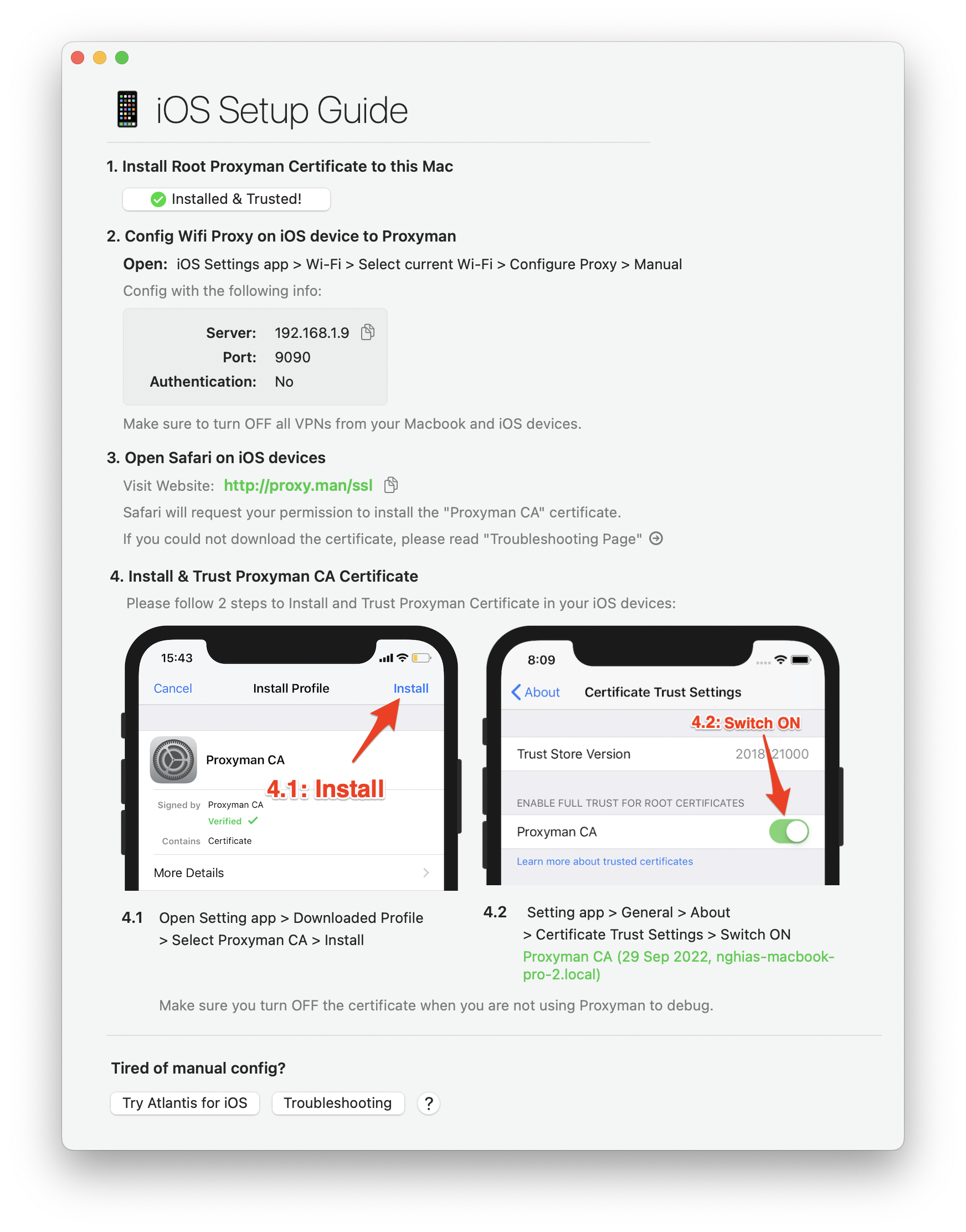
Easy-to-follow instructions to capture HTTP traffic from your iOS/ Android devices, simulators, emulators.

Proxyman capture http and https traffic with iOS and Android devices

Capture traffic from iOS/ Android devices

Proxyman provides a straightforward walkthrough to set up a Proxy with iOS, Android physical devices, iOS Simulators and Android Emulators .

Simply follow the detailed instructions to capture and intercept HTTP(s) traffic with just a few clicks.

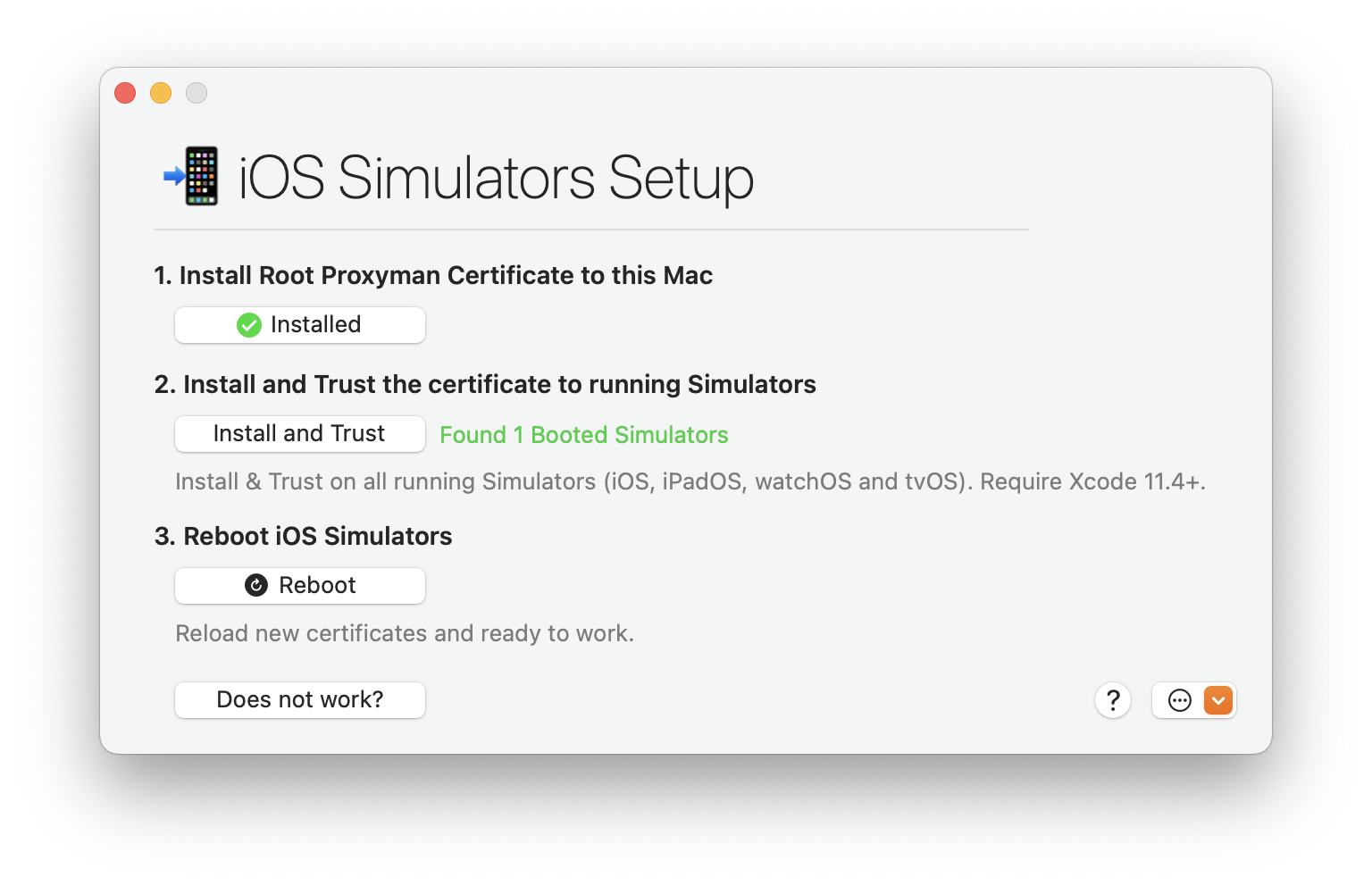
Capture traffic from iOS Simulators

Tired of manual & error-prone config on your iOS Simulator?

Leave all complicated steps to us and let Proxyman automatically inspect the network traffic for you. No need to configure HTTP Proxy, Install or Trust any Certificate.

Capture HTTPS traffic from iOS Simulator with Proxyman

Capture traffic from mobile devices

iOS Devices

Capture network traffic on iOS devices with a few clicks.

iOS Simulators

Capture network traffic on iOS Simulators without manual configuration.

Android Devices

Capture network traffic on Android devices in a few steps.

Android Emulators

Capture network traffic on Android Emulators with the Emulator Automatic Script.

Zero-Setup for Backend Developments

One-click to inspect HTTP(s) traffic from NodeJS, Ruby, Python, and Golang.

1Open Automatic Setup Windows
2Start new Apple Terminal App
Open a pre-configured Terminal app that automatically setup HTTP Proxy, Trust Proxyman's self-signed certificate.
It only affects your current Terminal session, not the whole system.
3Done
Automatically capture all HTTP(s) traffic from the Terminal as soon as you start your server or run scripts.
Support popular libraries from NodeJS, Ruby, Python, and Golang.

Support Popular Network Libraries

NodeJS

axios, fetch (v18+), node-fetch, got, https, and superagent.

Ruby

http, net/http, net/https, httparty, fastlane, and faraday.

Python

request, aiohttp, http.client, urllib3, and httpx.

Golang

net/http, rusty, fasthttp, resty, and gorequest

Other

cURL, httpie, Electron apps, and Flutter apps, and React Native apps.

New feature

Command Palette for Supercharged Productivity

Find and execute any Proxyman action instantly. Press ⌘⇧P, type to search, and accelerate your workflow.

1Open Command Palette (⌘⇧P)
Bring up a universal search for commands, tools, and settings, without touching the mouse.
2Search and execute instantly
Use fast, fuzzy search to find actions and hit Enter to run. No menus, no hunting.
3Pin favorites
Keep frequently-used actions at your fingertips. Works across windows and sessions.

What's more?

Comprehensive list of current and up-coming Proxyman features.

Basic Features

  • Inspect HTTP/HTTPS traffic in plain text
  • SSL Proxying
  • Proxying on iOS Devices, iOS Simulator and Android
  • Export Requests/ Responses
  • Content Filter
  • Body Syntax Highlighting
  • JSON/ Tree View Format
  • Horizontal/Vertical Layout
  • Finder Categorize

  • Multiple Tabs
  • Custom Previewer Tabs
  • Custom Header Columns
  • Highlight with Color & Add Comment
  • MessagePack Body Previewer
  • JSONPath Filter
  • Customize Toolbar

Advanced Features

  • HTTP/2 (macOS)
  • Network Extension / Transparent Proxy (BETA, macOS 26+, PRO)
  • Proxy Helper Tool
  • Map Local (File/Directory)
  • Map Remote
  • Breakpoint
  • No Caching
  • Repeat Requests
  • Compose Requests
  • WebSocket Debugging
  • Save Session
  • Block List
  • Allow List
  • External Proxying (HTTP/HTTPS/SOCKS/PAC)
  • Protobuf
  • Import Charles Proxy files
  • Custom Root & Client & Server Certificates
  • Wildcard & Regex Matching Rules
  • Scripting (ReWrite)
  • JS Addons and Snippet Code
  • Atlantis framework for iOS
  • GraphQL Debugging
  • Network Condition (Network Throttling)
  • Multiple Filters
  • Publish to Gist
  • Reverse Proxy
  • Code Generator
  • Command Line
  • Diff for Request/Response
  • Access Control
  • Automatic/Manual Setup
  • DNS Spoofing
  • SOCKS Proxy
  • Custom Filters
  • Command Palette

Upcoming Features

  • Proxyman Plugins

  • Request new features?
Explore all features

More than 800,000+proxyman-user-avatarproxyman-user-avatarproxyman-user-avatar happy users

Proxyman is used daily by 800k+ developers worldwide. Here are some of their feedbacks.

Proxyman: Loved by developers twitter section

Ibrahima Ciss

@bionik6

Tools I can't live without as an iOS engineer in 2022:
- @rocketsim_app by @twannl
- @proxyman_app by @_nghiatran
- Dash by @kapeli
- SwiftUI Companion by Javier
- Sourcery Pro & Inject by @merowing_

And you, what do you use as an iOS engineer to boost your productivity?

Proxyman: Loved by developers twitter section

Matthew O'Riordan

@mattheworiordan

Tried out the new native debugging proxy @proxyman_app, and it’s awesomely simple and just works - I love it 👍🏼. Glad to see it works with Websockets too so works with @ablyrealtime.

Proxyman: Loved by developers twitter section

DeLynn Berry

@delynn

I use Dash ( @kapeli ) almost every day. I find Paw ( @luckymarmot ) indispensable when dealing with APIs. I recently discovered Proxyman ( @proxyman_app ) and I’m glad I’ll never need to use Charles ever again.

Proxyman: Loved by developers twitter section

Guillermo Rauch

@rauchg

On 2️⃣, I highly recommend http://proxyman.com – you'd be surprised how much you can learn about any system by watching what it does over the network

Proxyman: Loved by developers twitter section

Wes Bos

@wesbos

Proxyman is such a cool app. You can view http/ws requests from any app on your computer, and install an SSL proxy cert so you can see requests/responses that apps on your computer are making.
I've used many - wireshark, charles, etc - and this is the best one i've used.

Proxyman: Loved by developers twitter section

Shai Mishali

@freak4pc

Have to say @proxyman_app is an absolutely phenomenal tool. I can't imagine using Charles with a native macOS app that works so well. One thing I'm really missing is the ability to run diffs between requests to the same endpoint, that would be such a valuable feature.

Proxyman: Loved by developers twitter section

Felix Krause

@KrauseFx

proxyman.app a new app to intercept network traffic on your Mac, a beautiful, native Mac app. Still a huge fan of Charles web proxy, but this one just looks so nice @proxyman_app

Proxyman: Loved by developers twitter section

Josh Holtz 💪🚀

@joshdholtz

Can ya’ll stop making great Mac apps? I’m getting tired of buying all of them 🙄
- Core Data Lab by @elemanssoftware
- @yoink
- @proxyman_app
- Fantastical by @flexbits
- @pdfviewerapp
- Rocket by @_matthewpalmer

But for real, thanks for the great work 🙏

Proxyman: Loved by developers twitter section

Ananay

@ananayarora

Officially switching to @proxyman_app after 10 years of using Charles! Much better interface, app performance, and also shows what process is making a particular web request!

Proxyman: Loved by developers twitter section

Daniel Friyia 🇨🇦

@wa2goose

Probably lame to most people 😅 but @proxyman_app is probably one of my favorite dev tools. For React Native apps that aren't on the Expo / Radeon IDE workflow yet, it's indispensable.

Proxyman: Loved by developers twitter section

Donny Wals 👾

@DonnyWals

Started using @proxyman_app instead of Charles recently and I’m enjoying it more and more 😁 it basically does everything Charles does, except slightly nicer and more convenient. Especially the way it installs certs on the simulator for proxying 👍🏼

Proxyman: Loved by developers twitter section

Dave DeLong

@davedelong

Hey @luckymarmot … please acquire and integrate @proxyman_app 🙏 #OneAppToRuleThemAll

Proxyman: Loved by developers twitter section

Daniel Jalkut

@danielpunkass

I've just discovered @proxyman_app and it looks like a pretty great Mac-only alternative to Charles Proxy. Super streamlined UI that gets right to the heart of what most of us want: to see the request and response being made from a specific app.

Proxyman: Loved by developers twitter section

Alan Cooke

@a1cooke

@proxyman_app has the nicest HTTP Proxy app for Mac, the cert installation flow for Simulators is where the bar is at!

Proxyman: Loved by developers twitter section

Richa Srivastava

@RichaHarsivo

Used Proxyman today for the first time and wow 😍
I've been using Charles for years, but honestly… Proxyman just gets it right.
Cleaner UI, faster setup, and way more dev-friendly.

Is it just me, or is Proxyman the new king of debugging tools? 👀
#iOSDev #SwiftUI #Proxyman

and more from Daring Fireball, Inessential, Donny Wals, iOS Dev Weekly, Twitter, and Hacker News.

See more Testimonials
Y

Mentioned on Hacker News

What developers are saying in the discussion

S

shubhamjain

HN

Hacker News

"Proxyman is 100x value for 2x the price. I am not even kidding. Native UI, shortcuts, cert installation helper tools. And script editor to programmatically edit requests is so much better and powerful than Charles' request editor."

J

jshier

HN

Hacker News

"Yes, Proxyman has great sim integration, including the ability to filter by apps within the sim. It's a far better macOS app than Charles, and I've never found it to be lacking a feature I used in Charles."

A

aaronbrethorst

HN

Hacker News

"Likewise. I was a dedicated user of Charles for about a decade. It's great, but if you are a macOS user, Proxyman is better, easier, and more macOS friendly."

I

itsn0tm3

HN

Hacker News

"It makes working with Xcode simulators even easier by having a dedicated UI workflow to install the proxy certificates and restart the sim. Proxyman makes this way nicer to work with and since switching I never faced certificate issues again."

O

OptionalDonuts

HN

Hacker News

"When I was still working with iOS, all of us on the team switched to Proxyman and found it much better than Charles. Developer experience wise that is (features, ui/ux, etc.) We ran into some issues with Charles and found Proxyman as the alternative. Don't remember the issues but we never looked back."

O

ollysb

HN

Hacker News

"I used Charles for many years but proxyman's performance is a real step up."

Check out Proxyman Tutorials

Proxyman with KODECO

Proxyman with

KODECO

Proxyman with KODECO
Proxyman with GDG

Proxyman with

GDG

Proxyman with GDG
Proxyman with GDG
Built by Proxyman Team

Crafted by the Proxyman Team

Proxyman comes from the same indie Mac team behind TCP Viewer and Tiny Shield: real products, real users, and practical support from people who build debugging tools every day.

Used by 800,000+ usersRead testimonials
Best-in-class macOS app
Trusted by developers
Privacy-first debugging
TCP Viewer app logo

TCP Viewer

Native packet capture and inspection

Proxyman app logo

Proxyman

Debugging proxy for desktop and mobile platforms

Tiny Shield app logo

Tiny Shield

See every connection. Block every threat.

Why choose Proxyman?

Built for everyday HTTP debugging and improved with every release.

On the market

6+ years

Helping developers debug HTTP traffic since our first public release.

Public builds

200+

Counted across our public changelog and archive.

Total users

800,000+

Developers worldwide use Proxyman to inspect and debug network traffic.

Platforms

5

Support for macOS, iOS, Android, Windows and Linux.

Developer apps

4

Proxyman, TinyShield, TCPViewer and Device MCP.

Security & compliance

SOC 2 Type II

Independently audited for security, availability, processing integrity, confidentiality, and privacy. Read the announcement.

AICPA SOC for Service Organizations logo
Proxyman app icon

Get started

Debug HTTP faster with Proxyman

Free to start. No credit card required.

Download for freeView pricing
You are visitor 01402503 — GeezerVison does not store the pages you look up.

Best viewed with Netscape Navigator 4.7 or Internet Explorer 6 at 800×600. No cookies required.