GeezerVisonThe World Wide Web, restored to 800 pixels of glory. | ||||||||||||
| Home|About|Gaming cabinet|Archives|How it works|Starter sites | ||||||||||||
GeezerVison is showing reference.wolfram.com — Part: Get a specified piece of an expression—Wolfram Documentation expr[[i]] or Part[expr,i] gives the i expr[[-i]] counts from the end. expr[[i,j,…]] or Part[expr,i,j,…] is equivalent to expr[[i]][[j]]…. expr[[{i1,i2,…}]] gives a list of the parts i1, i2, … of expr. expr[[m;;n]] gives parts m through n. expr[[m;;n;;s]] gives parts m through n in steps of s. expr[["key"]] gives the value associated with the key "key" in an association expr. expr[[Key[k]]] gives the value associated with an arbitrary key k in the association expr. Details
Background & Context
Examples
Basic Examples
Scope
Single-Level Specifications
Multilevel Specifications
Assignments
Input Forms
Applications
Properties & Relations
Possible Issues
See Also
Tech Notes
Related Guides
Related Links
History
Cite this Page
Part |
 part of
 part of
| expr[[m;;]] | part m through the end | |
| expr[[;;n]] | from the beginning to part n | |
| expr[[;;,j]] | column j | |
| expr[[m1;;n1,m2;;n2]] | submatrix |
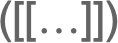
 [[
 and
 ]]
 or \[LeftDoubleBracket] and \[RightDoubleBracket].
Background & Context
- Part is a structural function that gives a specified indexed part of an expression. The expression Part[expr,i] is commonly represented using the shorthand syntax expr[[i]] or expr〚i〛. Part can be used to pick out parts of lists, a sequence of parts, elements of matrices, rows and columns of matrices, and so forth. Part can also be used to assign values to parts using Set, e.g. list[[k]]=newValue.
- Although Part is most commonly used with lists, it works with expressions of any kind. When using Part, parts of expressions may be specified using indices, lists of indices, Span expressions, or All.
- Useful functions that perform common special cases of Part include First, Last, Take, Drop, Rest, and Most. Position can be used to find the positions in an expression at which specified content appears. Extract is a more specialized function that extracts the part of an expression at the position specified by a given list, while the analogous function Delete removes an element from a specified position.
- A small number of functions contain parts that cannot be accessed or divided into subexpressions using Part or related functions. The most common cases are Complex and Rational, where for example Complex[1,2] is the internal representation for numbers such as 1+2 and Rational[1,2] is the internal representation for numbers such as 1/2. Functions having this property are said to be atomic, and they return True when AtomQ is applied to them.
Examples
open all close allBasic Examples (6)
Pick out a part of a list:
{a, b, c, d, e, f}[[3]]Obtain the second element from the end of a list:
{a, b, c, d, e, f}[[-2]]Pick out a sequence of parts:
{a, b, c, d, e, f}[[2 ;; 4]]Specify the part of an association corresponding to key "a":
<|"a" -> 5, "b" -> 6|>[["a"]]5Reassign a part:
v = {a, b, c}v[[2]] = dvPart works with expressions of any kind, not just lists:
(1 + 2 x ^ 2 + y ^ 2)[[2]]Part always operates on the FullForm of expressions:
(x / y)[[2]]FullForm[x / y]Scope (24)
Single-Level Specifications (7)
Select several parts, maintaining the head:
f[a, b, c, d, e][[{1, 3, 4}]]Obtain a list of parts, including repeats:
{a, b, c, d, e, f}[[{1, 3, 1, 2, -1, 6}]]Parts 1 through third-to-last:
{a, b, c, d, e, f}[[1 ;; -3]]Shorter notation:
{a, b, c, d, e, f}[[ ;; -3]]Parts 3 through third-to-last extracted in steps of 2:
{a, b, c, d, e, f, g, h, i, j, k}[[3 ;; -3 ;; 2]]Parts extracted in steps of 2 starting at the beginning:
{a, b, c, d, e, f, g, h, i, j, k}[[ ;; ;; 2]]The first part of an Association object:
<|2 -> b, 1 -> a|>[[1]]The part associated with the key 1:
<|2 -> b, 1 -> a|>[[Key[1]]]Take consecutive parts in an association:
<|"a" -> 1, "b" -> 2, "c" -> 3, "d" -> 4|>[[1 ;; 2]]Extract parts corresponding to multiple keys:
<|"a" -> 1, "b" -> 2, "c" -> 3|>[[{Key["a"], Key["c"]}]]Multilevel Specifications (7)
Pick out a part of a matrix:
{{a, b, c}, {d, e, f}, {g, h, i}}[[2, 3]]This can be understood as first extracting the middle row:
{{a, b, c}, {d, e, f}, {g, h, i}}[[2]]This is followed by extracting the third column from that row:
%[[3]]The second column of a matrix:
{{a, b, c}, {d, e, f}, {g, h, i}}[[All, 2]]Pick out parts 1 and 3:
{{a, b, c}, {d, e, f}, {g, h, i}}[[{1, 3}]]Pick out parts 2 and 3 of parts 1 and 3:
{{a, b, c}, {d, e, f}, {g, h, i}}[[{1, 3}, {2, 3}]]Extract a subexpression from an association:
assoc = <|"a" -> <|"c" -> "ac", 1 -> "a1"|>, "b" -> <|"c" -> "bc", 1 -> "b1"|>|>;assoc[["a", Key[1]]]Extract several subexpressions:
assoc[[All, Key[1]]]Use a mixture of Key-based and numeric indices:
assoc[["b", 1]]Extract deep parts of arbitrary expressions:
f[g[a, b], g[c, d]][[2, 1]]{x -> 4, y -> 5}[[1, 2]]For SparseArray objects, Part gives the parts in the corresponding ordinary array:
s = SparseArray[{{i_, j_} /; Abs[i - j] == 1 -> i - j}, {4, 4}]MatrixForm[s]s[[1, 2]]Rows or columns are represented as sparse vectors:
s[[All, 2]]Values can also be set:
s[[{1, 2}, {3, 4}]] = 1MatrixForm[s]For structured arrays, Part gives the parts in the corresponding ordinary array:
qa = QuantityArray[{{1.4, 2.3}, {2.8, 2.7}, {4.2, 3.5}}, {"Seconds", "Meters"}]Parts from a QuantityArray are a Quantity object with units:
qa[[1, 2]]If the part is still an array, its head is preserved:
qa[[1]]Assignments (6)
Reassign a nested part:
m = {{a, b}, {c, d}}m[[2, 2]] = xmReassign a sequence of parts:
v = {a, b, c, d, e, f}v[[2 ;; 4]] = xvAssign several parts at once:
m = {a, b, c, d}Assign parts 2 and 3 to be x:
m[[{2, 3}]] = xmAssign different values to parts 1, 3, and 4:
m[[{1, 3, 4}]] = {s, t, u}mAll standard assignment operations work on parts:
m = {a, b, c, d};m[[2]] += xmRearrange elements by reassigning parts:
m = {a, b, c, d};m[[{1, 2}]] = m[[{3, 1}]]mFor associations, it is possible to add keys using Part:
assoc = <||>;assoc[["a"]] = 1assoc[[Key[3]]] = "five"assocAdd a part to all the associations in a given level:
listOfAssocs = {<||>, <|"key" -> "val"|>};
listOfAssocs[[All, "new"]] = 2;
listOfAssocs
Input Forms (4)
Enter in FullForm:
Part[{a, b, c, d, e}, 3]Enter a Span specification using FullForm:
Part[{a, b, c, d, e}, Span[2, 4]]Enter using  [[
 and
 ]]
 :
{a, b, c, d, e}[[3]]Enter as a subscript using  :
Subscript[{a, b, c, d, e}, [[3]]]Use the special characters \[LeftDoubleBracket]and \[RightDoubleBracket]:
Subscript[{a, b, c, d, e}, [[3]]]Applications (6)
Pick out the first solution from an equation:
Solve[x ^ 2 + 5x + 1 == 0, x]%[[1, 1, 2]]Pick out all solutions for a univariate equation:
Solve[x ^ 2 + 5x + 1 == 0, x]%[[All, 1, 2]]Go through the first 1000 primes, and count how many lie in each possible "mod 10 bin":
m = Table[0, {10}];Do[m[[Mod[Prime[i], 10, 1]]]++, {i, 1000}]mAnother way to get the same result:
Table[Count[Table[Mod[Prime[i], 10], {i, 1000}], j], {j, 0, 9}]Apply a permutation:
{a, b, c, d, e}[[{4, 5, 1, 2, 3}]]Invert a permutation:
pinv = ConstantArray[0, 5];
pinv[[{4, 5, 1, 2, 3}]] = Range[5];
pinv
Verify the result with a direct computation using InversePermutation:
InversePermutation[{4, 5, 1, 2, 3}]Pick out parts cyclically by using Mod with offset 1:
Table[{a, b, c, d}[[Mod[i, 4, 1]]], {i, 15}]Properties & Relations (10)
The zeroth part of an expression is its head:
(a + b + c)[[0]]{a, b, c}[[0]]{a + b, 2x}[[2, 0]]Heads in the original expression are preserved when using a list of parts specification:
f[a, b, c][[{2, 3}]]This is true even when using a multilevel specification:
f[g[a, b], h[c, d]][[{1, 2}, {2}]]Part[expr,{}] yields Head[expr][]:
Part[{1, 2, 3}, {}]f[1, 2, 3][[{}]]For string keys, Key["key"] and "key" are equivalent:
assoc = <|"a" -> f, 3 -> g, b -> h|>;{assoc[[Key["a"]]], assoc[["a"]]}This is not true of general keys:
{assoc[[Key[3]]], assoc[[3]]}{assoc[[Key[b]]], assoc[[b]]}
Part[expr] gives expr:
Part[a]f[][[]]Assigning to part 0 is effectively a form of Apply:
t = {a, b, c};
t[[0]] = f;
t
Perform the same operation using @@ (Apply):
t = {a, b, c};
t = f@@t;
tPart[expr,m;;n] is effectively equivalent to Take[expr,{m,n}]:
list = {a, b, c, d, e, f, g}list[[2 ;; 5]] === Take[{a, b, c, d, e, f, g}, {2, 5}]Similarly, Part[expr,m;;n;;s] is effectively equivalent to Take[expr,{m,n,s}]:
list[[1 ;; 5 ;; 2]] === Take[{a, b, c, d, e, f, g}, {1, 5, 2}]Part[expr,i,j,…] is effectively equivalent to Extract[expr,{i,j,…}]:
mat = {{a, b, c}, {d, e, f}, {g, h, i}};mat[[1, 2]] === Extract[mat, {1, 2}]Part can extract rectangular blocks:
mat = {{a, b, c}, {d, e, f}, {g, h, i}};mat[[{1, 2}, {2, 3}]]Extract can return lists of parts at arbitrary positions:
Extract[mat, {{1, 2}, {2, 3}}]Permute and Part interpret permutations differently:
{a, b, c, d, e}[[{4, 5, 1, 2, 3}]]Permute[{a, b, c, d, e}, {4, 5, 1, 2, 3}]The two interpretations are related by InversePermutation:
Permute[{a, b, c, d, e}, InversePermutation[{4, 5, 1, 2, 3}]]Possible Issues (5)
Position does not return part specifications in a form that can immediately be used by Part:
Position[{1, 0, 0, 1, 0, 0, 1, 1}, 1]{1, 0, 0, 1, 0, 0, 1, 1}[[##]]&@@@%Extract extracts parts specified in the way returned by Position:
Extract[{1, 0, 0, 1, 0, 0, 1, 1}, {{1}, {4}, {7}, {8}}]When using a list of parts, successive part extraction is not always equivalent to direct part extraction:
{{a, b}, {c, d}}[[{2}, 2]]{{a, b}, {c, d}}[[{2}]][[2]]
If an expression contains held parts, extraction may cause them to evaluate:
a = Hold[2x + 2 * 3]a[[1]]This can lead to a difference between direct part extraction and successive part extraction:
a[[1, 1]]a[[1]][[1]]Only parts that already exist can be reassigned:
m = {a, b, c, d}m[[5]] = x
Create a shared variable whose value is a large matrix:
list = RandomReal[1, {10 ^ 4, 10 ^ 4}];
SetSharedVariable[list]
Accessing its elements causes the whole matrix to be transferred to the subkernels repeatedly:
AbsoluteTiming[ParallelEvaluate[Table[list[[i, $KernelID]], {i, 4}]]]Use Unevaluated to allow the special code for parts of shared variables to see the variable:
AbsoluteTiming[ParallelEvaluate[Table[Part[Unevaluated[list], i, $KernelID], {i, 4}]]]Related Guides
-
▪
- Parts of Expressions ▪
- Elements of Lists ▪
- Parts of Matrices ▪
- List Manipulation ▪
- Operations on Vectors ▪
- Expression Structure ▪
- Permutations ▪
- Handling Arrays of Data ▪
- Computation with Structured Datasets ▪
- Associations ▪
- Formula Manipulation ▪
- Tabular Objects ▪
- Wolfram Language Syntax ▪
- Structural Operations on Expressions ▪
- GPU Computing ▪
- Binary Data ▪
- GPU Computing with NVIDIA ▪
- GPU Computing with Apple

 An Elementary Introduction to the Wolfram Language

 An Elementary Introduction to the Wolfram Language
History
Introduced in 1988 (1.0) | Updated in 1996 (3.0) ▪ 1999 (4.0) ▪ 2000 (4.1) ▪ 2002 (4.2) ▪ 2003 (5.0) ▪ 2007 (6.0) ▪ 2014 (10.0)
Text
Wolfram Research (1988), Part, Wolfram Language function, https://reference.wolfram.com/language/ref/Part.html (updated 2014).
CMS
Wolfram Language. 1988. "Part." Wolfram Language & System Documentation Center. Wolfram Research. Last Modified 2014. https://reference.wolfram.com/language/ref/Part.html.
APA
Wolfram Language. (1988). Part. Wolfram Language & System Documentation Center. Retrieved from https://reference.wolfram.com/language/ref/Part.html
BibTeX
@misc{reference.wolfram_2026_part, author="Wolfram Research", title="{Part}", year="2014", howpublished="\url{https://reference.wolfram.com/language/ref/Part.html}", note=[Accessed: 12-November-2026]}
BibLaTeX
@online{reference.wolfram_2026_part, organization={Wolfram Research}, title={Part}, year={2014}, url={https://reference.wolfram.com/language/ref/Part.html}, note=[Accessed: 12-November-2026]}
Best viewed with Netscape Navigator 4.7 or Internet Explorer 6 at 800×600. No cookies required.