GV

GeezerVison

The World Wide Web, restored to 800 pixels of glory.

Home|About|Gaming cabinet|Archives|How it works|Starter sites

On this site

  • WOLFRAM
  • Products
  • AI AccessUse with Mathematica and Wolfram|One
  • Finance Platform
  • Wolfram|Alpha Notebook Edition
  • Application Server
  • Enterprise Private Cloud
  • Wolfram Engine
  • Wolfram Player
  • Wolfram Cloud App
  • Wolfram Player App
  • Wolfram|Alpha Website
  • Wolfram|Alpha APIs
  • Wolfram AI Ecosystem

This view

  • Original page
  • New address

GeezerVison is showing reference.wolfram.com — Scan—Wolfram Documentation

Scan[f,expr]

evaluates f applied to each element of expr in turn.

Scan[f,expr,levelspec]

applies f to parts of expr specified by levelspec.

Scan[f]

represents an operator form of Scan that can be applied to an expression.

Details and Options
Details and Options Details and Options
Examples  
Basic Examples  
Scope  
Level Specifications  
Generalizations & Extensions  
Options  
Heads  
Applications  
Properties & Relations  
See Also
Tech Notes
Related Guides
History
Cite this Page

Scan

Scan[f,expr]

evaluates f applied to each element of expr in turn.

Scan[f,expr,levelspec]

applies f to parts of expr specified by levelspec.

Scan[f]

represents an operator form of Scan that can be applied to an expression.

Details and Options

  • Scan[f,expr] discards the results of applying f to the subexpressions in expr. Unlike Map, Scan does not build up a new expression to return.
  • You can use Return to exit from Scan. Return[ret] causes the final value of Scan to be ret. If no explicit return values are specified, the final result from Scan is Null.
  • You can also use Throw to exit from Scan. »
  • Scan is useful in carrying out an operation on parts of expressions where the operation has a "side effect", such as making an assignment.
  • Scan uses standard level specifications:
  • nlevels 1 through n
    Infinitylevels 1 through Infinity
    {n}level n only
    {n1,n2}levels n1 through n2
  • The default value for levelspec in Scan is {1}.
  • A positive level n consists of all parts of expr specified by n indices.
  • A negative level -n consists of all parts of expr with depth n.
  • Level -1 consists of numbers, symbols, and other objects that do not have subparts.
  • Level 0 corresponds to the whole expression.
  • With the option setting Heads->True, Scan includes heads of expressions and their parts. »
  • Scan traverses the parts of expr in a depth-first order, with leaves visited before roots.
  • If expr is an Association object, Scan[f,expr] applies f only to the values in the association.
  • If expr is a SparseArray object, Scan[f,expr] applies f only to the values or subarrays that explicitly appear in expr.
  • Scan[f][expr] is equivalent to Scan[f,expr].
  • Parallelize[Scan[f,expr]] computes Scan[f,expr] in parallel on all subkernels. »

Examples

open all close all

Basic Examples  (6)

Wolfram Language code: Scan[Print, {a, b, c}]
Wolfram Language code: Scan[Print[# ^ 2]&, {2, 3, 4}]

Scan elements of an Association:

Wolfram Language code: Scan[Print, <|1 -> a, 2 -> b, 3 -> c|>]

Scan elements up to the second level:

Wolfram Language code: Scan[Print, <|1 -> {{a}}, 2 -> b|>, 2]

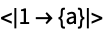
Scan elements including the 0^(th) level:

Wolfram Language code: Scan[Print, <|1 -> {a}|>, {0, Infinity}]

Use the operator form of Scan:

Wolfram Language code: Scan[Print][{a, b, c}]

Scope  (5)

Level Specifications  (5)

Scan level 1 (default):

Wolfram Language code: Scan[Print, {{{{{a}}}}}]

Scan down to level 2:

Wolfram Language code: Scan[Print, {{{{{a}}}}}, 2]

Scan only level 2:

Wolfram Language code: Scan[Print, {{{{{a}}}}}, {2}]

Scan levels 0 through 2:

Wolfram Language code: Scan[Print, {{{{{a}}}}}, {0, 2}]

Scan down to level 3:

Wolfram Language code: Scan[Print, {{{{{a}}}}}, 3]

Scan all levels, starting at level 1:

Wolfram Language code: Scan[Print, {{{a}}}, Infinity]

Scan also level 0:

Wolfram Language code: Scan[Print, {{{a}}}, {0, Infinity}]

Negative levels:

Wolfram Language code: Scan[Print, {{{{a}}}}, -1]
Wolfram Language code: Scan[Print, {{{{a}}}}, -2]
Wolfram Language code: Scan[Print, {{{{a}}}}, {-2}]

Positive and negative levels can be mixed:

Wolfram Language code: Scan[Print, {{{{{a}}}}}, {2, -3}]

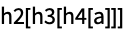
Different heads at each level:

Wolfram Language code: Scan[Print, h0[h1[h2[h3[h4[a]]]]], {2, -3}]
Generalizations & Extensions  (2)

Scan can be used on expressions with any head:

Wolfram Language code: Scan[Print, a + b + c]
Wolfram Language code: Scan[Print, x ^ 2 + y ^ 2, {2}]

Throw works inside Scan:

Wolfram Language code: Catch[Scan[If[# > 5, Throw[#]]&, {2, 4, 6, 8}]]

Options  (1)

Heads  (1)

By default, heads are not scanned:

Wolfram Language code: Scan[Print, {a, b}]
Wolfram Language code: Scan[Print, {a, b}, Heads -> True]

Applications  (2)

Make assignments based on data:

Wolfram Language code: Scan[(u[#] = x)&, {55, 11, 77, 88}]
Wolfram Language code: {u[76], u[77], u[78]}

Find all leaves in an expression:

Wolfram Language code: Integrate[1 / (x ^ 3 - 1), x]
Wolfram Language code: Reap[Scan[Sow, %, {-1}]][[2, 1]]

Properties & Relations  (4)

Leaves are visited before roots:

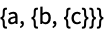
Wolfram Language code: Scan[Print, {a, {b, {c}}}, {0, -1}];

Scan does the same as Map, but without returning a result:

Wolfram Language code: Map[Print, {a, b, c}]
Wolfram Language code: Scan[Print, {a, b, c}]

Use Sow and Reap to collect results:

Wolfram Language code: Reap[Scan[If[# > 0, Sow[#]]&, {1, {-2, π}, -Sqrt[3]}, ∞]][[2, 1]]

Compute Scan in parallel:

Wolfram Language code: Parallelize[Scan[Print, Range[5]]]

See Also

Apply  Map  Level  Sow  NestWhile  Cases

Function Repository: ReadScan

Tech Notes

    ▪
  • Applying Functions to Parts of Expressions

Related Guides

    ▪
  • Applying Functions to Lists
  • ▪
  • Looping Constructs
  • ▪
  • List Manipulation
  • ▪
  • Functional Programming

History

Introduced in 1988 (1.0) | Updated in 1996 (3.0) ▪ 2003 (5.0) ▪ 2014 (10.0)

Wolfram Research (1988), Scan, Wolfram Language function, https://reference.wolfram.com/language/ref/Scan.html (updated 2014).

Text

Wolfram Research (1988), Scan, Wolfram Language function, https://reference.wolfram.com/language/ref/Scan.html (updated 2014).

CMS

Wolfram Language. 1988. "Scan." Wolfram Language & System Documentation Center. Wolfram Research. Last Modified 2014. https://reference.wolfram.com/language/ref/Scan.html.

APA

Wolfram Language. (1988). Scan. Wolfram Language & System Documentation Center. Retrieved from https://reference.wolfram.com/language/ref/Scan.html

BibTeX

@misc{reference.wolfram_2026_scan, author="Wolfram Research", title="{Scan}", year="2014", howpublished="\url{https://reference.wolfram.com/language/ref/Scan.html}", note=[Accessed: 12-November-2026]}

BibLaTeX

@online{reference.wolfram_2026_scan, organization={Wolfram Research}, title={Scan}, year={2014}, url={https://reference.wolfram.com/language/ref/Scan.html}, note=[Accessed: 12-November-2026]}

Top
You are visitor 01402503 — GeezerVison does not store the pages you look up.
Best viewed with Netscape Navigator 4.7 or Internet Explorer 6 at 800×600. No cookies required.