GeezerVisonThe World Wide Web, restored to 800 pixels of glory. |
| Home|About|Gaming cabinet|Archives|How it works|Starter sites |
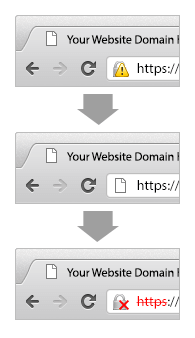
GeezerVison is showing shachecker.com — SHA Checker to Check Transition from SHA 1 to SHA 2 Certificate Check your website for old encryption algorithm SHA-1SSL Certificates rely on a "Signing Algorithm" to provide validation of a website’s identity. Currently, SHA-1 is the most popular of these signing algorithms. Evidence shows that the SHA-1 algorithm is is becoming weaker. Due to the ever increasing speed of computers, the ability to produce a forged SHA-1 certificate will soon be a reality. A recent security alert from Arstechica reports that the SHA-1 algorithm underpinning many SSL certificates could become easily compromised by 2018. More here For this reason, the SSL industry is encouraging websites that move to SHA-2 as soon as possible. Using the above checking tool, you can see if your site is in need of an updated certificate. It’s time to upgrade your current SHA-1 algorithm to SHA-2SHA-2 is a much stronger algorithm that is not currently known to suffer from the same weaknesses as SHA-1. It is also now widely supported by modern web browsers. Because most of the internet can support SHA-2, Google has decided to start giving a security warning in their Chrome web browser for websites using SHA-1 signed certificates.
These changes will begin to take effect on September 26th, 2014. Google has decided to encourage an early switch to SHA-2 due to the large body of research on SHA-1’s weaknesses. Here is a more in-depth discussion about SHA-1 deprecation by Google. How does SHA-2 work?SHA-2 is a set of cryptography hash functions that work with multiple hash algorithms. It includes multiple variations of cryptographic hash functions such as SHA-224, SHA-256 (the most popular), SHA-384, SHA-512, SHA-512/224, SHA-512/256. The research on this new SHA-2 algorithm by security experts shows that it’s almost impossible to break this structure of multiple hash functions and it should be fully secure for the foreseeable future. SHA-2 is a mathematical mechanism. It uses a one-way algorithm to produce a string that is unique to every file. This string – called a hash – is a set bit-length (based off the specific SHA function chosen, the most popular of these, SHA-256 is 256 bit. The number following each of the functions denotes its bit-length). So each file that a SHA-2556 hash is taken of will have a unique hash value of equal length. The one-way nature of this function means that if you are given a hash, you cannot use that to recreate or determine what the original file was. When a SSL provider validates you for a certificate, they store the hash value of your specific certificate and it is distributed with your certificate. It is then used to validate the authenticity of your certificate when a client (a user’s browser) connects to your server. How do I get a SHA-2 certificate?In order to get a SHA-2 certificate, you have to first pick an SSL provider who is capable of supplying certificates signed by SHA-2. We have researched the market and documented major brands who are signing certificates with SHA-2. These brands are Symantec, GeoTrust, Thawte, RapidSSL and Comodo.
If you already have a current certificate from one of these brands, or another CA who provides SHA-2 certificates, then all you need to do is reissue your current certificate and request it is signed with the SHA-2 algorithm. With the above brands this is done during their enrollment process and it is not required to specify SHA-2 in your CSR. If your current SSL provider does not offer SHA-2 certificates, or if you do not yet have an SSL certificate, you can purchase a new certificate from a provider who supplies brands with SHA-2 support. Remember: Always make sure that you have the matching private key for your new/reissued certificate! (If you are told it is necessary to specify SHA-2 in your CSR, you can do so with the below command line if you are using the popular OpenSSL tool:
"openssl req -new -sha256 -key your-private.key -out your-domain.csr" )If you want to know more about these brands of SSL certificates which include the SHA-2 algorithm please visit the following pages:
"For more information on the SHA-2 Algorithm Migration Click Here" |
| You are visitor 01402503 — GeezerVison does not store the pages you look up. Best viewed with Netscape Navigator 4.7 or Internet Explorer 6 at 800×600. No cookies required. |