GeezerVison is showing takocore.com — Tako — Native Terminal for macOS
Tako 0.2.1
A native terminal with room to work
Tako keeps each project in its own workspace. Tile terminals, float them, or park them on the shelf while they keep running. Tako uses Metal to render the terminal on macOS. Embed TakoCore, its Rust terminal engine, through Swift, Rust or C.
App: Apple Silicon, macOS 14 or later. SDK: macOS 14+ and iOS 17+.
0.2.1 release notes
Tako on macOS
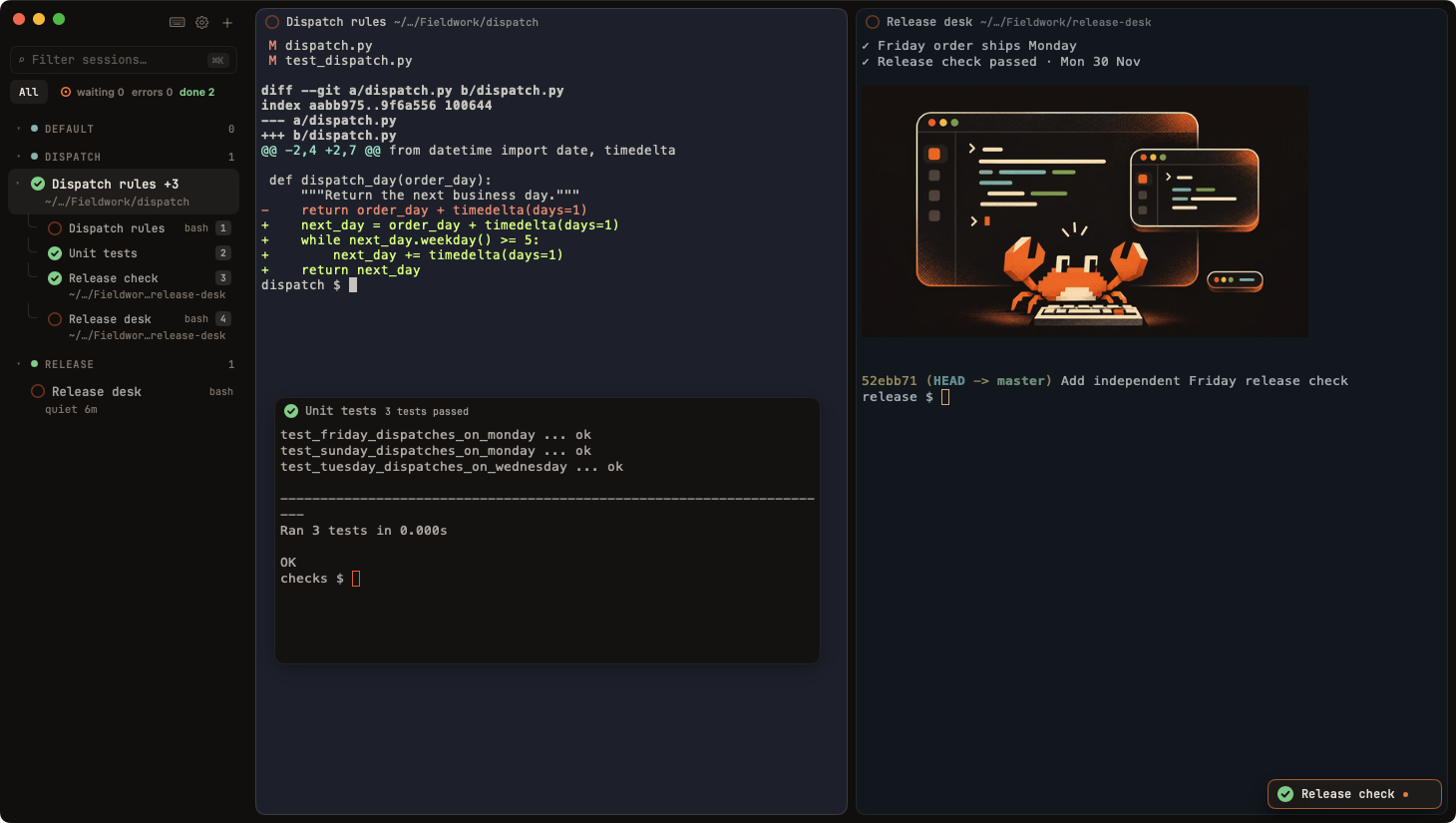
Give each project its own workspace
Keep your code, tests and release checks in sight. Float a pane over the grid or tuck it onto the shelf while its process keeps running.
Session Sidebar
Always visible, in Classic, Minimal or Compact style. Groups sessions by workspace or by status, with counters for waiting, failed and finished work. Rename sessions and terminals in place.
Tiled & Floating Cards
Terminals are tiled or floating cards. Split, maximize, float, minimize to a shelf and restore without restarting their processes.
Move Terminals Between Tabs
Move a terminal beside one in another tab, pull it out into a new tab, or merge a whole session into another tab. Processes keep running.
Pick Up Where You Left Off
Each tab's screen and scrollback come back after a relaunch, marked with when they were saved. A new shell is never passed off as the old one.
Find in All Tabs
Cmd+Shift+F searches every open terminal's history and jumps to the match. Where the shell marks its commands, matches are grouped by the command that printed them, with the exit status and directory the shell reported and the start time Tako recorded.
Know When a Command Ends
A long command that finishes or fails while you are elsewhere marks its tab and can notify you. The state comes from shell integration and exit codes, never from guessing at screen text.
Native Dictation Support
Seamless macOS voice input integration through full NSTextInputContext lifecycle and text-input handling.
Kinetic Touch Scrolling
Smooth momentum scrolling with precise alternate-screen scroll wheel emulation for vim, less, and tmux.
Cyrillic & Dead-Key Parity
Consistent physical keycode handling ensuring shortcuts like Ctrl+C and modifier sequences operate reliably across non-Latin layouts.
TakoCore Engine
The Engine Underneath
A high-fidelity, embeddable VT backend: deterministic snapshot serialization, configurable scrollback ringbuffers. On macOS and iOS, TakoCoreUI draws it with Metal; on servers the same engine runs headless with no renderer.
Illustrative engine output. The desktop and iOS apps render with Metal through TakoCoreUI; server hosts embed the engine headless through Rust or the C ABI.
Engine Highlights
Built for Mission-Critical Terminal Runtimes
Legacy terminal libraries suffer from memory fragmentation, snapshot drift, and crash bugs in high-throughput environments. TakoCore was re-architected from the ground up.
Memory-Safe Rust Engine
Built on Rust's type and memory safety guarantees to prevent memory corruption. Terminal scrollback history is constrained by configurable line limits, while host integrators drain or discard queued events (such as via prod_vt_discard_events()) to prevent retained parser payloads from accumulating in memory.
Lossless State Checkpointing
Instantly serialize the entire active grid, scrollback buffer, cursor coordinates, and active terminal modes into a compact wire format and restore with 0 byte drift.
Metal GPU Pipeline (120 FPS)
Hardware-accelerated glyph caching and instanced batch rendering via Apple Metal on macOS and iOS, delivering buttery-smooth 120Hz ProMotion updates.
AppKit & UIKit Native UI
Ready-to-use TakoTerminalNSView supporting full NSTextInputClient, IME, CJK, dead keys, macOS keyboard Dictation, and kinetic trackpad gestures.
Universal C ABI
Dead-simple integration with Go, Zig, C, and Python backends. Includes prod_vt_discard_events() for host servers that intentionally drain event notifications.
Modern Terminal Specs
Full support for 24-bit TrueColor, SGR extended coordinates, OSC 8 clickable URLs, bracketed paste mode, alternate screen buffers, and Unicode grapheme clustering.
Internal Design
Layered, High-Throughput Architecture
TakoCore cleanly separates stream decoding, grid mutation, lossless checkpointing, and GPU drawing into deterministic, decoupled layers.
Measured in-process throughput of the Rust VT parser and grid data structures using Criterion on Apple Silicon. Cross-product whole-app comparisons are unverified without a standardized external test harness and are qualified or omitted below.
Buffer reflow resizing 80 cols to 40 cols (resize/reflow_80_to_40)
< 1 µs
Circular Line Scroll
Row rotation without scrollback allocation (grid/scroll_up, no_scrollback)
Engine Ingestion Throughput
Higher is faster (MiB/s)
Criterion micro-benchmarks feeding continuous byte patterns into an 80×24 terminal on Apple Silicon (M-series, Darwin). Measured in-process using 256 KiB batch buffers.
feed/sgr_heavy (24-bit TrueColor)29 MiB/s
feed/wide_chars (CJK & Emoji)17 MiB/s
feed/plain_text (ASCII stream)11 MiB/s
feed/cursor_heavy (TUI / curses repaints)8 MiB/s
Measurement Scope & Boundaries
Scope Notice
✓ In-Process Engine Benchmarks (Verified)
The engine workload metrics above and in the breakdown table reflect direct Criterion micro-benchmarks on the pure Rust VT parser and grid memory structures (benches/throughput.rs). They are reproducible by cloning the repository and running cargo bench.
Comparative whole-app benchmarks (evaluating end-to-end PTY throughput, window compositor synchronization, and competitor memory footprints across terminal apps like Alacritty, Ghostty, or iTerm2) require a standardized multi-app measurement harness, version matrices, and published raw test artifacts. Because no third-party execution harness is bundled in the repository, cross-product speedup rankings and competitor timings are omitted to adhere strictly to verifiable data.
Note: Architectural comparisons are based on documented project architecture and repository source code. Cross-product performance and memory benchmarks require dedicated multi-app test harnesses and are not asserted here.
🔬
Reproducing the Engine Benchmarks
The engine workload suite benchmarks the in-process Rust VT parser and grid structures using Criterion. You can execute it directly on your machine:
git clone https://github.com/alex09x/tako && cd tako
cargo bench --bench throughput
The Criterion suite tests the standalone Rust engine (tako_core in-memory parsing and grid data structures). It does not measure end-to-end PTY streaming, display server compositing, or competitor desktop applications, which require a separate whole-app benchmark harness. Benchmark source code is tracked in benches/throughput.rs.
Installation & Integration
Get Started with Tako & TakoCore
Install the ready-to-run desktop terminal app Tako via Homebrew Cask or DMG, or embed the TakoCore engine directly into your own applications using SwiftPM, Cargo, or C ABI.
quickstart
# Install Tako.app and the CLI wrapper via Homebrew
# The tap can lag behind GitHub releases; the Downloads
# section below always lists the current builds.

# 1. Add personal Homebrew tap
brew tap alex09x/apps

# 2. Install Tako macOS App & CLI symlink
brew install --cask tako

# Or install in a single command:
brew install --cask alex09x/apps/tako

# Run Tako from anywhere
tako
// Instantiating a native Metal-accelerated terminal surface in Swift
import AppKit
import TakoCoreUI

/// Whatever runs the program: a local pty, an SSH session. Your app's.
/// A complete one with a login shell is in examples/macos-sample.
protocol TerminalTransport: AnyObject {
    func write(_ data: Data)
    func resize(cols: Int, rows: Int)
}

final class TerminalViewController: NSViewController, TakoTerminalNSViewDelegate {
    private let terminal = TakoTerminalNSView()
    private let transport: TerminalTransport

    init(transport: TerminalTransport) {
        self.transport = transport
        super.init(nibName: nil, bundle: nil)
    }
    required init?(coder: NSCoder) { fatalError() }

    override func loadView() {
        terminal.delegate = self
        view = terminal
    }

    // Program output in: call this with what the transport receives.
    func received(_ bytes: Data) { terminal.feed(data: bytes) }

    // Keys, paste, mouse and replies to the program's queries out.
    func terminalView(_ view: TakoTerminalNSView, sendInputData data: Data) { transport.write(data) }
    func terminalView(_ view: TakoTerminalNSView, sendDeviceReplyData data: Data) { transport.write(data) }
    func terminalView(_ view: TakoTerminalNSView, didResizeCols cols: Int, rows: Int) {
        transport.resize(cols: cols, rows: rows)
    }
}
// Cargo.toml & Rust usage
[dependencies]
tako-core = { git = "https://github.com/alex09x/tako", tag = "v0.2.1" }

// main.rs
use tako_core::terminal::Terminal;

fn main() {
    let mut term = Terminal::new(120, 36);
    term.feed(b"\x1b[32mHello from TakoCore!\x1b[0m\r\n");
    println!("{}", term.plain_string());

    // The whole terminal, restorable into another one.
    let checkpoint = term.export_checkpoint().unwrap();
    let mut copy = Terminal::new(120, 36);
    copy.import_checkpoint(&checkpoint).unwrap();
}
// C ABI: include/prod_vt.h, sample in examples/c
#include <string.h>
#include "prod_vt.h"   /* include/ in the repository */

int main(void) {
    ProdVt *vt = prod_vt_new(100, 30, 10000);   /* cols, rows, scrollback */
    const char *ansi = "\033[1;36mHello C ABI\033[0m\r\n";
    prod_vt_write(vt, (const uint8_t *)ansi, strlen(ansi));

    /* What the terminal owes the program, e.g. a cursor report. */
    uint8_t *reply; size_t len;
    if (prod_vt_drain_responses(vt, &reply, &len)) prod_vt_buffer_free(reply);

    /* Drop notifications this host does not use. */
    prod_vt_discard_events(vt);
    prod_vt_free(vt);
    return 0;
}
Downloads & Releases
Tako 0.2.1
Download the Tako desktop app for Apple Silicon Macs running macOS 14 or later, and a matched TakoCore XCFramework for macOS 14+ and iOS 17+.
Upgrading an app that embeds TakoCore 0.1.x? Review the SDK and API changes before updating.
Tako-0.2.1.dmg • 21.5 MB • SHA-256Developer ID signed, notarized by Apple
Settings as a native panel inside the terminal window, with app, workspace, session and terminal levels.
Full theme presets with reversible previews; workspaces, sessions and terminals inherit and override appearance.
Tiled or floating terminal cards, a shelf for minimized terminals, and a pane header menu to split, maximize, float or rename.
An always-visible session sidebar in Classic, Minimal or Compact style, grouped by workspace or by status.
Move a terminal to another tab, take it out into a new tab, or merge a whole session; processes keep running.
Per-event activity sounds, one-row toasts and background notifications for work that finishes, fails or waits out of sight.
You are visitor 01402792 — GeezerVison does not store the pages you look up. Best viewed with Netscape Navigator 4.7 or Internet Explorer 6 at 800×600. No cookies required.