GeezerVisonThe World Wide Web, restored to 800 pixels of glory. |
| Home|About|Gaming cabinet|Archives|How it works|Starter sites |
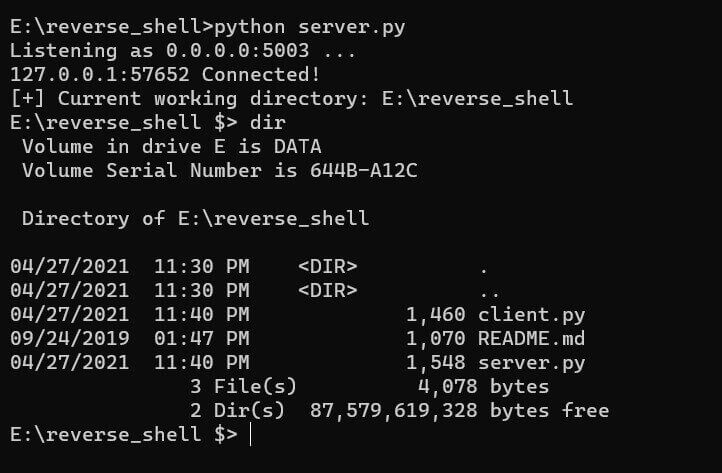
GeezerVison is showing thepythoncode.com — How to Create a Reverse Shell in Python - The Python Code Unlock the secrets of your code with our AI-powered Code Explainer. Take a look! IntroductionThere are many ways to gain control over a compromised system. A common practice is to gain interactive shell access, which enables you to try to gain complete control of the operating system. However, most basic firewalls block direct remote connections. One of the methods to bypass this is to use reverse shells. A reverse shell is a program that executes local cmd.exe (for Windows) or bash/zsh (for Unix-like) commands and sends the output to a remote machine. With a reverse shell, the target machine initiates the connection to the attacker machine, and the attacker's machine listens for incoming connections on a specified port; this will bypass firewalls. The basic idea of the code we will implement is that the attacker's machine will keep listening for connections. Once a client (or target machine) connects, the server will send shell commands to the target machine and expect output results. Related: How to Use Hash Algorithms in Python using hashlib. Server SideFirst, let's start with the server (attacker's code): Notice that I've used We then specified some variables and initiated the TCP socket. Notice I used However, malicious reverse shells usually use the popular port 80 (i.e Now let's bind that socket we just created to our IP address and port: Related: Build 35+ Ethical Hacking Scripts & Tools with Python EBook Listening for connections: If any client attempts to connect to the server, we need to accept it: accept() function waits for an incoming connection and returns a new socket representing the connection (client_socket), and the address (IP and port) of the client. Now below code will be executed only if a user is connected to the server; let us receive a message from the client that contains the current working directory of the client: Note that we need to encode the message to bytes before sending, and we must send the message using the Now let's start our main loop, which is sending shell commands and retrieving the results, and printing them: In the above code, we're prompting the server user (i.e., attacker) of the command he wants to execute on the client; we send that command to the client and expect the command's output to print it to the console. Note that we're splitting the output into command results and the current working directory. That's because the client will be sending both of these messages in a single send operation. If the command is "exit", just exit out of the loop and close the connections. Related: How to Make a Chat Application in Python. Client SideLet's see the code of the client now, open up a new file and write: Above, we're setting the Note that if you're testing both codes on the same machine, you can set the Let's create the socket and connect to the server: Remember, the server expects the current working directory of the client just after connection. Let's send it then: We used the Going to the main loop, we first receive the command from the server, execute it and send the result back. Here is the code for that: First, we receive the command from the server using After that, if it's not a Finally, we prepare our message that contains the command output and working directory and then send it. GET -10% OFF: Build 35+ Ethical Hacking Scripts & Tools with Python EBook. ResultsOkay, we're done writing the code for both sides. Let's run them. First, you need to run the server to listen on that port and then run the client after that. Below is a screenshot of when I started the server and instantiated a new client connection, and then ran a demo
And this was my run command on the client-side:
Note that I used ConclusionHere are some ideas to extend that code:
In our Ethical Hacking with Python EBook, we have built an advanced reverse shell that has all of the features mentioned above; it can capture the target machine's screen and microphone, download and upload any file, and many more features. We also made other malware, such as ransomware and keyloggers. Make sure you check it out here if you're interested! Also, there is a utility in Linux called To conclude, a reverse shell isn't generally meant to be malicious code. We can use it for legitimate purposes; for example, you can use this to manage your machines remotely. DISCLAIMER: We are not responsible for any misuse of the code provided in this tutorial. Use it on your own responsibility. Learn also: How to Transfer Files in the Network using Sockets in Python. Happy Coding ♥ Save time and energy with our Python Code Generator. Why start from scratch when you can generate? Give it a try!
Sharing is caring!
Read also
How to Make a Keylogger in PythonCreating and implementing a keylogger from scratch that records key strokes from keyboard and send them to email or save them as log files using Python and keyboard library. 
How to Make a Ransomware in PythonLearn how to build a ransomware using symmetric encryption (AES algorithm) with the help of cryptography library in Python. 
How to Make a Network Scanner using Scapy in PythonBuilding a simple network scanner using ARP requests and monitor the network using Scapy library in Python. CommentsGot a coding query or need some guidance before you comment? Check out this Python Code Assistant for expert advice and handy tips. It's like having a coding tutor right in your fingertips! |
| You are visitor 01402503 — GeezerVison does not store the pages you look up. Best viewed with Netscape Navigator 4.7 or Internet Explorer 6 at 800×600. No cookies required. |