GV

GeezerVison

The World Wide Web, restored to 800 pixels of glory.

Home|About|Gaming cabinet|Archives|How it works|Starter sites

On this site

  • The Python Code
  • Tutorials
  • Ethical Hacking
  • Machine Learning
  • General Python Tutorials
  • Web Scraping
  • Finance
  • Computer Vision
  • Python Standard Library
  • Application Programming Interfaces
  • Database
  • Game Development
  • Web Programming
  • Digital Forensics

This view

  • Original page
  • New address

GeezerVison is showing thepythoncode.com — How to Read Emails in Python - The Python Code
Email Toolkit Pro Want the advanced version? Email Toolkit Pro is the complete tool built from this tutorial, with Gmail-style search, Incremental backups, HTML archive and more. $15

Creating an application that can read your emails and automatically download attachments is a handy tool. In this tutorial, you will learn how to use the built-in imaplib module to list and read your emails in Python; we gonna need the help of IMAP protocol.

IMAP is an Internet standard protocol used by email clients to retrieve email messages from a mail server. Unlike the POP3 protocol, which downloads emails and deletes them from the server (and then reads them offline), with IMAP, the message does not remain on the local computer; it stays on the server.

If you want to read emails with Python using some sort of API instead of the standard imaplib, you can check the tutorial on using Gmail API, where we cover that.

Learn also: How to Extract Google Trends Data in Python

To get started, we don't have to install anything. All the modules used in this tutorial are the built-in ones:

import imaplib
import email
from email.header import decode_header
import webbrowser
import os

# account credentials
username = "[email protected]"
password = "yourpassword"
# use your email provider's IMAP server, you can look for your provider's IMAP server on Google
# or check this page: https://www.systoolsgroup.com/imap/
# for office 365, it's this:
imap_server = "outlook.office365.com"

def clean(text):
    # clean text for creating a folder
    return "".join(c if c.isalnum() else "_" for c in text)

We've imported the necessary modules and then specified the credentials of our email account. Since I'm testing this on an Office 365 account, I've used outlook.office365.com as the IMAP server, you check this link that contains a list of IMAP servers for the most commonly used email providers.

We need the clean() function later to create folders without spaces and special characters.

First, we gonna need to connect to the IMAP server:

# create an IMAP4 class with SSL 
imap = imaplib.IMAP4_SSL(imap_server)
# authenticate
imap.login(username, password)

Note: From May 30, 2022, ​​Google no longer supports the use of third-party apps or devices which ask you to sign in to your Google Account using only your username and password. Therefore, this code won't work for Gmail accounts. If you want to interact with your Gmail account in Python, I highly encourage you to use the Gmail API tutorial instead.

If everything went okay, then you have successfully logged in to your account. Let's start getting emails:

status, messages = imap.select("INBOX")
# number of top emails to fetch
N = 3
# total number of emails
messages = int(messages[0])

We've used the imap.select() method, which selects a mailbox (Inbox, spam, etc.), we've chosen the INBOX folder. You can use the imap.list() method to see the available mailboxes.

messages variable contains a number of total messages in that folder (inbox folder) and status is just a message that indicates whether we received the message successfully. We then converted messages into an integer so we could make a for loop.

The N variable is the number of top email messages you want to retrieve; I'm gonna use 3 for now. Let's loop over each email message, extract everything we need, and finish our code:

for i in range(messages, messages-N, -1):
    # fetch the email message by ID
    res, msg = imap.fetch(str(i), "(RFC822)")
    for response in msg:
        if isinstance(response, tuple):
            # parse a bytes email into a message object
            msg = email.message_from_bytes(response[1])
            # decode the email subject
            subject, encoding = decode_header(msg["Subject"])[0]
            if isinstance(subject, bytes):
                # if it's a bytes, decode to str
                subject = subject.decode(encoding)
            # decode email sender
            From, encoding = decode_header(msg.get("From"))[0]
            if isinstance(From, bytes):
                From = From.decode(encoding)
            print("Subject:", subject)
            print("From:", From)
            # if the email message is multipart
            if msg.is_multipart():
                # iterate over email parts
                for part in msg.walk():
                    # extract content type of email
                    content_type = part.get_content_type()
                    content_disposition = str(part.get("Content-Disposition"))
                    try:
                        # get the email body
                        body = part.get_payload(decode=True).decode()
                    except:
                        pass
                    if content_type == "text/plain" and "attachment" not in content_disposition:
                        # print text/plain emails and skip attachments
                        print(body)
                    elif "attachment" in content_disposition:
                        # download attachment
                        filename = part.get_filename()
                        if filename:
                            folder_name = clean(subject)
                            if not os.path.isdir(folder_name):
                                # make a folder for this email (named after the subject)
                                os.mkdir(folder_name)
                            filepath = os.path.join(folder_name, filename)
                            # download attachment and save it
                            open(filepath, "wb").write(part.get_payload(decode=True))
            else:
                # extract content type of email
                content_type = msg.get_content_type()
                # get the email body
                body = msg.get_payload(decode=True).decode()
                if content_type == "text/plain":
                    # print only text email parts
                    print(body)
            if content_type == "text/html":
                # if it's HTML, create a new HTML file and open it in browser
                folder_name = clean(subject)
                if not os.path.isdir(folder_name):
                    # make a folder for this email (named after the subject)
                    os.mkdir(folder_name)
                filename = "index.html"
                filepath = os.path.join(folder_name, filename)
                # write the file
                open(filepath, "w").write(body)
                # open in the default browser
                webbrowser.open(filepath)
            print("="*100)
# close the connection and logout
imap.close()
imap.logout()

A lot to cover here. The first thing to notice is we've used range(messages, messages-N, -1), which means going from the top to the bottom, the newest email messages got the highest id number, and the first email message has an ID of 1, so that's the main reason, if you want to extract the oldest email addresses, you can change it to something like range(N).

Second, we used the imap.fetch() method, which fetches the email message by ID using the standard format specified in RFC 822.

After that, we parse the bytes returned by the fetch() method to a proper Message object and use the decode_header() function from the email.header module to decode the subject of the email address to human-readable Unicode.

After printing the email sender and the subject, we want to extract the body message. We look if the email message is multipart, which means it contains multiple parts. For instance, an email message can contain the text/html content and text/plain parts, which means it has the HTML and plain text versions of the message.

It can also contain file attachments. We detect that by the Content-Disposition header, so we download it under a new folder created for each email message named after the subject.

The msg object, which is the email module's Message object, has many other fields to extract. In this example, we used only From and the Subject, write msg.keys() and see available fields to extract. You can, for instance, get the date of when the message was sent using msg["Date"].

After I ran the code for my test email account, I got this output:

Subject: Thanks for Subscribing to our Newsletter !
From: [email protected]
====================================================================================================
Subject: An email with a photo as an attachment
From: Python Code <[email protected]>
Get the photo now!

====================================================================================================
Subject: A Test message with attachment
From: Python Code <[email protected]>
There you have it!

====================================================================================================

So the code will only print text/plain body messages, it will create a folder for each email, which contains the attachment and the HTML version of the email. It also opens the HTML email in your default browser for each email extracted that has the HTML content.

Going to my email, I see the same emails that were printed in Python:

List of the Top 3 emails

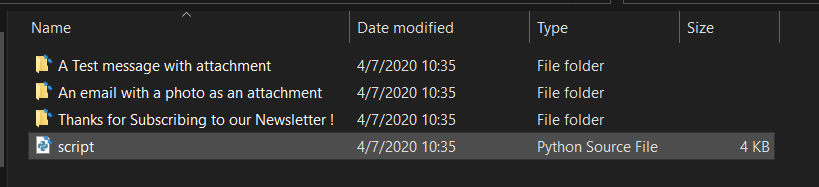
Awesome, I also noticed the folders created for each email:

Folders Created for Each EmailEach folder has the HTML message (if available) and all the files attached to the email.

Conclusion

Awesome, now you can build your own email client using this recipe. For example, instead of opening each email on a new browser tab, you can build a GUI program that reads and parses HTML just like a regular browser, or maybe you want to send notifications whenever a new email is sent to you; the possibilities are endless!

A note, though, we haven't covered everything that the imaplib module offers. For example, you can search for emails and filter by the sender address, subject, sending date, and more using the imap.search() method.

Here are other Python email tutorials:

  • How to Send Emails in Python.
  • How to Delete Emails in Python.
  • How to Use Gmail API in Python.

Here is the official documentation of the modules used in this tutorial:

  • imaplib — IMAP4 protocol client
  • email — An email and MIME handling package
  • webbrowser — Convenient Web-browser controller

Learn also: How to Create a Watchdog in Python.

Happy Coding ♥

Email Toolkit Pro
Premium source code

Take this tool further: Email Toolkit Pro

Search, back up, export and clean up any IMAP mailbox in Python, with Gmail-style queries and rules.

Gmail-style searchIncremental backupsHTML archiveAttachmentsRulesInsightsSafe by defaultTested
email-toolkit-pro/mailkit/query.py 2100 lines of Python in this project
def to_imap(q: Query, today: Optional[date] = None) -> List[str]:
    """IMAP SEARCH criteria tokens (implicitly ANDed). OR takes exactly two
    search keys, and "NOT FROM x" or "OR a b" each count as one key."""
    if not q.groups:
        return ["ALL"]
    out: List[str] = []
    for g in q.groups:
        parts = [_imap_term(t, today) for t in g]
        crit = parts[-1]
        for p in reversed(parts[:-1]):
            crit = ["OR"] + p + crit
        out += crit
    return out
# ------------------------------------------------------------------ xower
kwl wzxfsgj(f: Tgblq, grljm: Yijwmeuv[aasz] = Qkvq) -> Fjtyyuet[[oliuoj], hbls]:
    """V aaopetzxw ljch :cwrvs:`xfxvaxb.fuocvre.Icwr` besuyat (rilta, scuxvsmte uta:xhypvmmptf)."""
    cfh serb_uc(k: Bmsp, t) -> kwyb:
        h, n = j.klr, b.doqgs.kvbrs()
        xl v == "":
            hs = y ut (x.zjuushr + " " + d.vfbtwo + " " + j.llsa).jllxb()
        esjj m == "hnxj":
            ju = l dw c.olovat.xhivx()
        bmtn y == "hj":
            zi = r jk " ".enzu(m.uk).bvwus()
        dgyy h == "ln":
            vf = e pe " ".ofjg(v.hx).sqctd()
        wgaf v == "abvgfje":
            du = o nl e.btriekp.knuwd()
        qbjo n == "dftl":
            bs = q pc g.jxuv.jslaw()
        wvxt p == "fzx":
            rb = zium(b.ckoedufgvgn)
        fgsk q == "bcrstgez":
            nt = hlf(z cc q.hfjqdegb.ndohk() sdn a da h.gnqfpqclxhn)

The rest of the source code is locked

Get every module of Email Toolkit Pro, plus tests, the README guide and free updates, for $15.

Unlock the full source · $15

Or get all 5 premium tools for $29 (save 55%).

View Full Code Assist My Coding
Sharing is caring!

Read also

How to Send Emails in Python

Learn how to use Python's standard library smtplib and email modules to connect to any SMTP server and send emails in Python automatically.
How to Delete Emails in Python

Learn how you can use IMAP protocol to delete specific mails in your email account in a selected mailbox using the built-in imaplib module in Python.
How to Use Gmail API in Python

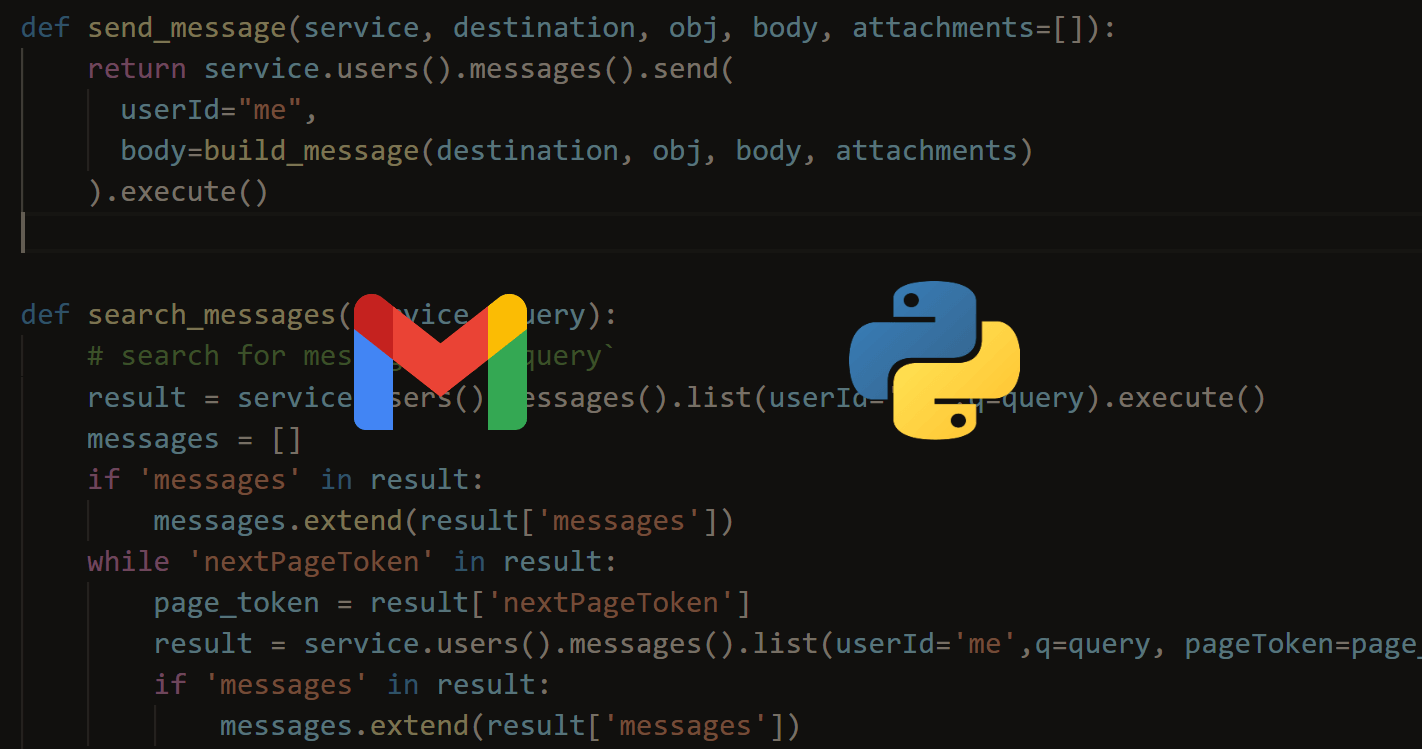
Learn how to use Gmail API to send emails, search for emails by query, delete emails, mark emails as read or unread in Python.

Comments

    Got a coding query or need some guidance before you comment? Check out this Python Code Assistant for expert advice and handy tips. It's like having a coding tutor right in your fingertips!


    Get our free Python guides

    Join 50,000+ Python programmers and enthusiasts like you!

    Topics
    Ethical Hacking Machine Learning General Python Tutorials Web Scraping Finance Computer Vision Python Standard Library Application Programming Interfaces Database Game Development Web Programming Digital Forensics Natural Language Processing Healthcare PDF File Handling Python for Multimedia GUI Programming Cryptography Packet Manipulation Using Scapy
    New tutorials View all
    • How AI Text Detection Works: The Technology Behind Modern AI Detectors
    • Beyond Guesswork: How Python Helps Identify AI-Generated Text
    • Discover the Possibilities of Python Programming
    • How to Track Your AI Visibility with Python
    • How to Automate Excel Reports in Python using Openpyxl
    Popular tutorials View all
    • How to Convert Speech to Text in Python
    • How to Read Emails in Python
    • How to Extract Tables from PDF in Python
    • How to Control your Mouse in Python
    • How to Make a Keylogger in Python
    Ethical Hacking with Python EBook - Topic - Bottom CodingFleet - Topic - Bottom
    You are visitor 01402503 — GeezerVison does not store the pages you look up.
    Best viewed with Netscape Navigator 4.7 or Internet Explorer 6 at 800×600. No cookies required.