GeezerVisonThe World Wide Web, restored to 800 pixels of glory. | ||||||||||||||||||||
| Home|About|Gaming cabinet|Archives|How it works|Starter sites | ||||||||||||||||||||
GeezerVison is showing thepythoncode.com — How to Build a Semantic Search Engine with FAISS and Sentence Transformers in Python - The Python Code Confused by complex code? Let our AI-powered Code Explainer demystify it for you. Try it out! Here's a sentence: "How do I make pasta at home?" Now here's another: "Pasta carbonara is an Italian dish made with eggs, cheese, pancetta, and black pepper." These two sentences share exactly one word: "pasta." A keyword search engine like This gap — between what words say and what they mean — is the entire reason semantic search exists. And in 2026, building one no longer requires a PhD or a cloud API key. You can run a high-quality semantic search engine entirely on your laptop, for free, with two Python libraries: Sentence Transformers for generating embeddings and FAISS for searching them at lightning speed. In this tutorial, I'll walk you through building one from scratch. We'll embed 140 documents across 7 categories, index them with FAISS, run real semantic queries, compare against keyword search, and visualize the entire embedding space — all in under 150 lines of Python. If you've ever wondered how retrieval works in systems like ChatGPT or how RAG chatbots find relevant documents before generating answers, this is the engine that powers that retrieval step. We have a full tutorial on building a RAG chatbot that uses this exact technique with ChromaDB and LangChain. What "Semantic Search" Actually MeansTraditional search matches tokens. You type "climate change effects" and the engine finds documents containing those exact words. This works fine until someone writes "global warming impacts" — semantically identical but lexically distinct. Keyword search sees zero overlap and returns nothing. Semantic search matches meaning. It converts both your query and every document into a dense vector — a list of 384 numbers (or 768, or 1536) that encodes what the text is about, not just what it contains. Documents with similar meanings end up near each other in this vector space, regardless of vocabulary. When you search, the engine finds the vectors closest to your query vector and returns those documents. This is the engine under every modern search system — Google, Spotify, Notion, ChatGPT's retrieval. And the tool that makes it possible at scale is FAISS (Facebook AI Similarity Search), an open-source library from Meta that can search billions of vectors in milliseconds. The Stack: Sentence Transformers + FAISSTwo libraries do all the heavy lifting:
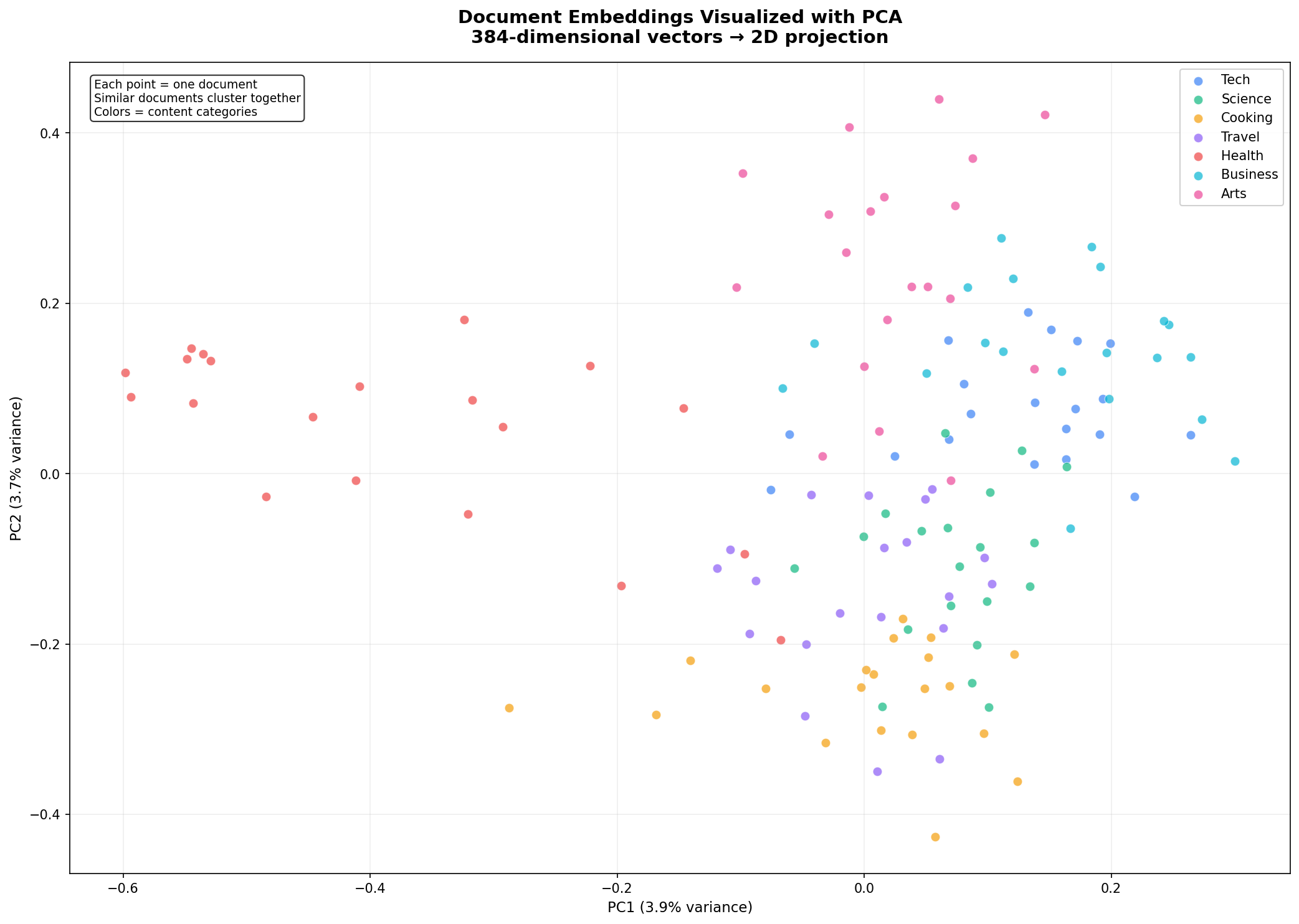
Both are pure The Step 1: Prepare Your Document CorpusSemantic search needs documents to search through. For this tutorial, I created 140 documents spread across 7 categories: Technology, Science, Cooking, Travel, Health, Business, and Arts. Each category has 20 short documents — single sentences about different topics. Here's a sample: The full dataset is 140 sentences — small enough to run instantly, diverse enough to demonstrate meaningful semantic clusters. In a real application, you'd replace this with thousands or millions of documents loaded from files, databases, or APIs. Step 2: Generate Embeddings with Sentence TransformersThis is where text becomes math. The model reads each document and outputs a fixed-size vector that captures its semantic meaning: Three important details here. First, What do these embeddings actually look like? Each one is a list of 384 numbers — impossible to visualize directly, but here are the first few values of the first embedding: These numbers encode the model's understanding of what the text means. Documents about cooking will have similar patterns of numbers, as will documents about science or travel — even if they use completely different vocabulary. Step 3: Build the FAISS IndexNow we take our 140 vectors and build a searchable index. FAISS offers several index types — for this tutorial we'll use That's it. The index is built and ready to search. Step 4: Run Semantic QueriesThe search function embeds your query the same way as the documents, then asks FAISS for the nearest neighbors: Now let's search. Here's what happens when you query "How do I make pasta at home?": Notice: the word "pasta" only appears in result #1. The other results — about roux and mise en place — don't share a single keyword with the query. Yet they're all about cooking, and the model knows it. That's semantic search. Here's another — "What causes earthquakes and volcanic eruptions?": The top result is a perfect match at 71.2%, and results 2-3 are clearly geology-related. The model understood the domain instantly. Semantic vs Keyword: The Difference Is DramaticTo really drive the point home, let's compare against a naive keyword approach on the same query: Query: "How do I create and deploy web applications?" Keyword search returns plate tectonics as the #1 result — just because it contains the word "how." Semantic search returns Docker, DevOps, Kubernetes — exactly what you'd want when asking about deploying web applications. The difference isn't subtle. Visualizing the Embedding Space384-dimensional vectors are impossible to visualize directly, but we can use PCA (Principal Component Analysis) to project them down to 2D while preserving as much structure as possible: Here's the result. Each dot is a document, colored by its semantic category:
Look at how the clusters form naturally. Cooking documents (yellow) group together. Science documents (green) form their own distinct region. Tech documents (blue) cluster on the right. The model learned these semantic groupings purely from reading billions of sentences during pre-training — we never told it about our categories. It understood that "pasta carbonara" and "chocolate chip cookies" belong together, while "plate tectonics" belongs somewhere else entirely. PC1 and PC2 together explain only about 7-8% of the total variance — normal when compressing 384 dimensions into 2. Most of the semantic structure lives in dimensions we can't see. But the visible structure is real and matches our human-labeled categories remarkably well. Performance: How Fast Is It?On a standard CPU, 1,000 searches across 140 documents completed in about 11 seconds — roughly 11 milliseconds per search, or 90 queries per second. This is fully brute-force (IndexFlatIP compares the query against every vector). FAISS offers faster index types for larger datasets:
Switching index types is a one-line change — the search API stays identical. Query-to-Cluster MappingAs a final demonstration, here's one query from each category mapped to its top result: Every single query maps correctly to its semantic cluster. The model understood the domain of each query — not by matching keywords, but by understanding meaning. Where to Go From HereThis tutorial gives you the foundation. From here, you can:
Wrapping UpYou now have a working semantic search engine that runs entirely on your machine — no API keys, no cloud services, no monthly bills. The same architecture scales from 100 documents to 100 million with a one-line index change in FAISS. What I find remarkable is how little code this requires. The heavy lifting — understanding language, converting it to vectors, searching those vectors efficiently — is all handled by two libraries. Your job is to feed them documents and ask good questions. The complete code is below. Install the dependencies and start searching. Further Reading:
Ready for more? Dive deeper into coding with our AI-powered Code Explainer. Don't miss it!
Sharing is caring!
CommentsGot a coding query or need some guidance before you comment? Check out this Python Code Assistant for expert advice and handy tips. It's like having a coding tutor right in your fingertips! | ||||||||||||||||||||
| You are visitor 01402503 — GeezerVison does not store the pages you look up. Best viewed with Netscape Navigator 4.7 or Internet Explorer 6 at 800×600. No cookies required. |