Plugin API
Vite plugins extends Rolldown's plugin interface with a few extra Vite-specific options. As a result, you can write a Vite plugin once and have it work for both dev and build.
It is recommended to go through Rolldown's plugin documentation first before reading the sections below.
Authoring a Plugin
Vite strives to offer established patterns out of the box, so before creating a new plugin make sure that you check the Features guide to see if your need is covered. Also review available community plugins, both in the form of a compatible Rollup plugin and Vite Specific plugins.
When creating a plugin, you can inline it in your vite.config.js. There is no need to create a new package for it. Once you see that a plugin was useful in your projects, consider sharing it to help others in the ecosystem.
TIP
When learning, debugging, or authoring plugins, we suggest including vite-plugin-inspect in your project. It allows you to inspect the intermediate state of Vite plugins. After installing, you can visit localhost:5173/__inspect/ to inspect the modules and transformation stack of your project. Check out install instructions in the vite-plugin-inspect docs. 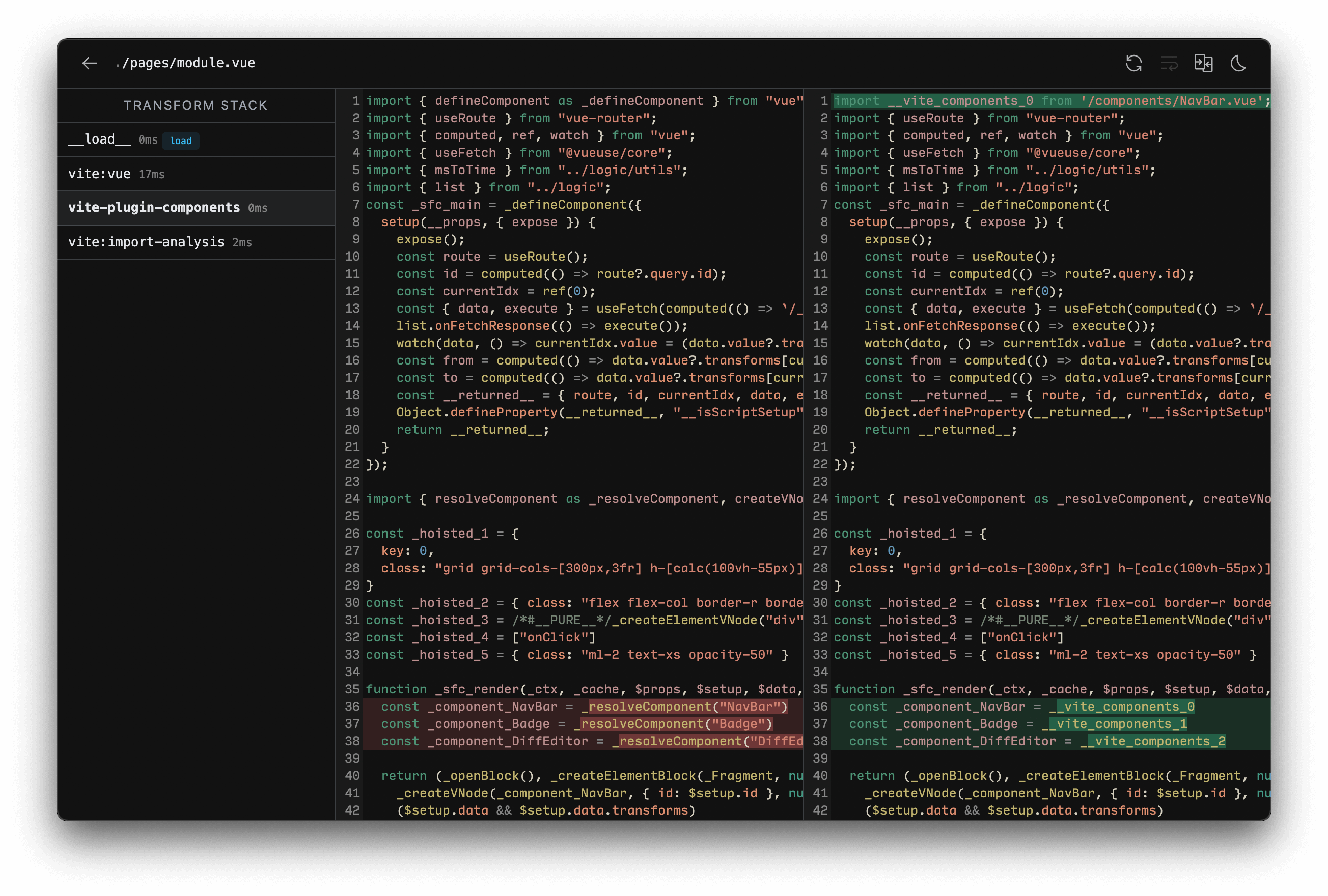
Conventions
If the plugin doesn't use Vite specific hooks and can be implemented as a Compatible Rolldown Plugin, then it is recommended to use the Rolldown Plugin naming conventions.
- Rolldown Plugins should have a clear name with
rolldown-plugin- prefix. - Include
rolldown-plugin and vite-plugin keywords in package.json keywords field.
This exposes the plugin to be also used in pure Rolldown or Rollup based projects.
For Vite only plugins
- Vite Plugins should have a clear name with
vite-plugin- prefix. - Include
vite-plugin keyword in package.json keywords field. - Include a section in the plugin docs detailing why it is a Vite only plugin (for example, it uses Vite specific plugin hooks).
If your plugin is only going to work for a particular framework, its name should be included as part of the prefix.
vite-plugin-vue- prefix for Vue Pluginsvite-plugin-react- prefix for React Pluginsvite-plugin-svelte- prefix for Svelte Plugins
See also Virtual Modules Convention.
Plugins Config
Users will add plugins to the project devDependencies and configure them using the plugins array option.
vite.config.js
jsimport rollupPlugin from 'rollup-plugin-feature'
import vitePlugin from 'vite-plugin-feature'
export default defineConfig({
plugins: [vitePlugin(), rollupPlugin()],
})
Falsy plugins will be ignored, which can be used to easily activate or deactivate plugins.
plugins also accepts presets including several plugins as a single element. This is useful for complex features (like framework integration) that are implemented using several plugins. The array will be flattened internally.
jsimport frameworkDevTools from 'vite-plugin-framework-devtools'
import frameworkRefresh from 'vite-plugin-framework-refresh'
export default function framework(config) {
return [frameworkRefresh(config), frameworkDevTools(config)]
}
vite.config.js
jsimport { defineConfig } from 'vite'
import framework from 'vite-plugin-framework'
export default defineConfig({
plugins: [framework()],
})
Simple Examples
TIP
It is common convention to author a Vite/Rolldown/Rollup plugin as a factory function that returns the actual plugin object. The function can accept options which allows users to customize the behavior of the plugin.
Transforming Custom File Types
jsconst fileRegex = /\.(my-file-ext)$/
export default function myPlugin() {
return {
name: 'transform-file',
transform: {
filter: {
id: fileRegex,
},
handler(src, id) {
return {
code: compileFileToJS(src),
map: null, // provide source map if available
}
},
},
}
}
Importing a Virtual File
Virtual modules allow you to pass build time information to the source files using normal ESM import syntax. See Virtual Modules Convention for the full convention.
jsimport { exactRegex } from '@rolldown/pluginutils'
export default function myPlugin() {
const virtualModuleId = 'virtual:my-module'
const resolvedVirtualModuleId = '\0' + virtualModuleId
return {
name: 'my-plugin', // required, will show up in warnings and errors
resolveId: {
filter: { id: exactRegex(virtualModuleId) },
handler() {
return resolvedVirtualModuleId
},
},
load: {
filter: { id: exactRegex(resolvedVirtualModuleId) },
handler() {
return `export const msg = "from virtual module"`
},
},
}
}
Which allows importing the module in JavaScript:
jsimport { msg } from 'virtual:my-module'
console.log(msg)
In Vite, since \0 is not a permitted char in import URLs, a \0{id} virtual id ends up encoded as /@id/__x00__{id} during dev in the browser. The id is decoded back before entering the plugins pipeline, so this is not seen by plugin hooks code.
Rolldown Hooks
During dev, the Vite dev server creates a plugin container that invokes Rolldown Build Hooks the same way Rolldown does it.
All rolldown hooks are per-environment hooks.
The following hooks are called once on server start:
The following hooks are called on each incoming module request:
These hooks also have an extended options parameter with additional Vite-specific properties. You can read more in the SSR documentation.
Some resolveId calls' importer value may be an absolute path for a generic index.html at root as it's not always possible to derive the actual importer due to Vite's unbundled dev server pattern. For imports handled within Vite's resolve pipeline, the importer can be tracked during the import analysis phase, providing the correct importer value.
The following hooks are called when the server is closed:
Note that the moduleParsed hook is not called during dev, because Vite avoids full AST parses for better performance.
Output Generation Hooks (except closeBundle) are not called during dev.
Vite Specific Hooks
Vite plugins can also provide hooks that serve Vite-specific purposes. These hooks are ignored by Rollup.
config
Type: (config: UserConfig, env: { mode: 'build' | 'serve', command: string, isSsrBuild?: boolean, isPreview?: boolean }) => UserConfig | null | void
Kind: async, sequential
Scope: Global
Modify Vite config before it's resolved. The hook receives the raw user config (CLI options merged with config file) and the current config env which exposes the mode and command being used. It can return a partial config object that will be deeply merged into existing config, or directly mutate the config (if the default merging cannot achieve the desired result).
Example:
js// return partial config (recommended)
const partialConfigPlugin = () => ({
name: 'return-partial',
config: () => ({
resolve: {
alias: {
foo: 'bar',
},
},
}),
})
// mutate the config directly (use only when merging doesn't work)
const mutateConfigPlugin = () => ({
name: 'mutate-config',
config(config, { command }) {
if (command === 'build') {
config.root = 'foo'
}
},
})
Note
User plugins are resolved before running this hook so injecting other plugins inside the config hook will have no effect.
configResolved
Type: (config: ResolvedConfig) => void | Promise<void>
Kind: async, parallel
Scope: Global
Called after the Vite config is resolved. Use this hook to read and store the final resolved config. It is also useful when the plugin needs to do something different based on the command being run.
Example:
jsconst examplePlugin = () => {
let config
return {
name: 'read-config',
configResolved(resolvedConfig) {
// store the resolved config
config = resolvedConfig
},
// use stored config in other hooks
transform(code, id) {
if (config.command === 'serve') {
// dev: plugin invoked by dev server
} else {
// build: plugin invoked by Rollup
}
},
}
}
Note that the command value is serve in dev (in the cli vite, vite dev, and vite serve are aliases).
configureServer
Type: (server: ViteDevServer) => (() => void) | void | Promise<(() => void) | void>
Kind: async, sequential
See also: ViteDevServer
Scope: Global
Hook for configuring the dev server. The most common use case is adding custom middlewares to the internal connect app:
jsconst myPlugin = () => ({
name: 'configure-server',
configureServer(server) {
server.middlewares.use((req, res, next) => {
// custom handle request...
})
},
})
Injecting Post Middleware
The configureServer hook is called before internal middlewares are installed, so the custom middlewares will run before internal middlewares by default. If you want to inject a middleware after internal middlewares, you can return a function from configureServer, which will be called after internal middlewares are installed:
jsconst myPlugin = () => ({
name: 'configure-server',
configureServer(server) {
// return a post hook that is called after internal middlewares are
// installed
return () => {
server.middlewares.use((req, res, next) => {
// custom handle request...
})
}
},
})
Storing Server Access
In some cases, other plugin hooks may need access to the dev server instance (e.g. accessing the WebSocket server, the file system watcher, or the module graph). This hook can also be used to store the server instance for access in other hooks:
jsconst myPlugin = () => {
let server
return {
name: 'configure-server',
configureServer(_server) {
server = _server
},
transform(code, id) {
if (server) {
// use server...
}
},
}
}
Note configureServer is not called when running the production build so your other hooks need to guard against its absence.
configurePreviewServer
Type: (server: PreviewServer) => (() => void) | void | Promise<(() => void) | void>
Kind: async, sequential
See also: PreviewServer
Scope: Global
Same as configureServer but for the preview server. Similarly to configureServer, the configurePreviewServer hook is called before other middlewares are installed. If you want to inject a middleware after other middlewares, you can return a function from configurePreviewServer, which will be called after internal middlewares are installed:
jsconst myPlugin = () => ({
name: 'configure-preview-server',
configurePreviewServer(server) {
// return a post hook that is called after other middlewares are
// installed
return () => {
server.middlewares.use((req, res, next) => {
// custom handle request...
})
}
},
})
closeServer
Type: (context: { reason: 'restart' | 'close' }) => void | Promise<void>
Kind: async, parallel
Scope: Global
Called when the dev server is restarted or closed, after the server has been torn down. Typically used to dispose resources created in configureServer.
The context.reason distinguishes the two cases:
'restart': the server is restarting (e.g. a config file change or a call to server.restart()).'close': the server is shutting down (e.g. the q shortcut, or a call to server.close()).
jsconst myPlugin = () => {
let resource
return {
name: 'close-server',
configureServer(server) {
resource = createResource()
},
async closeServer({ reason }) {
if (reason === 'close') {
await resource.dispose()
}
},
}
}
closePreviewServer
Type: () => void | Promise<void>
Kind: async, parallel
Scope: Global
Same as closeServer but for the preview server. The preview server never restarts, so there is no reason.
jsconst myPlugin = () => {
let resource
return {
name: 'close-preview-server',
configurePreviewServer(server) {
resource = createResource()
},
async closePreviewServer() {
await resource.dispose()
},
}
}
transformIndexHtml
Type: IndexHtmlTransformHook | { order?: 'pre' | 'post', handler: IndexHtmlTransformHook }
Kind: async, sequential
Scope: Per-environment
Dedicated hook for transforming HTML entry point files such as index.html. The hook receives the current HTML string and a transform context. The context exposes the ViteDevServer instance during dev, and exposes the Rollup output bundle during build.
The hook can be async and can return one of the following:
- Transformed HTML string
- An array of tag descriptor objects (
{ tag, attrs, children }) to inject to the existing HTML. Each tag can also specify where it should be injected to (default is prepending to <head>) - An object containing both as
{ html, tags }
By default order is undefined, with this hook applied after the HTML has been transformed. In order to inject a script that should go through the Vite plugins pipeline, order: 'pre' will apply the hook before processing the HTML. order: 'post' applies the hook after all hooks with order undefined are applied.
Basic Example:
jsconst htmlPlugin = () => {
return {
name: 'html-transform',
transformIndexHtml(html) {
return html.replace(
/<title>(.*?)<\/title>/,
`<title>Title replaced!</title>`,
)
},
}
}
Full Hook Signature:
tstype IndexHtmlTransformHook = (
html: string,
ctx: {
path: string
filename: string
server?: ViteDevServer
bundle?: import('rolldown').OutputBundle
chunk?: import('rolldown').OutputChunk
originalUrl?: string
},
) =>
| IndexHtmlTransformResult
| void
| Promise<IndexHtmlTransformResult | void>
type IndexHtmlTransformResult =
| string
| HtmlTagDescriptor[]
| {
html: string
tags: HtmlTagDescriptor[]
}
interface HtmlTagDescriptor {
tag: string
/**
* attribute values will be escaped automatically if needed
*/
attrs?: Record<string, string | boolean>
children?: string | HtmlTagDescriptor[]
/**
* default: 'head-prepend'
*/
injectTo?: 'head' | 'body' | 'head-prepend' | 'body-prepend'
}
Note
This hook won't be called if you are using a framework that has custom handling of entry files (for example SvelteKit).
handleHotUpdate
Plugin Context Meta
For plugin hooks that have access to the plugin context, Vite exposes additional properties on this.meta:
this.meta.viteVersion: The current Vite version string (e.g. "8.0.0").
Detecting Rolldown powered Vite
this.meta.rolldownVersion is only available for Rolldown powered Vite (i.e. Vite 8+). You can use it to detect whether the current Vite instance is powered by Rolldown:
tsfunction versionCheckPlugin(): Plugin {
return {
name: 'version-check',
buildStart() {
if (this.meta.rolldownVersion) {
// only do something if running on a Rolldown powered Vite
} else {
// do something else if running on a Rollup powered Vite
}
},
}
}
Output Bundle Metadata
During build, Vite augments Rolldown's build output objects with a Vite-specific viteMetadata field.
This is available through:
RenderedChunk (for example in renderChunk and augmentChunkHash)OutputChunk and OutputAsset (for example in generateBundle and writeBundle)
viteMetadata provides:
viteMetadata.importedCss: Set<string>viteMetadata.importedAssets: Set<string>
This is useful when writing plugins that need to inspect emitted CSS and static assets without relying on build.manifest.
Example:
vite.config.ts
tsfunction outputMetadataPlugin(): Plugin {
return {
name: 'output-metadata-plugin',
enforce: 'post',
generateBundle(_, bundle) {
for (const output of Object.values(bundle)) {
const css = output.viteMetadata?.importedCss
const assets = output.viteMetadata?.importedAssets
if (!css?.size && !assets?.size) continue
console.log(output.fileName, {
css: css ? [...css] : [],
assets: assets ? [...assets] : [],
})
}
},
}
}
Referencing Emitted Assets
To emit an asset from a plugin, call this.emitFile({ type: 'asset', ... }). It returns a referenceId that you can use to generate the asset's URL, since its final file name isn't known until the bundle is generated.
In JavaScript
Use import.meta.ROLLDOWN_FILE_URL_<referenceId>:
jsconst referenceId = this.emitFile({
type: 'asset',
name: 'icon.png',
source: fileContent,
})
// it's a JavaScript expression, so append any query or hash with string concatenation
return `export default import.meta.ROLLDOWN_FILE_URL_${referenceId} + '#frag'`
In CSS or HTML
import.meta.ROLLDOWN_FILE_URL_<referenceId> only works in JavaScript expression position. In CSS or HTML, use the __VITE_ASSET__<referenceId>__ token instead, appending any query or hash right after it:
cssbackground: url(__VITE_ASSET__<referenceId>__#frag);
Plugin Ordering
A Vite plugin can additionally specify an enforce property (similar to webpack loaders) to adjust its application order. The value of enforce can be either "pre" or "post". The resolved plugins will be in the following order:
- Alias
- User plugins with
enforce: 'pre' - Vite core plugins
- User plugins without enforce value
- Vite build plugins
- User plugins with
enforce: 'post' - Vite post build plugins (minify, manifest, reporting)
Note that this is separate from hooks ordering, those are still separately subject to their order attribute as usual for Rolldown hooks.
Conditional Application
By default plugins are invoked for both serve and build. In cases where a plugin needs to be conditionally applied only during serve or build, use the apply property to only invoke them during 'build' or 'serve':
jsfunction myPlugin() {
return {
name: 'build-only',
apply: 'build', // or 'serve'
}
}
A function can also be used for more precise control:
jsapply(config, { command }) {
// apply only on build but not for SSR
return command === 'build' && !config.build.ssr
}
Rolldown Plugin Compatibility
A fair number of Rolldown / Rollup plugins will work directly as a Vite plugin (e.g. @rollup/plugin-alias or @rollup/plugin-json), but not all of them, since some plugin hooks do not make sense in an unbundled dev server context.
In general, as long as a Rolldown / Rollup plugin fits the following criteria then it should just work as a Vite plugin:
- It doesn't use the
moduleParsed hook. - It doesn't rely on the Rolldown specific options like
transform.inject - It doesn't have strong coupling between bundle-phase hooks and output-phase hooks.
If a Rolldown / Rollup plugin only makes sense for the build phase, then it can be specified under build.rolldownOptions.plugins instead. It will work the same as a Vite plugin with enforce: 'post' and apply: 'build'.
You can also augment an existing Rolldown / Rollup plugin with Vite-only properties:
vite.config.js
jsimport example from 'rolldown-plugin-example'
import { defineConfig } from 'vite'
export default defineConfig({
plugins: [
{
...example(),
enforce: 'post',
apply: 'build',
},
],
})
Path Normalization
Vite normalizes paths while resolving ids to use POSIX separators ( / ) while preserving the volume in Windows. On the other hand, Rollup keeps resolved paths untouched by default, so resolved ids have win32 separators ( \ ) in Windows. However, Rollup plugins use a normalizePath utility function from @rollup/pluginutils internally, which converts separators to POSIX before performing comparisons. This means that when these plugins are used in Vite, the include and exclude config pattern and other similar paths against resolved ids comparisons work correctly.
So, for Vite plugins, when comparing paths against resolved ids it is important to first normalize the paths to use POSIX separators. An equivalent normalizePath utility function is exported from the vite module.
jsimport { normalizePath } from 'vite'
normalizePath('foo\\bar') // 'foo/bar'
normalizePath('foo/bar') // 'foo/bar'
Filtering, include/exclude pattern
Vite exposes @rollup/pluginutils's createFilter function to encourage Vite specific plugins and integrations to use the standard include/exclude filtering pattern, which is also used in Vite core itself.
Hook Filters
Rolldown introduced a hook filter feature to reduce the communication overhead between the Rust and JavaScript runtimes. This feature allows plugins to specify patterns that determine when hooks should be called, improving performance by avoiding unnecessary hook invocations.
This is also supported by Rollup 4.38.0+ and Vite 6.3.0+. To make your plugin backward compatible with older versions, make sure to also run the filter inside the hook handlers.
jsexport default function myPlugin() {
const jsFileRegex = /\.js$/
return {
name: 'my-plugin',
// Example: only call transform for .js files
transform: {
filter: {
id: jsFileRegex,
},
handler(code, id) {
// Additional check for backward compatibility
if (!jsFileRegex.test(id)) return null
return {
code: transformCode(code),
map: null,
}
},
},
}
}
TIP
@rolldown/pluginutils exports some utilities for hook filters like exactRegex and prefixRegex. These are also re-exported from rolldown/filter for convenience.
Chunk Import Map Information
Experimental
This feature is experimental and may change in the future.
When build.chunkImportMap option is enabled, the import statements in the generated chunks will use a unique ID for each chunk instead of the file path.
To get the mapping from the chunk ID to the file path, you can access the import map emitted to the bundle in the generateBundle hook or the writeBundle hook. The import map has the name specified by build.rolldownOptions.experimental.chunkImportMap.fileName (defaults to importmap.json).
tsfunction accessImportMap() {
let config: ResolvedConfig
return {
name: 'access-import-map',
configResolved(resolvedConfig) {
config = resolvedConfig
},
generateBundle(options, bundle) {
const chunkImportMap =
config.build.rolldownOptions.experimental?.chunkImportMap
if (chunkImportMap) {
const importMapFilename =
typeof chunkImportMap === 'object' && chunkImportMap.fileName
? chunkImportMap.fileName
: 'importmap.json'
const importMap = bundle[importMapFilename]! as OutputAsset
const mapping = JSON.parse(importMap.source).imports
console.log(mapping)
// { "./entry.hash1.js": "./entry.hash2.js" }
}
},
}
}
Client-server Communication
Since Vite 2.9, we provide some utilities for plugins to help handle the communication with clients.
Server to Client
On the plugin side, we could use server.ws.send to broadcast events to the client:
vite.config.js
jsexport default defineConfig({
plugins: [
{
// ...
configureServer(server) {
server.ws.on('connection', () => {
server.ws.send('my:greetings', { msg: 'hello' })
})
},
},
],
})
NOTE
We recommend always prefixing your event names to avoid collisions with other plugins.
On the client side, use hot.on to listen to the events:
ts// client side
if (import.meta.) {
import.meta..('my:greetings', () => {
.(.msg) // hello
})
}
Client to Server
To send events from the client to the server, we can use hot.send:
ts// client side
if (import.meta.hot) {
import.meta.hot.send('my:from-client', { msg: 'Hey!' })
}
Then use server.ws.on and listen to the events on the server side:
vite.config.js
jsexport default defineConfig({
plugins: [
{
// ...
configureServer(server) {
server.ws.on('my:from-client', (data, client) => {
console.log('Message from client:', data.msg) // Hey!
// reply only to the client (if needed)
client.send('my:ack', { msg: 'Hi! I got your message!' })
})
},
},
],
})
TypeScript for Custom Events
Internally, vite infers the type of a payload from the CustomEventMap interface, it is possible to type custom events by extending the interface:
Note
Make sure to include the .d.ts extension when specifying TypeScript declaration files. Otherwise, TypeScript may not know which file the module is trying to extend.
events.d.ts
tsimport 'vite/types/customEvent.d.ts'
declare module 'vite/types/customEvent.d.ts' {
interface CustomEventMap {
'custom:foo': { msg: string }
// 'event-key': payload
}
}
This interface extension is utilized by InferCustomEventPayload<T> to infer the payload type for event T. For more information on how this interface is utilized, refer to the HMR API Documentation.
tstype = <'custom:foo'>
import.meta.?.('custom:foo', () => {
// The type of payload will be { msg: string }
})
import.meta.?.('unknown:event', () => {
// The type of payload will be any
})