This specification extends HTMLMediaElement [HTML] to allow JavaScript to generate
media streams for playback. Allowing JavaScript to generate streams facilitates a variety of
use cases like adaptive streaming and time shifting live streams.
Status of This Document
This section describes the status of this
document at the time of its publication. A list of current W3C
publications and the latest revision of this technical report can be found
in the
W3C standards and drafts index.
On top of editorial updates, substantive changes since publication as a W3C Recommendation
in November 2016 are:
the addition of a changeType() method to switch among codecs or
bytestreams
the possibility to create and use MediaSource objects off the main thread in
dedicated workers
the removal of the createObjectURL() extension to the URL object following
its integration in the File API [FILEAPI]
Implementors should be aware that this specification is not stable. Implementors
who are not taking part in the discussions are likely to find the specification changing
out from under them in incompatible ways. Vendors interested in implementing this
specification before it eventually reaches the Candidate Recommendation stage should track
the GitHub repository and take part in
the discussions.
This document was published by the Media Working Group as
an Editor's Draft.
Publication as
an Editor's Draft does not imply endorsement
by W3C and its Members.
This is a draft document and may be updated, replaced, or obsoleted by other
documents at any time. It is inappropriate to cite this document as other
than a work in progress.
This document was produced by a group
operating under the
W3C Patent
Policy.
W3C maintains a
public list of any patent disclosures
made in connection with the deliverables of
the group; that page also includes
instructions for disclosing a patent. An individual who has actual
knowledge of a patent that the individual believes contains
Essential Claim(s)
must disclose the information in accordance with
section 6 of the W3C Patent Policy.
This specification allows JavaScript to dynamically construct media streams for
<audio> and <video>. It defines a MediaSource object that can serve as a source
of media data for an HTMLMediaElement. MediaSource objects have one or more
SourceBuffer objects. Applications append data segments to the SourceBuffer
objects, and can adapt the quality of appended data based on system performance and other
factors. Data from the SourceBuffer objects is managed as track buffers for audio,
video and text data that is decoded and played. Byte stream specifications used with these
extensions are available in the byte stream format registry [MSE-REGISTRY].
A presentation timestamp range used to filter out coded frames while appending.
The append window represents a single continuous time range with a single start time
and end time. Coded frames with presentation timestamp within this range are
allowed to be appended to the SourceBuffer while coded frames outside this range
are filtered out. The append window start and end times are controlled by the
appendWindowStart and appendWindowEnd attributes
respectively.
The duration of a coded frame. For video and text, the duration indicates how long
the video frame or text SHOULD be displayed. For audio, the duration represents the sum
of all the samples contained within the coded frame. For example, if an audio frame
contained 441 samples @44100Hz the frame duration would be 10 milliseconds.
A group of coded frames that are adjacent and have monotonically increasing
decode timestamps without any gaps. Discontinuities detected by the coded frame processing algorithm and abort() calls trigger the start of a new
coded frame group.
Decode Timestamp
The decode timestamp indicates the latest time at which the frame needs to be decoded
assuming instantaneous decoding and rendering of this and any dependant frames (this is
equal to the presentation timestamp of the earliest frame, in presentation order, that is dependant on this frame). If frames can be decoded out of
presentation order, then the decode timestamp MUST be present in or derivable from
the byte stream. The user agent MUST run the append error algorithm if this is not
the case. If frames cannot be decoded out of presentation order and a decode
timestamp is not present in the byte stream, then the decode timestamp is equal to the
presentation timestamp.
Initialization Segment
A sequence of bytes that contain all of the initialization information required to
decode a sequence of media segments. This includes codec initialization data,
Track ID mappings for multiplexed segments, and timestamp offsets (e.g., edit
lists).
A sequence of bytes that contain packetized & timestamped media data for a portion of
the media timeline. Media segments are always associated with the most
recently appended initialization segment.
These URLs are the same as a blob URLs, except that anything in the definition of
that feature that refers to File and Blob objects is hereby extended to also
apply to MediaSource objects.
The presentation start time is the earliest time point in the presentation and
specifies the initial playback
position and earliest possible
position. All presentations created using this specification have a presentation
start time of 0.
Note
For the purposes of determining if HTMLMediaElement's buffered
contains a TimeRanges that includes the current playback position, implementations
MAY choose to allow a current playback position at or after presentation start time
and before the first TimeRanges to play the first TimeRanges if that
TimeRanges starts within a reasonably short time, like 1 second, after
presentation start time. This allowance accommodates the reality that muxed streams
commonly do not begin all tracks precisely at presentation start time.
Implementations MUST report the actual buffered range, regardless of this allowance.
Presentation Interval
The presentation interval of a coded frame is the time interval from its
presentation timestamp to the presentation timestamp plus the coded frame's duration. For example, if a coded frame has a presentation
timestamp of 10 seconds and a coded frame duration of 100 milliseconds, then the
presentation interval would be [10-10.1). Note that the start of the range is
inclusive, but the end of the range is exclusive.
Presentation Order
The order that coded frames are rendered in the presentation. The presentation
order is achieved by ordering coded frames in monotonically increasing order by
their presentation timestamps.
Presentation Timestamp
A reference to a specific time in the presentation. The presentation timestamp in a
coded frame indicates when the frame SHOULD be rendered.
Random Access Point
A position in a media segment where decoding and continuous playback can begin
without relying on any previous data in the segment. For video this tends to be the
location of I-frames. In the case of audio, most audio frames can be treated as a
random access point. Since video tracks tend to have a more sparse distribution of
random access points, the location of these points are usually considered the random
access points for multiplexed streams.
A specific set of tracks distributed across one or more SourceBuffer objects owned
by a single MediaSource instance.
Implementations MUST support at least 1 MediaSource object with the following
configurations:
A single SourceBuffer with 1 audio track and/or 1 video track.
Two SourceBuffers with one handling a single audio track and the other handling a
single video track.
MediaSource objects MUST support each of the configurations above, but they are only
required to support one configuration at a time. Supporting multiple configurations at
once or additional configurations is a quality of implementation issue.
Track Description
A byte stream format specific structure that provides the Track ID, codec
configuration, and other metadata for a single track. Each track description inside a
single initialization segment has a unique Track ID. The user agent MUST run
the append error algorithm if the Track ID is not unique within the
initialization segment.
Track ID
A Track ID is a byte stream format specific identifier that marks sections of the byte
stream as being part of a specific track. The Track ID in a track description
identifies which sections of a media segment belong to that track.
3.
MediaSource interface
The MediaSource interface represents a source of media data for an
HTMLMediaElement. It keeps track of the readyState for this source as
well as a list of SourceBuffer objects that can be used to add media data to the
presentation. MediaSource objects are created by the web application and then attached to
an HTMLMediaElement. The application uses the SourceBuffer objects in
sourceBuffers to add media data to this source. The HTMLMediaElement
fetches this media data from the MediaSource object when it is needed during
playback.
Terminates playback and signals that a network error has occurred.
Note
JavaScript applications SHOULD use this status code to terminate playback with a
network error. For example, if a network error occurs while fetching media data.
decode
Terminates playback and signals that a decoding error has occurred.
Note
JavaScript applications SHOULD use this status code to terminate playback with a decode
error. For example, if a parsing error occurs while processing out-of-band media data.
Contains a handle useful for attachment of a dedicated worker MediaSource object to an
HTMLMediaElement via srcObject. The handle remains the same object
for this MediaSource object across accesses of this attribute, but it is distinct for
each MediaSource object.
Note
This specification may eventually enable visibility of this attribute on MediaSource
objects on the main Window context. If so, specification care will be necessary to prevent
potential backwards incompatible changes, such as could happen if exceptions were thrown on
accesses to this attribute.
On getting, run the following steps:
If the handle for this MediaSource object has not yet been created, then run the
following steps:
Let created handle be the result of creating a new
MediaSourceHandle object and associated resources, linked internally to this
MediaSource.
SourceBuffer objects in this list MUST appear in the same order as they appear in the
sourceBuffers attribute; e.g., if only sourceBuffers[0] and
sourceBuffers[3] are in activeSourceBuffers, then activeSourceBuffers[0]
MUST equal sourceBuffers[0] and activeSourceBuffers[1] MUST equal sourceBuffers[3].
This attribute enables main thread and dedicated worker feature detection of support for
creating and using a MediaSource object in a dedicated worker, and mitigates the need
for higher latency detection polyfills like attempting creation of a MediaSource object
from a dedicated worker, especially if the feature is not supported.
If type is an empty string then throw a TypeError exception and abort
these steps.
If type contains a MIME type that is not supported or contains a MIME type that is
not supported with the types specified for the other SourceBuffer objects in
sourceBuffers, then throw a NotSupportedError exception and abort these
steps.
If the user agent can't handle any more SourceBuffer objects or if creating a
SourceBuffer based on type would result in an unsupported SourceBuffer configuration,
then throw a QuotaExceededError exception and abort these steps.
Note
For example, a user agent MAY throw a QuotaExceededError exception if the media
element has reached the HAVE_METADATA readyState. This can occur
if the user agent's media engine does not support adding more tracks during playback.
Check to see whether the MediaSource is capable of creating SourceBuffer
objects for the specified MIME type.
Note
If true is returned from this method, it only indicates that the MediaSource
implementation is capable of creating SourceBuffer objects for the specified MIME type.
An addSourceBuffer() call SHOULD still fail if sufficient resources are not
available to support the addition of a new SourceBuffer.
Note
This method returning true implies that HTMLMediaElement's
canPlayType() will return "maybe" or "probably" since it does not make
sense for a MediaSource to support a type the HTMLMediaElement knows it cannot play.
When this method is invoked, the user agent must run the following steps:
If type is an empty string, then return false.
If type does not contain a valid MIME type string, then return false.
If type contains a media type or media subtype that the MediaSource does not support,
then return false.
If type contains a codec that the MediaSource does not support, then return false.
If the MediaSource does not support the specified combination of media type, media
subtype, and codecs then return false.
The rest of this section describes a model for bounding information latency for
attachments of a Window media element to a DedicatedWorkerGlobalScopeMediaSource. While the model describes communication using message passing,
implementations MAY choose to communicate in potentially faster ways, such as using
shared memory and locks. Attachments to a WindowMediaSource synchronously have
the information already without communicating it across contexts.
Algorithms in this specification that need to communicate information from a WindowHTMLMediaElement to an attached DedicatedWorkerGlobalScopeMediaSource, or
vice versa, will use these internal ports implicitly to post a message to their
counterpart, where the implicit handler of the message runs steps as described in the
algorithms.
Extending the object URL attachment mechanism to worker MediaSource object URLs
would further propagate this idiom that is less preferred versus using srcObject,
and would unnecessarily increase user agent interoperability risk and
implementation complexity.
The first step of the resource fetch algorithm is expected to eventually align with
selecting local mode for URL records whose objects are media provider objects. The
intent is that if the HTMLMediaElement's src attribute or
selected child source's src attribute is a blob: URL matching a
MediaSource object URL when the respective src attribute was last changed, then
that MediaSource object is used as the media provider object and current media
resource in the local mode logic in the resource fetch algorithm. This also means
that the remote mode logic that includes observance of any preload attribute is skipped
when a MediaSource object is attached. Even with that eventual change to [HTML], the
execution of the following steps at the beginning of the local mode logic is still
required when the current media resource is a MediaSource object.
At the beginning of the "Otherwise (mode is local)" section of the resource fetch algorithm, execute the additional steps, below.
Note
Relative to the action which triggered the media element's resource selection
algorithm, these steps are asynchronous. The resource fetch algorithm is run after
the task that invoked the resource selection algorithm is allowed to continue and a
stable state is reached. Implementations may delay the steps in the "Otherwise"
clause, below, until the MediaSource object is ready for use.
This prevents using MediaSource object URLs for DedicatedWorker MediaSource
attachments. Transferring MediaSource's handle from the
DedicatedWorker to the Window context and assigning it to the media element's
srcObject attribute is the only way to attach such a
MediaSource.
An attached MediaSource does not use the remote mode steps in the resource fetch algorithm, so the media element will not fire "suspend" events. Though future
versions of this specification will likely remove "progress" and "stalled" events from
a media element with an attached MediaSource, user agents conforming to this version of
the specification may still fire these two events as these [HTML] references changed
after implementations of this specification stabilized.
3.15.2
Detaching from a media element
The following steps are run in any case where the media element is going to transition
to NETWORK_EMPTY and queue a task to fire an event named
emptied at the media element. These steps SHOULD be run right
before the transition.
Going forward, this algorithm is intended to be externally called and run in any case
where the attached MediaSource, if any, must be detached from the media element. It
MAY be called on HTMLMediaElement [HTML] operations like load() and resource fetch algorithm failures in addition to, or in place of, when the media element transitions
to NETWORK_EMPTY. Resource fetch algorithm failures are those
which abort either the resource fetch algorithm or the resource selection algorithm,
with the exception that the "Final step" [HTML] is not considered a failure that
triggers detachment.
3.15.3
Seeking
Run the following steps as part of the "Wait until the user agent has established
whether or not the media data for the new playback position is available, and, if it
is, until it has decoded enough data to play back that position" step of the
seek algorithm:
The web application can use buffered and
HTMLMediaElement's buffered to determine what the
media element needs to resume playback.
Otherwise
Continue
Note
If the readyState attribute is "ended" and the
new playback position is within a TimeRanges currently in
HTMLMediaElement's buffered, then the seek operation
must continue to completion here even if one or more currently selected or
enabled track buffers' largest range end timestamp is less than new playback
position. This condition should only occur due to logic in
buffered when readyState is
"ended".
The media element resets all decoders and initializes each one with data from the
appropriate initialization segment.
Having enough data to ensure uninterrupted playback is an
implementation specific condition where the user agent determines that it currently has
enough data to play the presentation without stalling for a meaningful period of time.
This condition is constantly evaluated to determine when to transition the media
element into and out of the HAVE_ENOUGH_DATA ready state. These
transitions indicate when the user agent believes it has enough data buffered or it
needs more data respectively.
Note
An implementation MAY choose to use bytes buffered, time buffered, the append rate, or
any other metric it sees fit to determine when it has enough data. The metrics used MAY
change during playback so web applications SHOULD only rely on the value of
HTMLMediaElement's readyState to determine whether more data
is needed or not.
Note
When the media element needs more data, the user agent SHOULD transition it from
HAVE_ENOUGH_DATA to HAVE_FUTURE_DATA early
enough for a web application to be able to respond without causing an interruption in
playback. For example, transitioning when the current playback position is 500ms before
the end of the buffered data gives the application roughly 500ms to append more data
before playback stalls.
Playback may resume at this point if it was previously suspended by a
transition to HAVE_CURRENT_DATA.
Abort these steps.
If HTMLMediaElement's buffered contains a TimeRanges
that includes the current playback position and some time beyond the current playback
position, then run the following steps:
Playback may resume at this point if it was previously suspended by a
transition to HAVE_CURRENT_DATA.
Abort these steps.
If HTMLMediaElement's buffered contains a TimeRanges
that ends at the current playback position and does not have a range covering the
time immediately after the current position:
If an audio track becomes disabled and the SourceBuffer associated with this
track is not associated with any other enabled or selected track, then run the
following steps:
If a text track mode becomes "disabled"
and the SourceBuffer associated with this track is not associated with any other
enabled or selected track, then run the following steps:
Duration reductions that would truncate currently buffered media are disallowed.
When truncation is necessary, use remove() to reduce the buffered
range before updating duration.
This algorithm gets called when the application signals the end of stream via an
endOfStream() call or an algorithm needs to signal a decode error. This
algorithm takes an error parameter that indicates whether an error
will be signalled.
This allows the duration to properly reflect the end of the appended media
segments. For example, if the duration was explicitly set to 10 seconds and
only media segments for 0 to 5 seconds were appended before endOfStream()
was called, then the duration will get updated to 5 seconds.
Notify the media element that it now has all of the media data.
Post an internal mirror on window message to [[port to main]] whose
implicit handler in Window will run steps. Return control to the caller without
awaiting that handler's receipt of the message.
Note
The purpose of the mirror message mechanism is to ensure that:
steps run asynchronously as their own task on Window rather than these
steps somehow happening in the middle of some other Window task's
execution, and
steps are run without blocking the synchronous execution and return of this
algorithm on DedicatedWorkerGlobalScope.
This distinct object is necessary to attach a cross-context MediaSource to a media
element because MediaSource objects themselves are not transferable since they are
event targets.
MediaSourceHandle objects are Transferable, each having a [[Detached]] internal slot that is used to ensure that once the
handle object instance has been transferred, that instance cannot be transferred again.
Implementors should be aware that assumption of "move" semantics implied by
Transferable is not always reality. For example, extensions or internal
implementations of postMessage using broadcast may cause unintended multiple recipients
of a transferred MediaSourceHandle. For this reason, implementations are guided to
not resolve which potential clone of a transferred MediaSourceHandle is still valid
for attachment until and unless any handle for the underlying MediaSource object is
used in the asynchronous portion of the media element's resource selection algorithm.
This is similar to the existing behavior for attachment via MediaSource object URLs,
which can be cloned easily, where such a URL is valid for at most one attachment start
(across all of its potentially many clones).
The timestamps in the media segment determine where the coded frames are placed in
the presentation. Media segments can be appended in any order.
sequence
Media segments will be treated as adjacent in time independent of the timestamps in the
media segment. Coded frames in a new media segment will be placed immediately after the
coded frames in the previous media segment. The timestampOffset
attribute will be updated if a new offset is needed to make the new media segments
adjacent to the previous media segment. Setting the timestampOffset
attribute in "sequence" mode allows a media segment to be placed at a
specific position in the timeline without any knowledge of the timestamps in the media
segment.
Controls how a sequence of media segments are handled. This attribute is
initially set by addSourceBuffer() after the object is created, and
can be updated by changeType() or setting this attribute.
On getting, Return the initial value or the last value that was successfully set.
Indicates whether the asynchronous continuation of an appendBuffer()
or remove() operation is still being processed. This attribute is
initially set to false when the object is created.
Text track buffers are included in the calculation of highest end time,
above, but excluded from the buffered range calculation here. They are not
necessarily continuous, nor should any discontinuity within them trigger playback
stall when the other media tracks are continuous over the same time range.
If readyState is "ended", then set the end
time on the last range in track ranges to highest end time.
Let new intersection ranges equal the intersection
between the intersection ranges and the track ranges.
Replace the ranges in intersection ranges with the new intersection
ranges.
If intersection ranges does not contain the exact same range information as the
current value of this attribute, then update the current value of this attribute to
intersection ranges.
Controls the offset applied to timestamps inside subsequent media segments that
are appended to this SourceBuffer. The timestampOffset is
initially set to 0 which indicates that no offset is being applied.
On getting, Return the initial value or the last value that was successfully set.
On setting, run the following steps:
Let new timestamp offset equal the new value being assigned to this
attribute.
If the updating attribute equals true, then throw an
InvalidStateError exception and abort these steps.
If type contains a MIME type that is not supported or contains a MIME type that
is not supported with the types specified (currently or previously) of
SourceBuffer objects in the sourceBuffers attribute of the
parent media source, then throw a NotSupportedError exception and abort these
steps.
Removes media for a specific time range. The start of the removal range, in seconds
measured from presentation start time The end of the removal range, in seconds
measured from presentation start time.
When this method is invoked, the user agent must run the following steps:
Each track buffer has a last decode timestamp
variable that stores the decode timestamp of the last coded frame appended in the
current coded frame group. The variable is initially unset to indicate that no
coded frames have been appended yet.
Each track buffer has a track buffer ranges
variable that represents the presentation time ranges occupied by the coded frames
currently stored in the track buffer.
Note
For track buffer ranges, these presentation time ranges are based on presentation timestamps, frame durations, and potentially coded frame group start times for coded
frame groups across track buffers in a muxed SourceBuffer.
These coded frame group start times differ slightly from those mentioned in the coded frame processing algorithm in that they are the earliest presentation timestamp
across all track buffers following a discontinuity. Discontinuities can occur within the
coded frame processing algorithm or result from the coded frame removal
algorithm, regardless of mode. The threshold for determining
disjointness of track buffer ranges is implementation-specific. For example, to
reduce unexpected playback stalls, implementations MAY approximate the coded frame processing algorithm's discontinuity detection logic by coalescing adjacent ranges
separated by a gap smaller than 2 times the maximum frame duration buffered so far in
this track buffer. Implementations MAY also use coded frame group start times as
range start times across track buffers in a muxed SourceBuffer to further reduce
unexpected playback stalls.
Each SourceBuffer object has an [[append
state]] internal slot that keeps track of the high-level segment parsing state.
It is initially set to WAITING_FOR_SEGMENT and can transition to the following
states as data is appended.
Each SourceBuffer object has an [[input
buffer]] internal slot that is a byte buffer that holds unparsed bytes across
appendBuffer() calls. The buffer is empty when the SourceBuffer
object is created.
Each SourceBuffer object has a [[buffer full
flag]] internal slot that keeps track of whether appendBuffer()
is allowed to accept more bytes. It is set to false when the SourceBuffer object is
created and gets updated as data is appended and removed.
Each SourceBuffer object has a [[group start
timestamp]] internal slot that keeps track of the starting timestamp for a new
coded frame group in the "sequence" mode. It is unset when the
SourceBuffer object is created and gets updated when the mode
attribute equals "sequence" and the timestampOffset
attribute is set, or the coded frame processing algorithm runs.
The frequency at which the coded frame processing algorithm is run is
implementation-specific. The coded frame processing algorithm MAY be called
when the input buffer contains the complete media segment or it MAY be called
multiple times as complete coded frames are added to the input buffer.
Let recent element error be true if the HTMLMediaElement's
error attribute is not null. If that attribute is null, then
let recent element error be false.
Otherwise
Let recent element error be the value resulting from the steps for the
Window case, but run on the WindowHTMLMediaElement on any change to
its error attribute and communicated by using
[[port to worker]] implicit messages. If such a message has
not yet been received, then let recent element error be false.
If recent element error is true, then throw an InvalidStateError exception
and abort these steps.
This is the signal that the implementation was unable to evict enough data to
accommodate the append or the append is too big. The web application SHOULD use
remove() to explicitly free up space and/or reduce the size of the
append.
5.5.5
Buffer Append
When appendBuffer() is called, the following steps are run to process
the appended data.
Each SourceBuffer object has a [[first initialization
segment received flag]] internal slot that tracks whether the first
initialization segment has been appended and received by this algorithm. This flag
is set to false when the SourceBuffer is created and updated by the algorithm below.
Each SourceBuffer object has a [[pending
initialization segment for changeType flag]] internal slot that tracks whether an
initialization segment is needed since the most recent
changeType(). This flag is set to false when the SourceBuffer is
created, set to true by changeType() and reset to false by the
algorithm below.
Update the duration attribute if it currently equals NaN:
If the initialization segment contains a duration:
Run the duration change algorithm with new duration set
to the duration in the initialization segment.
Otherwise:
Run the duration change algorithm with new duration set to positive
Infinity.
Verify the following properties. If any of the checks fail then run the
append error algorithm and abort these steps.
The number of audio, video, and text tracks match what was in the first
initialization segment.
If more than one track for a single type are present (e.g., 2 audio
tracks), then the Track IDs match the ones in the first initialization segment.
The codecs for each track are supported by the user agent.
Note
User agents MAY consider codecs, that would otherwise be supported, as "not
supported" here if the codecs were not specified in type
parameter passed to (a) the most recently successful
changeType() on this SourceBuffer object, or (b) if no
successful changeType() has yet occurred on this object,
the addSourceBuffer() that created this SourceBuffer
object. For example, if the most recently successful
changeType() was called with 'video/webm' or
'video/webm; codecs="vp8"', and a video track containing vp9 appears in
the initialization segment, then the user agent MAY use this step to
trigger a decode error even if the other two properties' checks, above,
pass. Implementations are encouraged to trigger error in such cases only
when the codec is indeed not supported or the other two properties' checks
fail. Web authors are encouraged to use changeType(),
addSourceBuffer() and isTypeSupported()
with precise codec parameters to more proactively detect user agent
support. changeType() is required if the SourceBuffer
object's bytestream format is changing.
If the initialization segment contains tracks with codecs the user agent
does not support, then run the append error algorithm and abort these steps.
Note
User agents MAY consider codecs, that would otherwise be supported, as "not
supported" here if the codecs were not specified in type parameter
passed to (a) the most recently successful changeType() on
this SourceBuffer object, or (b) if no successful
changeType() has yet occurred on this object, the
addSourceBuffer() that created this SourceBuffer object.
For example, MediaSource.isTypeSupported('video/webm;codecs="vp8,vorbis"')
may return true, but if addSourceBuffer() was called with
'video/webm;codecs="vp8"' and a Vorbis track appears in the initialization segment, then the user agent MAY use this step to trigger a decode error.
Implementations are encouraged to trigger error in such cases only when the
codec is indeed not supported. Web authors are encouraged to use
changeType(), addSourceBuffer() and
isTypeSupported() with precise codec parameters to more
proactively detect user agent support. changeType() is
required if the SourceBuffer object's bytestream format is changing.
Let audio byte stream track ID be the Track ID for the current track
being processed.
Let audio language be a BCP 47 language tag for the language
specified in the initialization segment for this track or an empty string
if no language info is present.
If audio language equals the 'und' BCP 47 value, then assign an empty
string to audio language.
Let audio label be a label specified in the initialization segment for this track or an empty string if no label info is present.
Let audio kinds be a sequence of kind strings
specified in the initialization segment for this track or a sequence with a
single empty string element in it if no kind information is provided.
For each value in audio kinds, run the following steps:
Let current audio kind equal the value from audio kinds
for this iteration of the loop.
Let video byte stream track ID be the Track ID for the current track
being processed.
Let video language be a BCP 47 language tag for the language
specified in the initialization segment for this track or an empty string
if no language info is present.
If video language equals the 'und' BCP 47 value, then assign an empty
string to video language.
Let video label be a label specified in the initialization segment for this track or an empty string if no label info is present.
Let video kinds be a sequence of kind strings
specified in the initialization segment for this track or a sequence with a
single empty string element in it if no kind information is provided.
For each value in video kinds, run the following steps:
Let current video kind equal the value from video kinds
for this iteration of the loop.
Let text byte stream track ID be the Track ID for the current track
being processed.
Let text language be a BCP 47 language tag for the language
specified in the initialization segment for this track or an empty string
if no language info is present.
If text language equals the 'und' BCP 47 value, then assign an empty
string to text language.
Let text label be a label specified in the initialization segment for this track or an empty string if no label info is present.
Let text kinds be a sequence of kind strings specified
in the initialization segment for this track or a sequence with a single
empty string element in it if no kind information is provided.
For each value in text kinds, run the following steps:
Let current text kind equal the value from text kinds for
this iteration of the loop.
Generate a unique ID and assign it to the id
property on new text track.
Assign text language, text label and current text kind to
the language, label and
kind properties on new text track respectively.
Set the mode property on new text track to text
track mode, and populate the remaining properties on new text
track with the appropriate information determined from the
initialization segment for this track.
Generate a unique ID and assign it to the id
property on new text track.
Assign text language, text label and current text kind to
the language, label and
kind properties on new text track respectively.
Set the mode property on new text track to text
track mode, and populate the remaining properties on new text
track with the appropriate information determined from the
initialization segment for this track.
Let presentation timestamp be a double precision floating point
representation of the coded frame's presentation timestamp in seconds.
Note
Special processing may be needed to determine the presentation and
decode timestamps for timed text frames since this information may not
be explicitly present in the underlying format or may be dependent on
the order of the frames. Some metadata text tracks, like MPEG2-TS PSI
data, may only have implied timestamps. Format specific rules for these
situations SHOULD be in the byte stream format specifications or in
separate extension specifications.
Let decode timestamp be a double precision floating point
representation of the coded frame's decode timestamp in seconds.
Note
Implementations don't have to internally store timestamps in a double
precision floating point representation. This representation is used
here because it is the representation for timestamps in the HTML spec.
The intention here is to make the behavior clear without adding
unnecessary complexity to the algorithm to deal with the fact that
adding a timestampOffset may cause a timestamp rollover in the
underlying timestamp representation used by the byte stream format.
Implementations can use any internal timestamp representation they
wish, but the addition of timestampOffset SHOULD behave in a similar
manner to what would happen if a double precision floating point
representation was used.
Let frame duration be a double precision floating point representation
of the coded frame's duration in seconds.
Jump to the Loop Top step above to restart processing of the
current coded frame.
Otherwise:
Continue.
Let frame end timestamp equal the sum of presentation timestamp and
frame duration.
If presentation timestamp is less than appendWindowStart,
then set the need random access point flag to true, drop the coded frame, and
jump to the top of the loop to start processing the next coded frame.
Note
Some implementations MAY choose to collect some of these coded frames with
presentation timestamp less than appendWindowStart and use
them to generate a splice at the first coded frame that has a presentation timestamp greater than or equal to appendWindowStart even if
that frame is not a random access point. Supporting this requires multiple
decoders or faster than real-time decoding so for now this behavior will not be
a normative requirement.
If frame end timestamp is greater than appendWindowEnd, then
set the need random access point flag to true, drop the coded frame, and jump
to the top of the loop to start processing the next coded frame.
Note
Some implementations MAY choose to collect coded frames with presentation
timestamp less than appendWindowEnd and frame end timestamp
greater than appendWindowEnd and use them to generate a splice
across the portion of the collected coded frames within the append window at
time of collection, and the beginning portion of later processed frames which
only partially overlap the end of the collected coded frames. Supporting this
requires multiple decoders or faster than real-time decoding so for now this
behavior will not be a normative requirement. In conjunction with collecting
coded frames that span appendWindowStart, implementations MAY
thus support gapless audio splicing.
Let remove window timestamp equal the overlapped framepresentation timestamp plus 1 microsecond.
If the presentation timestamp is less than the remove window
timestamp, then remove overlapped frame from track buffer.
Note
This is to compensate for minor errors in frame timestamp
computations that can appear when converting back and forth between
double precision floating point numbers and rationals. This
tolerance allows a frame to replace an existing one as long as it
is within 1 microsecond of the existing frame's start time. Frames
that come slightly before an existing frame are handled by the
removal step below.
Remove all coded frames from track buffer that have a presentation timestamp greater than or equal to presentation timestamp and less than
frame end timestamp.
If highest end timestamp for track buffer is set and less than or equal
to presentation timestamp:
Remove all possible decoding dependencies on the coded frames removed in
the previous two steps by removing all coded frames from track buffer between
those frames removed in the previous two steps and the next random access point
after those removed frames.
Note
Removing all coded frames until the next random access point is a
conservative estimate of the decoding dependencies since it assumes all frames
between the removed frames and the next random access point depended on the
frames that were removed.
If spliced audio frame is set:
Add spliced audio frame to the track buffer.
If spliced timed text frame is set:
Add spliced timed text frame to the track buffer.
Otherwise:
Add the coded frame with the presentation timestamp, decode
timestamp, and frame duration to the track buffer.
The greater than check is needed because bidirectional prediction between coded
frames can cause presentation timestamp to not be monotonically increasing
even though the decode timestamps are monotonically increasing.
Let remove end timestamp be the current value of
duration
If this track buffer has a random access point timestamp that is
greater than or equal to end, then update remove end timestamp to that
random access point timestamp.
Note
Random access point timestamps can be different across tracks because the
dependencies between coded frames within a track are usually different than
the dependencies in another track.
Remove all media data, from this track buffer, that contain starting
timestamps greater than or equal to start and less than the remove end
timestamp.
Remove all possible decoding dependencies on the coded frames removed in
the previous step by removing all coded frames from this track buffer
between those frames removed in the previous step and the next random access point after those removed frames.
Note
Removing all coded frames until the next random access point is a
conservative estimate of the decoding dependencies since it assumes all frames
between the removed frames and the next random access point depended on the
frames that were removed.
This algorithm is run to free up space in this SourceBuffer when new data is
appended.
Let new data equal the data that is about to be appended to this
SourceBuffer.
Issue 289: Editorial? Coded Frame eviction algorithm needs to note that "buffer full flag" may be updated immediately based on |new data|
Need to recognize step here that implementations MAY decide to set
[[buffer full flag]] true here if it predicts that processing
new data in addition to any existing bytes in [[input buffer]]
would exceed the capacity of the SourceBuffer. Such a step enables more
proactive push-back from implementations before accepting new data which would
overflow resources, for example. In practice, at least one implementation already
does this.
Let removal ranges equal a list of presentation time ranges
that can be evicted from the presentation to make room for the new data.
Note
Implementations MAY use different methods for selecting removal ranges so web
applications SHOULD NOT depend on a specific behavior. The web application can use
the buffered attribute to observe whether portions of the buffered
data have been evicted.
For each range in removal ranges, run the coded frame removal algorithm with
start and end equal to the removal range start and end
timestamp respectively.
Update presentation timestamp and decode timestamp to the nearest audio sample
timestamp based on sample rate of the audio in overlapped frame. If a timestamp is
equidistant from both audio sample timestamps, then use the higher timestamp (e.g.,
floor(x * sample_rate + 0.5) / sample_rate).
Some implementations MAY apply fades to/from silence to coded frames on either
side of the inserted silence to make the transition less jarring.
Return to caller without providing a splice frame.
Note
This is intended to allow new coded frame to be added to the track buffer
as if overlapped frame had not been in the track buffer to begin with.
Let frame end timestamp equal the sum of presentation timestamp and
frame duration.
Let splice end timestamp equal the sum of presentation timestamp and the
splice duration of 5 milliseconds.
Let fade out coded frames equal overlapped frame as well as any additional
frames in track buffer that have a presentation timestamp greater than
presentation timestamp and less than splice end timestamp.
Remove all the frames included in fade out coded frames from track buffer.
Return a splice frame with the following properties:
The fade out coded frames equals fade out coded frames.
The fade in coded frame equals new coded frame.
Note
If the new coded frame is less than 5 milliseconds in duration, then coded
frames that are appended after the new coded frame will be needed to properly
render the splice.
The splice timestamp equals presentation timestamp.
Note
See the audio splice rendering algorithm for details on how this splice frame
is rendered.
5.5.12
Audio Splice Rendering
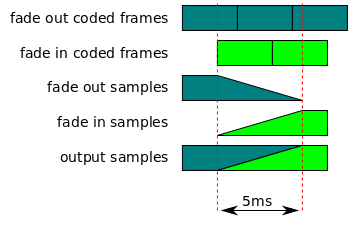
The following steps are run when a spliced frame, generated by the audio splice frame algorithm, needs to be rendered by the media element:
Let fade out coded frames be the coded frames that are faded out during the
splice.
Let fade in coded frames be the coded frames that are faded in during the
splice.
Let presentation timestamp be the presentation timestamp of the first
coded frame in fade out coded frames.
Let splice end timestamp equal splice timestamp plus five milliseconds.
Let fade out samples be the samples generated by decoding fade out coded
frames.
Trim fade out samples so that it only contains samples between presentation
timestamp and splice end timestamp.
Let fade in samples be the samples generated by decoding fade in coded frames.
If fade out samples and fade in samples do not have a common sample rate and
channel layout, then convert fade out samples and fade in samples to a common
sample rate and channel layout.
Let output samples be a buffer to hold the output samples.
Apply a linear gain fade out with a starting gain of 1 and an ending gain of 0 to
the samples between splice timestamp and splice end timestamp in fade out
samples.
Apply a linear gain fade in with a starting gain of 0 and an ending gain of 1 to
the samples between splice timestamp and splice end timestamp in fade in samples.
Copy samples between presentation timestamp to splice timestamp from fade out
samples into output samples.
For each sample between splice timestamp and splice end timestamp, compute the
sum of a sample from fade out samples and the corresponding sample in fade in
samples and store the result in output samples.
Copy samples between splice end timestamp to end timestamp from fade in
samples into output samples.
Render output samples.
Note
Here is a graphical representation of this algorithm.
5.5.13
Text Splice Frame
Follow these steps when the coded frame processing algorithm needs to generate a
splice frame for two overlapping timed text coded frames:
Let track buffer be the track buffer that will contain the splice.
Let new coded frame be the new coded frame, that is being added to track
buffer, which triggered the need for a splice.
Let frame end timestamp equal the sum of presentation timestamp and
frame duration.
Let first overlapped frame be the coded frame in track buffer with a
presentation interval that contains presentation timestamp.
Let overlapped presentation timestamp be the presentation timestamp of
the first overlapped frame.
Let overlapped frames equal first overlapped frame as well as any additional
frames in track buffer that have a presentation timestamp greater than
presentation timestamp and less than frame end timestamp.
Remove all the frames included in overlapped frames from track buffer.
Update the coded frame duration of the first overlapped frame to
presentation timestamp minus overlapped presentation timestamp.
Add first overlapped frame to the track buffer.
Return to caller without providing a splice frame.
Note
This is intended to allow new coded frame to be added to the track buffer as if
it hadn't overlapped any frames in track buffer to begin with.
6.
SourceBufferList interface
SourceBufferList is a simple container object for SourceBuffer objects. It
provides read-only array access and fires events when the list is modified.
The following steps are run periodically, whenever the SourceBuffer Monitoring algorithm is scheduled to run.
Having enough managed data to ensure uninterrupted playback is an implementation
defined condition where the user agent determines that it currently has enough data to play
the presentation without stalling for a meaningful period of time. This condition is
constantly evaluated to determine when to transition the value of
streaming. These transitions indicate when the user agent believes
it has enough data buffered or it needs more data respectively.
Being able to retrieve and buffer data in an efficient way is an implementation
defined condition where the user agent determines that it can fetch new data in an energy
efficient manner while able to achieve the desired memory usage.
The time ranges removed between the last updatestart and updateend events (which
would have occurred during the last run of the coded frame removal or coded frame eviction algorithm or if the user agent evicted content in response to a
memory cleanup).
Run the coded frame removal algorithm with start set to 0, end set to
positive infinity, and abort these steps.
Let removal ranges equal a list of presentation time ranges
that can be evicted from the presentation to ensure uninterrupted playback from
currentTime until such presentation could be retrieved again.
Note
Implementations can use different strategies for selecting removal ranges so web
applications shouldn't depend on a specific behavior. The web application would listen
to the bufferedchange event to observe whether portions of the buffered data have
been evicted.
For each range in removal ranges, run the coded frame removal algorithm with
start and end equal to the removal range start and end
timestamp respectively.
This case is intended to handle implementations that may no longer maintain any
previous information about buffered or seekable media in a MediaSource that was
constructed in a DedicatedWorkerGlobalScope that has been terminated by
terminate() or user agent execution of terminate a worker for the
MediaSource's DedicatedWorkerGlobalScope, for instance as the eventual result of
close() execution.
Issue 277: MSE-in-Workers: Consider (eventually) transitioning attached element to error upon termination of MediaSource's worker/what should media element do? mse-in-workers
Should there be some (eventual) media element error transition in the case of an
attached worker MediaSource having its context destroyed? The experimental Chromium
implementation of worker MSE just keeps the element readyState, networkState and
error the same as prior to that context destruction, though the seekable and
buffered attributes each report an empty TimeRange.
Let recent duration and recent live seekable range respectively be the recent values of duration and
[[live seekable range]], determined as follows:
Let union ranges be the union of recent live
seekable range and the HTMLMediaElement's buffered
attribute.
Return a single range with a start time equal to the earliest start time
in union ranges and an end time equal to the highest end time in union
ranges and abort these steps.
This case is intended to handle implementations that may no longer maintain any
previous information about buffered or seekable media in a MediaSource that was
constructed in a DedicatedWorkerGlobalScope that has been terminated by
terminate() or user agent execution of terminate a worker for the
MediaSource's DedicatedWorkerGlobalScope, for instance as the eventual result of
close() execution.
Issue 277: MSE-in-Workers: Consider (eventually) transitioning attached element to error upon termination of MediaSource's worker/what should media element do? mse-in-workers
Should there be some (eventual) media element error transition in the case of an
attached worker MediaSource having its context destroyed? The experimental Chromium
implementation of worker MSE just keeps the element readyState, networkState and
error the same as prior to that context destruction, though the seekable and
buffered attributes each report an empty TimeRange.
Let recent intersection ranges be determined as follows:
The overhead of recalculating and communicating recent intersection ranges so
frequently is one reason for allowing implementation flexibility to query this
information on-demand using other mechanisms such as shared memory and locks as
mentioned in cross-context communication model.
If the current value of this attribute has not been set by this algorithm or recent
intersection ranges does not contain the exact same range information as the current
value of this attribute, then update the current value of this attribute to recent
intersection ranges.
The bytes provided through appendBuffer() for a SourceBuffer form a
logical byte stream. The format and semantics of these byte streams are defined in byte stream format specifications. The byte stream format
registry [MSE-REGISTRY] provides mappings between a MIME type that may be passed to
addSourceBuffer(), isTypeSupported() or
changeType() and the byte stream format expected by a SourceBuffer
using that MIME type for parsing newly appended data. Implementations are encouraged to
register mappings for byte stream formats they support to facilitate interoperability. The
byte stream format registry [MSE-REGISTRY] is the authoritative source for these
mappings. If an implementation claims to support a MIME type listed in the registry, its
SourceBuffer implementation MUST conform to the byte stream format specification
listed in the registry entry.
Note
The byte stream format specifications in the registry are not intended to define new
storage formats. They simply outline the subset of existing storage format structures that
implementations of this specification will accept.
Note
Byte stream format parsing and validation is implemented in the segment parser loop
algorithm.
This section provides general requirements for all byte stream format specifications:
If the byte stream format covers a format similar to one covered in the in-band tracks
spec [INBANDTRACKS], then it SHOULD try to use the same attribute mappings so that
Media Source Extensions playback and non-Media Source Extensions playback provide the
same track information.
It MUST be possible to identify segment boundaries and segment type (initialization or
media) by examining the byte stream alone.
The user agent MUST run the append error algorithm when any of the following
conditions are met:
The number and type of tracks are not consistent.
Note
For example, if the first initialization segment has 2 audio tracks and 1 video
track, then all initialization segments that follow it in the byte stream MUST
describe 2 audio tracks and 1 video track.
Track IDs are not the same across initialization segments, for segments
describing multiple tracks of a single type (e.g., 2 audio tracks).
Video frame size changes. The user agent MUST support seamless playback.
Note
This will cause the <video> display region to change size if the web
application does not use CSS or HTML attributes (width/height) to constrain the
element size.
Audio channel count changes. The user agent MAY support this seamlessly and could
trigger downmixing.
Note
This is a quality of implementation issue because changing the channel count may
require reinitializing the audio device, resamplers, and channel mixers which tends
to be audible.
The following rules apply to all media segments within a byte stream. A user agent
MUST:
Support seamless playback of media segments having a timestamp gap smaller than
the audio frame size. User agents MUST NOT reflect these gaps in the
buffered attribute.
Note
This is intended to simplify switching between audio streams where the frame
boundaries don't always line up across encodings (e.g., Vorbis).
The number and type (audio, video, text, etc.) of all tracks in the media segments are not identified.
The decoding capabilities needed to decode each track (i.e., codec and codec
parameters) are not provided.
Encryption parameters necessary to decrypt the content (except the encryption key
itself) are not provided for all encrypted tracks.
All information necessary to decode and render the earliest random access point
in the sequence of media segments and all subsequence samples in the sequence (in
presentation time) are not provided. This includes in particular,
Information that determines the intrinsic width and height of
the video (specifically, this requires either the picture or pixel aspect ratio,
together with the encoded resolution).
Information necessary to convert the video decoder output to a format suitable
for display
For example, if I1 is associated with M1, M2, M3 then the above MUST hold for all the
combinations I1+M1, I1+M2, I1+M1+M2, I1+M2+M3, etc.
Byte stream specifications MUST at a minimum define constraints which ensure that the above
requirements hold. Additional constraints MAY be defined, for example to simplify
implementation.
15. Conformance
As well as sections marked as non-normative, all authoring guidelines, diagrams, examples, and notes in this specification are non-normative. Everything else in this specification is normative.
The key words MAY, MUST, MUST NOT, SHOULD, and SHOULD NOT in this document
are to be interpreted as described in
BCP 14
[RFC2119] [RFC8174]
when, and only when, they appear in all
capitals, as shown here.
<videoid="v"autoplay></video><script>const video = document.getElementById("v");
const mediaSource = newMediaSource();
mediaSource.addEventListener("sourceopen", onSourceOpen);
video.src = window.URL.createObjectURL(mediaSource);
asyncfunctiononSourceOpen(e) {
const mediaSource = e.target;
if (mediaSource.sourceBuffers.length > 0) return;
const sourceBuffer = mediaSource.addSourceBuffer(
'video/webm; codecs="vorbis,vp8"',
);
video.addEventListener("seeking", (e) =>onSeeking(mediaSource, e.target));
video.addEventListener("progress", () =>appendNextMediaSegment(mediaSource),
);
try {
const initSegment = awaitgetInitializationSegment();
if (initSegment == null) {
// Error fetching the initialization segment. Signal end of stream with an error.
mediaSource.endOfStream("network");
return;
}
// Append the initialization segment.
sourceBuffer.addEventListener("updateend", functionfirstAppendHandler() {
sourceBuffer.removeEventListener("updateend", firstAppendHandler);
// Append some initial media data.appendNextMediaSegment(mediaSource);
});
sourceBuffer.appendBuffer(initSegment);
} catch (error) {
// Handle errors that might occur during initialization segment fetching.console.error("Error fetching initialization segment:", error);
mediaSource.endOfStream("network");
}
}
asyncfunctionappendNextMediaSegment(mediaSource) {
if (
mediaSource.readyState === "closed" ||
mediaSource.sourceBuffers[0].updating
)
return;
// If we have run out of stream data, then signal end of stream.if (!haveMoreMediaSegments()) {
mediaSource.endOfStream();
return;
}
try {
const mediaSegment = awaitgetNextMediaSegment();
// NOTE: If mediaSource.readyState == "ended", this appendBuffer() call will// cause mediaSource.readyState to transition to "open". The web application// should be prepared to handle multiple "sourceopen" events.
mediaSource.sourceBuffers[0].appendBuffer(mediaSegment);
}
catch (error) {
// Handle errors that might occur during media segment fetching.console.error("Error fetching media segment:", error);
mediaSource.endOfStream("network");
}
}
functiononSeeking(mediaSource, video) {
if (mediaSource.readyState === "open") {
// Abort current segment append.
mediaSource.sourceBuffers[0].abort();
}
// Notify the media segment loading code to start fetching data at the// new playback position.seekToMediaSegmentAt(video.currentTime);
// Append a media segment from the new playback position.appendNextMediaSegment(mediaSource);
}
functiononProgress(mediaSource, e) {
appendNextMediaSegment(mediaSource);
}
// Example of async function for getting initialization segmentasyncfunctiongetInitializationSegment() {
// Implement fetching of the initialization segment// This is just a placeholder function
}
// Example function for checking if there are more media segmentsfunctionhaveMoreMediaSegments() {
// Implement logic to determine if there are more media segments// This is just a placeholder function
}
// Example function for getting the next media segmentasyncfunctiongetNextMediaSegment() {
// Implement fetching of the next media segment// This is just a placeholder function
}
// Example function for seeking to a specific media segmentfunctionseekToMediaSegmentAt(currentTime) {
// Implement seeking logic// This is just a placeholder function
}
</script>
<script>asyncfunctionsetUpVideoStream() {
// Specific video format and codecconst mediaType = 'video/mp4; codecs="mp4a.40.2,avc1.4d4015"';
// Check if the type of video format / codec is supported.if (!window.ManagedMediaSource?.isTypeSupported(mediaType)) {
return; // Not supported, do something else.
}
// Set up video and its managed source.const video = document.createElement("video");
const source = newManagedMediaSource();
video.controls = true;
awaitnewPromise((resolve) => {
video.src = URL.createObjectURL(source);
source.addEventListener("sourceopen", resolve, { once: true });
document.body.appendChild(video);
});
const sourceBuffer = source.addSourceBuffer(mediaType);
// Set up the event handlers
sourceBuffer.onbufferedchange = (e) => {
console.log("onbufferedchange event fired.");
console.log(`Added Ranges: ${timeRangesToString(e.addedRanges)}`);
console.log(`Removed Ranges: ${timeRangesToString(e.removedRanges)}`);
};
source.onstartstreaming = async () => {
const response = awaitfetch("./videos/bipbop.mp4");
const buffer = await response.arrayBuffer();
awaitnewPromise((resolve) => {
sourceBuffer.addEventListener("updateend", resolve, { once: true });
sourceBuffer.appendBuffer(buffer);
});
};
source.onendstreaming = async () => {
// Stop fetching new segments here
};
}
// Helper function...functiontimeRangesToString(timeRanges) {
const ranges = [];
for (let i = 0; i < timeRanges.length; i++) {
ranges.push([timeRanges.start(i), timeRanges.end(i)]);
}
return"[" + ranges.map(([start, end]) =>`[${start}, ${end})` ) + "]";
}
</script><bodyonload="setUpVideoStream()"></body>
17.
Acknowledgments
The editors would like to thank Alex Giladi, Bob Lund, Chris Needham, Chris Poole, Chris
Wilson, Cyril Concolato, Dale Curtis, David Dorwin, David Singer, Duncan Rowden, François
Daoust, Frank Galligan, Glenn Adams, Jer Noble, Joe Steele, John Simmons, Kagami Sascha
Rosylight, Kevin Streeter, Marcos Cáceres, Mark Vickers, Matt Ward, Matthew Gregan,
Michael(tm) Smith, Michael Thornburgh, Mounir Lamouri, Paul Adenot, Philip Jägenstedt,
Philippe Le Hegaret, Pierre Lemieux, Ralph Giles, Steven Robertson, and Tatsuya Igarashi
for their contributions to this specification.
A.
VideoPlaybackQuality
This section is non-normative.
The video playback quality metrics described in previous revisions of this specification
(e.g., sections 5 and 10 of the Candidate Recommendation) are
now being developed as part of [MEDIA-PLAYBACK-QUALITY]. Some implementations may have
implemented the earlier draft VideoPlaybackQuality object and the HTMLVideoElement
extension method getVideoPlaybackQuality() described in those previous
revisions.
B. Issue summary
Issue 276: MSE-in-Workers: Consider adding a "closing" readyState to explain new `InvalidStateError` exception when closing underway
Issue 289: Editorial? Coded Frame eviction algorithm needs to note that "buffer full flag" may be updated immediately based on |new data|
Issue 277: MSE-in-Workers: Consider (eventually) transitioning attached element to error upon termination of MediaSource's worker/what should media element do?
Issue 277: MSE-in-Workers: Consider (eventually) transitioning attached element to error upon termination of MediaSource's worker/what should media element do?
You are visitor 01402503 — GeezerVison does not store the pages you look up. Best viewed with Netscape Navigator 4.7 or Internet Explorer 6 at 800×600. No cookies required.