Wissance/StringFormatter



StringFormatter is a high-performance Go library for string (text) formatting. It offers a syntax familiar to C#, Java and Python developers (via template arguments - {0} (positional), {name} (named)), extensive argument formatting options (numbers, lists, code style), and a set of text utilities — all while being significantly fast as the standard fmt package and even more! Typical usage of sf are:
- Create
e-mails, Messages (SMS, Telegram, other Notifications) or other complicated text based on templates
- Create a complicated log text with specific argument formatting
- Use for template-based src code generator
- Other text proccessing
Other important resources:
✨ 1 Features
🔤 Flexible Syntax: Supports both indexed / positional ({0}) and named ({user}) placeholders in templates.
🎨 Advanced Formatting: Built-in directives for numbers (HEX, BIN), floats, lists, and code styles (camelCase, SNAKE_CASE).
🚀 Performance: Template formatting and slice conversion are even faster then fmt.
🛠 Utilities: Functions to convert maps and slices into strings with custom separators and formats.
:man_technologist: Safe : StringFormatter aka sf is safe (SAST and tests are running automatically on push)
📦 2 Installation
go get github.com/Wissance/stringFormatter
🚀 3 Usage
3.1 Template Formatting
3.1.1 By Argument Order (Format)
The Format function replaces {n} placeholders with the corresponding argument in the provided order.
package main

import (
    "fmt"
    sf "github.com/Wissance/stringFormatter"
)

func main() {
    template := "Hello, {0}! Your balance is {1} USD."
    result := sf.Format(template, "Alex", 2500)
    fmt.Println(result)
    // Output: Hello, Alex! Your balance is 2500 USD.
}
3.1.2 By Argument Name (FormatComplex)
The FormatComplex function uses a map[string]any to replace named placeholders like {key}.
package main

import (
    "fmt"
    sf "github.com/Wissance/stringFormatter"
)

func main() {
    template := "User {user} (ID: {id}) logged into {app}."
    args := map[string]any{
        "user": "john_doe",
        "id":   12345,
        "app":  "dashboard",
    }
    result := sf.FormatComplex(template, args)
    fmt.Println(result)
    // Output: User john_doe (ID: 12345) logged into dashboard.
}
3.2 Advanced Argument Formatting
You can control how arguments are displayed by adding a colon (:) and a format specifier to the placeholder.
| Type |
Specifier |
Description |
Example Template |
Example Value |
Output |
| Numbers |
:B |
Binary (without padding) |
"{0:B}" |
15 |
1111 |
| |
:B8 |
Binary with 8-digit padding |
"{0:B8}" |
15 |
00001111 |
| |
:X |
Hexadecimal (lowercase) |
"{0:X}" |
250 |
fa |
| |
:X4 |
Hexadecimal with 4-digit padding |
"{0:X4}" |
250 |
00fa |
| |
:o |
Octal |
"{0:o}" |
11 |
14 |
| Floating Point |
:F |
Default float format |
"{0:F}" |
10.4567890 |
10.456789 |
| |
:F2 |
Float with 2 decimal places |
"{0:F2}" |
10.4567890 |
10.46 |
| |
:F4 |
Float with 4 decimal places |
"{0:F4}" |
10.4567890 |
10.4568 |
| |
:F8 |
Float with 8 decimal places |
"{0:F8}" |
10.4567890 |
10.45678900 |
| |
:E2 |
Scientific notation |
"{0:E2}" |
191.0478 |
1.91e+02 |
| Percentage |
:P100 |
Percentage (multiply by 100) |
"{0:P100}" |
12 |
12% |
| Lists (Slices) |
:L- |
Join with hyphen |
"{0:L-}" |
[1 2 3] |
1-2-3 |
| |
:L, |
Join with comma and space |
"{0:L, }" |
[1 2 3] |
1, 2, 3 |
| Code Styles |
:c:snake |
Convert to snake_case |
"{0:c:snake}" |
myFunc |
my_func |
| |
:c:Snake |
Convert to Snake_Case (PascalSnake) |
"{0:c:Snake}" |
myFunc |
My_Func |
| |
:c:SNAKE |
Convert to SNAKE_CASE (upper) |
"{0:c:SNAKE}" |
read-timeout |
READ_TIMEOUT |
| |
:c:camel |
Convert to camelCase |
"{0:c:camel}" |
my_variable |
myVariable |
| |
:c:Camel |
Convert to CamelCase (PascalCase) |
"{0:c:Camel}" |
my_variable |
MyVariable |
| |
:c:kebab |
Convert to kebab-case |
"{0:c:kebab}" |
myVariable |
my-variable |
| |
:c:Kebab |
Convert to Kebab-Case (PascalKebab) |
"{0:c:Kebab}" |
myVariable |
My-Variable |
| |
:c:KEBAB |
Convert to KEBAB-CASE (upper) |
"{0:c:KEBAB}" |
myVariable |
MY-VARIABLE |
package main

import (
    "fmt"
    sf "github.com/Wissance/stringFormatter"
)

func main() {
    template := "Status 0x{0:X4} (binary: {0:B8}), temp: {1:F1}°C, items: {2:L, }."
    result := sf.Format(template, 475, 23.876, []int{1, 2, 3})
    fmt.Println(result)
    // Output: Status 0x01DB (binary: 00011101), temp: 23.9°C, items: 1, 2, 3.
}
🛠 4 Text Utilities
4.1 Map to String (MapToString)
Converts a map with primitive keys to a formatted string.
options := map[string]any{
    "host": "localhost",
    "port": 8080,
    "ssl":  true,
}

str := sf.MapToString(&options, "{key} = {value}", "\n")
// Possible output (key order is not guaranteed):
// host = localhost
// port = 8080
// ssl = true
4.2 Slice to String (SliceToString, SliceSameTypeToString)
Converts slices to a string using a specified separator.
// For a slice of any type
mixedSlice := []any{100, "text", 3.14}
separator := " | "
result1 := sf.SliceToString(&mixedSlice, &separator)
// result1: "100 | text | 3.14"

// For a typed slice
numSlice := []int{10, 20, 30}
result2 := sf.SliceSameTypeToString(&numSlice, &separator)
// result2: "10 | 20 | 30"
📊 5 Benchmarks
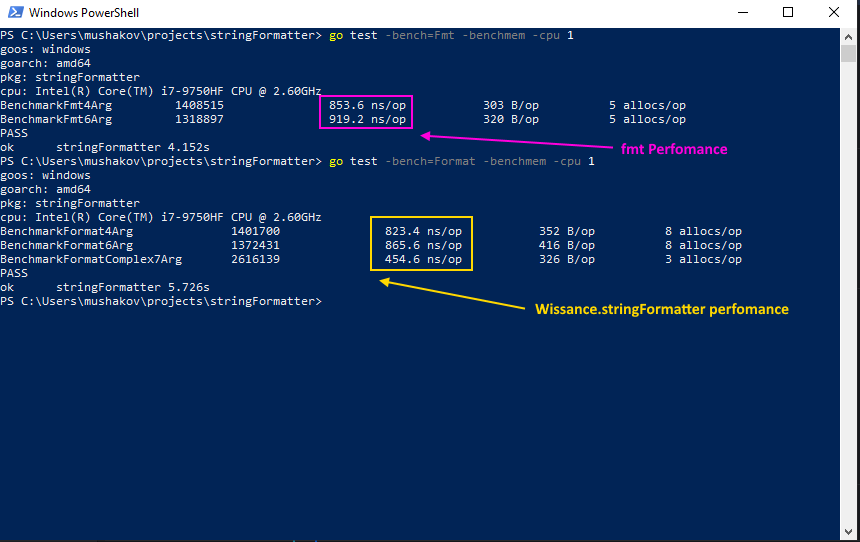
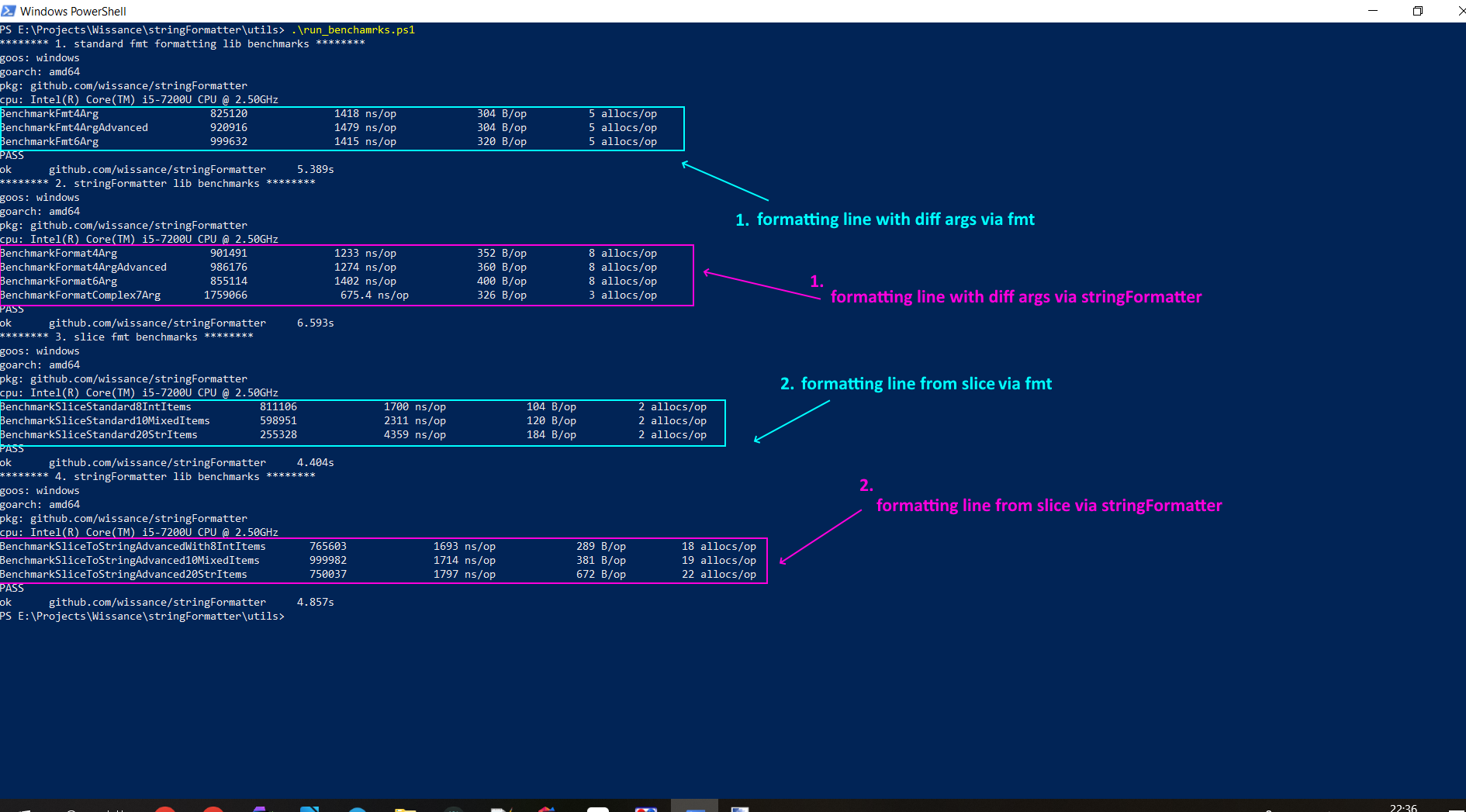
The library is optimized for high-load scenarios. Key benchmarks show significant performance gains (performance could be differ due to 1. different CPU architectures 2. statistics):
Formatting (Format) vs fmt.Sprintf: 3-5x faster for complex templates.
Slices (SliceToString) vs manual fmt-based joining: from 2.5 faster up to 20 items.
These benchmarks tests are running with githun ci on push to develop or master, see
Run the benchmarks yourself:
go test -bench=Format -benchmem -cpu 1
go test -bench=Fmt -benchmem -cpu 1
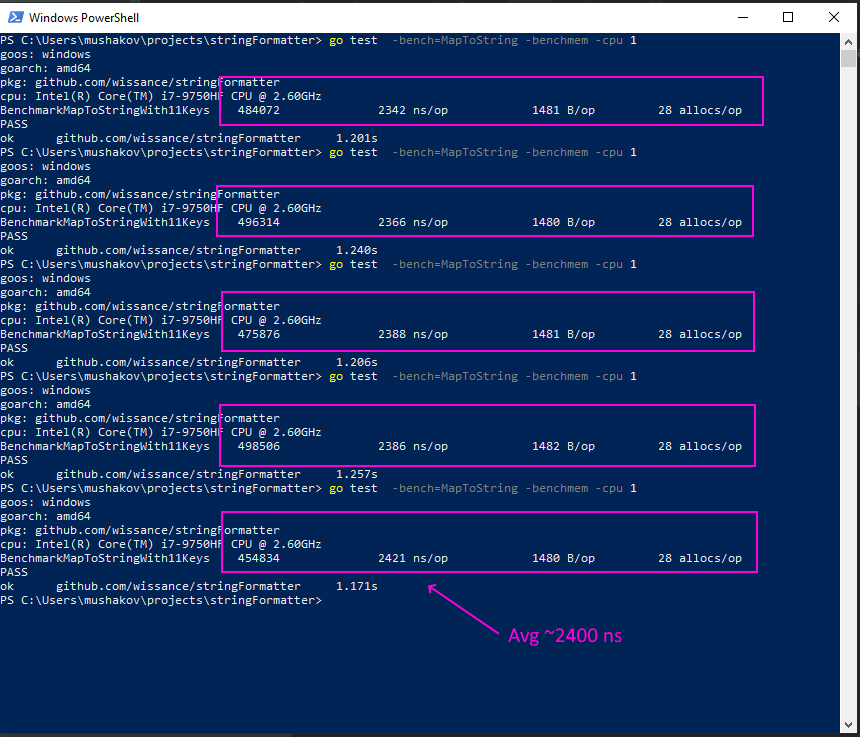
go test -bench=MapToStr -benchmem -cpu 1
Some benchmark screenshots:
-
Format and FormatComplex:
-
MapToStr:
-
SliceToStr:
📄 6 License
This project is licensed under the MIT License - see the LICENSE file for details.
🤝 7 Contributing
Contributions are welcome! If you find a bug or have a feature suggestion, please open an issue or submit a pull request.
Contributors:
