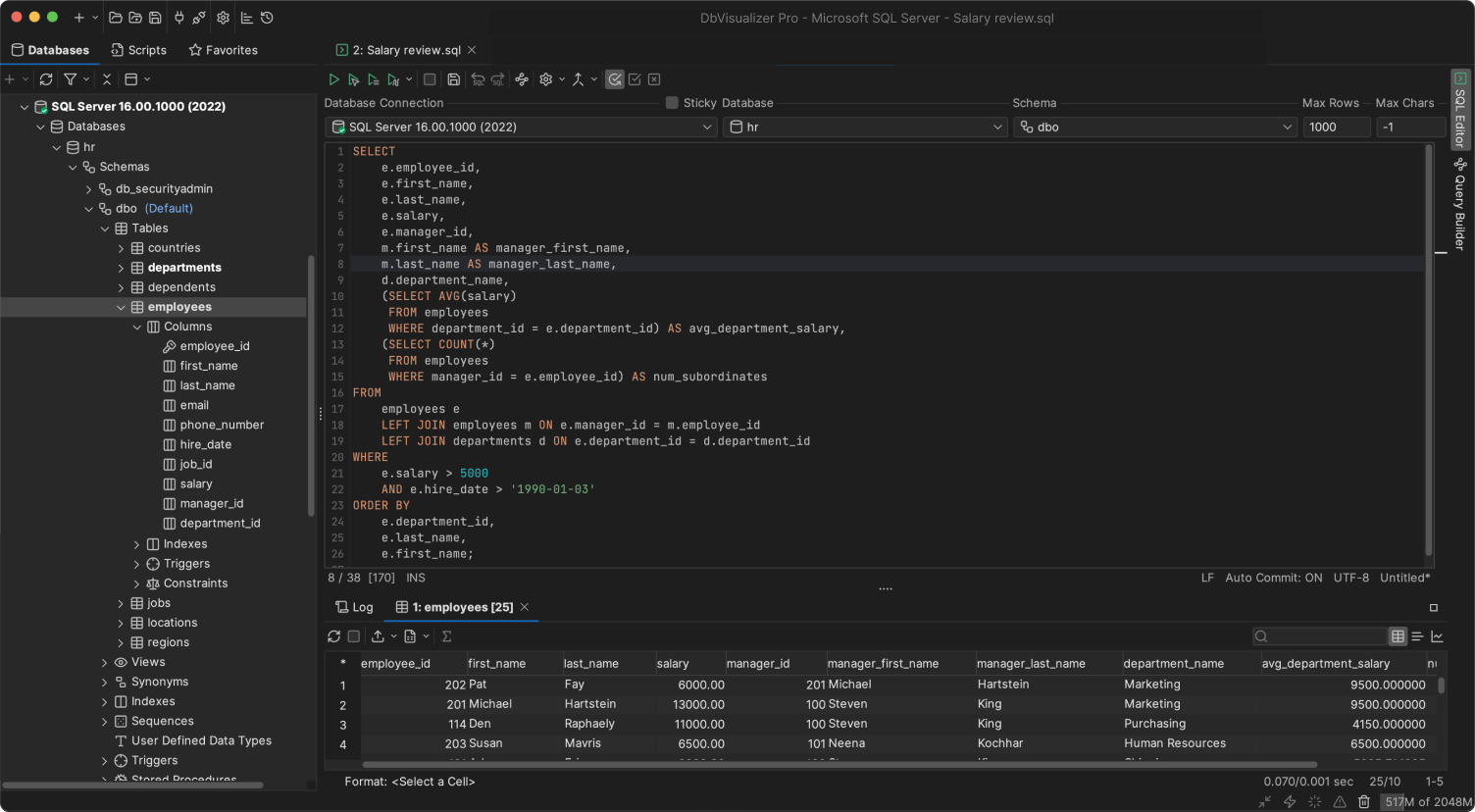
DbVisualizer has been a top-performing SQL Server database client for a long time.
It includes all you need to connect, develop and manage your SQL Server database. It has support for SQL Server specific object types and everything else that makes MSSQL Server great.
OBJECT TYPES AND ACTIONS
Supports object types specific to SQL Server
DbVisualizer gives you full control of your SQL Server database. It even offers support for object types and actions specific to Microsoft SQL Server. Here are some examples.
You can set up custom properties for your MSSQL databases directly in DbVisualizer, so that you can make it the best Microsoft SQL client matching your preferences. Make sure the user is prompted to enter User ID and password. Enable preprocessing of scripts. You can even set up auto-commit and much more.
The properties below and many more can be configured in the MSSQL manager to match how you want to work.
AUTHENTICATION
DELIMITED IDENTIFIERS
QUALIFIERS
PHYSICAL CONNECTION
TRANSACTION
ENCODING
SQL STATEMENTS
CONNECTION HOOKS
COLOR AND BORDER
SQL COMMANDER
QUERY BUILDER
EXPLAIN PLAN
SQL CLIENT
The universal database tool
DbVisualizer is meticulously engineered to handle objects and properties specific to SQL Server - but our out-of-the-box features work across almost any data source.
Relations are crucial in SQL Server, and DbVisualizer will help you automatically generate visual Entity Relationship Diagrams so that you can understand dependencies and opportunities directly in the client.
Writing SQL for SQL Server is similar, but not exactly the same as for other databases. DbVisualizer understands these nuances and helps you write SQL queries more efficiently.
DbVisualizer always has the latest JDBC driver for Microsoft SQL Server, and historical versions. With the JDBC driver manager you’ll easily connect to your databases using JDBC drivers hosted on Maven, with multiple versions to choose from.
reviews
Our users love our product
Users love using DbVisualizer with Microsoft SQL Server.
Easy to Navigate, Efficient Query Tabs, and Handy Grid Editing What do you like best about DbVisualizer?
I'm a QA tester for school district software and I'm in DbVisualizer Pro pretty much every day, mostly against our...
What do you like best about DbVisualizer?
I'm a QA tester for school district software and I'm in DbVisualizer Pro pretty much every day, mostly against our PostgreSQL & MSSQL databases for our internal services and our customers. A lot of my testing depends on having the right data before I start. For example, if I'm testing a report download screen I need a print file my test login can actually
show less
Verified user.
Review from g2.com
Role:
Senior developer
Field:
Program Development
*****
Pros: One GUI to rule them all! DbVisualizer is a universal client management that you can use for many popular databases from mySQL, MS SQL Server, MongoDB, PostgreSQL, and many more. Really easy UI interface and works in Windows, Linux, and Mac OS!Cons: I don't really have any complaints about DbV...read more
Pros: One GUI to rule them all! DbVisualizer is a universal client management that you can use for many popular databases from mySQL, MS SQL Server, MongoDB, PostgreSQL, and many more. Really easy UI interface and works in Windows, Linux, and Mac OS!Cons: I don't really have any complaints about DbVisualizer!Overall: This has been my go to SQL Client for the past 5 years. They have a great product with
show less
Verified user.
Review from SourceForge
Name:
Mauri S.
Role:
Development Manager
*****
The only professional software that I'm ready to pay from my own pocket I can access Microsoft SQL server, Postgresql and Mariadb/mysql with the same tool. It can find the metadata and data definitions of all of them. I can't even remember how many years I've used it but I use it for my hobby projects a...read more
The only professional software that I'm ready to pay from my own pocket I can access Microsoft SQL server, Postgresql and Mariadb/mysql with the same tool. It can find the metadata and data definitions of all of them. I can't even remember how many years I've used it but I use it for my hobby projects at home and my work projects at work. It is awesome. I like the
show less
Verified user.
Review from Capterra
Name:
Robert B
Role:
Associate Dean
*****
Great! Love using it! Writing scripts help automate data export needs.Pros: Easy to use and links great with different databases. Easy to demonstrate SQL to students in a class.Cons: Lots of updates to new versions that can take time to installSwitched From: Microsoft SQL ServerReasons for Switching to DbVisualizer: Too cumbersome and didn't work well with Oracle
Great! Love using it! Writing scripts help automate data export needs.Pros: Easy to use and links great with different databases. Easy to demonstrate SQL to students in a class.Cons: Lots of updates to new versions that can take time to installSwitched From: Microsoft SQL ServerReasons for Switching to DbVisualizer: Too cumbersome and didn't work well with Oracle
show less
Verified user.
Review from Capterra
Field:
Hospital & Health Care
*****
Easy Visual Data Layouts—Smooth Transition from MSSQL to MySQL What do you like best about DbVisualizer?
I learned on MSSQL, any when I changed jobs to a company that used MySQL, this was much easier for me to have visu...
What do you like best about DbVisualizer?
I learned on MSSQL, any when I changed jobs to a company that used MySQL, this was much easier for me to have visual representation of my data layoutsWhat do you dislike about DbVisualizer?
I have not had any problems with the software/What problems is DbVisualizer solving and how is that benefiting you?
It is allowing me to visually build my queries, and that helps me
show less
Verified user.
Review from g2.com
Name:
Joseph Hu
*****
DBVisualizer get everything done for me. My company has a diverse set of systems for IT, Finance, Forecasting, and Manufacturing and we use multiple databases from Oracle, Microsoft SQL Server, MySQL, PostgreSQL, AS/400 D...
DBVisualizer get everything done for me. My company has a diverse set of systems for IT, Finance, Forecasting, and Manufacturing and we use multiple databases from Oracle, Microsoft SQL Server, MySQL, PostgreSQL, AS/400 DB2, Sparks, etc. DBVisualizer allows me to quickly connect to these databases and do any data manipulation I need to do for my work. I need to do integration work frequently and the first tool
show less
Verified user.
Review from g2.com
Name:
Richard Moeller
Field:
Education Management
*****
Excellent Universal SQL Client. Working in a school district, I deal with a lot of databases from a lot of different vendors. With DbVisualizer, I can easily switch between all the various databases (including Oracle, Mar...
Excellent Universal SQL Client. Working in a school district, I deal with a lot of databases from a lot of different vendors. With DbVisualizer, I can easily switch between all the various databases (including Oracle, MariaDB, mySQL, and Microsoft SQL server), all from one interface. I use this application daily in my position as Data Manager. Installation and configuration was simple. Customer support has always been fast and friendly, but
show less
Verified user.
Review from g2.com
Name:
Mike V
Role:
Corporate Director of Information Systems
*****
Pros: Easy to install and configure; use same interface across multiple database platforms. Quick and dirty use of SQL while still being able to do things like browse tables.Cons: Rough upgrade process, but the most recent major release fixed this with a more automatic process.Overall: We needed...read more
Pros: Easy to install and configure; use same interface across multiple database platforms. Quick and dirty use of SQL while still being able to do things like browse tables.Cons: Rough upgrade process, but the most recent major release fixed this with a more automatic process.Overall: We needed a tool to just be able to get data out of RDMS'. This fit the bill. It uses a JDBC common denominator to
show less
Verified user.
Review from SourceForge
Name:
Rob G.
Role:
Operations and Systems Director
*****
What is not to like about DbVisualizer? Superb. I use it every day! I have a number of databases that I regularly use to either develop against or to extract information for whatever analysis I want to perform. My goto is DbVisual...
Superb. I use it every day! I have a number of databases that I regularly use to either develop against or to extract information for whatever analysis I want to perform. My goto is DbVisualizer. No other tool I have used comes anywhere close.Pros
What I love most is that I can EASILY post lots of data to and from a spreadsheet!! What you are looking to seed data this is
show less
Verified user.
Review from Capterra
Name:
Michael F.
Role:
CTO
*****
Really great database tool Really positive experience with a great product that I can recommend to anybody that works with different databases.Pros
Really easy to use with many different databases and auth options. Have not yet found any thing that can’t be done.Cons
Java setup and dependencies can be a bit tricky on some setups, but I have it working on both windows and Linux, so not that bad.
Really positive experience with a great product that I can recommend to anybody that works with different databases.Pros
Really easy to use with many different databases and auth options. Have not yet found any thing that can’t be done.Cons
Java setup and dependencies can be a bit tricky on some setups, but I have it working on both windows and Linux, so not that bad.
show less
Verified user.
Review from Capterra
AWARDS
Used and rated by the best
Recognized by industry leaders and honored across top review platforms!
Microsoft SQL Server is a relational database management system.
View +
Hide -
WHAT IS A MSSQL CLIENT?
You use the MSSQL client to connect to your MSSQL database once connected you can manage your data.
View +
Hide -
WHAT IS MSSQL DATABASE CLIENT USED FOR?
The client is used to navigate and manage data in your Microsoft SQL Server database.
View +
Hide -
HOW DO I CONNECT TO MSSQL WITH DBVISUALIZER?
It is very easy to connect to your Microsoft Server database via the built-in driver manager in DbVisualizer. The driver manager is hosted on Maven and gives you multiple versions of JDBC drivers to choose from.
View +
Hide -
HOW CAN I USE DBVISUALIZER AS A QUERY TOOL?
You write your SQL queries in DbVisualizer that cleverly highlights operations and autocomplete suggestions. The tool also has a visual query builder, that automatically generates SQL code as you drag and drop tables and select what values you want to include.
View +
Hide -
HOW DO I GET STARTED TO USE MSSQL WITH DBVISUALIZER?
Download DbVisualizer and connect to your MSSQL database. You can download the free version with limited functionality, try the Pro version for 21 days or buy the Pro version to get the full function set of the database client.
View +
Hide -
WHAT ARE THE BENEFITS OF USING MSSQL?
Microsoft SQL Server is known for being a very secure and high performing database used worldwide by corporations.
View +
Hide -
CAN I CONNECT TO MSSQL AND OTHER DATABASES USING DBVISUALIZER AS A MSSQL CLIENT?
Yes. You can connect to many different data sources to view and manage data with DbVisualizer. You get one tool to manage all (on this list) data sources that are used in your business.
View +
Hide -
HOW CAN I CONNECT TO MY DATABASE USING THE MSSQL JDBC DRIVER?
You can easily connect to Microsoft SQL Server by selecting MSSQL from the list of available databases in the built-in driver manager, enter your credentials, and DbVisualizer sets up the connection automatically.
View +
Hide -
WHAT OBJECT TYPES ARE SUPPORTED IN THE DBVISUALIZER MSSQL CLIENT?
This is the list of supported object types for MSSQL in DbVisualizer, we offer extended support for these MSSQL object types and functions.
View +
Hide -
WHAT ARE SOME OF THE FEATURES OF THE MSSQL GUI IN DBVISUALIZER?
You can do a lot using DbViusualizer such as create powerful scripts using client side commands to automate import/ export of data, save scripts, let the auto-complete feature assist you in writing SQL, use the reference graphs to see how tables are related and much more.
View +
Hide -
WHAT IS THE DIFFERENCE BETWEEN A MSSQL CLIENT, A MSSQL GUI, A MSSQL IDE, A MSSQL EDITOR AND A MSSQL WORKBENCH?
Different environmental labels mean more or less the same thing. A client indicates that you have a server elsewhere, a GUI refers to the graphical interface of the app. While IDE refers to the larger "integrated development environment" and editor refers to an actual part of the client where you write your code. A workbench concentrates more on the process of development. All of these have come to be synonyms in how people refer to the application in which you do the actual coding.
View +
Hide -
IS THERE A DATABASE BROWSER IN DBVISUALIZER?
Yes, you can browse your database with DbVisualizer! You can see the tables, relations, and custom objects that have been created for each database. The automatic visualization tools give you a view of the servers explain plans and you can generate Entity Relationship Diagrams (ERDs).
View +
Hide -
Notify me when new features are announced
You are visitor 01402503 — GeezerVison does not store the pages you look up. Best viewed with Netscape Navigator 4.7 or Internet Explorer 6 at 800×600. No cookies required.