GV

GeezerVison

The World Wide Web, restored to 800 pixels of glory.

Home|About|Gaming cabinet|Archives|How it works|Starter sites

On this site

  • Java Tutorial
  • Advanced Java
  • Interview Questions
  • Exercises
  • Examples
  • Quizzes
  • Projects
  • Cheatsheet
  • DSA in Java
  • Java Collection
  • Introduction3 min read
  • Variables2 min read
  • Data Types7 min read
  • Operators7 min read

This view

  • Original page
  • New address

GeezerVison is showing www.geeksforgeeks.org — Byte Code in Java - GeeksforGeeks

geeksforgeeks
search icon
  • Courses
  • Tutorials
  • Interview Prep
  • Java Tutorial
  • Advanced Java
  • Interview Questions
  • Exercises
  • Examples
  • Quizzes
  • Projects
  • Cheatsheet
  • DSA in Java
  • Java Collection

Byte Code in Java

Last Updated : 23 Jan, 2026

Bytecode is an intermediate, platform-independent code generated when a .java file is compiled into a .class file. This bytecode is executed by the Java Virtual Machine (JVM), enabling Java’s Write Once, Run Anywhere principle.

  • Bytecode consists of instructions meant for the JVM, not for any specific hardware or operating system.
  • It ensures platform independence, allowing the same program to run on different systems.
  • Bytecode is verified by the JVM for security before execution.
  • It supports efficient execution through interpretation and JIT (Just-In-Time) compilation.

How is Byte Code generated?

The execution of a Java program happens in the following steps:

  • Source Code: The programmer writes code in a high-level language (Java).
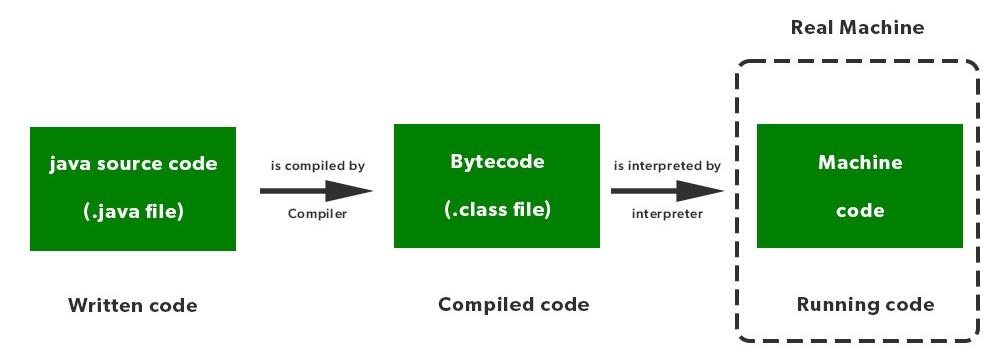
  • Compilation: The Java compiler (javac) converts the source code into bytecode (.class file).
  • Execution by JVM: The JVM loads and executes the byte code using an interpreter and Just-In-Time (JIT) compiler.

Byte code acts as a bridge between the compiler and the JVM, making Java platform-independent.
bytecode
Java Code Execution

Java code is first compiled into bytecode and then converted into machine code by the JVM during execution, which is illustrated in picture above.

Step-by-Step Illustration

Consider the following Java program:

Java
import java.io.*;

class GFG {
    public static void main(String[] args) {
        System.out.println("GFG!");
    }
}

Output
GFG!

Explanation:

  • The above code is Java source code (.java file).
  • The Java compiler converts it into byte code (.class file).
  • The JVM executes the byte code and produces the output.

Why Byte Code Makes Java Platform-Independent

  • Java programs are not directly converted into machine code of a specific operating system.
  • Instead, they are converted into byte code, which is independent of hardware and OS.
  • Any system with a compatible JVM can execute the same byte code.

This is the reason Java follows the principle: "Write Once, Run Anywhere (WORA)"

Note:

  • Byte code is not machine code; it is executed by the JVM.
  • The JVM may interpret byte code or compile it at runtime using JIT (Just-In-Time) compilation for better performance.
  • Different platforms have different JVM implementations, but they all understand the same byte code.
Comment

Explore

    Basics
    • Introduction3 min read
    • Variables2 min read
    • Data Types7 min read
    • Operators7 min read
    • Decision Making5 min read
    • Methods7 min read
    • Arrays7 min read
    • Strings5 min read
    OOP & Interface
    • Introduction6 min read
    • Constructors6 min read
    • Encapsulation3 min read
    • Inheritance8 min read
    • Polymorphism5 min read
    • Abstraction5 min read
    • Interfaces8 min read
    Collections
    • Collection class9 min read
    • Collection Interface5 min read
    • List Interface8 min read
    • Set Interface5 min read
    • Queue Interface5 min read
    • Map Interface in Java6 min read
    • Iterator4 min read
    Advance Java Concepts
    • Exception handling6 min read
    • Java Multithreading Tutorial3 min read
    • Synchronization in Java9 min read
    • File handling6 min read
    • Method References3 min read
    • Java 8 Stream Tutorial7 min read
    • Memory Management4 min read
    • Garbage Collection in Java6 min read
    • Networking6 min read
    • JDBC5 min read
    Practice Java
    • Interview Questions15+ min read
    • Programs6 min read
    • Practice Problems5 min read
    • Quiz1 min read
    • Project Ideas15+ min read
    Courses
    • Java Backend Course2 min read
    • Placement 360 Course2 min read
You are visitor 01402503 — GeezerVison does not store the pages you look up.
Best viewed with Netscape Navigator 4.7 or Internet Explorer 6 at 800×600. No cookies required.