A constructor in Java is a special member that is called when an object is created. It initializes the new object’s state. It is used to set default or user-defined values for the object's attributes.
A constructor does not have a return type, not even void.
A constructor is called automatically when an object is created using new.
Constructors can have parameters and can be overloaded.
Explanation: The Student class has a constructor that accepts a String parameter. When new Student("Vishnu") is executed, the constructor is called automatically and assigns "Vishnu" to the name variable. The display() method then prints the initialized value.
Types of Constructors in Java
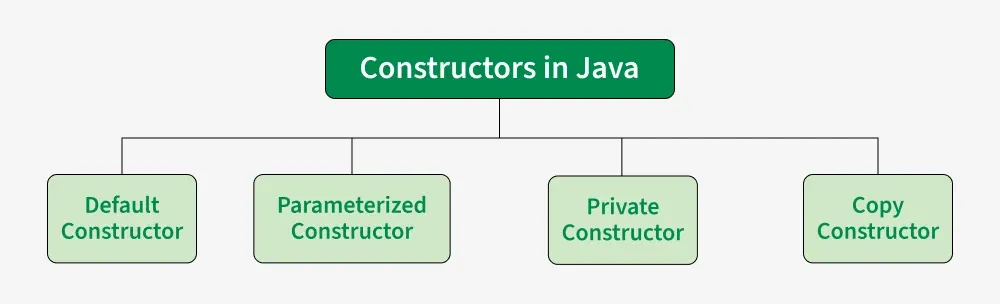
There are four types of constructors in Java
Constructor
1. Default Constructor
A default constructor has no parameters. It’s used to assign default values to an object. If no constructor is explicitly defined, Java provides a default constructor.
Explanation: No constructor is declared in the Student class. Therefore, the compiler provides a default no-argument constructor. When new Student() is executed, that constructor is called. The instance variables receive their default values, such as null for String and 0 for int.
Note: If you declare any constructor yourself, the compiler does not automatically provide the default constructor.
2. Parameterized Constructor
A constructor that has parameters is known as parameterized constructor. If we want to initialize fields of the class with our own values, then use a parameterized constructor.
Java
classGeeks{// data members of the classStringname;intid;// Parameterized ConstructorGeeks(Stringname,intid){this.name=name;this.id=id;}// Method to display object datavoiddisplay(){System.out.println("GeekName: "+name+" and GeekId: "+id);}// main() method — placed inside the same class for// universal compatibilitypublicstaticvoidmain(String[]args){// This will invoke the parameterized constructorGeeksgeek1=newGeeks("Sweta",68);geek1.display();}}
Output
GeekName: Sweta and GeekId: 68
Explanation: The Geeks constructor accepts name and id as parameters. When new Geeks("Sweta", 68) is executed, these values are passed to the constructor. The this keyword refers to the current object, so this.name and this.id initialize the object's instance variables.
3. Copy Constructor in Java
Unlike other constructors copy constructor is passed with another object which copies the data available from the passed object to the newly created object.
Java
importjava.io.*;classGeeks{// data members of the classStringname;intid;// Parameterized ConstructorGeeks(Stringname,intid){this.name=name;this.id=id;}// Copy ConstructorGeeks(Geeksobj2){this.name=obj2.name;this.id=obj2.id;}}classGFG{publicstaticvoidmain(String[]args){// This would invoke the parameterized constructorSystem.out.println("First Object");Geeksgeek1=newGeeks("Sweta",68);System.out.println("GeekName: "+geek1.name+" and GeekId: "+geek1.id);System.out.println();// This would invoke the copy constructorGeeksgeek2=newGeeks(geek1);System.out.println("Copy Constructor used Second Object");System.out.println("GeekName: "+geek2.name+" and GeekId: "+geek2.id);}}
Output
First Object
GeekName: Sweta and GeekId: 68

Copy Constructor used Second Object
GeekName: Sweta and GeekId: 68
Explanation: This depicts a copy constructor, where the second Geeks object (geek2) is created by passing the first object (geek1) to the constructor. The copy constructor copies name and id from geek1 to geek2, resulting in two objects with the same data.
Note: Java does not provide a built-in copy constructor like C++. We can create our own by writing a constructor that takes an object of the same class as a parameter and copies its fields.
4. Private Constructor
A private constructor cannot be accessed from outside the class. It is commonly used in:
Singleton Pattern: To ensure only one instance of a class is created.
Utility/Helper Classes: To prevent instantiation of a class containing only static methods.
Java
classGFG{// Private constructorprivateGFG(){System.out.println("Private constructor called");}// Static methodpublicstaticvoiddisplayMessage(){System.out.println("Hello from GFG class!");}}classMain{publicstaticvoidmain(String[]args){// GFG u = new GFG(); // Error: constructor is// privateGFG.displayMessage();}}
Output
Hello from GFG class!
Explanation: The GFG constructor is declared private, so an object of GFG cannot be created in main(). The class is accessed only through the static method displayMessage(), which is called directly using the class name.
Constructor Overloading
This is a key concept in OOP related to constructors. Constructor overloading allows a class to have multiple constructors with different parameter lists. It provides different ways to initialize objects based on the values available at the time of object creation.
Constructor overloading is resolved at compile time.
It allows objects of the same class to be initialized in different ways.
It helps avoid writing separate initialization methods for different sets of values.
Java
importjava.io.*;classGeeks{// constructor with one argumentGeeks(Stringname){System.out.println("Constructor with one "+"argument - String: "+name);}// constructor with two argumentsGeeks(Stringname,intage){System.out.println("Constructor with two arguments: "+" String and Integer: "+name+" "+age);}// Constructor with one argument but with different// type than previousGeeks(longid){System.out.println("Constructor with one argument: "+"Long: "+id);}}classGFG{publicstaticvoidmain(String[]args){// Creating the objects of the class named 'Geek'// by passing different argumentsGeeksgeek2=newGeeks("Sweta");// Invoke the constructor with two argumentsGeeksgeek3=newGeeks("Amiya",28);// Invoke the constructor with one argument of// type 'Long'.Geeksgeek4=newGeeks(325614567);}}
Output
Constructor with one argument - String: Sweta
Constructor with two arguments:  String and Integer: Amiya 28
Constructor with one argument: Long: 325614567
Explanation: Demonstrates constructor overloading by defining multiple Geeks constructors with different parameter lists. Based on the arguments passed while creating objects (geek2, geek3, geek4), the corresponding constructor is invoked at compile time.
You are visitor 01402503 — GeezerVison does not store the pages you look up. Best viewed with Netscape Navigator 4.7 or Internet Explorer 6 at 800×600. No cookies required.