GV

GeezerVison

The World Wide Web, restored to 800 pixels of glory.

Home|About|Gaming cabinet|Archives|How it works|Starter sites

On this site

  • Java Tutorial
  • Advanced Java
  • Interview Questions
  • Exercises
  • Examples
  • Quizzes
  • Projects
  • Cheatsheet
  • DSA in Java
  • Java Collection
  • Introduction3 min read
  • Variables2 min read
  • Data Types7 min read
  • Operators7 min read

This view

  • Original page
  • New address

GeezerVison is showing www.geeksforgeeks.org — Access Modifiers in Java - GeeksforGeeks

geeksforgeeks
search icon
  • Courses
  • Tutorials
  • Interview Prep
  • Java Tutorial
  • Advanced Java
  • Interview Questions
  • Exercises
  • Examples
  • Quizzes
  • Projects
  • Cheatsheet
  • DSA in Java
  • Java Collection

Access Modifiers in Java

Last Updated : 28 Sep, 2026

Access modifiers in Java are used to control the visibility and accessibility of classes, methods, and variables. They help enforce encapsulation by restricting access to different parts of a program. Java provides four types of access modifiers to define scope and protection levels.

  • Public modifier: Accessible from anywhere in the program
  • Protected modifier: Accessible within the same package and by subclasses
  • Private modifier: Accessible only within the same class
  • Default modifier: Accessible only within the same package

Real-World Example: In a banking app, private is used for balance (hidden), default for internal helpers, protected for methods used in subclasses, and public for actions like deposit or view details.

Types of Access Modifiers

There are 4 types of access modifiers available in Java: 

Access-Modifiers-in-Java-1
Access Modifiers in Java

1. Private Access Modifier

The private access modifier is specified using the keyword private. The methods or data members declared as private are accessible only within the class in which they are declared.

  • Provides the highest level of restriction.
  • Commonly used to protect fields and implementation details.
Java
class Person {

    // private variable
    private String name;

    public void setName(String name)  {

        this.name = name; // accessible within class
    }

    public String getName() { return name; }
}

public class Geeks {
    public static void main(String[] args)
    {

        Person p = new Person();
        p.setName("Alice");

        // System.out.println(p.name); // Error: 'name'
        // has private access
        System.out.println(p.getName());
    }
}

Output
Alice

Explanation: Direct access to name is not allowed outside Person, enforcing encapsulation.

2. Default Access Modifier

If no access modifier is specified, this means only classes within the same package can access it.

  • Provides more access than private but less than protected and public.
  • Cannot be directly accessed from classes in other packages.
Java
class Car {
    String model; // default access
}

public class Main {
    
    public static void main(String[] args){
        
        Car c = new Car();
        c.model = "Tesla"; // accessible within the same package
        System.out.println(c.model);
    }
}

Output
Tesla

Explanation: Members with default access cannot be accessed from classes in a different package.

Geeks.java: Default class within the same package

Java
// default access modifier 
package p1; 

// Class Geek is having 
// Default access modifier 
class Geek 
{ 
    void display() 
    { 
        System.out.println("Hello World!"); 
    } 
}

GeeksNew.java: Default class from a different package (for contrast)

C++
// package with default modifier 
package p2; 
import p1.*;    // importing package p1

// This class is having 
// default access modifier 
class GeekNew { 
    public static void main(String args[]) { 
      
        // Accessing class Geek from package p1 
        Geek o = new Geek(); 

        o.display(); 
    } 
}

Explanation: In this example, the program will show the compile-time error when we try to access a default modifier class from a different package.

3. Protected Access Modifier

The protected access modifier is specified using the keyword protected. The methods or data members declared as protected are accessible within the same package or subclasses in different packages.

  • Provides more access than private and default access, but less access than public.
  • Commonly used for methods or classes intended to be accessed externally.
Java
package p1;
public class Vehicle {
    protected int speed;
}

// File: Bike.java in package p2
package p2;
import p1.Vehicle;
public class Bike extends Vehicle {
    void showSpeed() {
        speed = 100; // allowed: subclass in different package
        System.out.println(speed);
    }
}

// File: Test.java in package p2
package p2;
import p1.Vehicle;
public class Test {
    public static void main(String[] args) {
        Bike b = new Bike();
        b.showSpeed(); // prints 100

        Vehicle v = new Vehicle();
        // System.out.println(v.speed); // ERROR: cannot access protected outside package & non-subclass
    }
} 

Output
Access via subclass method: 100
0

Explanation: speed is accessible via subclass methods and other classes in the same package, but direct access from a different package (non-subclass) would fail.

4. Public Access Modifier

The public access modifier is specified using the keyword public. Public members are accessible from everywhere in the program. There is no restriction on the scope of public data members.

Java
class MathUtils { 
    
    public static int add(int a, int b) {
        return a + b;
    }
}

public class Main {
    
    public static void main(String[] args) {
        
        System.out.println(MathUtils.add(5, 10)); // accessible anywhere
    }
}

Output
15

Explanation: add() is globally accessible due to the public modifier.

Top-level classes or interfaces can not be declared as private because, private means "only visible within the enclosing class".

Comparison Table of Access Modifiers in Java
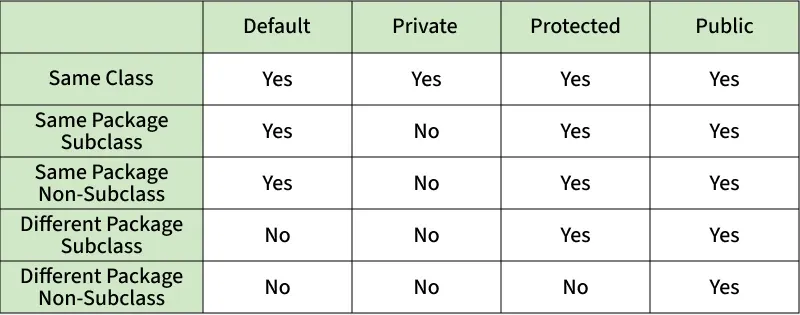
same_class
Access-Modifier

When to Use Access Modifier in Real-World Projects

  • Private: The idea should be use as restrictive access as possible, so private should be used as much as possible.
  • Default (Package-Private): Often used in package-scoped utilities or helper classes.
  • Protected: Commonly used in inheritance-based designs like framework extensions.
  • Public: This is used for API endpoints, service classes, or utility methods shared across different parts of an application.
Comment

Explore

    Basics
    • Introduction3 min read
    • Variables2 min read
    • Data Types7 min read
    • Operators7 min read
    • Decision Making5 min read
    • Methods7 min read
    • Arrays7 min read
    • Strings5 min read
    OOP & Interface
    • Introduction6 min read
    • Constructors6 min read
    • Encapsulation3 min read
    • Inheritance8 min read
    • Polymorphism5 min read
    • Abstraction5 min read
    • Interfaces8 min read
    Collections
    • Collection class9 min read
    • Collection Interface5 min read
    • List Interface8 min read
    • Set Interface5 min read
    • Queue Interface5 min read
    • Map Interface in Java6 min read
    • Iterator4 min read
    Advance Java Concepts
    • Exception handling6 min read
    • Java Multithreading Tutorial3 min read
    • Synchronization in Java9 min read
    • File handling6 min read
    • Method References3 min read
    • Java 8 Stream Tutorial7 min read
    • Memory Management4 min read
    • Garbage Collection in Java6 min read
    • Networking6 min read
    • JDBC5 min read
    Practice Java
    • Interview Questions15+ min read
    • Programs6 min read
    • Practice Problems5 min read
    • Quiz1 min read
    • Project Ideas15+ min read
    Courses
    • Java Backend Course2 min read
    • Placement 360 Course2 min read
You are visitor 01402503 — GeezerVison does not store the pages you look up.
Best viewed with Netscape Navigator 4.7 or Internet Explorer 6 at 800×600. No cookies required.