GeezerVisonThe World Wide Web, restored to 800 pixels of glory. |
| Home|About|Gaming cabinet|Archives|How it works|Starter sites |
GeezerVison is showing www.geeksforgeeks.org — Compilation and Execution of a Java Program - GeeksforGeeks  
Compilation and Execution of a Java ProgramLast Updated : 14 Oct, 2025 Java is a high-level, platform-independent language. To run a Java program, it must go through compilation and execution. Understanding this process is essential for beginners. For example, a simple Java program: Output Hello, Geeks How to run the above code?
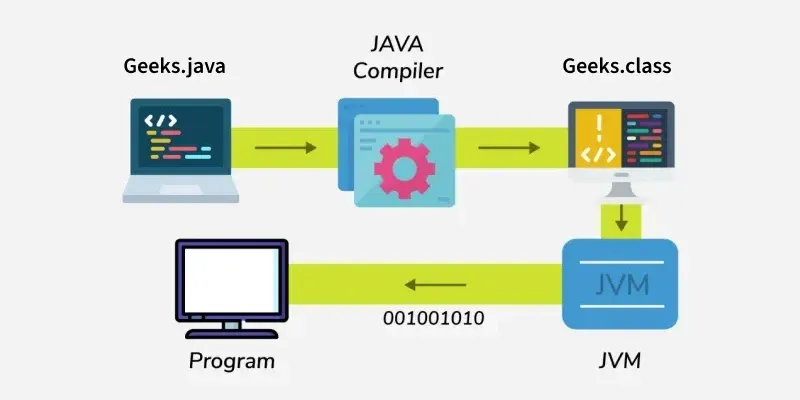 Steps to Compile and Execute a Java ProgramRunning a Java program involves two main steps: compilation and execution. Let’s look at each step in detail. Step 1: Writing the Java ProgramBefore you can run a Java program, you need to write it in a text editor. You can use any text editor like Notepad (Windows), TextEdit (Mac), or an IDE (Integrated Development Environment) like Eclipse, IntelliJ IDEA, or VS Code. Example:

Step 2: Compiling the Java ProgramOnce the Java program is written, it needs to be compiled. Compilation is the process of converting the human-readable Java code into bytecode, which can be understood by the Java Virtual Machine (JVM). Command to compile:
Here:
 If there are no errors, this command will create a file called Geeks.class. The .class file contains bytecode, which is a platform-independent code that the JVM can execute. If there are errors, the compiler will show them in the terminal. You need to fix the errors before running the program. Step 3: Executing the Java ProgramAfter successful compilation, you can run the program using the Java interpreter. Command to run:
 Here:
When executed, you will see:
Comment Explore |
| You are visitor 01402503 — GeezerVison does not store the pages you look up. Best viewed with Netscape Navigator 4.7 or Internet Explorer 6 at 800×600. No cookies required. |