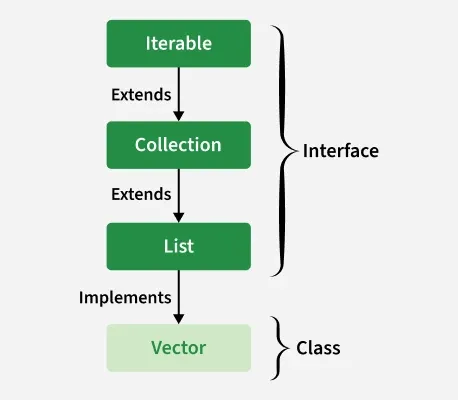
In Java, a Vector is a dynamic array that can grow or shrink in size as elements are added or removed. It is part of the java.util package and extends the AbstractList class.
Maintains insertion order and allows duplicate and null values.
Dynamically grows its size when capacity is exceeded.
Implements List, RandomAccess, Cloneable, and Serializable interfaces.
Vector is a Legacy class that was introduced in early versions of Java.
Thread-safe: All methods are synchronized for safe multi-threaded access.
ArrayList is preferred over vector in general when in-built thread synchronization is not required..
It implements the List interface, which is a sub-interface of the Collection interface.
Constructors of Vector
In order to create a Vector, we need to create an object of the Vector class. The Vector class provides various constructors to create a vector in different ways.
1. Vector()
Creates an empty vector with a default initial capacity of 10.
Vector<Integer> vector = new Vector<>();
2. Vector(int initialCapacity)
Creates a vector with the specified initial capacity.
Vector<Integer> vector = new Vector<>(20);
3. Vector(int initialCapacity, int capacityIncrement)
Creates a vector with a specified initial capacity and capacity increment (amount by which the vector grows when full).
Vector<Integer> vector = new Vector<>(10, 5);
4. Vector(Collection c)
Creates a vector containing all elements of the specified collection.
Vector<Integer> vector = new Vector<>(collection);
Vector Capacity in Java
When a Vector is created using the default constructor, it is initialized with a default capacity of 10. This means it can hold up to 10 elements before needing to grow in size. If the number of elements exceeds the current capacity, the Vector automatically increases its capacity.
importjava.util.Vector;publicclassVectorDoublingExample{publicstaticvoidmain(String[]args){Vector<Integer>vector=newVector<>(2);// initial capacity = 2System.out.println("Initial capacity: "+vector.capacity());// Add elements to trigger capacity increasevector.add(10);vector.add(20);System.out.println("Capacity after adding 2 elements: "+vector.capacity());vector.add(30);// Triggers resize (2 → 4)System.out.println("Capacity after adding 3rd element: "+vector.capacity());vector.add(40);vector.add(50);// Triggers resize again (4 → 8)System.out.println("Capacity after adding 5 elements: "+vector.capacity());}}
Output
Initial capacity: 2
Capacity after adding 2 elements: 2
Capacity after adding 3rd element: 4
Capacity after adding 5 elements: 8
Different Operations of Vector Class
1. Adding Elements
To add the elements to the Vector, we use the add() method. This method is overloaded to perform multiple operations based on different parameters. They are listed below as follows:
add(Object): This method is used to add an element at the end of the Vector.
add(int index, Object): This method is used to add an element at a specific index in the Vector.
Java
importjava.io.*;importjava.util.*;classGeeks{publicstaticvoidmain(String[]arg){// Creating a default vectorVectorv1=newVector();// Adding custom elements using add() methodv1.add(1);v1.add(2);v1.add("geeks");v1.add("forGeeks");v1.add(3);System.out.println("Vector v1 is "+v1);// Creating generic vectorVector<Integer>v2=newVector<Integer>();// Adding custom elements using add() methodv2.add(1);v2.add(2);v2.add(3);System.out.println("Vector v2 is "+v2);}}
Output
Vector v1 is [1, 2, geeks, forGeeks, 3]
Vector v2 is [1, 2, 3]
2. Updating Elements
To update an element in a Vector, use the set() method. It takes the index and the new element to replace the existing one at that position.
Java
importjava.util.*;publicclassGeeks{publicstaticvoidmain(Stringargs[]){// Creating an empty Vector Vector<Integer>v=newVector<Integer>();// Use add() method to add elements in the vector v.add(12);v.add(23);v.add(22);v.add(10);v.add(20);// Displaying the Vector System.out.println("Vector: "+v);// Using set() method to replace 12 with 21 System.out.println("The Object that is replaced is: "+v.set(0,21));// Using set() method to replace 20 with 50 System.out.println("The Object that is replaced is: "+v.set(4,50));System.out.println("The new Vector is:"+v);}}
Output
Vector: [12, 23, 22, 10, 20]
The Object that is replaced is: 12
The Object that is replaced is: 20
The new Vector is:[21, 23, 22, 10, 50]
3. Removing Elements
To remove an element from a Vector, we can use the remove() method. This method is overloaded to perform multiple operations based on different parameters. They are:
remove(Object): Removes the first occurrence of the specified object.
remove(int index): Removes the element at the given index and shifts remaining elements to the left.
Java
importjava.util.*;importjava.io.*;classGeeks{publicstaticvoidmain(String[]arg){// Create default vector of capacity 10Vectorv=newVector();// Add elements using add() methodv.add(1);v.add(2);v.add("Geeks");v.add("forGeeks");v.add(4);// Removing first occurrence element at 1v.remove(1);System.out.println("After removal: "+v);}}
Output
After removal: [1, Geeks, forGeeks, 4]
4. Iterating the Vector
There are multiple ways to iterate through the Vector. The most famous ways are by using the basic for loop in combination with a get() method to get the element at a specific index and the advanced for a loop.
Java
importjava.util.*;publicclassGeeks{publicstaticvoidmain(Stringargs[]){// create an instance of vectorVector<String>v=newVector<>();// Add elements using add() methodv.add("Geeks");v.add("Geeks");v.add(1,"For");// Using the Get method and the for loopfor(inti=0;i<v.size();i++){System.out.print(v.get(i)+" ");}System.out.println();for(Stringstr:v)System.out.print(str+" ");}}
You are visitor 01402503 — GeezerVison does not store the pages you look up. Best viewed with Netscape Navigator 4.7 or Internet Explorer 6 at 800×600. No cookies required.