GV

GeezerVison

The World Wide Web, restored to 800 pixels of glory.

Home|About|Gaming cabinet|Archives|How it works|Starter sites

On this site

  • Java Tutorial
  • Advanced Java
  • Interview Questions
  • Exercises
  • Examples
  • Quizzes
  • Projects
  • Cheatsheet
  • DSA in Java
  • Java Collection
  • Introduction3 min read
  • Variables2 min read
  • Data Types7 min read
  • Operators7 min read

This view

  • Original page
  • New address

GeezerVison is showing www.geeksforgeeks.org — StringBuffer Class in Java - GeeksforGeeks

geeksforgeeks
search icon
  • Courses
  • Tutorials
  • Interview Prep
  • Java Tutorial
  • Advanced Java
  • Interview Questions
  • Exercises
  • Examples
  • Quizzes
  • Projects
  • Cheatsheet
  • DSA in Java
  • Java Collection

StringBuffer Class in Java

Last Updated : 27 May, 2026

StringBuffer class in Java represents a sequence of characters that can be modified, which means we can change the content of the StringBuffer without creating a new object every time. It represents a mutable sequence of characters.

  • Unlike String, we can modify the content of the StringBuffer without creating a new object.
  • All methods of StringBuffer are synchronized, making it safe to use in multithreaded environments.
  • Ideal for scenarios with frequent modifications like append, insert, delete or replace operations.

Example: Here is an example of using StringBuffer to concatenate strings.

Java
public class Geeks {
    public static void main(String[] args){
      
      	// Creating StringBuffer
        StringBuffer s = new StringBuffer();
      
      	// Adding elements in StringBuffer
        s.append("Hello");
        s.append(" ");
        s.append("world");
        
      	// String with the StringBuffer value
      	String str = s.toString();
        System.out.println(str);
    }
}

Output
Hello world

Interface Hierarchy Implemented by StringBuffer

The diagram shows the interfaces implemented by StringBuffer and illustrates its relationship with Appendable, CharSequence, and Serializable in Java.
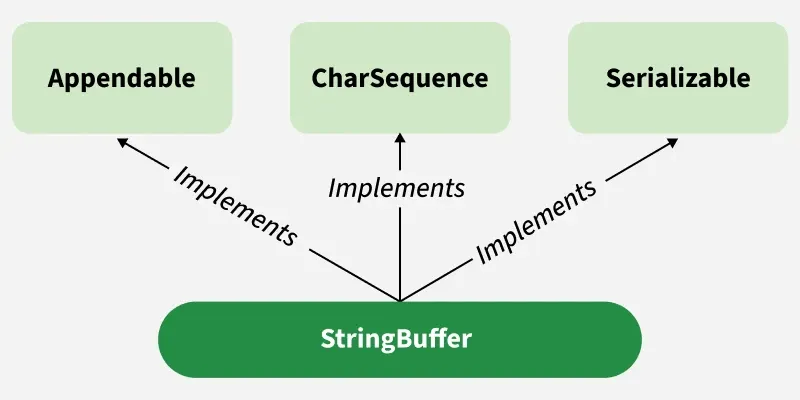
stringbuffer
StringBuffer

Constructors of StringBuffer Class

  • StringBuffer(): It reserves room for 16 characters without reallocation
  • StringBuffer(int size): It accepts an integer argument that explicitly sets the size of the buffer.
  • StringBuffer(String str): It accepts a string argument that sets the initial contents of the StringBuffer object and reserves room for 16 more characters without reallocation.

Example:

Java
public class Geeks {
    public static void main(String[] args) {

        // 1. Using default constructor
        StringBuffer sb1 = new StringBuffer();
        sb1.append("Hello");
        System.out.println("Default Constructor: " + sb1);

        // 2. Using constructor with specified capacity
        StringBuffer sb2 = new StringBuffer(50);
        sb2.append("Java Programming");
        System.out.println("With Capacity 50: " + sb2);

        // 3. Using constructor with String
        StringBuffer sb3 = new StringBuffer("Welcome");
        sb3.append(" to Java");
        System.out.println("With String: " + sb3);
    }
}

Output
Default Constructor: Hello
With Capacity 50: Java Programming
With String: Welcome to Java

Implementation of Java StringBuffer Method

1. append() Method

append() method concatenates the given argument with this string.

Java
import java.io.*;

class Geeks {
    public static void main(String args[])
    {
        StringBuffer sb = new StringBuffer("Hello ");
        sb.append("Java"); // now original string is changed
        System.out.println(sb);
    }
}

Output
Hello Java

2. insert() Method

insert() method inserts the given string with this string at the given position. 

Java
import java.io.*;

class Geeks {
    public static void main(String args[])
    {
        StringBuffer sb = new StringBuffer("Hello ");
        sb.insert(1, "Java");
        
        // Now original string is changed
        System.out.println(sb);
    }
}

Output
HJavaello 

3. replace() Method

replace() method replaces the given string from the specified beginIndex and endIndex-1.

Java
import java.io.*;

class Geeks {
    public static void main(String args[]) {
      
        StringBuffer sb = new StringBuffer("Hello");
        sb.replace(1, 3, "Java");
        System.out.println(sb);
    }
}

Output
HJavalo

4. delete() Method

delete() method is used to delete the string from the specified beginIndex to endIndex-1.

Java
import java.io.*;

class Geeks {
    public static void main(String args[]) {
      
        StringBuffer sb = new StringBuffer("Hello");
        sb.delete(1, 3);
        System.out.println(sb);
    }
}

Output
Hlo

5. reverse() Method

reverse() method of the StringBuffer class reverses the current string. 

Java
import java.io.* ;

class Geeks {
    public static void main(String args[]) {
        StringBuffer sb = new StringBuffer("Hello");
        sb.reverse();
        System.out.println(sb);
    }
}

Output
olleH

6. capacity() Method

capacity() method of the StringBuffer class returns the current capacity of the buffer. The default capacity of the buffer is 16. If the number of characters increases from its current capacity, it increases the capacity by (oldcapacity*2)+2.

For example, if the current capacity is 16, it will be (16*2)+2=34.

Java
import java.io.*;

class Geeks {
    public static void main(String args[])
    {
        StringBuffer sb = new StringBuffer();
      
      	// default 16
        System.out.println(sb.capacity()); 
        sb.append("Hello");
      
      	// now 16
        System.out.println(sb.capacity()); 
        sb.append("java is my favourite language");
        
      	// (oldcapacity*2)+2
      	System.out.println(sb.capacity());
    }
}

Output
16
16
34

7. length()

This method return the number of character in given string.

Java
import java.io.*;

class Geeks {
    public static void main(String[] args) {

        // Creating and storing string by creating object of StringBuffer
        StringBuffer s = new StringBuffer("GeeksforGeeks");

        // Getting the length of the string
        int p = s.length();

        // Getting the capacity of the string
        System.out.println("Length of string GeeksforGeeks=" + p);
    } 
}

Output
Length of string GeeksforGeeks=13

Advantages:

  • Mutable: Its content can be modified after creation while String remains immutable.
  • Better for Repeated Updates: Frequent concatenations perform efficiently because no new objects are created for each change.
  • Thread-Safe: All methods are synchronized, making it safe in multithreaded environments.

Limitations:

  • Performance Overhead: Synchronization makes operations slower compared to non-synchronized alternatives.
  • Not Ideal for Single-Threaded Applications: When thread safety is unnecessary, it adds extra processing cost.
  • Lower Performance Than StringBuilder: StringBuilder is preferred in non-threaded scenarios because it is faster.

StringBuffer all Methods

Methods

Description

Syntax

append()Used to add text at the end of the existing text.

sb.append(String str);

length()The length of a StringBuffer can be found by the length( ) method.

int len = sb.length();

capacity()the total allocated capacity can be found by the capacity( ) method.

int cap = sb.capacity();

charAt()This method returns the char value in this sequence at the specified index.

char ch = sb.charAt(int index);

delete()Deletes a sequence of characters from the invoking object.

sb.delete(int start, int end);

deleteCharAt()Deletes the character at the index specified by the loc.

sb.deleteCharAt(int index);

ensureCapacity()Ensures capacity is at least equal to the given minimum.

sb.ensureCapacity(int minimumCapacity);

insert()Inserts text at the specified index position.

sb.insert(int offset, String str);

reverse()Reverse the characters within a StringBuffer object.

sb.reverse();

replace()Replace one set of characters with another set inside a StringBuffer object.

sb.replace(int start, int end, String str);

ensureCapacity()

Increases StringBuffer capacity to the specified value

void ensureCapacity(int capacity)

appendCodePoint(int codePoint)

Appends code point as a string to the sequence.

public StringBuffer appendCodePoint(int codePoint)

charAt(int index)

Returns the char at the specified index.

public char charAt(int index)

IntStream chars()

Returns a stream of int values from zero-extended chars in the sequence..

public IntStream chars()

codePointAt()

Returns the character (Unicode code point) at the specified index.

public int codePointAt(int index)

codePointBefore()

Returns the Unicode code point before the given index.

public int codePointBefore(int index)

codePointCount()

Returns the count of Unicode code points in the specified text range.

public int codePointCount(int beginIndex, int endIndex)

IntStream codePoints()

Returns a stream of code points from the sequence.

public IntStream codePoints()

getChars()

Copies characters from the sequence into the destination array.

public void getChars(int srcBegin, int srcEnd, char[] dst, int dstBegin)

indexOf()

Returns the index of the first occurrence of the specified substring.

public int indexOf(String str)
public int indexOf(String str, int fromIndex)

lastIndexOf()

Returns the index of the last occurrence of the specified substring.

public int lastIndexOf(String str)
public int lastIndexOf(String str, int fromIndex)

offsetByCodePoints()

Returns the index offset by a specified number of code points from the given index..

public int offsetByCodePoints(int index, int codePointOffset)

setCharAt()

In this method, the character at the specified index is set to ch.

public void setCharAt(int index, char ch)

setLength()

This method sets the length of the character sequence.

public void setLength(int newLength)

subSequence()

Returns index offset by given code points from the specified index.

public CharSequence subSequence(int start, int end)

substring()

Returns a new String containing a subsequence of this character sequence.

public String substring(int start)
public String substring(int start,int end)

toString()

Returns a string representing the data in the sequence.

public String toString()

trimToSize()

Attempts to minimize storage used by the character sequence.

public void trimToSize()

Comment

Explore

    Basics
    • Introduction3 min read
    • Variables2 min read
    • Data Types7 min read
    • Operators7 min read
    • Decision Making5 min read
    • Methods7 min read
    • Arrays7 min read
    • Strings5 min read
    OOP & Interface
    • Introduction6 min read
    • Constructors6 min read
    • Encapsulation3 min read
    • Inheritance8 min read
    • Polymorphism5 min read
    • Abstraction5 min read
    • Interfaces8 min read
    Collections
    • Collection class9 min read
    • Collection Interface5 min read
    • List Interface8 min read
    • Set Interface5 min read
    • Queue Interface5 min read
    • Map Interface in Java6 min read
    • Iterator4 min read
    Advance Java Concepts
    • Exception handling6 min read
    • Java Multithreading Tutorial3 min read
    • Synchronization in Java9 min read
    • File handling6 min read
    • Method References3 min read
    • Java 8 Stream Tutorial7 min read
    • Memory Management4 min read
    • Garbage Collection in Java6 min read
    • Networking6 min read
    • JDBC5 min read
    Practice Java
    • Interview Questions15+ min read
    • Programs6 min read
    • Practice Problems5 min read
    • Quiz1 min read
    • Project Ideas15+ min read
    Courses
    • Java Backend Course2 min read
    • Placement 360 Course2 min read
You are visitor 01402503 — GeezerVison does not store the pages you look up.
Best viewed with Netscape Navigator 4.7 or Internet Explorer 6 at 800×600. No cookies required.