GV

GeezerVison

The World Wide Web, restored to 800 pixels of glory.

Home|About|Gaming cabinet|Archives|How it works|Starter sites

On this site

  • JS Tutorial
  • Web Tutorial
  • A to Z Guide
  • Projects
  • OOP
  • DOM
  • Set
  • Map
  • Math
  • Number
  • Boolean
  • Exercise
  • Introduction3 min read
  • Variables5 min read

This view

  • Original page
  • New address

GeezerVison is showing www.geeksforgeeks.org — JavaScript While Loop - GeeksforGeeks

geeksforgeeks
search icon
  • Courses
  • Tutorials
  • Interview Prep
  • JS Tutorial
  • Web Tutorial
  • A to Z Guide
  • Projects
  • OOP
  • DOM
  • Set
  • Map
  • Math
  • Number
  • Boolean
  • Exercise

JavaScript While Loop

Last Updated : 30 Sep, 2025

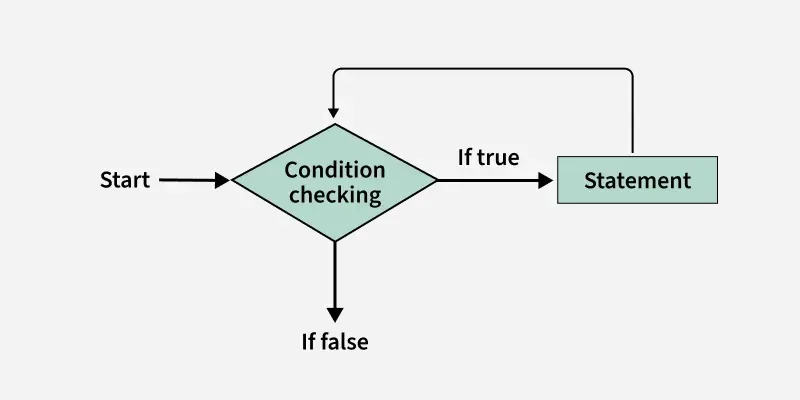
The while loop executes a block of code as long as a specified condition is true. In JavaScript, this loop evaluates the condition before each iteration and continues running as long as the condition remains true.

Here's an example that prints from 1 to 5.

JavaScript
let count = 1;
while (count <= 5) {
  console.log(count);
  count++;
}

This flowchart shows the working of the while loop in JavaScript. You can see the control flow in the while loop.
While-loop
while loop

Using While Loop to find Traverse an Array

JavaScript
let arr = [10, 20, 30, 40];
let i = 0;
while (i < arr.length) {
  console.log(arr[i]);
  i++;
}

Output
10
20
30
40

Syntax:

while (condition) {     
Code block to be executed 
}

Do-While loop

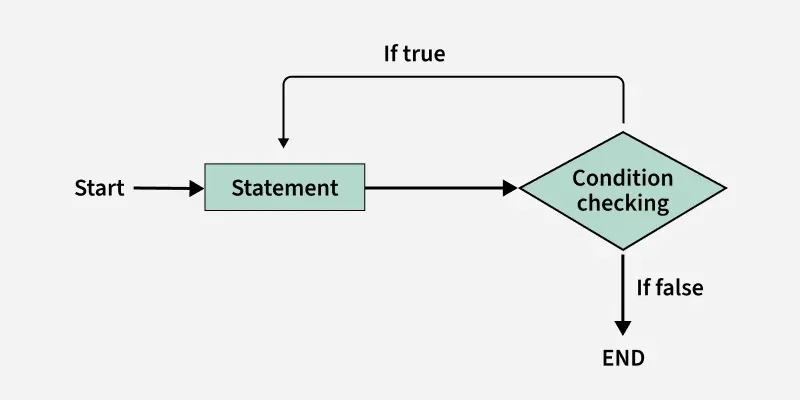
A Do-While loop is another type of loop in JavaScript that is similar to the while loop, but with one key difference: the do-while loop guarantees that the block of code inside the loop will be executed at least once, regardless of whether the condition is initially true or false .
Do-while-loop

Example : Here's an example of a do-while loop that counts from 1 to 5.

JavaScript
let count = 1;
do {
  console.log(count);
  count++;
} while (count <= 5);

Output
1
2
3
4
5

Syntax:

do { 
   // code block to be executed   
} while (condition);

Comparison between the while and do-while loop:

The do-while loop executes the content of the loop once before checking the condition of the while loop. While the while loop will check the condition first before executing the content.

While Loop

Do-While Loop

It is an entry condition looping structure.

It is an exit condition looping structure.

The number of iterations depends on the condition mentioned in the while block.

Irrespective of the condition mentioned in the do-while block, there will a minimum of 1 iteration.

The block control condition is available at the starting point of the loop.

The block control condition is available at the endpoint of the loop


Comment

Explore

    JavaScript Basics
    • Introduction3 min read
    • Variables5 min read
    • Operators4 min read
    • Control Statements4 min read
    Array & String
    • Arrays6 min read
    • Array Methods4 min read
    • String5 min read
    • String Methods8 min read
    Function & Object
    • Functions4 min read
    • Function Expression3 min read
    • Function Overloading4 min read
    • Objects4 min read
    • Constructors4 min read
    OOP
    • OOP5 min read
    • Classes & Objects4 min read
    • Access Modifiers5 min read
    • Constructor4 min read
    Asynchronous JavaScript
    • Asynchronous2 min read
    • Callbacks4 min read
    • Promises4 min read
    • Event Loop3 min read
    • Async Await Fuction3 min read
    Exception Handling
    • Error and Exceptional Handling5 min read
    • Errors Throw & Try to Catch2 min read
    • Custom Errors2 min read
    • TypeError Invalid Array.prototype.sort argument1 min read
    DOM
    • DOM8 min read
    • DOM Elements3 min read
    • Custom Events4 min read
    • Addeventlistener5 min read
    Advanced Topics
    • Closure3 min read
    • Hoisting5 min read
    • Scope4 min read
    • Higher Order Functions7 min read
    • Debugging3 min read
    Courses
    • Placement 360 Course2 min read
    • MERN Full Stack Course2 min read
    • DSA and System Design Course2 min read
You are visitor 01402503 — GeezerVison does not store the pages you look up.
Best viewed with Netscape Navigator 4.7 or Internet Explorer 6 at 800×600. No cookies required.