GeezerVisonThe World Wide Web, restored to 800 pixels of glory. |
| Home|About|Gaming cabinet|Archives|How it works|Starter sites |
GeezerVison is showing www.imore.com — AirDrop: The Ultimate Guide
This content was produced prior to the launch of iMore Labs.
Find out more about Labs.

Follow us
Add us as a preferred source on Google
Subscribe to our newsletter
AirDrop lets you quickly and easily transfer files between iPhones, iPads, and Macs. It uses Bluetooth LE to broadcast, discover, and negotiate connections, and point-to-point Wi-Fi to transfer data. That makes it fast, power-efficient, and secure! When you're using AirDrop between iPhones and iPads, you can AirDrop photos, videos, contacts, Passbook passes, Voice Memos, Map locations, and any and everything else that appears on a Share sheet. Here are a few different ways to get started using AirDrop!
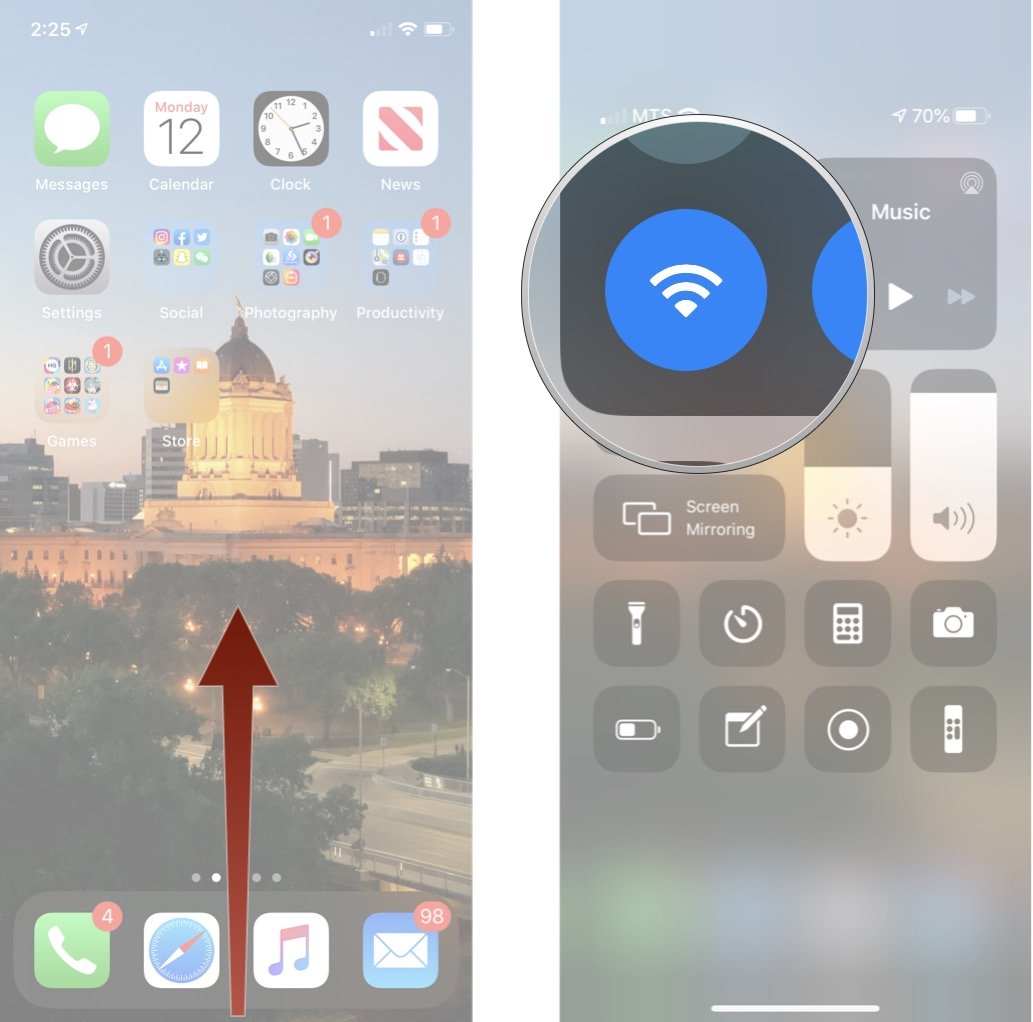
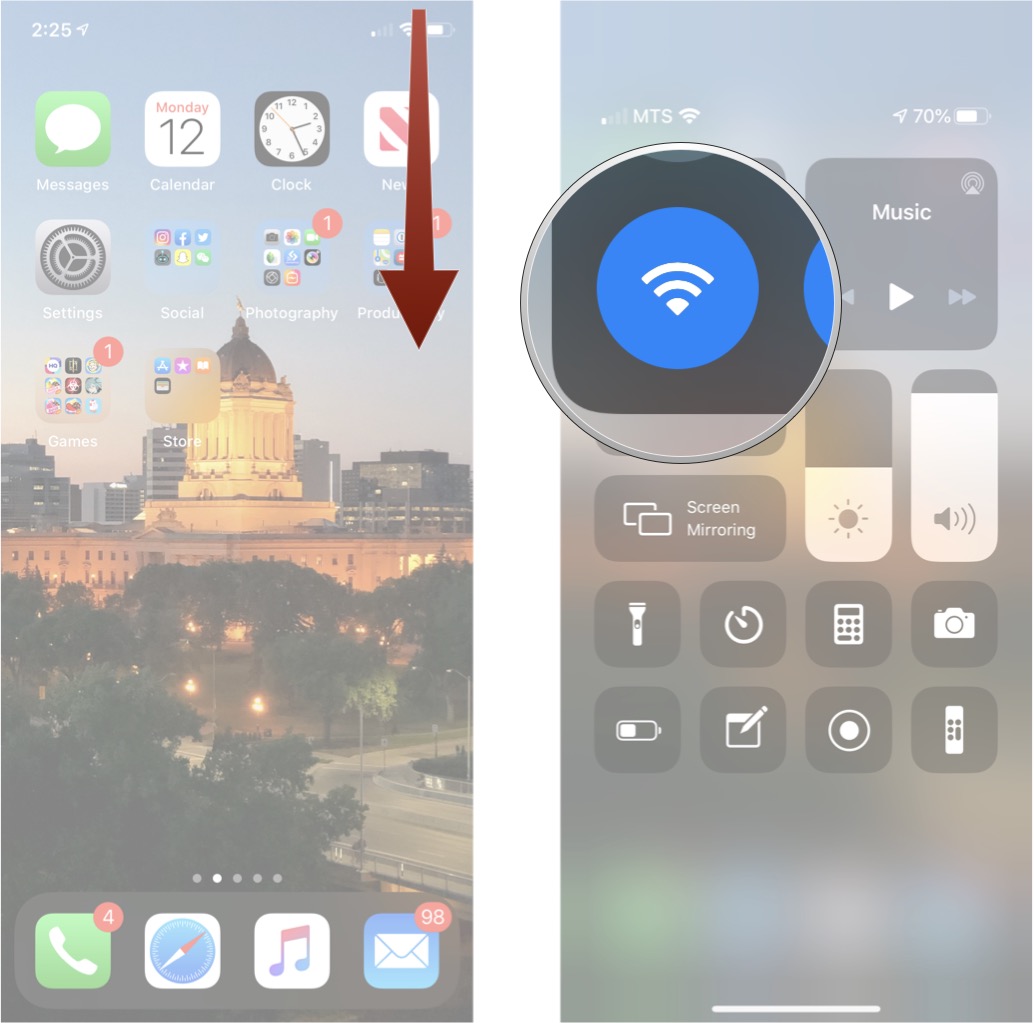
How to turn on AirDrop for iPhone or iPadAirDrop lets you choose between enabling it for just your contacts or for everyone. "Contacts" requires more work, as you and the person you want to AirDrop with both have to be logged into iCloud and be in each other's Contacts. "Everyone" is easier but means random people you don't know can send you prank AirDrops.
How to turn on (or off) AirDrop for iPhone X, iPhone XS, or iPhone XR
How to AirDrop files from your iPhone or iPadYou can AirDrop files from any iPhone or iPad app that includes the built-in Share sheet, and you can share to anyone and any of their devices that show up in the Share sheet.
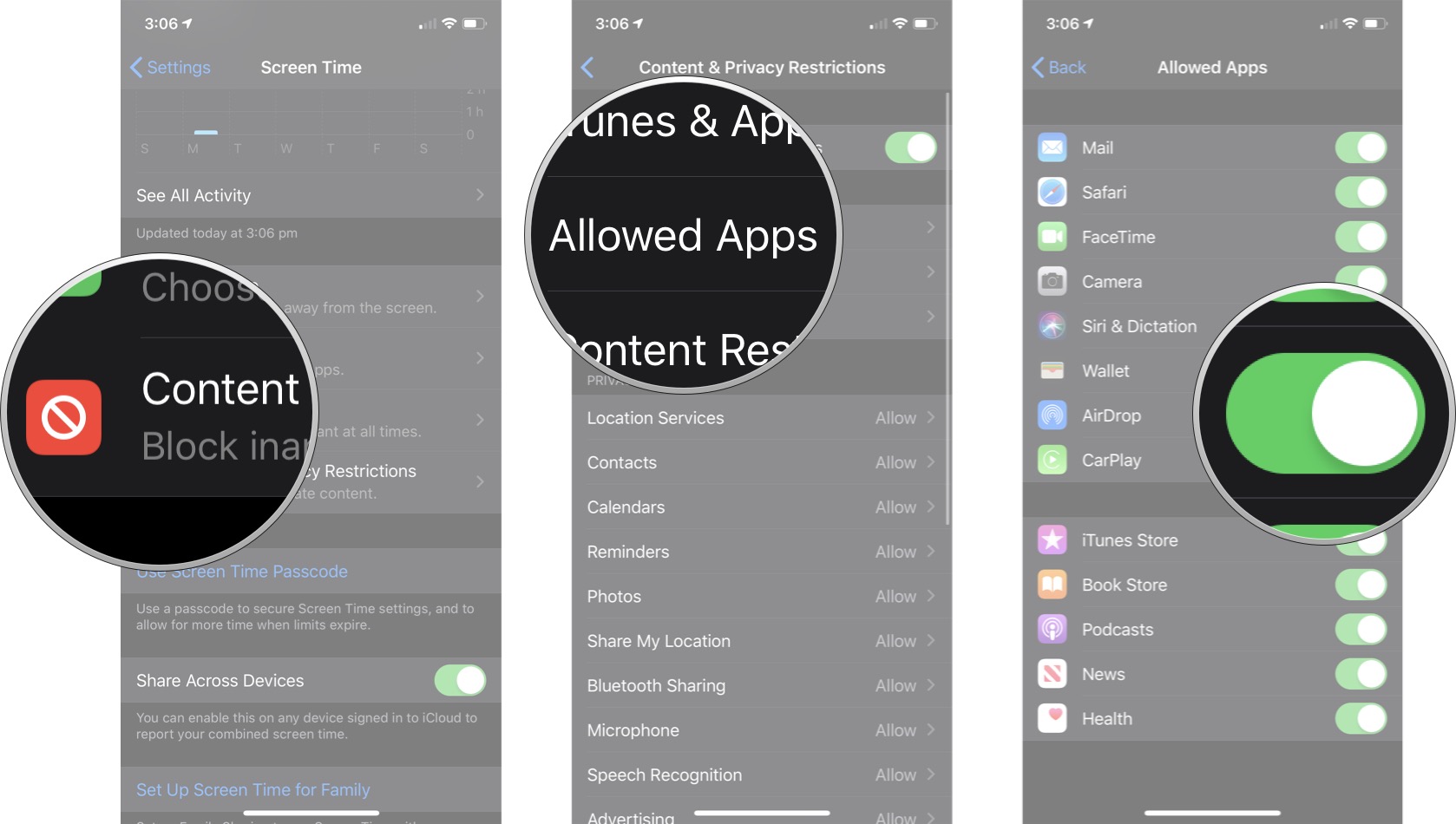
Note: If you choose Contacts Only, make sure you're logged into iCloud. Apple won't share your contacts with another device to determine if there's a match; it'll check both your iCloud accounts instead. Then, if there is a match, it'll show you your own version of the contact on your own device. That way, no data gets leaked. If you choose Everyone, even though you are highly visible to other devices, you will always be prompted when someone is trying to share files with you through AirDrop. If you don't recognize the sender or do not want to receive the files, you can always choose not to accept them. Files sent through AirDrop will appear in the app that typically handles those sorts of files — i.e. photos will show up in Photos. How to block AirDrop with Screen Time for iPhone and iPadIf you want to not just turn off AirDrop but block it completely, for example on your child's iPhone or iPad, you can use restrictions — also known as parental controls.
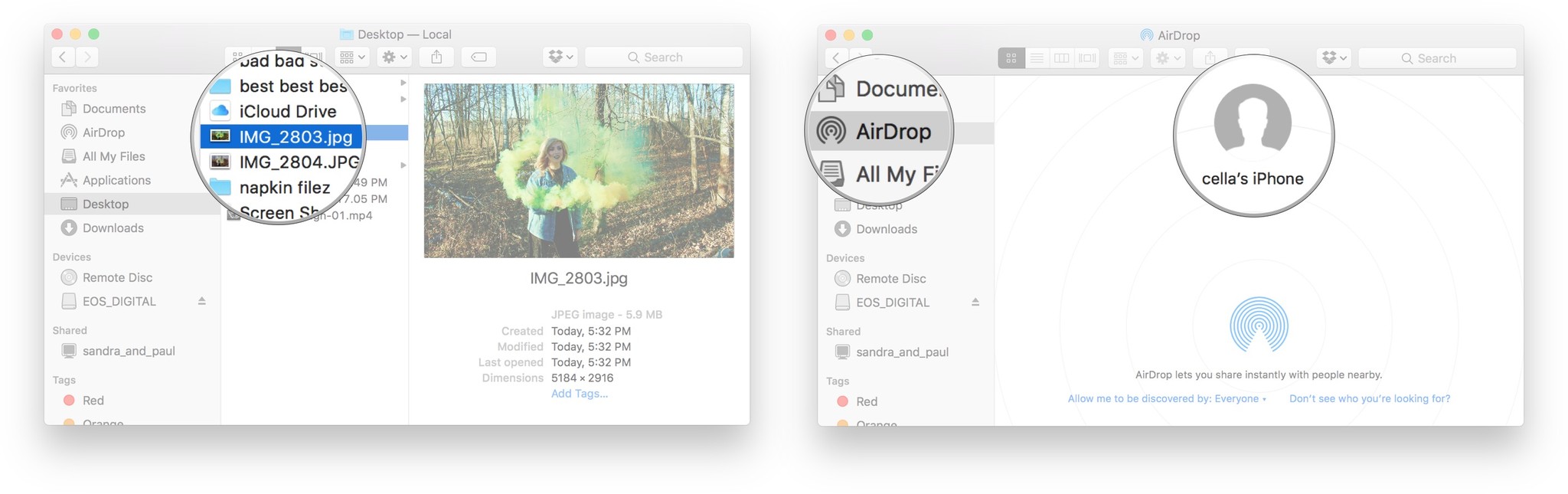
You can repeat these steps to enable AirDrop again at any time. How to troubleshoot AirDrop on iPhone and iPhoneAirDrop feels miraculous when it's working, frustrating when it's not. If you're having trouble with AirDrop on your iPhone or iPad, here are some fixes: How to turn on (or off) AirDrop for MacAirDrop lets you choose between enabling it for just your contacts or for everyone. "Contacts" requires more work, as you and the person you want to AirDrop with both have to be logged into iCloud and be in each other's Contacts. "Everyone" is easier but means random people you don't know can send you prank AirDrops.
How to AirDrop from your Mac using the drag and dropIf you want to grab some files and quickly throw them into AirDrop, the fastest way to do it is using drag and drop.
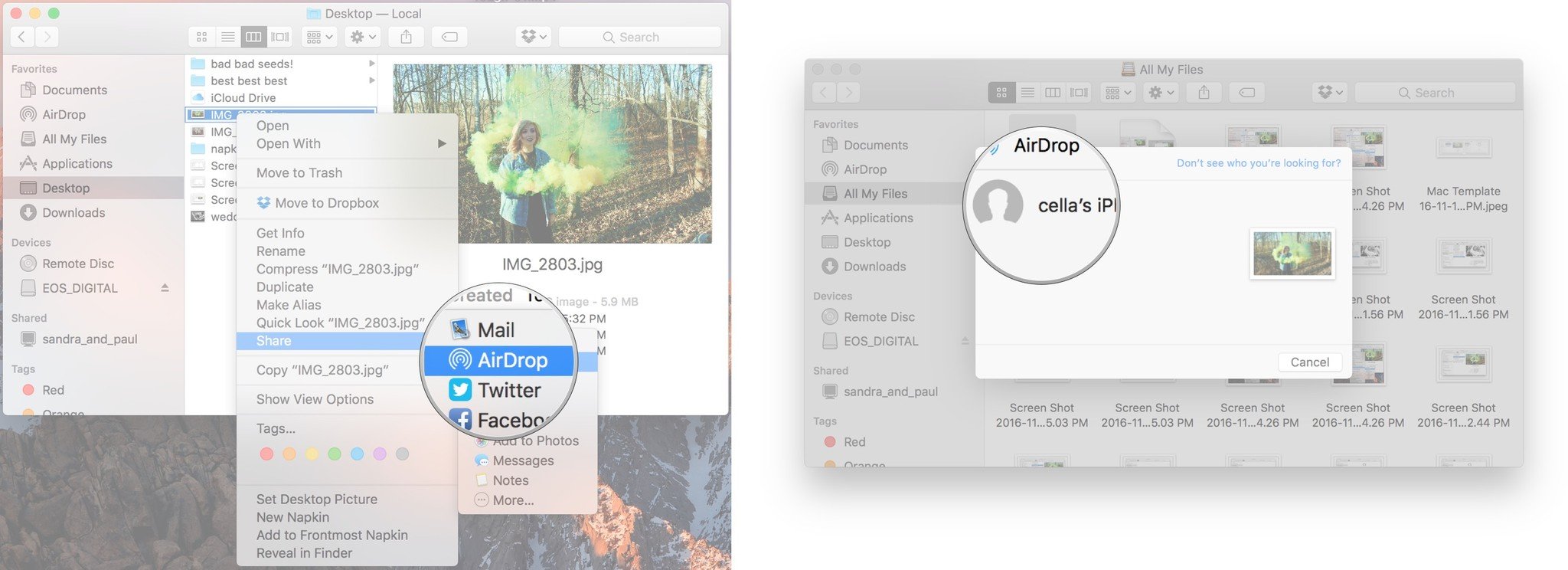
How to AirDrop from your Mac using the context menuIf you prefer to control/right-click on your Mac, you can access AirDrop that way as well.
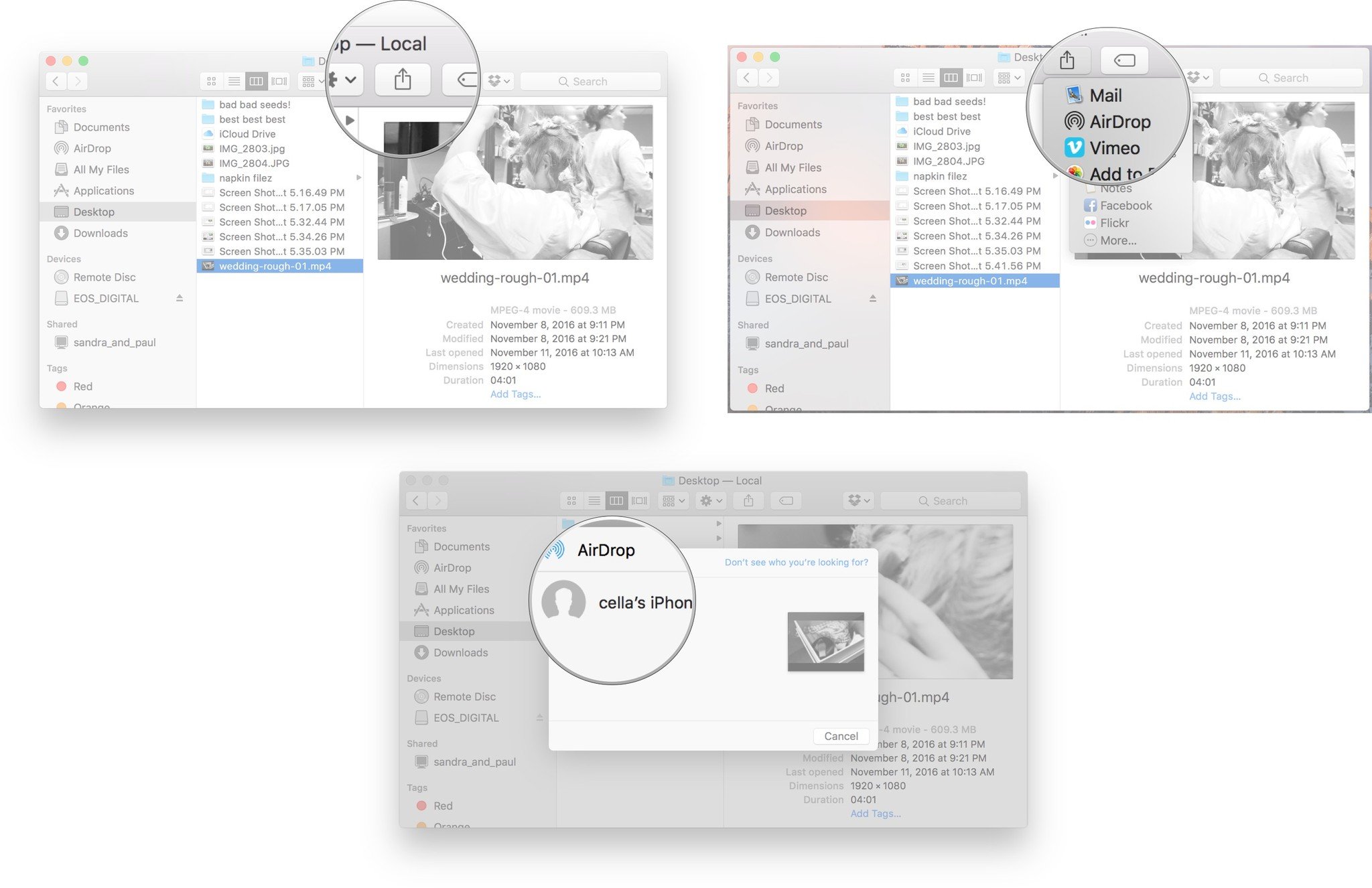
How to AirDrop from your Mac using the Share sheetYou can also AirDrop files using the Share sheet on macOS, including from the Finder and Safari.
How to troubleshoot AirDrop on on MacIf contacts don't show up in the AirDrop interface, try these solutions, in order:
Any AirDrop questions?If you have any issues with AirDrop, or any additional questions, drop them in the comments! Updated August 2019: Updated for macOS Catalina and iOS 13. 
Contributor
Rene Ritchie is one of the most respected Apple analysts in the business, reaching a combined audience of over 40 million readers a month. His YouTube channel, Vector, has over 90 thousand subscribers and 14 million views and his podcasts, including Debug, have been downloaded over 20 million times. He also regularly co-hosts MacBreak Weekly for the TWiT network and co-hosted CES Live! and Talk Mobile. Based in Montreal, Rene is a former director of product marketing, web developer, and graphic designer. He's authored several books and appeared on numerous television and radio segments to discuss Apple and the technology industry. When not working, he likes to cook, grapple, and spend time with his friends and family.
LATEST ARTICLES
|
| You are visitor 01402503 — GeezerVison does not store the pages you look up. Best viewed with Netscape Navigator 4.7 or Internet Explorer 6 at 800×600. No cookies required. |