GeezerVisonThe World Wide Web, restored to 800 pixels of glory. | ||||||||
| Home|About|Gaming cabinet|Archives|How it works|Starter sites | ||||||||
GeezerVison is showing www.modbusdriver.com — Free Modbus Slave Simulator and Test Tool diagslave is a simple command line based Modbus slave simulator and test utility. diagslave is using the FieldTalk™ Modbus driver. Diagslave binaries are available for the following operating system platforms and architectures:
InstallationWindowsDownload into a folder and extract the zip archive. The diagslave.exe command must be run from a Command Prompt:win\diagslave -h LinuxDownload into a folder. Then unpack the tarball:tar xzf diagslave-3.2.tgzThe tarball contains multiple binaries for different CPU architectures. Run the version matching your system from the command line. Example for Raspberry Pi: cd diagslave linux_arm-eabihf/diagslave -h UsageUsage: diagslave [OPTIONS] [SERIALPORT]
Arguments:
SERIALPORT Serial port when using Modbus ASCII or Modbus RTU protocol
COM1, COM2 ... on Windows
/dev/ttyS0, /dev/ttyS1 ... on Linux
General options:
-m ascii Modbus ASCII protocol
-m rtu Modbus RTU protocol (default if SERIALPORT set)
-m tcp MODBUS/TCP protocol (default otherwise)
-m udp MODBUS UDP
-m enc Encapsulated Modbus RTU over TCP
-o # Master activity time-out in seconds (1.0 - 100, 3 s is default)
-a # Slave address (1-255 for RTU/ASCII, 0-255 for TCP)
Options for MODBUS/TCP, UDP and RTU over TCP:
-p # TCP port number (502 is default)
-c # Connection time-out in seconds (1.0 - 3600, 60 s is default)
Options for Modbus ASCII and Modbus RTU:
-b # Baudrate (e.g. 9600, 19200, ...) (19200 is default)
-d # Databits (7 or 8 for ASCII protocol, 8 for RTU)
-s # Stopbits (1 or 2, 1 is default)
-p none No parity
-p even Even parity (default)
-p odd Odd parity
-4 # RS-485 mode, RTS on while transmitting and another # ms after
Options for Modbus RTU:
-f # Tolerance for inter-frame gap detection in ms (0-20)
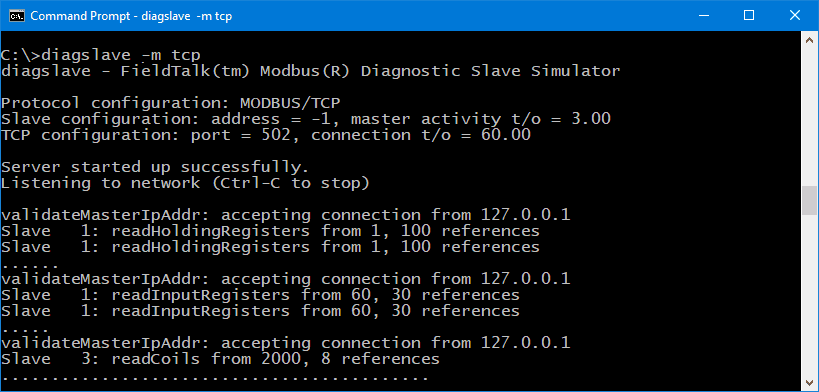
Usage ExamplesTo get help on usage run the following command:diagslave -hTo run a Modbus RTU server at 9600 baud on COM1 run: diagslave -b 9600 -p none -m rtu COM1To run a Modbus/TCP server on Ethernet run: diagslave -m tcp | ||||||||
| You are visitor 01402792 — GeezerVison does not store the pages you look up. Best viewed with Netscape Navigator 4.7 or Internet Explorer 6 at 800×600. No cookies required. |