GeezerVisonThe World Wide Web, restored to 800 pixels of glory. |
| Home|About|Gaming cabinet|Archives|How it works|Starter sites |
GeezerVison is showing www.runoob.com — Node.js Web 模块 | 菜鸟教程
Node.js 教程
Node.js 教程
Node.js 概念
Node.js 安装配置
Node.js VS Code
Node.js NVM
Node.js 创建第一个应用
Node.js 工作机制
NPM 使用介绍
PNPM 使用介绍
Node.js REPL
Node.js 异步编程
Node.js 回调函数
Node.js Promise
Node.js async/await
Node.js 事件循环
Node.js EventEmitter
Node.js Buffer
Node.js Stream
Node.js 模块系统
Node.js 模块导入
Node.js 函数
Node.js 路由
Node.js 全局对象
Node.js 常用工具
Node.js 文件系统
Node.js 内置模块
Node.js 测验
Node.js 应用Node.js 构建简单应用 Node.js GET/POST请求 Node.js util 模块 Node.js Web 模块 Node.js Express 框架 Node.js RESTful API Node.js 多进程 Node.js JXcore 打包 Node.js MySQL Node.js MongoDB npx 入门教程Node.js Web 模块什么是 Web 服务器?Web服务器一般指网站服务器,是指驻留于因特网上某种类型计算机的程序,Web服务器的基本功能就是提供Web信息浏览服务。它只需支持HTTP协议、HTML文档格式及URL,与客户端的网络浏览器配合。 大多数 web 服务器都支持服务端的脚本语言(php、python、ruby)等,并通过脚本语言从数据库获取数据,将结果返回给客户端浏览器。
目前最主流的三个Web服务器是Apache、Nginx、IIS。 Web 应用架构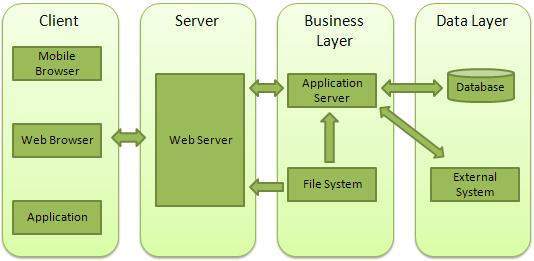
使用 Node 创建 Web 服务器Node.js 提供了 http 模块,http 模块主要用于搭建 HTTP 服务端和客户端,使用 HTTP 服务器或客户端功能必须调用 http 模块,代码如下: var http = require('http');
以下是演示一个最基本的 HTTP 服务器架构(使用 8080 端口),创建 server.js 文件,代码如下所示: 实例var http = require('http');
var fs = require('fs');
var url = require('url');
// 创建服务器
http.createServer( function (request, response) {
// 解析请求,包括文件名
var pathname = url.parse(request.url).pathname;
// 输出请求的文件名
console.log("Request for " + pathname + " received.");
// 从文件系统中读取请求的文件内容
fs.readFile(pathname.substr(1), function (err, data) {
if (err) {
console.log(err);
// HTTP 状态码: 404 : NOT FOUND
// Content Type: text/html
response.writeHead(404, {'Content-Type': 'text/html'});
}else{
// HTTP 状态码: 200 : OK
// Content Type: text/html
response.writeHead(200, {'Content-Type': 'text/html'});
// 响应文件内容
response.write(data.toString());
}
// 发送响应数据
response.end();
});
}).listen(8080);
// 控制台会输出以下信息
console.log('Server running at http://127.0.0.1:8080/');
接下来我们在该目录下创建一个 index.html 文件,代码如下: index.html 文件<!DOCTYPE html>
<html>
<head>
<meta charset="utf-8">
<title>菜鸟教程(runoob.com)</title>
</head>
<body>
<h1>我的第一个标题</h1>
<p>我的第一个段落。</p>
</body>
</html>
执行 server.js 文件: $ node server.js Server running at http://127.0.0.1:8080/ 接着我们在浏览器中打开地址:http://127.0.0.1:8080/index.html,显示如下图所示: 
执行 server.js 的控制台输出信息如下: Server running at http://127.0.0.1:8080/ Request for /index.html received. # 客户端请求信息 使用 Node 创建 Web 客户端Node 创建 Web 客户端需要引入 http 模块,创建 client.js 文件,代码如下所示: 实例var http = require('http');
// 用于请求的选项
var options = {
host: 'localhost',
port: '8080',
path: '/index.html'
};
// 处理响应的回调函数
var callback = function(response){
// 不断更新数据
var body = '';
response.on('data', function(data) {
body += data;
});
response.on('end', function() {
// 数据接收完成
console.log(body);
});
}
// 向服务端发送请求
var req = http.request(options, callback);
req.end();
新开一个终端,执行 client.js 文件,输出结果如下: $ node client.js
<!DOCTYPE html>
<html>
<head>
<meta charset="utf-8">
<title>菜鸟教程(runoob.com)</title>
</head>
<body>
<h1>我的第一个标题</h1>
<p>我的第一个段落。</p>
</body>
</html>
执行 server.js 的控制台输出信息如下: Server running at http://127.0.0.1:8080/ Request for /index.html received. # 客户端请求信息
AI 思考中...
点我分享笔记取消
分类导航
 字节 Coding Plan
限时 9.9 元起,支持 Deepseek-V4、GLM-5.3、Doubao-Seed-Evolving、Kimi-K3。  Trae
AI 原生开发环境,让编程更高效。新用户注册赠2500积分,管理项目,也交付成果。
Advertisement
|
| You are visitor 01402792 — GeezerVison does not store the pages you look up. Best viewed with Netscape Navigator 4.7 or Internet Explorer 6 at 800×600. No cookies required. |
