GeezerVisonThe World Wide Web, restored to 800 pixels of glory. |
| Home|About|Gaming cabinet|Archives|How it works|Starter sites |
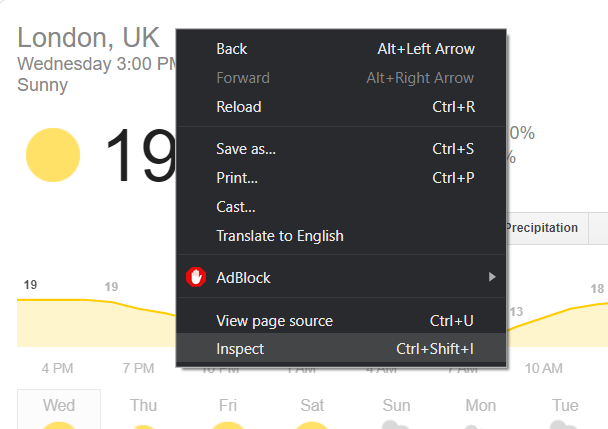
GeezerVison is showing thepythoncode.com — How to Extract Weather Data from Google in Python - The Python Code Welcome! Meet our Python Code Assistant, your new coding buddy. Why wait? Start exploring now! As you may know, Web scraping is essentially extracting data from websites. Doing such a task in a high-level programming language like Python is very handy and powerful. In this tutorial, you will learn how to use requests and BeautifulSoup to scrape weather data from the Google search engine. Although, this is not the perfect and official way to get the actual weather for a specific location, because there are hundreds of weather APIs out there to use. However, it is a great exercise for you to get familiar with scraping. There are also handy tools that are already built with Python, such as wttr.in. Related: How to Make an Email Extractor in Python. Alright, let's get started, installing the required dependencies: First, let's experiment a little bit, open up a Google search bar and type for instance: "weather london", you'll see the official weather, let's right-click and inspect HTML code as shown in the following figure:
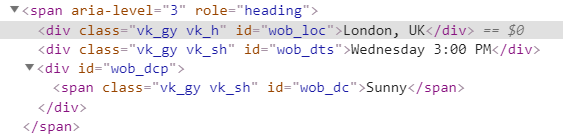
Note: Google does not have its appropriate weather API, as it also scrapes weather data from weather.com, so we are essentially scraping from it. You'll be forwarded to HTML code that is responsible for displaying the region, day and hour, and the actual weather:
Great, let's try to extract this information in a Python interactive shell quickly: Don't worry about how we created the soup object, all you need to worry about right now is how you can grab that information from HTML code, all you have to specify to soup.find() method is the HTML tag name and the matched attributes, in this case, a div element with an id of "wob_loc" will get us the location. Similarly, let's extract the current day and time: The actual weather: Alright, now you are familiar with it, let's create our quick script for grabbing more information about the weather (as much information as we can). Open up a new Python script and follow with me. First, let's import the necessary modules: It is worth noting that Google tries to prevent us to scrape its website programmatically, as it is an unofficial way to get data because it provides us with a convenient alternative, which is the Custom Search Engine (check this tutorial for how to use it), but just for educational purposes, we gonna pretend that we are a legitimate web browser, let's define the user-agent: This link provides you with the latest browser versions, make sure you replace Let's define a function that given a URL, it tries to extract all useful weather information and return it in a dictionary: All we did here, is to create a session with that browser and language, and then download the HTML code using session.get(url) from the web, and finally creating the BeautifulSoup object with an HTML parser. Let's get current region, weather, temperature, and actual day and hour: Since the current precipitation, humidity and wind are displayed, why not grab them? Let's try to get weather information about the next few days, if you take some time finding the HTML code of it, you'll find something similar to this: Not human-readable, I know, but this parent div contains all information about one next day, which is "Saturday" as shown in the first child div element with the class of Z1VzSb in the aria-label attribute, the weather information is within the alt attribute in the img element, in this case, "Sunny". The temperature, however, there is max and min with both Celsius and Fahrenheit, these lines of code takes care of everything: Now result dictionary got everything we need, let's finish up the script by parsing command-line arguments using argparse: Displaying everything: If you run this script, it will automatically grab the weather of your current region determined by your IP address. However, if you want a different region, you can pass it as arguments: This will show weather data of New York state in the US: Alright, we are done with this tutorial, I hope this was helpful for you to understand how you can combine requests and BeautifulSoup to grab data from web pages. By the way, there is another tutorial for extracting YouTube videos data in Python or accessing Wikipedia pages in Python! Read also: How to Extract All Website Links in Python. Happy Scraping ♥ Let our Code Converter simplify your multi-language projects. It's like having a coding translator at your fingertips. Don't miss out!
Sharing is caring!
Read also
How to Extract YouTube Data in PythonScraping YouTube videos and extracting useful video information such as title, total views, publish date, video duration, tags, likes and dislikes and more in Python using requests_html and Beautiful Soup libraries. 
How to Extract Wikipedia Data in PythonExtracting data and searching in Wikipedia, getting article summaries, links, images and more using Wikipedia library in Python. 
How to Download All Images from a Web Page in PythonLearn how to extract and download images from a single web page in Python using requests and BeautifulSoup libraries. CommentsGot a coding query or need some guidance before you comment? Check out this Python Code Assistant for expert advice and handy tips. It's like having a coding tutor right in your fingertips! |
| You are visitor 01402503 — GeezerVison does not store the pages you look up. Best viewed with Netscape Navigator 4.7 or Internet Explorer 6 at 800×600. No cookies required. |