Python: Clear the screen or terminal
Clear Terminal
Write a Python program to clear the screen or terminal.
Sample Solution:
Python Code:
# Import the 'os' and 'time' modules to work with system commands and time-related functions, respectively.

import os
import time

# Execute the 'ls' command to list the contents of the current directory.
os.system("ls")

# Pause the program's execution for 2 seconds.
time.sleep(2)

# Clear the terminal screen. (This comment is not entirely accurate; 'os.system('clear')' is used to clear the terminal screen.)
os.system('clear')
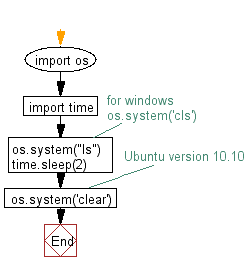
Flowchart:
For more Practice: Solve these Related Problems:
- Write a Python program to clear the screen in a cross-platform way.
- Write a Python program to display a loading animation before clearing the terminal.
- Write a Python program to clear only the last few lines of the console output.
- Write a Python program to clear the terminal and then immediately print a new message.
Go to:
Previous: Write a Python program to get the system time.
Next: Write a Python program to get the name of the host on which the routine is running.
Python Code Editor: