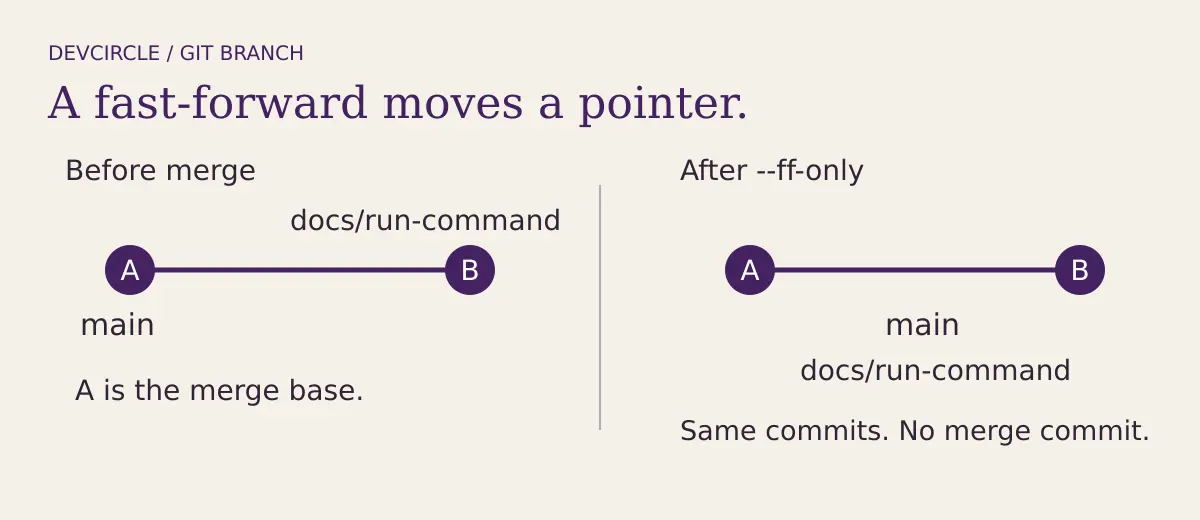
Diagram update, November 26, 2026: The redrawn graph marks the common ancestor and the precise fast-forward this exercise performs, with no merge commit created.
A useful branch isolates a well-defined change, not a vague collection of everything you did today. “Document the command that starts this project” sets a clear scope that another person can understand and review.
Create a disposable practice repository
You need Git 2.28 or later and either Bash or Git Bash. Run the setup commands outside any existing project, so they can safely create a new branch-practice folder, or choose a different unused directory name if that one is already taken. A configured Git commit identity is also required; enter your own name and email privacy address instead of copying placeholder values from a guide.
mkdir branch-practice
cd branch-practice
git init -b main
printf '# Practice project\n' > README.md
git add README.md
git commit -m "Add project introduction"
git switch -c docs/run-command
printf '\nRun the exercise with Python 3.11 or newer.\n' >> README.md
git diff
The change is still uncommitted in your working tree. Run git diff to confirm that only the new instruction appears. If you see unrelated files, pause and find out why they changed before staging anything.
Stage the intended patch
git add README.md
git diff --cached
git status --short
git commit -m "Document the exercise runtime"
git log --oneline --max-count=2
Reading the staged diff reveals the exact snapshot your next commit will capture, which beats trusting that an earlier git add still matches your latest edits. A single file can carry staged and unstaged changes at once, so git status --short prints two status columns: M in the first column means a staged index update, and M in the second means an unstaged working-tree change.
For a file containing unrelated edits, use git add -p to review each diff hunk and choose what to stage (y stages a hunk, n skips it, and s splits a combined hunk). Don’t split work that belongs together just to make a commit smaller. Instead, keep each commit as a coherent unit that a reviewer can follow and that leaves the project passing its checks.
Compare the branch with its starting point
Run git diff main...HEAD to compare the merge base (git merge-base main HEAD) with the tip of your current branch. In this exercise, the three-dot syntax shows just the runtime line you added. On an active team repository where main has moved on since you branched, the three-dot form isolates your own work, while a two-dot diff (git diff main..HEAD) folds in every newer upstream commit on main as if your branch had reversed them.
Scroll sideways if the columns extend beyond the frame.
| Command | Question it answers | Safety and scope notes |
|---|---|---|
git switch -c docs/run-command |
Create and switch to a new branch starting at HEAD |
Dedicated branch-switching command introduced in Git 2.23; avoids overloading git checkout with file-restoration behavior |
git branch -v |
List local branches with their latest commit hash and subject | Highlights the currently active branch with * |
git diff main...HEAD |
What has changed on this branch since it diverged from main? |
Compares the common ancestor against HEAD; matches what a pull request diff displays |
git diff main..HEAD |
How does the current snapshot of HEAD differ from the current tip of main? |
Includes commits added to main after you branched |
git branch --merged main |
Which branches are already fully incorporated into main? |
Safe candidates for cleanup after a merge |
git branch -d docs/run-command |
Delete a branch after checking it is fully merged into its configured upstream, or HEAD if no upstream is set |
In this fixture, switch to main first. A configured upstream may be different from your intended merge destination, so inspect git branch --merged main too; -D bypasses the merged-history check. |
Read the README as someone new to the project would. Does it provide a runnable command, or only name a runtime? Update the instruction to match the actual project before finishing. This small fixture makes that editorial difference easy to spot.
Merge a finished change
git switch main
git merge --ff-only docs/run-command
git status --short
No new commits landed on main after docs/run-command branched off, so the fast-forward finishes cleanly: Git simply moves the main pointer up to docs/run-command, and the status output stays completely empty. Had main advanced, --ff-only would refuse to create a surprise merge commit. For a local exercise or a linear-history workflow, this is a useful, explicit policy, but teams need not all adopt it. If the project wants a merge commit to mark the branch boundary, git merge --no-ff creates one even when Git could fast-forward.
Keep the branch around until you have confirmed the merged result (git branch --merged main lists both main and docs/run-command). This exercise never requires deleting branches right away, and if you accidentally lose a branch reference, git reflog records local HEAD movements so you can recover the commit hash before garbage collection prunes it. On a shared remote repository, follow the project’s pull-request workflow instead of merging directly into the main branch.
What to check before a real contribution
Before contributing, check the repository’s base branch, contribution guide, test command, and policy for generated files. Run git status before switching branches to see whether you have uncommitted work. Branches don’t isolate those edits: changes in the working tree and index follow you through git switch unless they conflict with files that differ between the branch tips. If your uncommitted edits collide with the branch you want to check out, either save a temporary work-in-progress commit on your current branch or run git stash push -m "reason". Never force a checkout that overwrites local modifications.
For your next exercise, try a reproducible merge conflict or a first open source contribution. A concise README is often a good place for a first, focused patch.
Source: Git branch documentation, git switch, and git diff define branch references and comparison forms.
Keep building
- Resolve a Git merge conflict without guessing
Reproduce a conflict in a disposable repository, choose the intended result, and verify the final history.
- How to contribute to open source with a small first patch
Choose a maintained project, reproduce one issue, and prepare a focused contribution that is easy to review.
- Pytest tutorial: test the edges of a small parser
Test a price parser with normal input, invalid input, and a temporary file instead of checking only the happy path.