Status: Supported · Applies to: FlexRadio
DAX IQ delivers raw I/Q samples from the radio's digital down-converter to other SDR programs. Regular DAX Virtual Audio carries demodulated audio from a slice; DAX IQ carries the unprocessed complex signal of a panadapter, before any mode, filter or AGC. AetherSDR offers four IQ channels at 24, 48, 96 or 192 kHz, depending on the radio model. DAX IQ is a FlexRadio feature.
Typical uses:
- Second-opinion SDR software: run SDR#, GQRX, SDR Console or similar alongside AetherSDR.
- Skimmers: CW Skimmer and SDC take IQ through the TCI Server, up to four streams at once.
- Recording and analysis: record raw IQ, or feed GNU Radio or your own DSP.
- Satellite data: the built-in WFM demodulator (below).
Setup
Choosing which panadapter feeds a channel
IQ channels belong to panadapters, not slices. In the panadapter overlay, open the DAX flyout and pick the channel in IQ Ch (None, 1–4). The stream itself is switched on in the DAX IQ applet.
Starting a stream
- Open the DAX IQ applet (applet-tray button IQ, closed by default).
- Choose a rate for the channel.
- Press On for that channel.
The button follows the radio's stream status, not just acceptance of the request. Turning a channel off cancels an unanswered create. A quick On → Off → On waits for the old allocation to settle before requesting its replacement.
Using DAX IQ
Getting IQ into other programs
On Linux, each running channel appears as a virtual capture device named AetherSDR DAX IQ n (PulseAudio/PipeWire source aethersdr-iq-n): float32 stereo, I on the left channel and Q on the right, at the rate you chose.
- SDR#: pick the audio IQ input, choose AetherSDR DAX IQ 1, and set the same sample rate.
- GQRX: use a PulseAudio I/Q input on AetherSDR DAX IQ 1 at the matching rate.
- GNU Radio: an Audio Source on
aethersdr-iq-1at the matching rate gives interleaved I/Q.
On other platforms, take IQ through the TCI Server instead, which is how CW Skimmer and SDC connect.
WFM demodulator (satellite data)
AetherSDR can FM-demodulate a panadapter's DAX IQ stream on the computer, for G3RUH 9600-baud satellite data. The chain applies phase-continuous Doppler correction, resamples to exactly 48 kHz and uses a flat discriminator, then sends the audio to a virtual audio cable for a program such as HS-SoundModem.
- In the panadapter overlay DAX flyout, set IQ Ch first.
- Press WFM, directly below it. It works in any slice mode, on the flyout's slice.
- The first time, a Select WFM Audio Output Device dialog asks for the output. Choose a virtual cable (for example Hi-Fi Cable, BlackHole or a PipeWire null sink) and optionally remember the choice.
WFM needs a radio with DAX IQ; on other radios it is refused with a notice. WFM needs channel 1 to be free; it does not borrow a stream already used by the DAX IQ applet or TCI. Stopping WFM releases only its original IQ allocation, not a replacement stream created after a reconnect.
Reference
The DAX IQ applet
The applet has one row per channel, IQ 1 to IQ 4:
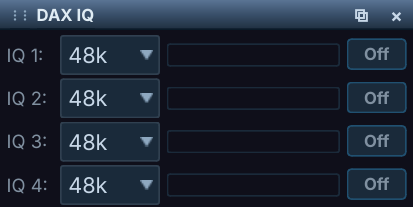
The DAX IQ applet: four IQ channels, each with a sample rate and an on/off button.
| Control | What it does |
|---|---|
| Rate | 24k, 48k, 96k or 192k; unsupported rates remain visible and disabled, with a reason |
| Off / On | Creates or removes the IQ stream for that channel |
| Level meter | Signal level in dBFS over a −70 to −10 dBFS window. Normal signals sit low; a full bar means you are near overload. |
The rate and on/off state of each channel are saved and restored at startup. A saved 192k selection uses 96k when connecting to a model limited to 96 kHz. This fallback does not overwrite the saved preference: it returns to 192k on a model that supports it, unless you choose another rate.
The same rate limits apply when IQ streams are recreated after a profile load.
Higher rates use more of the radio's resources and more network bandwidth.
Limits
- FLEX-6300, FLEX-6400/6400M, FLEX-8400/8400M and AU-510/510M support 24, 48 and 96 kHz.
- FLEX-6500, FLEX-6600/6600M, FLEX-6700/6700R, FLEX-8600/8600M, AU-520/520M, ML-9600/W/X, MLS-9601, CL-9300, CLS-9301 and RT-2122 also support 192 kHz.
- Until a supported model is identified, IQ rate selection and stream creation are unavailable. TCI rate requests follow the same model limits.
- The radio reports how many IQ channels it can supply; four is the maximum.
- Receivers on the same panadapter share that panadapter's IQ stream, so four independent band views need four panadapters.
Troubleshooting
A program sees no AetherSDR DAX IQ device
The device only exists on Linux, and only while that channel's stream is on.
- In the panadapter overlay DAX flyout, set IQ Ch for the panadapter you want.
- In the DAX IQ applet, press On for that channel.
- On macOS or Windows, connect the program through the TCI Server instead.
- Set the program's sample rate to the rate chosen in the applet.
WFM is refused with a notice
The connected radio has no DAX IQ.
- Use a FlexRadio, which supplies DAX IQ.
If the status bar says WFM needs DAX IQ channel 1 to be free, stop the channel's existing applet or TCI consumer and wait for its removal before starting WFM.
A channel stays Off after a stream request times out
An unanswered allocation is not automatically retried: the radio may have created it without returning a usable reply.
- Check the connection and logs for the stream request's result.
- Reconnect to clear the previous session's unconfirmed requests.
- Enable the channel again once the radio is connected and identified.