Status: Supported · Applies to: FlexRadio, IC-7300MK2, IC-705 (early)
The CWX (CW Transmit) panel sends Morse code typed on your keyboard or stored in macros, keyed by the radio's own CW text keyer. On a FlexRadio it uses the radio's CWX keyer; on a supported Networked Icom radio the same panel drives the radio's CI-V text keyer and is labeled CWK.
Requirements
- Mode: CWX keys the transmit slice, so it is available when the TX slice is in CW or CWL. The indicator is grayed out otherwise, and switching the TX slice out of CW closes the panel.
- Radio support: the indicator is hidden on radios without a radio-side CW text keyer (for example the Hermes-Lite 2), and the panel closes with it.
- On Icom (CWK): supported on the IC-705 and IC-7300MK2. The speed range follows the radio, and the Live and Setup views are hidden because the CI-V keyer has no live keying or stored macros.
Using the CWX panel
Opening CWX
Click the CWX indicator in the status bar at the bottom of the screen, or Tab to it and press Enter (or use Tools → CW Keyer). The panel opens beside the panadapter.
The CWX panel and the DVK Panel share the same space — opening one closes the other.
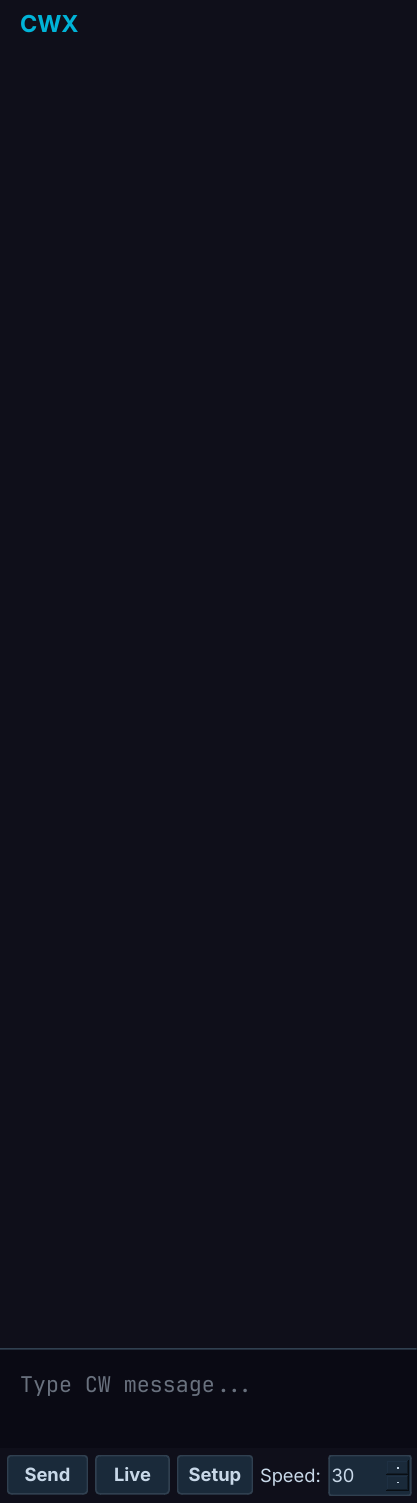
The CWX panel, opened from CWX in the status bar with the TX slice in CW.
Sending text
The panel has three views, chosen with the buttons at its top: Send, Live and Setup (see Views). In Send, type text and send it; sent text appears as history bubbles above the entry line. In Live, characters are keyed as you type them.
Speed sets the keyer speed in WPM (5–100 on FlexRadio). With several speed edits pending, a delayed status echo from an earlier edit does not cancel your newer request.
When disconnected, Speed, Delay, QSK and macro edits remain local drafts. Reconnecting reads the radio's current settings; it does not send those draft settings automatically.
Right-click a sent bubble for Resend (sent again exactly as typed, per-word speed changes included) or Clear History.
When the CWX queue empties, AetherSDR releases its text-send intent. A separately held MOX remains on; otherwise the radio returns to receive after the last character. Escape cancels queued text and its local sidetone without releasing a separately held MOX.
Text is not automatically resent after a lost connection. Reconnect before starting a new send.
Macros and shortcuts
| Key | Action |
|---|---|
| F1–F12 | Send the matching macro. Works app-wide while the TX slice is in CW/CWL, even with the panel closed. |
| Escape | Abort the CW being sent |
F1–F12 follow the transmit slice's mode: in CW they fire CWX macros, in voice modes they play DVK recordings (see DVK Panel), and only one of the two responds. CWX macros 1–12 can also be assigned to FlexControl, MIDI and other controller buttons.
The DX call placeholder
Write {CALL} in a macro, or in text you type and send, and AetherSDR keys the DX call in its place. One DX call serves every macro, so a set such as {CALL} 5NN and TU {CALL} 73 answers whichever station you picked last.
The DX call box is at the top of the panel, beside its title, in the Send and the Setup view:
- Double-click a callsign in the CW Decoder text, or right-click it and choose Use … as DX call, to fill the box.
- Type in the box to enter a call or to correct a letter. It keeps capital letters, digits and
/. - ✕ clears it. It also clears when you disconnect, and it is not saved.
While the box is empty, a macro or message that contains {CALL} is not sent and AetherSDR shows a notice. Any other text in braces, such as {NAME}, is sent as typed. The sent bubble shows the text as keyed, with the call filled in, and Resend on that bubble sends the same call again.
Where {CALL} applies:
- It is filled in for stored macros (F1–F12, a click on the F-key label, and a keyboard shortcut, controller or MIDI button assigned to Macro F1 … Macro F12) and for text sent with Send. It is not case-sensitive.
- It is not used in Live, where each character is keyed as you type it.
- Text sent by another program over TCI or MQTT is keyed as received.
- AetherSDR keeps a
{CALL}macro as you wrote it, for this radio, on this computer. The radio's own slot holds the text without{CALL}({CALL} 5NN TUis stored as5NN TU), so SmartSDR, a Maestro or AetherSDR on another computer plays that macro without the call. - If the radio's slot is changed from another client, AetherSDR shows the radio's text. Your
{CALL}version is kept and is shown again if the slot holds the same text once more; editing the macro in AetherSDR replaces it. - A macro fired in the first moments after connecting, before the radio has reported its macro texts, is played by the radio as stored, without the call.
Keyboard and MIDI keying (local iambic keyer)
Beyond text entry, AetherSDR has a local iambic / straight-key keyer that respects the radio's break-in setting. Three actions can be bound to keys or MIDI controls:
| Action | Default key |
|---|---|
| Trigger straight key | unbound |
| Trigger CW Left Paddle (dits) | unbound |
| Trigger CW Right Paddle (dahs) | unbound |
Bind keys under Settings → Configure Shortcuts... and turn on Settings → Keyboard Shortcuts (off by default), or map a MIDI control in MIDI Controller Mapping. Further CW actions include speed up/down, sidetone, iambic on/off, iambic mode A/B, swap paddles and break-in.
The keyboard map binds the left and right CTRL, SHIFT and ALT keys separately, so a USB Morse adapter that types left/right Ctrl for its two paddles can drive dit and dah. A left or right key can only trigger the hold actions (the CW keys, PTT hold and Monitor hold), on its own, without other modifiers. An existing binding to plain Ctrl still answers either side; on a cap that has no binding of its own, the Key label says "plain Ctrl, both sides", and Clear or Reset there changes that shared binding. While a paddle is held, Ctrl is down for the whole app, so Ctrl+wheel and Ctrl+click on the panadapter behave as Ctrl-modified during keying.
Platform limits for a squeeze (both paddles held):
-
Windows does not report the second Ctrl press while the first is held, and with both Shift keys held it does not report the first one released. AetherSDR reads the other side's state from Windows on every event of that modifier, so the hidden edge is recognized when the other key changes, not at the moment it happens.
-
macOS reports nothing for the second Ctrl while the first is held, so a squeeze cannot be keyed. Releasing the last Ctrl always releases both paddles.
-
Linux reports every press and release.
-
With break-in on, a paddle or straight-key press keys the radio directly. With break-in off, MOX must be on for the CW to go out.
-
Element timing is scheduled against an exact clock with a sample-accurate sidetone, and iambic Mode B behaves correctly when both paddles are released together.
-
The break-in delay holds when you change speed.
-
CW keying and TUNE lock each other out: you cannot key CW while TUNE is on, or start TUNE while a key is down.
The sidetone plays on your selected audio output and follows the radio's sidetone pitch and level.
To watch your own sending, turn on the TX decode of the CW Decoder.
Reference
Views
| View | What it does |
|---|---|
| Send | Type text and send it. Sent text appears as history bubbles above the entry line. |
| Live | Characters are keyed as you type them. |
| Setup | Delay, QSK, speed step and the twelve F1–F12 macros. |
Setup settings
| Setting | What it does |
|---|---|
| Delay | Break-in delay, 0–2000 ms |
| QSK | Full break-in on or off |
| Step | How many WPM each + or - speed prefix changes the speed (1–20) |
| F1–F12 | Twelve macro texts |
Delay follows the radio's break-in delay. AetherSDR does not push a default or enforce a minimum when you connect.
Special characters
On FlexRadio with SmartSDR 4.3 firmware, double quotation marks (") are preserved in Send, Live, and stored macros, including macros received from the radio. Enter them directly; no escaping is needed. Quotation-mark handling is unverified on earlier firmware.
The legend under the macros lists the special characters:
- Prosigns:
=(BT),+(AR),((KN),&(BK),$(SK) - Speed changes:
+wordsends that word faster,-wordslower;++/--change by twice the step. A+or-only counts as a speed prefix at the start of a word — a standalone+is still AR. - DX call:
{CALL}is replaced by the call in the DX call box (see The DX call placeholder).
Known issues
- Receive audio can go silent after a CW transmission and only return after a TUNE cycle (#5312).
Troubleshooting
Receive audio goes silent for about a minute after sending CWX
On FLEX firmware v4.2.18, a CWX break-in delay of 0 makes the radio mute all receive audio for roughly 70 seconds after CWX text is sent. The panadapter keeps running, but audio, the CW decoder and the S-meter go dead. This is a firmware defect, fixed in v4.2.20 (#5945).
- Update the radio to firmware v4.2.20 or later. See Firmware Update.
The CWX indicator is grayed out
The transmit slice is not in a CW mode.
- Switch the TX slice to CW or CWL.
The CWX indicator is missing
The radio has no radio-side CW text keyer, as on the Hermes-Lite 2. Use the local keyer instead (see Keyboard and MIDI keying).
A paddle or key press sends nothing
Break-in is off, so the keyer waits for MOX.
- Turn on break-in, or turn on MOX before keying.
- Check that TUNE is off; CW keying is locked out while it is on.
CWX reports invalid text or too many unacknowledged speed changes
Pasted control characters are refused. A batch is also cancelled if more than 256 speed changes remain unacknowledged by the radio. At that limit, further Speed edits are refused without cancelling the existing batch; wait for the radio to acknowledge changes before trying again.
- Remove control characters from the text, or shorten the message and reduce per-word speed changes.
- Check the radio connection before starting a new send. Cancelled text is not resent automatically.