GeezerVisonThe World Wide Web, restored to 800 pixels of glory. |
| Home|About|Gaming cabinet|Archives|How it works|Starter sites |
GeezerVison is showing docs.voltactivedata.com — 3.3. Reading the Execution Plan and Optimizing Your SQL Statements Guide to Performance and Customization3.3. Reading the Execution Plan and Optimizing Your SQL StatementsThe execution plan is an ordered representation of how VoltDB will execute the statement. Read the plan from bottom up to understand the order in which the plan is executed. So, for example, looking at the InsertACSStmt SQL statement in the Voter application's Initialize stored procedure, we see the following execution plan for inserting an area code into the area_code_state table: RETURN RESULTS TO STORED PROCEDURE
LIMIT 1
RECEIVE FROM ALL PARTITIONS
SEND PARTITION RESULTS TO COORDINATOR
INSERT into "AREA_CODE_STATE"
MATERIALIZE TUPLE from parameters and/or literalsAs mentioned before it is easiest to read the plans from the bottom up. So in this instance, how the SQL statement is executed is by:
You will notice that the lines of the execution plan are indented to indicate precedence. For example, the construction of the tuple must happen before it is inserted into the table. Let's look at another example from the Voter sample. The checkContestantStmt in the Vote stored procedure performs a read operation: RETURN RESULTS TO STORED PROCEDURE INDEX SCAN of "CONTESTANTS" using its primary key index uniquely match (CONTESTANT_NUMBER = ?0) You can see from the plan that the scan of the CONTESTANTS table uses the primary key index. It is also a partitioned table and procedure so the results can be sent directly back to the stored procedure. Of course, planning for a SQL statement accessing one table with only one condition is not very difficult. The execution plan becomes far more interesting when evaluating more complex statements. For example, you can find a more complex execution plan in the GetStateHeatmap stored procedure: RETURN RESULTS TO STORED PROCEDURE
ORDER BY (SORT)
Hash AGGREGATION ops: SUM(V_VOTES_BY_CONTESTANT_NUMBER_STATE.NUM_VOTES)
RECEIVE FROM ALL PARTITIONS
SEND PARTITION RESULTS TO COORDINATOR
SEQUENTIAL SCAN of "V_VOTES_BY_CONTESTANT_NUMBER_STATE"In this example you see an execution plan for a multi-partition stored procedure. Again, reading from the bottom up, the order of execution is:
3.3.1. Evaluating the Use of IndexesWhat makes the execution plans important is that they can help you optimize your database application by pointing out where the data access can be improved, either by modifying indexes or by changing the join order of queries. Let's start by looking at indexes. VoltDB uses information about the partitioning column to determine what partition needs to execute a single-partitioned stored procedure. However, it does not automatically create an index for accessing records in that column. So, for example, in the Hello World example, if we remove the primary key (DIALECT) on the HELLOWORLD table, the execution plan for the Select statement also changes. Before: RETURN RESULTS TO STORED PROCEDURE INDEX SCAN of "HELLOWORLD" using its primary key index uniquely match (DIALECT = ?0) After: RETURN RESULTS TO STORED PROCEDURE SEQUENTIAL SCAN of "HELLOWORLD" filter by (DIALECT = ?0) Note that the first operation has changed to a sequential scan of the HELLOWORLD table, rather than a indexed scan. Since the Hello World example only has a few records, it does not take very long to look through five or six records looking for the right one. But imagine doing a sequential scan of an employee table containing tens of thousands of records. It quickly becomes apparent how important having an index can be when looking for individual records in large tables. There is an incremental cost associated with inserts or updates to tables containing an index. But the improvement on read performance often far exceeds any cost associated with writes. For example, consider the flight application that is used as an example in the Using VoltDB manual. The FLIGHT table is a replicated table with an index on the FLIGHT_ID, which helps for transactions that join the FLIGHT and RESERVATION tables looking for a specific flight. However, one of the most common transactions associated with the FLIGHT table is customers looking for flights during a specific time period; not by flight ID. In fact, looking up flights by time period is estimated to occur at least twice as often as looking for a specific flight. The execution plan for the LookupFlight stored procedure using the original schema looks like this: RETURN RESULTS TO STORED PROCEDURE
SEQUENTIAL SCAN of "FLIGHT"
filter by ((((ORIGIN = ?0) AND (DESTINATION = ?1))
AND (DEPARTTIME > ?2)) AND (DEPARTTIME < ?3))Clearly, looking through a table of 2,000 flights without an index 10,000 times a second will impact performance. So it makes sense to add another index to improve this transaction. For example: CREATE TABLE Flight (
FlightID INTEGER UNIQUE NOT NULL,
DepartTime TIMESTAMP NOT NULL,
Origin VARCHAR(3) NOT NULL,
Destination VARCHAR(3) NOT NULL,
NumberOfSeats INTEGER NOT NULL,
PRIMARY KEY(FlightID)
);
CREATE INDEX flightTimeIdx ON FLIGHT ( departtime);After adding the index, the execution plan changes to use the index: RETURN RESULTS TO STORED PROCEDURE
INDEX SCAN of "FLIGHT" using "FLIGHTTIMEIDX"
range-scan covering from (DEPARTTIME > ?2) while (DEPARTTIME < ?3),
filter by ((ORIGIN = ?0) AND (DESTINATION = ?1))Indexes are not required for every database query. For very small tables or infrequent queries, an index could be unnecessary overhead. However, in most cases and especially frequent queries over large datasets, not having an applicable index can severely impact performance. When tuning your VoltDB database application, one useful step is to review the schema for any unexpected sequential (non-indexed) scans. The Volt Management Center makes this easy because it puts the "Scans" icon in the attributes column for any stored procedures that contain sequential scans.  See the following chapter, Chapter 4, Using Indexes Effectively, for more information on tuning your database through effective use of indexes. 3.3.2. Evaluating the Table Order for JoinsThe other information that the execution plans provides, in addition to the use of indexes, is the order in which the tables are joined. Join order often impacts performance. Normally, when joining two or more tables, you want the database engine to scan the table that produces the smallest number of matching records first. That way, there are fewer comparisons to evaluate when considering the other conditions. However, at compile time, VoltDB does not have any information about the potential sizing of the individual tables and must make its best guess based solely on the table schema, query, and any indexes that are defined. For example, assume we have a database that correlates employees to departments. There is a DEPARTMENT table and an EMPLOYEE table, with a DEPT_ID column that acts as a foreign key. But departments have managers, who are themselves employees. So there is a MANAGER table that also contains both a DEPT_ID and an EMP_ID column. The relationship of the tables looks like this: 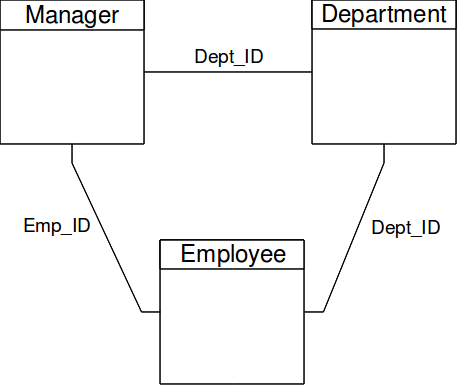 Most transactions look up employees by their employee ID or their department ID. So indexes are created for those columns. However, say we want to look up all the employees that report to a specific manager. Now we need to join the MANAGER table (to get the department ID), the DEPARTMENT table (to get the department name), and the EMPLOYEE table (to get the employees' names). VoltDB does not know, in advance when compiling the schema, that there will be many more employees than departments or managers. As a result, the winning plan might look like the following: RETURN RESULTS TO STORED PROCEDURE
ORDER BY (SORT)
NESTLOOP INDEX JOIN
inline (INDEX SCAN of "DEPARTMENT" using "DEPTIDX" (unique-scan covering))
NESTLOOP INDEX JOIN
inline (INDEX SCAN of "MANAGER" using "MGRIDX" (unique-scan covering))
RECEIVE FROM ALL PARTITIONS
SEND PARTITION RESULTS TO COORDINATOR
SEQUENTIAL SCAN of "EMPLOYEE"Clearly, performing a sequential scan of the employees (since the department ID has not been identified yet) is not going to provide the best performance. What you really want to do is to join the MANAGER and DEPARTMENT tables first, to identify the department ID before joining the EMPLOYEE table so the last join can take advantage of the appropriate index. For cases where you are joining multiple tables and know what the optimal join order would be, VoltDB lets you specify the join order as part of the SQL statement definition. Normally, you declare a new SQLstmt class by specifying the SQL query only. However, you can provide a second argument specifying the join order as a comma-separated list of table names and aliases. For example, the declaration of the preceding SQL query, including join order, would look like this: public final SQLStmt FindEmpByMgr = new SQLStmt(
"SELECT dept.dept_name, dept.dept_id, emp.emp_id, " +
"emp.first_name, emp.last_name, manager.emp_id " +
"FROM MANAGER, DEPARTMENT AS Dept, EMPLOYEE AS Emp " +
"WHERE manager.emp_id=? AND manager.dept_id=dept.dept_id " +
"AND manager.dept_id=emp.dept_id " +
"ORDER BY emp.last_name, emp.first_name",
"manager,dept,emp");Note that where the query defines an alias for a table — as the preceding example does for the DEPARTMENT and EMPLOYEE tables — the join order must use the alias name rather than the original table name. Also, if a query joins six or more tables, you must specify the join order or VoltDB reports an error when it compiles the project. Having specified the join order, the chosen execution plan changes to reflect the new sequence of operations: RETURN RESULTS TO STORED PROCEDURE
ORDER BY (SORT)
RECEIVE FROM ALL PARTITIONS
SEND PARTITION RESULTS TO COORDINATOR
NESTLOOP INDEX JOIN
inline (INDEX SCAN of "EMPLOYEE" using "EMPDEPTIDX" (unique-scan covering))
NESTLOOP INDEX JOIN
inline (INDEX SCAN of "DEPARTMENT" using "DEPTIDX" (unique-scan covering))
SEQUENTIAL SCAN of "MANAGER"The new execution plan has at least three advantages over the default plan:
|
| You are visitor 01402775 — GeezerVison does not store the pages you look up. Best viewed with Netscape Navigator 4.7 or Internet Explorer 6 at 800×600. No cookies required. |