GV

GeezerVison

The World Wide Web, restored to 800 pixels of glory.

Home|About|Gaming cabinet|Archives|How it works|Starter sites

On this site

  • Documentation
  • Privacy Statement
  • License Agreement
  • Contact Us

This view

  • Original page
  • New address

GeezerVison is showing docs.voltactivedata.com — 2.4. Using Asynchronous Stored Procedure Calls

  • Volt Active Data
  • Developer Hub
  • Books
    • VoltDB Tutorial
    • Using VoltDB
    • VoltDB Guide to Performance and Customization
    • VoltDB Administrator's Guide
    • Volt Kubernetes Administrator's Guide
    • VoltDB Quick Reference
  • VoltDB V16
    • VoltDB V16
    • VoltDB V15.3 LTS
    • VoltDB V14.3 LTS
    • VoltDB V13.3 LTS
    • VoltDB V12.3 LTS
    • VoltDB V11.4
    • VoltDB V10.2
    • VoltDB V9.3
2.4. Using Asynchronous Stored Procedure Calls

Guide to Performance and Customization

  • Preface▶
    • 1. Organization of this Manual
    • 2. Other Resources
  • 1. Introduction▶
    • 1.1. What Affects Performance?
    • 1.2. How to Use This Book
  • 2. Hello, World! Revisited▶
    • 2.1. Optimizing your Application for VoltDB
    • 2.2. Applying Hello World to a Practical Problem
    • 2.3. Partitioned vs. Replicated Tables
      • 2.3.1. Defining the Partitioning Column
      • 2.3.2. Creating the Stored Procedures
    • 2.4. Using Asynchronous Stored Procedure Calls
      • 2.4.1. Understanding Asynchronous Programming
      • 2.4.2. The Callback Procedure
      • 2.4.3. Making an Asynchronous Procedure Call
    • 2.5. Connecting to all Servers
    • 2.6. Putting it All Together
    • 2.7. Next Steps
  • 3. Understanding VoltDB Execution Plans▶
    • 3.1. How VoltDB Selects Execution Plans for Individual SQL Statements
    • 3.2. Understanding VoltDB Execution Plans
    • 3.3. Reading the Execution Plan and Optimizing Your SQL Statements
      • 3.3.1. Evaluating the Use of Indexes
      • 3.3.2. Evaluating the Table Order for Joins
  • 4. Using Indexes Effectively▶
    • 4.1. Basic Principles for Effective Indexing
    • 4.2. Defining Indexes
    • 4.3. The Goals for Effective Indexing
    • 4.4. How Indexes Work
    • 4.5. Summary
  • 5. Client2, A Modern Java Client Programming Interface (API)▶
    • 5.1. Configuring the Client
    • 5.2. Connecting to the Database
    • 5.3. Calling Procedures
      • 5.3.1. Handling Backpressure
      • 5.3.2. Handling Request Timeouts
      • 5.3.3. Defining Options on a Per-Call Basis
  • 6. Creating Flexible Schemas With JSON▶
    • 6.1. Using JSON Data Structures as VoltDB Content
    • 6.2. Querying JSON Data
    • 6.3. Updating JSON Data
    • 6.4. Indexing JSON Fields
    • 6.5. Summary: Using JSON in VoltDB
  • 7. Creating Geospatial Applications▶
    • 7.1. The Geospatial Datatypes
      • 7.1.1. The GEOGRAPHY_POINT Datatype
      • 7.1.2. The GEOGRAPHY Datatype
      • 7.1.3. Sizing GEOGRAPHY Columns
      • 7.1.4. How Geospatial Values are Interpreted
    • 7.2. Entering Geospatial Data
    • 7.3. Working With Geospatial Data
      • 7.3.1. Working With Locations
      • 7.3.2. Working With Regions
  • 8. Creating Custom Importers, Exporters, and Formatters▶
    • 8.1. Writing a Custom Exporter
      • 8.1.1. The Structure and Workflow of the Export Client
      • 8.1.2. How to Use Custom Properties to Configure the Client
      • 8.1.3. How to Compile and Install the Client
      • 8.1.4. How to Configure the Export Client
    • 8.2. Writing a Custom Importer
      • 8.2.1. Designing and Coding a Custom Importer
      • 8.2.2. Packaging and Installing a Custom Importer
      • 8.2.3. Configuring and Running a Custom Importer
    • 8.3. Writing a Custom Formatter
      • 8.3.1. The Structure of the Custom Formatter
      • 8.3.2. Compiling and Packaging Custom Formatter Bundles
      • 8.3.3. Installing and Invoking Custom Formatters
      • 8.3.4. Using Custom Formatters With the kafkaloader Utility
  • 9. Creating Custom Tasks▶
    • 9.1. Overview of How Custom Tasks Work
    • 9.2. Modifying the Procedure Call and Arguments
      • 9.2.1. Designing a Java Class That Implements ActionGenerator
      • 9.2.2. Compiling and Loading the Class into VoltDB
      • 9.2.3. Declaring the Task
    • 9.3. Modifying the Interval Between Invocations
      • 9.3.1. Designing a Java Class That Implements IntervalGenerator
      • 9.3.2. Compiling and Loading the Class into VoltDB
      • 9.3.3. Declaring the Task
    • 9.4. Modifying Both the Procedure and Interval
      • 9.4.1. Designing a Java Class That Implements ActionScheduler
      • 9.4.2. Compiling and Loading the Class into VoltDB
      • 9.4.3. Declaring the Task
  • 10. Using Compound Procedures▶
    • 10.1. How Compound Procedures Work
    • 10.2. Defining the Compound Procedure
    • 10.3. Compiling and Loading the Compound Procedure
    • 10.4. Declaring the Compound Procedure
    • 10.5. Invoking the Compound Procedure
    • 10.6. Handling Errors
    • 10.7. Managing Compound Procedures and System Resources
  • 11. Understanding Memory Usage▶
    • 11.1. How the Database Uses Memory
    • 11.2. Actions that Impact Memory Usage
    • 11.3. How the Database Manages Memory
    • 11.4. How Memory is Allocated and Deallocated
    • 11.5. Controlling How Memory is Allocated and Used
      • 11.5.1. Managing the Java Heap
      • 11.5.2. Controlling the Compaction Process for Table Data
    • 11.6. Understanding Memory Usage for Specific Applications
  • 12. Managing Time▶
    • 12.1. The Importance of Time
    • 12.2. Using NTP to Manage Time
      • 12.2.1. Basic Configuration
      • 12.2.2. Troubleshooting Issues with Time
      • 12.2.3. Correcting Common Problems with Time
      • 12.2.4. Example NTP Configuration
    • 12.3. Configuring NTP in a Hosted, Virtual, or Cloud Environment
      • 12.3.1. Considerations for Hosted Environments
      • 12.3.2. Considerations for Virtual and Cloud Environments

2.4. Using Asynchronous Stored Procedure Calls

Now we are ready to write the client application. There are two key aspects to taking full advantage of VoltDB in your client applications. One is make connections to all nodes on the cluster, which we will discuss shortly. The other is to use asynchronous stored procedure calls.

You can call VoltDB stored procedures either synchronously or asynchronously. When you call a stored procedure synchronously, your client application waits for the call to be processed before continuing. If you call a procedure asynchronously, your application continues processing once the call has been initiated. Once the procedure is complete, your application is notified through a callback procedure.

2.4.1. Understanding Asynchronous Programming

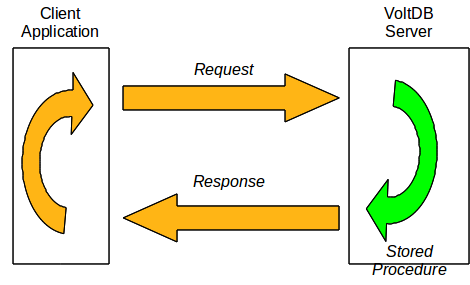
Synchronous calls are easy to understand because all processing is linear; your application waits for the query results. However, after VoltDB processes a transaction — between when VoltDB sends back the results, your application handles the results, initiates a new procedure call, and the call reaches the VoltDB server — the VoltDB database has no work to do (assuming there is only one client application). In this situation whether the stored procedures are single- or multi-partitioned doesn't matter, since you are only ever asking the cluster to process one procedure at a time.

As shown in Figure 2.1, “Synchronous Procedure Calls”, more time can be spent in the round trip between transactions (shown in yellow) than in processing the stored procedures themselves.

Figure 2.1. Synchronous Procedure Calls
Synchronous Procedure Calls

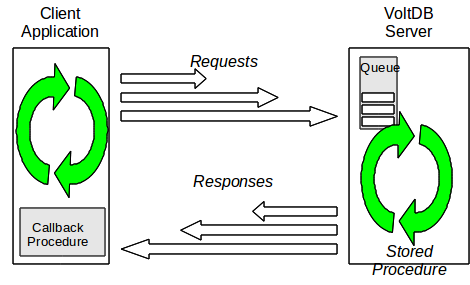
What you would like to do is queue up as much work (i.e. transactions) as possible so the database always has work to do as soon as each transaction is complete. This is what asynchronous stored procedure calls do.

As soon as an asynchronous call is initiated, your application continues processing, including making additional asynchronous calls. These calls are queued up on the servers and processed in the order they are received. Once a stored procedure is processed, the results are returned to the calling application and the next queued transaction started. As Figure 2.2, “Asynchronous Procedure Calls” shows, the database does not need to wait for the next procedure request, it simply takes the next entry off the queue as soon as the current procedure is complete.

Figure 2.2. Asynchronous Procedure Calls
Asynchronous Procedure Calls

2.4.2. The Callback Procedure

For asynchronous procedures calls, you must provide a callback procedure that is invoked when the requested transaction is complete. Your callback procedure notifies the client application that the call is complete and performs the same logic your client application normally performs following a procedure call: interpreting the results of the procedure (if any) and making appropriate changes to client application variables.

For our new Hello World example, when the SignIn procedure completes, we want to display the return values in a welcome message to the user. So our callback procedure might look like this:

    static class SignInCallback implements ProcedureCallback {   1
        @Override
        public void clientCallback(ClientResponse response) {    2

        // Make sure the procedure succeeded.
            if (response.getStatus() != ClientResponse.SUCCESS) {3
                System.err.println(response.getStatusString());
                return;
             }

           VoltTable results[] = response.getResults();          4
           VoltTable recordset = results[0];

           System.out.printf("%s, %s!\n",
                recordset.fetchRow(0).getString("Hello"),
                recordset.fetchRow(0).getString("Firstname") );

       }
    }

The following notes describe the individual components of the callback procedure.

1

You define the callback procedure as a class that implements (and overrides) the VoltDB ProcedureCallback class.

2

Whereas a synchronous procedure call returns the ClientResponse as a return value, an asynchronous call returns the same ClientResponse object as a parameter to the callback procedure.

3

In the body of the callback, first we check to make sure the procedure completed successfully. (If the procedure fails for any reason, for example if a SQL query generates a constraint violation, the ClientResponse contains information about the failure.) In this case we are only looking for success.

4

Once we know the procedure succeeded, we perform the same functions we would for a synchronous call. In this case, we retrieve the appropriate words from the response and use them to construct and display a greeting to the user.

Since we also want to call the RegisterUser procedure asynchronously, we need to create a callback for that procedure as well. In the case of registering the user, we do not need to provide feedback, so the callback procedure is simplified. All that is needed in the body of the callback is to detect and report any errors that might occur. The RegisterCallback looks like this:

    static class RegisterCallback implements ProcedureCallback {
        @Override
        public void clientCallback(ClientResponse response) {

                // Make sure the procedure succeeded. If not
                // (for example, account already exists), 
                // report the error.
            if (response.getStatus() != ClientResponse.SUCCESS) {
                System.err.println(response.getStatusString());
              }

         }
    }

2.4.3. Making an Asynchronous Procedure Call

Once you define a callback, you are ready to initiate the procedure call. You make asynchronous procedure calls in the same way you make synchronous procedure calls. The only differences are that you specify the callback procedure as the first argument to the callProcedure method and you do not need to make an assignment to a client response, since the response is sent as a parameter to the callback procedure.

The following example illustrates both a synchronous and an asynchronous call to the SignIn procedure we defined earlier:

         // Synchronous procedure call
ClientResponse response = myApp.callProcedure("SignIn",
                    email, currenttime);

         // Asynchronous procedure call
myApp.callProcedure(new SignInCallback(), "SignIn",
                    email, currenttime);

If you do not need to verify the results of a transaction, you do not even need to create a unique callback procedure. Just as you can make a synchronous procedure call and not assign the results to a local object if they are not needed, you can make an asynchronous procedure call using the default callback procedure, which does no special processing. For example, the following code calls the Insert procedure to add a HELLOWORLD record using the default callback:

myApp.callProcedure(new NullCallback(), "Insert",
                    "English", "Hello",  "World");
You are visitor 01402775 — GeezerVison does not store the pages you look up.
Best viewed with Netscape Navigator 4.7 or Internet Explorer 6 at 800×600. No cookies required.